
1. Вступ
Thank you for choosing the CoolJumper Q28 Open Ear Headphones. These wireless Bluetooth earphones are designed to provide a comfortable listening experience while allowing you to remain aware of your surroundings. Featuring Bluetooth 5.4 connectivity, an LED display charging case, and IPX7 water resistance, the Q28 headphones are suitable for various activities including running and fitness. This manual provides detailed instructions for setup, operation, maintenance, and troubleshooting to ensure optimal performance and longevity of your device.
2. Що в коробці
Upon opening your CoolJumper Q28 package, please verify that all the following components are included:
- 2 x Open Ear Headphones (Left and Right)
- 1 x Charging Case with LED Display
- 1 x USB-C зарядний кабель
- 1 х Посібник користувача (цей документ)

Image: The CoolJumper Q28 Open Ear Headphones nestled in their charging case, showcasing світлодіодний дисплей.
3. Особливості продукту
3.1 Open Ear Design
The ergonomic open-ear design allows for comfortable, all-day wear without inserting into the ear canal. This design ensures awareness of ambient sounds, enhancing safety during outdoor activities.
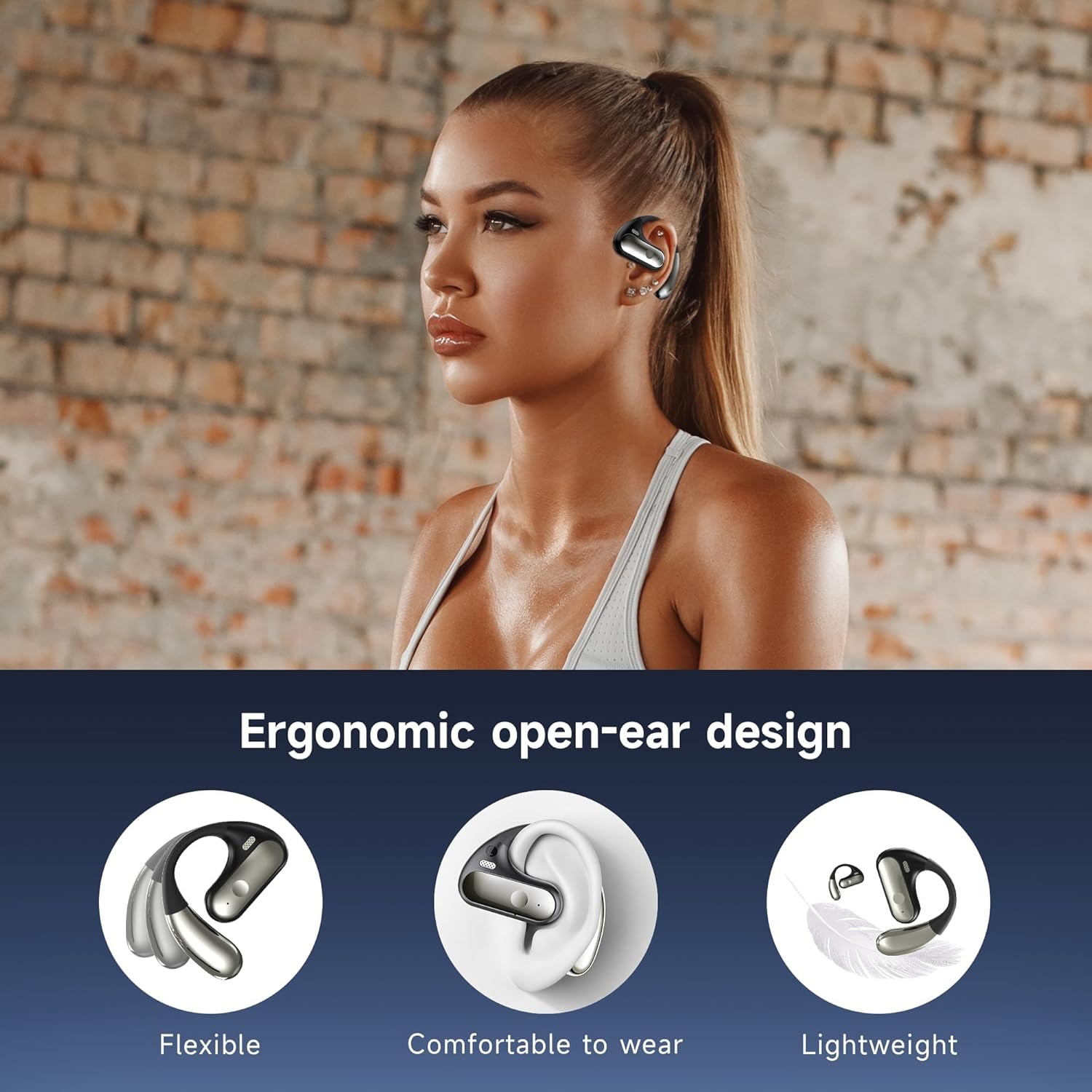
Image: A person wearing the CoolJumper Q28 earbud, demonstrating its ergonomic open-ear fit.
3.2 Battery Life and LED Display
Enjoy up to 8 hours of continuous playtime on a single charge. The compact charging case provides an additional 64 hours of battery life, totaling up to 80 hours of usage. The integrated LED digital display on the charging case clearly shows the remaining battery percentagяк для футляра, так і для окремих навушників.

Image: The CoolJumper Q28 charging case with earbuds, displaying the LED screen indicating 100% charge and battery icons.
3.3 Підключення Bluetooth 5.4
Equipped with an advanced Bluetooth 5.4 chip, the headphones offer faster transmission speeds, more stable connections, and lower power consumption. This ensures high-quality sound with ultra-low latency and seamless pairing with your smart devices.

Зображення: Детальна діаграмаasing the advanced Bluetooth 5.4 chip and its benefits in transmission speed, stable connection, and connection range.
3.4 Hi-Fi Sound Quality
The Q28 headphones feature a 14.2mm dynamic speaker, delivering clear and distinct Hi-Fi sound with dynamically resonant bass. The acoustic design optimizes audio performance for a realistic auditory experience.

Зображення: Вибух view diagram of the 14.2mm dynamic speaker, highlighting its internal components responsible for sound production.
3.5 Водонепроникний клас IPX7
With an IPX7 waterproof rating, these headphones are resistant to rain, sweat, and splashes, making them ideal for workouts and outdoor activities.

Image: The CoolJumper Q28 headphones and charging case shown with water splashes, indicating their IPX7 waterproof and sweatproof capabilities.
3.6 Розумне сенсорне керування
The earbuds are equipped with flexible touch controls, allowing you to manage music playback, calls, and voice assistant functions with simple taps.

Image: A visual guide detailing the smart touch control gestures for play/pause, skipping songs, adjusting volume, answering/hanging up calls, rejecting calls, and activating voice assistant.
3.7 Шумоподавлення під час дзвінків за допомогою штучного інтелекту
The headphones employ AI-powered Call Noise Cancellation technology to ensure clear and crisp call quality by reducing environmental noise.
Video: An official product video demonstrating the features of the CoolJumper Q28 Open-Ear Hook Headphones, including premium sound and design.
4. Посібник із налаштування
4.1 Початкове заряджання
- Вставте обидва навушники в зарядний чохол.
- Connect the provided USB-C cable to the charging port on the case and a compatible USB power source (e.g., wall adapter, computer USB port).
- The LED display on the charging case will show the charging status. A full charge for the case takes approximately 1.5 hours.
- Ensure both earbuds are fully charged before first use.
4.2 Створення пари Bluetooth
The Q28 headphones feature automatic one-step pairing.
- Відкрийте зарядний футляр. Навушники автоматично увімкнуться та перейдуть у режим сполучення.
- На вашому пристрої (смартфоні, планшеті, комп’ютері) перейдіть до налаштувань Bluetooth.
- шукати available devices and select "YYK-Q28" from the list.
- Після підключення голосова підказка підтвердить успішне сполучення.
- Для подальшого використання навушники автоматично підключатимуться до останнього сполученого пристрою після виймання з кейса.

Image: The CoolJumper Q28 headphones and charging case next to a smartphone displaying Bluetooth settings, showing 'YYK-Q28' as a discoverable device.
5. Інструкція з експлуатації
5.1 Увімкнення/вимкнення живлення
- Увімкнення: Відкрийте зарядний футляр або натисніть і утримуйте сенсорну область на обох навушниках протягом 3 секунд.
- Вимкнення живлення: Помістіть навушники назад у зарядний футляр і закрийте кришку або натисніть і утримуйте сенсорну область на обох навушниках протягом 5 секунд.
5.2 Елементи керування відтворенням музики
- Відтворення/пауза: Двічі торкніться сенсорної області на лівому (L) або правому (R) навушнику.
- Наступна пісня: Press and hold the touch area on the Right (R) earbud for 1 second.
- Попередня пісня: Press and hold the touch area on the Left (L) earbud for 1 second.
- Збільшення гучності: Triple-tap the touch area on the Right (R) earbud.
- Зменшення гучності: Triple-tap the touch area on the Left (L) earbud.
5.3 Керування викликами
- Відповісти/закінчити виклик: Двічі торкніться сенсорної області на будь-якому навушнику.
- Відхилити виклик: Press and hold the touch area on either earbud for 1 second.
5.4 Голосовий помічник
- Активуйте голосового помічника (Siri, Google Assistant тощо): Тричі торкніться сенсорної області на будь-якому навушнику.
6. Технічне обслуговування
6.1 Очищення
- Регулярно протирайте навушники та зарядний футляр м’якою, сухою тканиною без ворсу.
- Не використовуйте абразивні засоби для чищення, розчинники або аерозольні спреї.
- Уникайте потрапляння вологи в будь-які отвори.
6.2 Зберігання
- Зберігайте навушники в зарядному футлярі, коли вони не використовуються, щоб захистити їх та підтримувати зарядженими.
- Зберігайте пристрій у прохолодному, сухому місці, подалі від екстремальних температур та прямих сонячних променів.
7. Вирішення проблем
7.1 Earbuds Not Pairing with Device
- Переконайтеся, що навушники заряджені та вийняті з зарядного футляра.
- Вимкніть Bluetooth на своєму пристрої та знову його ввімкніть.
- Forget/delete "YYK-Q28" from your device's Bluetooth list and attempt to pair again.
- Перезапустіть пристрій.
7.2 Працює лише один навушник
- Переконайтеся, що обидва навушники заряджені.
- Помістіть обидва навушники назад у зарядний футляр, закрийте кришку, зачекайте кілька секунд, потім відкрийте кришку та вийміть їх. Це часто призводить до повторної синхронізації.
- Якщо проблема не зникає, спробуйте скинути налаштування навушників (зверніться до повного посібника користувача для отримання конкретних інструкцій щодо скидання, якщо такі є, або спробуйте забути пристрій і повторно виконати сполучення).
7.3 Charging Case Not Charging
- Переконайтеся, що кабель USB-C надійно підключений як до корпусу, так і до джерела живлення.
- Спробуйте інший кабель USB-C та/або адаптер живлення.
- Переконайтеся, що зарядний порт на чохлі чистий і не містить сміття.
7.4 Низька гучність або погана якість звуку
- Відрегулюйте гучність як на пристрої, так і на навушниках.
- Переконайтеся, що навушники правильно розташовані у вухах.
- Очистіть решітки динаміків від будь-якого сміття.
- Підійдіть ближче до сполученого пристрою, щоб уникнути перешкод.
8. Технічні характеристики
| Особливість | Деталь |
|---|---|
| Назва моделі | Q28 |
| Бренд | CoolJumper |
| Технологія підключення | Бездротовий зв'язок (Bluetooth 5.4) |
| Версія Bluetooth | 5.4 |
| Діапазон Bluetooth | 33 футів (10 метрів) |
| Розташування вуха | Відкрите вухо |
| Розмір звукового драйвера | 14.2 мм динамічний драйвер |
| Імпеданс | 16 Ом |
| Контроль шуму | Шумоподавлення навколишнього середовища (для дзвінків) |
| Тип управління | Сенсорне керування |
| Час відтворення навушників | До 8 годин |
| Загальний час відтворення (з кейсом) | До 80 годин |
| Час заряджання (корпус) | Приблизно 1.5 години (USB-C) |
| Водонепроникність | IPX7 (водонепроникний) |
| Вага виробу (кожен навушник) | 0.26 унцій (приблизно 7.4 г) |
| Розміри зарядного кейса | 2.7 x 1.7 x 0.6 дюймів |
| матеріал | Акрилонітрил-бутадієн-стирол (АБС), силікон |
9. Гарантія та підтримка
CoolJumper products are designed and manufactured to the highest quality standards. For information regarding warranty coverage, please refer to the warranty card included in your product packaging or visit the official CoolJumper website. If you encounter any issues or have questions not covered in this manual, please contact CoolJumper customer support for assistance.
You can often find support contact information on the product packaging or by searching for "CoolJumper Support" online.