
вступ
Дякуємо за покупкуasing the Anker Soundcore P31i True Wireless Earbuds. This manual provides detailed instructions on how to set up, operate, and maintain your earbuds to ensure optimal performance and longevity. Please read this manual carefully before use and retain it for future reference.
Що включено
Your Soundcore P31i package includes the following items:
- Soundcore P31i Earbuds (Left and Right)
- Зарядний футляр
- Ear Tips (XS, S, M, L - M size pre-installed)
- Зарядний кабель від USB-C до USB-A
- Короткий посібник
- Інструкція з безпеки
Продукт закінченийview
The Soundcore P31i earbuds are designed for comfort and high-quality audio. Each earbud features a touch control area and an indicator light. The charging case protects the earbuds and provides additional battery life.
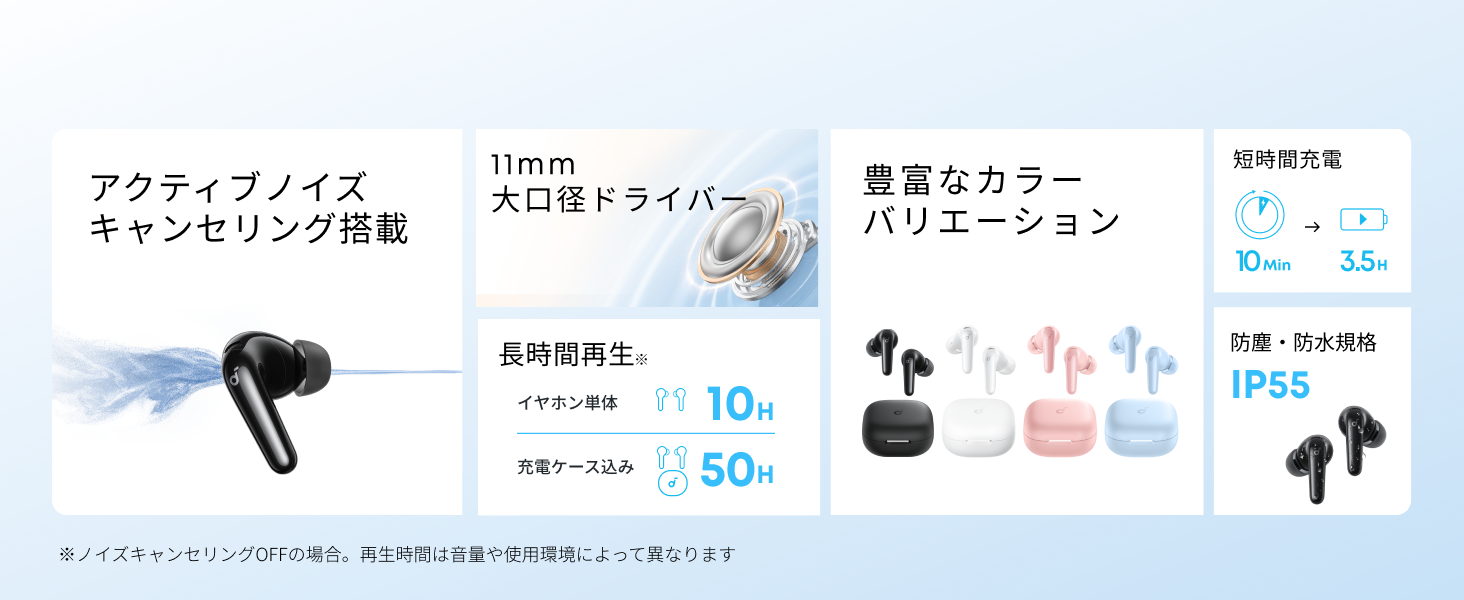
Diagram showing the Soundcore P31i earbuds and charging case with key components labeled.
Навушники: Each earbud is equipped with an 11mm dynamic driver for powerful bass and clear sound. They feature active noise cancellation and AI noise reduction for calls. The ergonomic design ensures a secure and comfortable fit.
Зарядний футляр: The compact charging case not only stores and protects your earbuds but also recharges them on the go. It has a USB-C charging port and a strap hole for portability.
Зарядка навушників і футляра
Перед першим використанням повністю зарядіть навушники та зарядний футляр.
- Зарядка навушників: Place the earbuds into the charging case. The indicator lights on the earbuds will show charging status.
- Зарядка футляра: Connect the charging case to a power source using the provided USB-C to USB-A cable. A full charge for the case and earbuds takes approximately 3 hours.
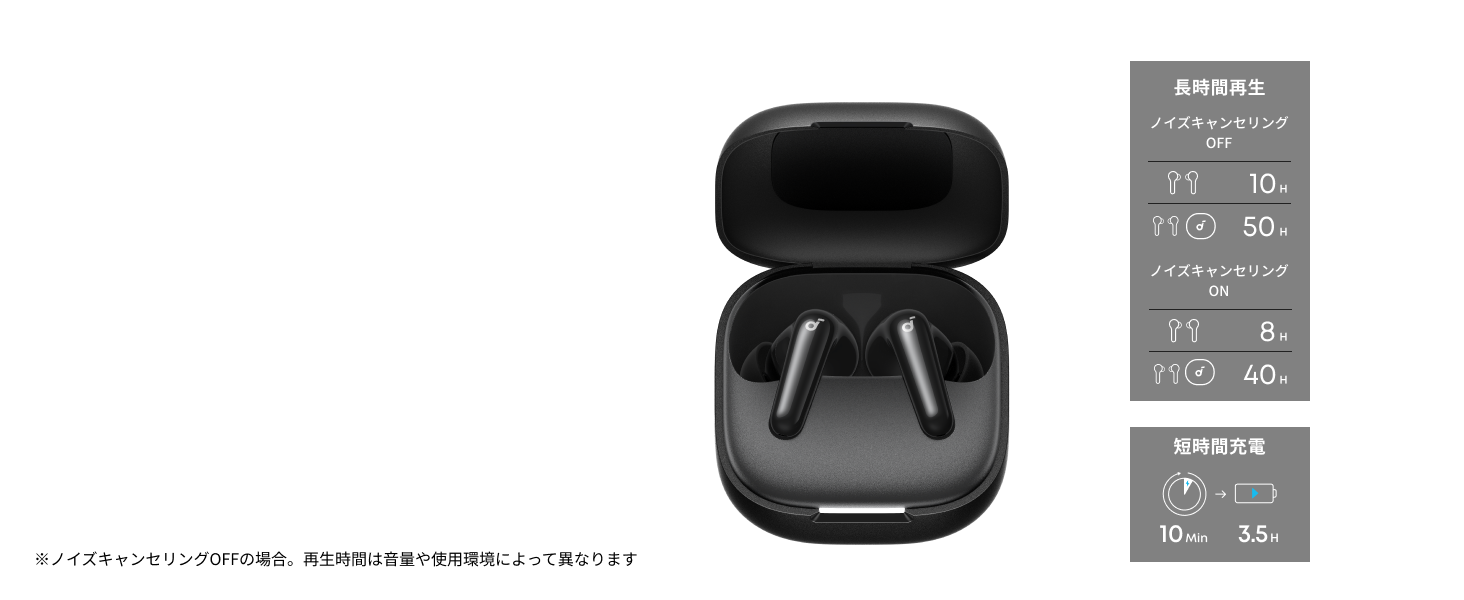
Diagram illustrating charging times and playback duration for Soundcore P31i earbuds.
Термін служби батареї:
- Up to 10 hours of playback on a single charge (earbuds only).
- До 50 годин повного відтворення з зарядним футляром.
- A quick 10-minute charge provides up to 3.5 hours of listening time.
Note: Playback time varies depending on volume level and audio content.
Носіння навушників
For optimal sound quality and comfort, it is important to wear your earbuds correctly.
- Виберіть правильні насадки для вух: Select the ear tips that provide the best seal and comfort for your ears. Experiment with different sizes (XS, S, M, L) to find the perfect fit.
- Вставте навушники: Обережно вставте навушники у вушні проходи.
- Поверніть, щоб закріпити: Twist the earbuds slightly until they fit snugly and securely in your ears.

Image showing a person wearing the Soundcore P31i earbuds correctly.
Bluetooth-парування
Follow these steps to pair your Soundcore P31i earbuds with your device:
- Перше створення пари:
- Open the charging case. The earbuds will automatically enter Bluetooth pairing mode. The indicator lights on the earbuds will flash white.
- На вашому пристрої (смартфоні, планшеті тощо) перейдіть до налаштувань Bluetooth.
- Select "Soundcore P31i" from the list of available devices.
- Once connected, the indicator lights on the earbuds will turn solid white for 1 second and then turn off.
- Сполучення з іншим пристроєм:
- Помістіть навушники в зарядний футляр і залиште кришку відкритою.
- Press and hold the button on the charging case for 3 seconds until the earbud indicator lights flash white rapidly.
- Repeat steps 2 and 3 from "First-Time Pairing" on your new device.
Елементи керування
The Soundcore P31i earbuds feature touch controls for managing playback, calls, and other functions. Specific control configurations can often be customized via the Soundcore app.
General Touch Controls (Default):
- Відтворення/пауза: Натисніть один раз на будь -який навушник.
- Наступний трек: Двічі торкніться правого навушника.
- Попередній трек: Двічі торкніться лівого навушника.
- Відповісти/закінчити виклик: Натисніть один раз на будь -який навушник.
- Відхилити виклик: Натисніть і утримуйте будь-який навушник протягом 2 секунд.
- Активувати голосового помічника: Triple-tap either earbud (may vary).
- Перемикання режимів ANC/прозорості: Press and hold the right earbud for 2 seconds (may vary).
For detailed and customizable controls, please refer to the Soundcore app or the included Quick Start Guide.
Активне шумозаглушення (ANC)
The Soundcore P31i earbuds feature Active Noise Cancelling technology to minimize ambient noise, allowing for an immersive listening experience.

Illustration demonstrating the active noise cancelling feature of the Soundcore P31i earbuds.
ANC detects and reduces various types of noise, such as engine hum on trains or buses, and chatter in cafes. This allows you to enjoy your music or podcasts with greater clarity and fewer distractions.
To switch between ANC, Normal, and Transparency modes, use the touch controls on the earbuds or adjust settings within the Soundcore app.
Якість звуку
The Soundcore P31i earbuds are engineered to deliver a rich audio experience.

Diagram illustrating the 11mm dynamic driver responsible for the audio output.
- Динамічні драйвери 11 мм: Equipped with large 11mm drivers, these earbuds produce a wide frequency range and detailed sound.
- BassUp™ Technology: Anker's proprietary BassUp™ technology enhances low frequencies, delivering powerful and impactful bass.
You can further customize the sound profile using the equalizer settings within the Soundcore app.
Якість дзвінка
The Soundcore P31i earbuds ensure clear voice calls and web конференції.

Illustration depicting AI noise reduction technology for clear voice calls.
Зменшення шуму AI: Integrated AI noise reduction technology effectively filters out background noise, ensuring your voice is transmitted clearly to the person on the other end of the call, even in noisy environments.
Багатоточкове з'єднання
The Soundcore P31i supports multi-point connection, allowing you to connect to two Bluetooth devices simultaneously.

Illustration showing the Soundcore P31i connected to multiple devices simultaneously.
This feature enables seamless switching between devices. For example, you can listen to music on your laptop and instantly switch to answer a call on your phone without manually re-pairing.
To enable multi-point connection, ensure both devices are paired with your earbuds. The earbuds will automatically connect to the last two paired devices when powered on.
Додаток Soundcore
Download the Soundcore app to enhance your experience with the P31i earbuds. The app offers various features and customization options.

Screenshots of the Soundcore app interface, highlighting customization features.
App Features include:
- Настроювані елементи керування: Personalize touch controls for playback, calls, and voice assistant.
- Налаштування еквалайзера: Налаштуйте аудіо проfiles to your preference or choose from preset EQs.
- ANC/Transparency Mode Switching: Easily toggle between noise cancelling and transparency modes.
- Оновлення прошивки: Оновлюйте свої навушники, використовуючи найновіші функції та покращення.
- AI Translation Function: (Available from Spring 2026, requires Soundcore app ver 4.0.0 or higher).
The Soundcore app is available for download on both iOS and Android devices.
Продукт закінченийview відео
Офіційне відео-презентація продуктуasing the key features and design of the Soundcore P31i True Wireless Earbuds, including active noise cancellation, powerful bass, long battery life, and multi-point connectivity.
Технічне обслуговування та догляд
Proper maintenance ensures the longevity and performance of your Soundcore P31i earbuds.
- Прибирання: Регулярно протирайте навушники та зарядний футляр м’якою, сухою тканиною без ворсу. Не використовуйте агресивні хімікати або абразивні матеріали.
- Навушники: Remove the ear tips and clean them with water and mild soap if necessary. Ensure they are completely dry before reattaching.
- Контакти для зарядки: Тримайте зарядні контакти як на навушниках, так і на футлярі чистими та сухими, щоб забезпечити належне заряджання.
- Зберігання: Коли навушники не використовуються, зберігайте їх у зарядному футлярі, щоб захистити від пилу та пошкоджень.
- Водонепроникність: The earbuds are rated IP55 for dust and water resistance. This means they can withstand sweat and light rain, but are not designed for submersion in water. Ensure the earbuds are dry before placing them back in the charging case.

Image showing Soundcore P31i earbuds with water droplets, highlighting their IP55 water resistance.
Усунення несправностей
If you encounter any issues with your Soundcore P31i earbuds, refer to the following common solutions:
- Навушники не підключаються:
- Переконайтеся, що обидва навушники повністю заряджені.
- Place earbuds in the case, close the lid, then open it again to re-enter pairing mode.
- Forget "Soundcore P31i" from your device's Bluetooth list and try pairing again.
- Reset the earbuds (refer to the Quick Start Guide for specific reset instructions).
- Only One Earbud Playing Audio:
- Place both earbuds back into the charging case and close the lid for 5 seconds, then open it again.
- Ensure both earbuds have sufficient battery.
- Скинути навушники.
- Погана якість звуку:
- Переконайтеся, що вушні насадки добре прилягають до вушного каналу. Спробуйте різні розміри.
- Очистіть насадки навушників від будь-якого сміття.
- Підійдіть ближче до підключеного пристрою, щоб уникнути перешкод.
- Проблеми із зарядкою:
- Перевірте зарядний кабель та адаптер на наявність пошкоджень.
- Переконайтеся, що зарядні контакти на навушниках та кейсі чисті.
- Спробуйте інший зарядний кабель або джерело живлення.
Технічні характеристики
| Особливість | Деталь |
|---|---|
| Бренд | Саундкор |
| Назва моделі | P31i |
| Номер моделі | D1202 |
| Колір | Чорний (цей конкретний варіант) |
| Форм-фактор | Вкладиші |
| Технологія підключення | Бездротовий зв'язок (Bluetooth 6.1) |
| Контроль шуму | Активне шумозаглушення |
| Розмір драйвера | 11-мм динамічні драйвери |
| Час відтворення (навушники) | До 10 годин |
| Загальний час відтворення (з футляром) | До 50 годин |
| Швидка зарядка | 10 хвилин зарядки для 3.5 годин відтворення |
| Charging Time (Full) | Приблизно 3 годин |
| Водонепроникність | IP55 |
| Багатоточкове з'єднання | Підтримується |
| UPC | 194644251543 |
| Країна походження | Китай |
Гарантія та підтримка клієнтів
Soundcore provides a comprehensive warranty for your P31i earbuds.

Image detailing the warranty period and extension for Soundcore P31i.
- Стандартна гарантія: An 18-month warranty is provided for products purchased from authorized retailer AnkerDirect.
- Розширена гарантія: Anker members can extend their warranty up to a maximum of 24 months.
- Важлива примітка: Purchases from unauthorized sellers may not be covered under warranty.
For product inquiries, delivery questions, or technical support, please contact Soundcore customer support. Contact details can typically be found on the official Soundcore webсайті або у вашому Короткому посібнику з початку роботи.
Інформація про безпеку
Будь ласка, прочитайте та дотримуйтесь цих правил безпеки, щоб запобігти пошкодженню пристрою або травмуванню себе:
- Не розбирайте та не модифікуйте навушники чи зарядний футляр.
- Тримайте пристрій подалі від екстремальних температур, прямих сонячних променів та відкритого вогню.
- Avoid exposing the device to excessive moisture or liquids, beyond its IP55 rating.
- Do not use the device at high volume levels for extended periods to prevent hearing damage.
- Зберігати в недоступному для дітей та домашніх тварин місці.
- Утилізуйте виріб відповідально відповідно до місцевих правил.