
вступ
Thank you for choosing BESTISAN GM06 Computer Gaming Speakers. These speakers are designed to provide a superior audio experience for various entertainment scenarios, including gaming, movies, and music. Featuring dynamic RGB illumination, multiple sound modes, and broad compatibility, the GM06 speakers are a versatile addition to any desktop setup.
Вміст упаковки
Будь ласка, перевірте упаковку на наявність наступних предметів:
- BESTISAN GM06 Computer Speakers (2 units)
- Адаптер живлення
- Аудіокабель від 3.5 мм до 3.5 мм
- Посібник користувача

Image: BESTISAN GM06 speakers, 3.5mm audio cable, power adapter, and user manual.
Ключові характеристики
- Чудова якість звуку: Equipped with 2x 2.75-inch mid-bass drivers and 2x 1-inch silk dome tweeters, delivering 50W peak power for a broad and detailed sound stage.
- Широка сумісність: Supports 3.5mm AUX, Bluetooth 5.3, and Type-C sound card inputs for connection to PC, Mac, PS4, Xbox, CD players, laptops, TVs, and mobile phones.
- Кілька режимів звуку: Three professional EQ modes (Gaming, Movies, Music) allow seamless switching for an optimized auditory experience in different entertainment scenarios.
- Динамічне RGB-підсвічування: Features 8 RGB backlit options to create a unique ambiance and personalize your entertainment experience.
- Delicate Design: Unique diamond-shaped cabinet with a 5-degree elevation, 0.7L isometric cavity, matte panel, metal laser engraving logo, silicone buttons, and anti-slip foot pads.

Зображення: Вибух view of the speaker showing the 2.75-inch mid-bass driver and 1-inch silk dome tweeter, highlighting the 50W total peak power.
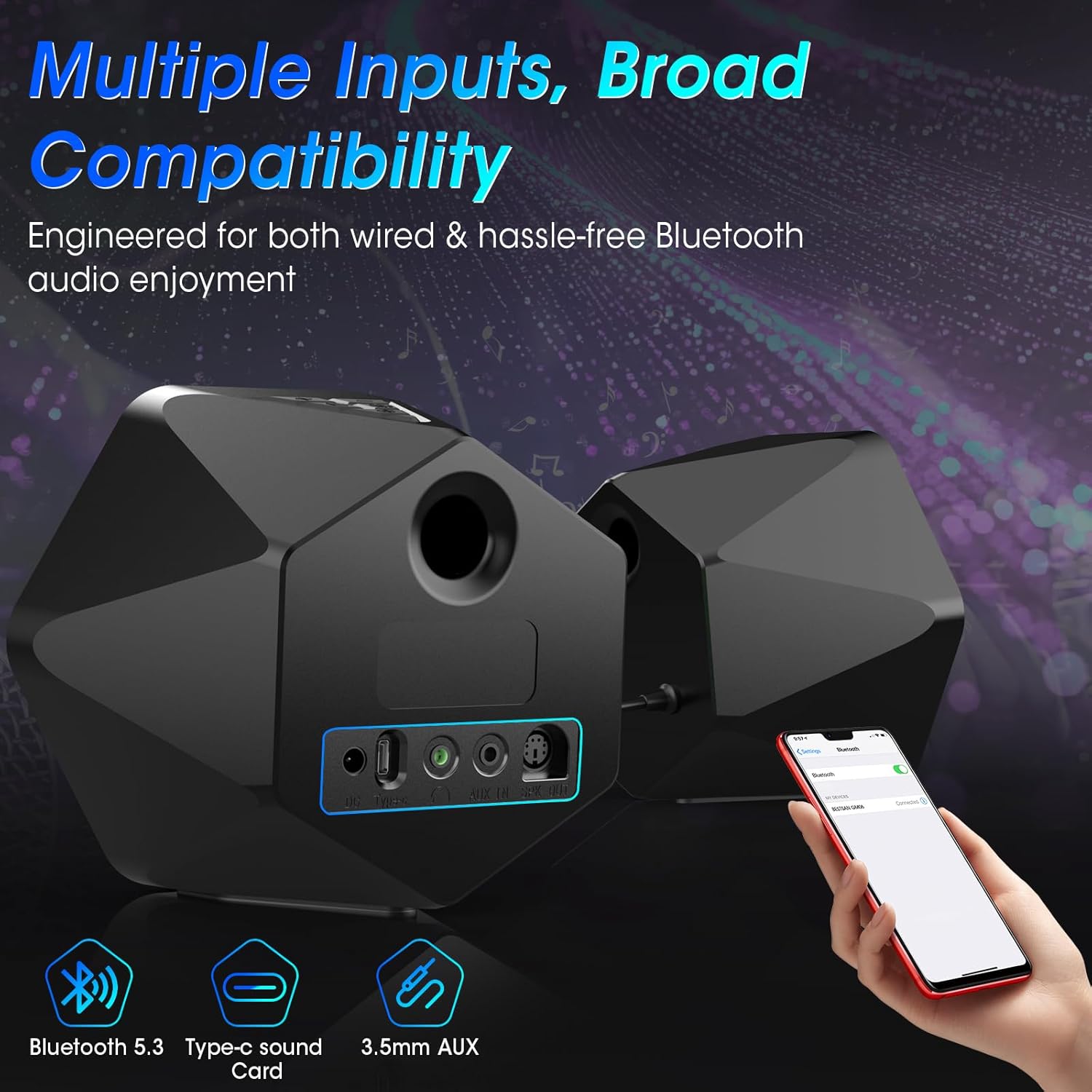
Зображення: Задня частина view of the speakers illustrating the Bluetooth 5.3, Type-C sound card, and 3.5mm AUX input options, emphasizing broad compatibility.

Image: Visual representation of the three EQ modes (Game, Movie, Music) with corresponding usage scenarios, powered by a Digital Signal Processor (DSP).

Image: Two BESTISAN GM06 speakers flanking a monitor, showcasing the vibrant RGB lighting effects that enhance the desktop aesthetic.

Image: A user wearing headphones connected to one of the BESTISAN GM06 speakers, illustrating the convenient headphone jack for private listening.
Інструкції з налаштування
- Підключення динаміків: Connect the main speaker (with controls) to the secondary speaker using the provided PS2 cable.
- Підключення живлення: Connect the power adapter to the main speaker's power port and then to a power outlet.
- Аудіоз'єднання: Виберіть бажаний метод введення аудіо:
- 3.5 мм AUX: Connect the 3.5mm audio cable from your device's audio output to the AUX IN port on the main speaker.
- Bluetooth: Power on the speakers. The speakers will automatically enter Bluetooth pairing mode (indicated by a flashing blue light). On your device, search for "BESTISAN GM06" in the Bluetooth settings and pair.
- Тип C: Connect your device to the Type-C port on the main speaker using a compatible Type-C cable.
- Позиційні спікери: Place the speakers on your desktop or desired surface, ensuring optimal sound projection. The 5-degree elevation is designed for improved audio direction.
Інструкція з експлуатації
The main speaker features intuitive controls for easy operation:

Зображення: Верх view of the main speaker showing the silicone buttons for On/Off, RGB lights switch, Volume/Track control, and Sound Source/EQ switch.
- Увімкнення/вимкнення живлення: Press and hold the Power/Mode button (labeled with power symbol and 'M') for 3 seconds.
- Перемикач режиму введення: Short press the Power/Mode button to cycle through AUX, Bluetooth, and Type-C input modes.
- Регулювання гучності: Use the Volume Lever (labeled with '+' and '-') to increase or decrease the volume.
- Контроль треку: Long press the '+' button for the next track, and long press the '-' button for the previous track (in Bluetooth mode).
- RGB освітлення: Press the RGB lights switch button (labeled with a lightbulb symbol) to cycle through 8 different RGB lighting modes.
- Режим еквалайзера: Press the EQ button (labeled with 'EQ') to switch between Gaming, Movies, and Music sound modes.
- Відтворення/пауза: Press the Play/Pause button (labeled with play/pause symbol) to play or pause audio (in Bluetooth mode).
Video Tutorial: GM06 Gaming Speaker's Button/Backlight/Interface Details
Video: An official BESTISAN US video demonstrating the functionality of the buttons, backlight, and interface details of the GM06 Gaming Speaker.
Технічні характеристики
| Назва моделі | GM06 |
| Тип динаміка | Книжкова полиця |
| Технологія підключення | Auxiliary, Bluetooth 5.3, Type-C |
| Максимальна вихідна потужність динаміка | 50 Вт (пікова) |
| АЧХ | 20 кГц |
| Співвідношення сигнал-шум | 80 дБ |
| Діаметр НЧ-динаміка | 2.75 дюймів |
| Діаметр твітера | 1 дюймів |
| Розміри продукту | 6.3" Г x 4.3" Ш x 5.7" В |
| Вага товару | 3.3 фунта |
| Особливість | LED Light (8 RGB Modes) |
| Спосіб контролю | Дотик |
Технічне обслуговування
To ensure the longevity and optimal performance of your BESTISAN GM06 speakers, please follow these maintenance guidelines:
- Прибирання: Використовуйте м’яку суху тканину для протирання поверхонь динаміків. Уникайте використання абразивних засобів для чищення, воску або розчинників, оскільки вони можуть пошкодити покриття.
- Розміщення: Place speakers on a stable, flat surface to prevent accidental falls. Ensure adequate ventilation around the speakers.
- Уникайте вологи: Keep the speakers away from water, excessive humidity, and direct exposure to rain or splashes. These speakers are not waterproof.
- температура: Avoid exposing the speakers to extreme temperatures (hot or cold) or direct sunlight for extended periods.
- Догляд за кабелем: Handle cables gently. Avoid bending, twisting, or pinching them, which can damage internal wiring.
Усунення несправностей
If you encounter any issues with your BESTISAN GM06 speakers, please refer to the following common solutions:
- Немає звуку:
- Переконайтеся, що динаміки увімкнено, а гучність підвищено.
- Verify that the correct input mode (AUX, Bluetooth, Type-C) is selected.
- Check all cable connections (power, speaker interconnect, audio input) are secure.
- Confirm your device's volume is not muted or too low.
- Спотворений звук:
- Lower the volume on both the speakers and your connected device.
- Check for interference if using Bluetooth. Try moving the speakers closer to the device or away from other electronic devices.
- Ensure audio cables are fully inserted and not damaged.
- Проблеми зі сполученням Bluetooth:
- Ensure the speakers are in Bluetooth pairing mode (flashing blue light).
- Вимкніть і ввімкніть Bluetooth на своєму пристрої, а потім спробуйте ще раз створити пару.
- Forget/remove "BESTISAN GM06" from your device's Bluetooth list and re-pair.
- Світильники RGB не працюють:
- Переконайтеся, що динаміки увімкнено.
- Press the RGB lights switch button to cycle through modes or turn them on.
Гарантія та підтримка
The BESTISAN GM06 Computer Gaming Speakers come with a Limited Warranty. For specific details regarding warranty coverage, duration, and terms, please refer to the warranty card included in your package or contact BESTISAN customer support.
For technical support, troubleshooting assistance, or any inquiries regarding your product, please visit the official BESTISAN website or contact their customer service team through the contact information provided in your user manual.