
1. Вступ
Thank you for choosing the Temtop W100 Lite Professional Weather Station. This device provides real-time monitoring of indoor and outdoor temperature and humidity, atmospheric pressure, weather forecasts, moon phases, and includes an alarm clock function. This manual will guide you through the setup, operation, and maintenance of your weather station to ensure optimal performance.
2. Вміст упаковки
Будь ласка, перевірте вміст упаковки після розпакування:
- Головний блок метеостанції
- Відкритий датчик
- Адаптер живлення
- Посібник користувача

Image: Contents of the Temtop W100 Lite package, showing the main weather station unit, the outdoor sensor, and the power adapter.
3. Продукт закінчивсяview
Familiarize yourself with the main components and display features of your Temtop W100 Lite Weather Station.
3.1 Main Unit Display

Зображення: спереду view of the Temtop W100 Lite Weather Station, displaying various weather parameters and time information.
The main unit features a clear color display that shows the following information:
- Зовнішня температура та вологість
- Температура та вологість повітря в приміщенні
- Weather Forecast (Sunny, Partially Sunny, Cloudy, Rainy, Snowy)
- Час і Дата
- Фаза місяця
- Атмосферний тиск
- Comfort Level Indicator (Wet, Comfort, Dry)
- Sunrise and Sunset Times (for selected city)
3.2 Main Unit Buttons and Outdoor Sensor

Зображення: Детальне view of the weather station display with labels indicating each data field.
Зображення: Задня частина view of the weather station, highlighting the battery compartment, power input, and control buttons.
The main unit features several control buttons on the back for settings adjustment:
- Кнопка SET: Enters/confirms settings.
- UP/CH Button: Adjusts values upwards, changes channels.
- DOWN/MEM Button: Adjusts values downwards, accesses min/max memory.
- Кнопка ПОПЕРЕДЖЕННЯ: Sets temperature alerts.
- Кнопка ALARM: Sets alarm time.
- CITY Button: Selects city for sunrise/sunset times.
The outdoor sensor transmits temperature and humidity data wirelessly to the main unit.
4. Налаштування
4.1 Живлення пристрою
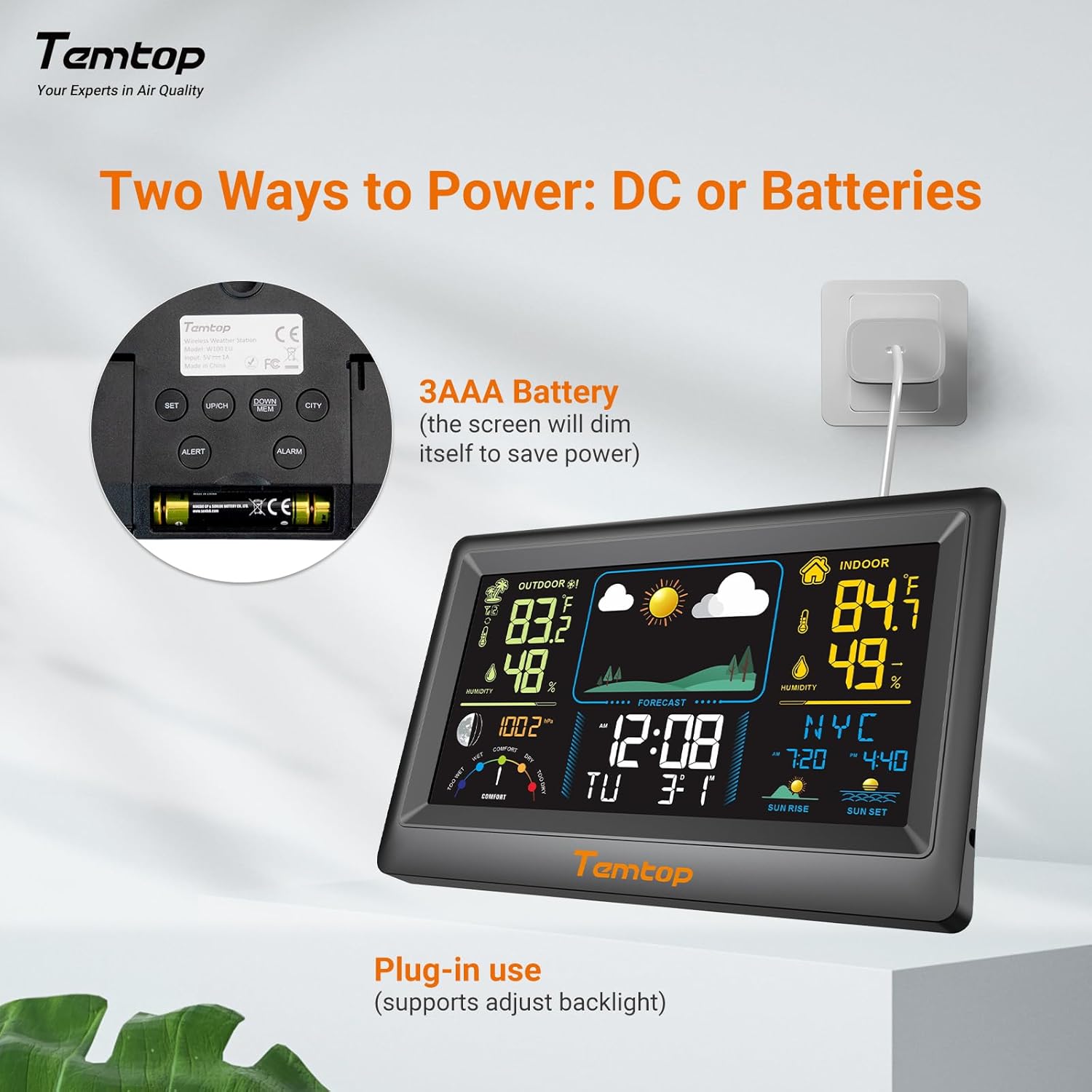
The weather station can be powered by either the included AC adapter or 3x AAA batteries (not included for the main unit, but included for the outdoor sensor). For continuous backlight and optimal performance, AC power is recommended.
- Основний блок: Insert the AC adapter into the power port on the back of the unit and plug it into a wall outlet. Alternatively, insert 3x AAA batteries into the battery compartment.
- Зовнішній датчик: Insert 2x AAA batteries into the outdoor sensor's battery compartment.

Зображення: Прample of digital displays, illustrating the clear readouts of temperature and humidity.

Image: Illustration of power modes, showing the weather station connected via AC adapter and the battery compartment. AC mode allows adjustable backlight, while battery mode conserves power by dimming the display.
4.2 Розміщення зовнішнього датчика
Place the outdoor sensor in a shaded area, protected from direct sunlight and rain, to ensure accurate temperature and humidity readings. The sensor has a wireless range of up to 100 meters (328 feet) in an open, unobstructed area.

Image: Diagram showing the wireless range of the outdoor sensor from the main unit, suitable for gardens, terraces, or rooftops.
4.3 Початкові налаштування (час, дата, місто)
Follow these steps to set the correct time, date, and city for accurate sunrise/sunset times:
- Натисніть і утримуйте НАБІР button to enter setting mode. The hour field will begin to flash.
- Використовуйте UP/CH і ВНИЗ/МЕМ кнопки для налаштування години.
- Прес НАБІР to confirm the hour and move to the next item (minute, year, month, day). Repeat the adjustment and confirmation process for each.
- After setting the date, briefly press the МІСТО button. The city code will flash.
- Використовуйте UP/CH button to scroll through the list of cities until you find your location.
- Нарешті натисніть НАБІР to confirm your city selection. The sunrise, sunset times, and date will now be accurately displayed.
Video: This video demonstrates how to set the time, date, and city on your Temtop W100 Lite Weather Station to ensure accurate display of local sunrise and sunset times.
5. Операція
5.1 Display Interpretation
The main display is divided into several sections for easy reading:
- Зовнішня секція: Shows current outdoor temperature and humidity, and temperature trend.
- Критий сектор: Displays current indoor temperature and humidity, and temperature trend.
- Прогноз погоди: Icons indicate the predicted weather for the next 12 hours (Sunny, Partially Sunny, Cloudy, Rainy, Snowy).
- Час і дата: Поточний час, день тижня та дата.
- Фаза Місяця: Відображає поточну фазу місяця.
- Атмосферний тиск: Shows current barometric pressure and its trend.
- Рівень комфорту: A gauge indicating indoor comfort levels (Wet, Comfort, Dry).
- Схід Захід: Displays the local sunrise and sunset times for the selected city.

Image: Visual representation of the five weather forecast modes and moon phases displayed on the weather station.
5.2 Вибір одиниці температури
To switch between Celsius (°C) and Fahrenheit (°F), briefly press the UP/CH button during normal display mode.
5.3 Min/Max Temperature and Humidity Records
The weather station automatically records the minimum and maximum temperature and humidity values over a 24-hour period. Briefly press the ВНИЗ/МЕМ кнопку до view these records. Press again to cycle through min/max indoor and outdoor values.
5.4 Налаштування будильників
The device supports both time alarms and temperature alerts.
- Час будильника: Натисніть ТРИВОГА кнопку для входу в режим налаштування будильника. Використовуйте UP/CH і ВНИЗ/МЕМ to adjust the alarm time, and ТРИВОГА to confirm. The snooze function can be activated by pressing any button (except ALARM) when the alarm sounds.
- Попередження про температуру: Натисніть ПОПЕРЕДЖЕННЯ button to set high/low temperature alerts for indoor or outdoor readings. Use UP/CH і ВНИЗ/МЕМ to set the desired temperature thresholds.
6. Технічне обслуговування
- Очистіть дисплей та casing з м'яким, damp тканина. Не використовуйте абразивні засоби чи розчинники.
- Replace batteries in the outdoor sensor when the low battery indicator appears on the main unit.
- Avoid exposing the main unit to direct sunlight, extreme temperatures, or moisture.
7. Вирішення проблем
| проблема | Можлива причина | Рішення |
|---|---|---|
| Немає дисплея на головному пристрої. | Немає живлення або низький заряд батарей. | Ensure AC adapter is properly connected or replace batteries. |
| Outdoor readings are inaccurate or not displayed. | Sensor out of range, interference, or low sensor batteries. | Move sensor closer to main unit, reduce obstructions, or replace sensor batteries. |
| Прогноз погоди здається неправильним. | The forecast is based on atmospheric pressure changes and is an estimation. | Allow time for the station to calibrate (up to 24 hours). It provides a general trend, not a precise forecast. |
8. Технічні характеристики
| Особливість | Деталь |
|---|---|
| Бренд | Темтоп |
| Модель | EU-W100-Lite |
| Джерело живлення | Battery (Main Unit: 3x AAA, Sensor: 2x AAA) / AC Adapter |
| Особливості | Customizable Alarms, Wireless Connectivity |
| Технологія підключення | Бездротовий |
| Колір | чорний |
| Сенсорні технології | Бездротовий |
| Робоча температура (верхня) | 40 градусів Цельсія |
| Тип дисплея | Кольоровий дисплей |
| Вага товару | 100 грамів |
9. Гарантія та підтримка
Temtop products are designed for reliability and performance. For warranty information, technical support, or service inquiries, please refer to the warranty card included in your package or visit the official Temtop webсайт. Зберігайте чек про покупку як підтвердження покупки.