
1. Вступ
This manual provides essential information for the safe and efficient use of your XIAOMI Redmi 15 5G Smartphone. Please read it carefully before using the device and keep it for future reference.
2. Вміст упаковки
Переконайтеся, що ваш пакет містить такі елементи:
- Смартфон XIAOMI Redmi 15 5G
- Захисний футляр
- Кабель USB-C
- Інструмент для витягування SIM-карти
Примітка: A power adapter is not included in the package. Please use a compatible 33W fast charger for optimal charging performance.
3. Схема пристрою
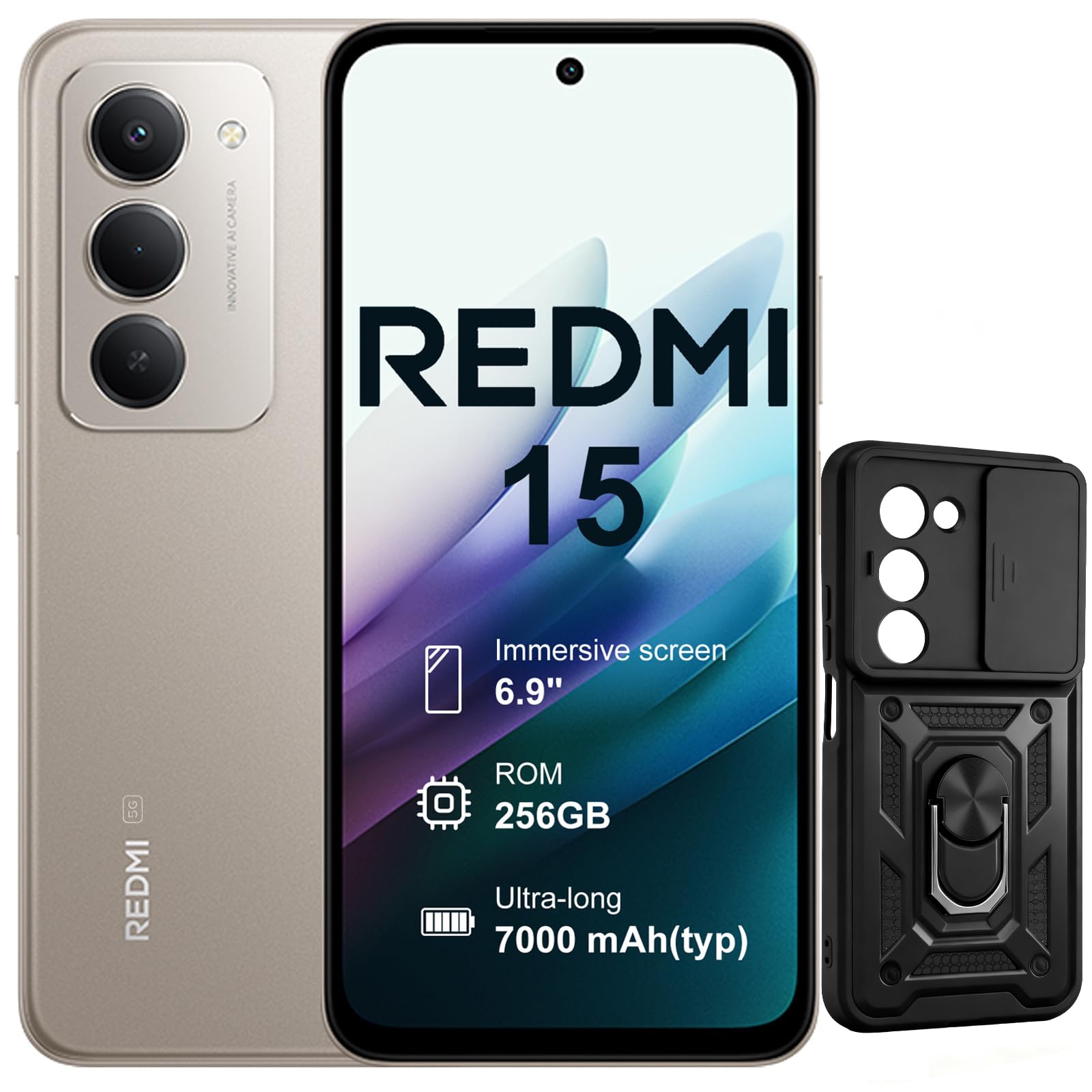
Зображення: Лицьова та зворотна сторони view of the XIAOMI Redmi 15 5G Smartphone. The device features a large display on the front and a triple camera setup on the rear.
Ознайомтеся з фізичними компонентами вашого смартфона:
- Кнопка живлення: Located on the side, used to power on/off or wake/sleep the device. Also integrates the fingerprint sensor.
- Кнопки гучності: Розташований збоку, використовується для регулювання гучності медіа та дзвінків.
- Порт USB-C: Розташований внизу, для заряджання та передачі даних.
- Гніздо для навушників 3.5 мм: Located on the top/bottom, for connecting wired headphones.
- Лоток для SIM-карти: Located on the side, for inserting Nano SIM cards.
- Фронтальна камера: Located on the display, for selfies and video calls.
- Задні камери: Multiple lenses on the back for high-quality photography and video recording.
4. Налаштування
4.1. Вставлення SIM-карт
- Знайдіть лоток для SIM-картки на боковій стороні пристрою.
- Вставте інструмент для вилучення SIM-картки в маленький отвір поруч із лотком і міцно натисніть, доки лоток не вискочить.
- Place your Nano SIM card(s) into the designated slots on the tray. This device supports Dual SIM.
- Обережно вставте лоток назад у телефон.
4.2. Початкове увімкнення та налаштування
- Натисніть і утримуйте кнопку живлення, доки не з’явиться логотип XIAOMI.
- Дотримуйтесь інструкцій на екрані, щоб вибрати мову, підключитися до мережі Wi-Fi та налаштувати обліковий запис Google.
- Configure security features such as fingerprint recognition (integrated into the power button) and screen lock.
5. Керування смартфоном
5.1. Відображення та взаємодія
The Redmi 15 features an immersive 6.9-inch FHD+ display with a 144Hz refresh rate for smooth visuals. It also includes an all-day eye-care display for comfortable viewінж.

Зображення: Людина viewing the smartphone screen in a dimly lit room, demonstrating the all-day eye-care display feature for reduced eye strain.
The device incorporates Wet Touch Technology 2.0, ensuring accurate touch response even when your fingers are wet or covered with oil or foam.

Image: A person interacting with the smartphone while at the beach, illustrating the Wet Touch Technology 2.0 which allows for accurate touch input even with wet fingers.
5.2. Функції камери
The Redmi 15 5G is equipped with a 50MP AI dual camera system, offering features like Super Resolution mode and dynamic shots. Video recording is stabilized in 4K.
5.3. Connectivity and Performance
Powered by the Snapdragon 6 Gen 3 processor with integrated 5G modem, the device provides ultra-fast downloads and smooth gaming. It ensures powerful and fluid multitasking even with demanding applications.

Image: A graphic representation of the Snapdragon 6s Gen 3 processor, highlighting its 5G capabilities and support for up to 16GB RAM with memory extension.
5.4. Особливості
Обведіть, щоб шукати за допомогою Google: This feature allows you to instantly search for anything you see on your phone by circling, scribbling, or tapping to pinpoint items without needing screenshots.

Image: A smartphone screen demonstrating the "Circle to Search with Google" feature, where a user circles an item in an image to perform a search and view related results.
6. Технічне обслуговування та управління акумуляторами
6.1. Battery Charging and Longevity
The device is equipped with a 7000mAh battery, providing up to 2 days of typical use. It supports 33W turbo charging for quick power-ups.

Image: A smartphone screen displaying a charging animation with "86.11%" and "MI TURBO CHARGE", alongside text highlighting the benefits of 33W turbo charging.
The battery is designed for durability, maintaining at least 80% of its original capacity after 1600 full charging cycles. Even at 1% battery level, the phone can remain in standby mode for up to 7.5 hours or allow up to 59 minutes of calls.

Image: A graphic illustrating "1% power endurance" with call and standby times, and "1600 charge cycles, capacity still ≥80%", emphasizing battery longevity.
The device also supports 18W reverse charging, allowing it to function as a portable power bank for other devices.

Image: Two smartphones connected via a cable, demonstrating the 18W reverse charging feature where one phone charges another, effectively acting as a power bank.
6.2. Environmental Resilience
The Redmi 15 5G is designed for reliable performance even in low temperatures, with enhanced battery performance at -20°C. It is also water-resistant.

Image: A smartphone with frost on its edges, illustrating its reliable performance and battery endurance at -20°C, with specific video playback and call times.
7. Вирішення проблем
Якщо у вас виникли проблеми з пристроєм, спробуйте виконати такі основні дії з усунення несправностей:
- Пристрій не відповідає: Натисніть і утримуйте кнопку живлення приблизно 10-15 секунд, щоб примусово перезавантажити комп'ютер.
- Проблеми з мережею: Перевірте, чи правильно вставлено SIM-картку. Спробуйте ввімкнути та вимкнути режим польоту. Перевірте налаштування мобільних даних.
- Проблеми із зарядкою: Ensure the USB-C cable is securely connected to both the phone and the power adapter (not included). Try a different cable or power source.
- Несправності програми: Закрийте та знову відкрийте програму. Якщо проблема не зникає, очистіть кеш програми або перевстановіть її.
- Сканер відбитків пальців не працює: Ensure your finger is clean and dry. Re-register your fingerprints if necessary.
For more advanced troubleshooting, please refer to the official XIAOMI support resources.
8. Технічні характеристики
| Особливість | Специфікація |
|---|---|
| Бренд | XIAOMI |
| Назва моделі | Redmi 15 |
| Операційна система | Android 15 |
| ОЗУ | 8 ГБ |
| Ємність зберігання | 256 ГБ |
| Розмір екрана | 6.9 дюймів |
| роздільна здатність | 2460 х 1080 |
| Частота оновлення | 144 Гц |
| Стільникові технології | 5G |
| Слоти для SIM-карт | Подвійна SIM-карта |
| Біометрична ідентифікація | Розпізнавання відбитків пальців |
| Рівень водонепроникності | Водостійкий |
| Гніздо для навушників | 3.5 мм |
| Роздільна здатність передньої камери | 8 Мп |
| Роздільна здатність задньої камери | 50 Мп |
| Ємність акумулятора | 7000 мАг |
| Середній термін служби батареї | 2 днів |
| Розміри | 16.9 х 8 х 0.8 см |
| Порт зарядки | USB-C |
9. Інформація про гарантію
Your XIAOMI Redmi 15 5G Smartphone comes with a 2-річна гарантія виробникаЦя гарантія поширюється на дефекти матеріалів та виготовлення за умов нормального використання. Будь ласка, збережіть чек про покупку для пред'явлення претензій за гарантією.
For detailed warranty terms and conditions, please visit the official XIAOMI webсайту або зв’яжіться зі службою підтримки клієнтів.
10. Підтримка
For further assistance, technical support, or service inquiries, please contact XIAOMI customer support through their official channels. You can also visit the official XIAOMI store for more information and resources:


