
1. Вступ
This manual provides detailed instructions for the installation, operation, and maintenance of your new XTRONS Android 14 Qualcomm 665 Car Stereo. Please read this manual thoroughly before using the product to ensure proper functionality and safety.
1.1 Applicable Models & Years
This car stereo is compatible with the following vehicle models and years:
- Для БМВ: E46 4-door Sedan (1998-2005), E46 2-door Coupe (1999-2006), E46 2-door Convertible (1999-2006), E46 5-door Touring (1999-2005), E46 3-door Hatchback (2000-2004), E46 M3 (2000-2006)
- For Rover: Ровер 75 (1999-2005)
- For MG: ZT (2001-2005)

Figure 1: Applicable Models & Years
1.2 Важливі примітки щодо сумісності
Before installation, please check your car's center console and air-conditioning cover for compatibility. If necessary, remove the air-conditioning cover to fit the unit perfectly. Additional cables may be required depending on your vehicle's original setup.

Figure 2: Important Notes on Compatibility and Required Cables
2. Ключові характеристики
- 9-inch QLED IPS Screen: 1280*800 high-definition QLED display with a capacitive touchscreen, 178° wide viewing angle, powered by Adreno 610 GPU for ultra-smooth 4K entertainment.
- High Performance CPU: Qualcomm Snapdragon 665 Octa-Core processor with 8GB RAM and 256GB ROM storage, running Android 14 for responsive performance.
- Підключення до смартфону: Built-in Wireless Car Auto Play, Built-in Wireless & Wired Android Auto, and Bluetooth 5.0 for calls and voice control.
- Вбудований цифровий сигнальний процесор (DSP): цифровий Amplifier Processing (TDA7808) and DTS Digital Sound (Si47925) for enhanced audio fidelity and interference immunity.
- Optimized CANbus Decoding: Seamless integration with vehicle features like steering wheel control, ACC control, reversing control, and door status.
- Split Screen & Picture-in-Picture: Run two applications side-by-side or watch videos while multitasking.
- Дводіапазонний Wi-Fi: Supports both 2.4GHz and 5GHz bands for faster and more stable internet connectivity.
2.1 Візуальні особливості

Figure 3: 9-inch QLED IPS Screen
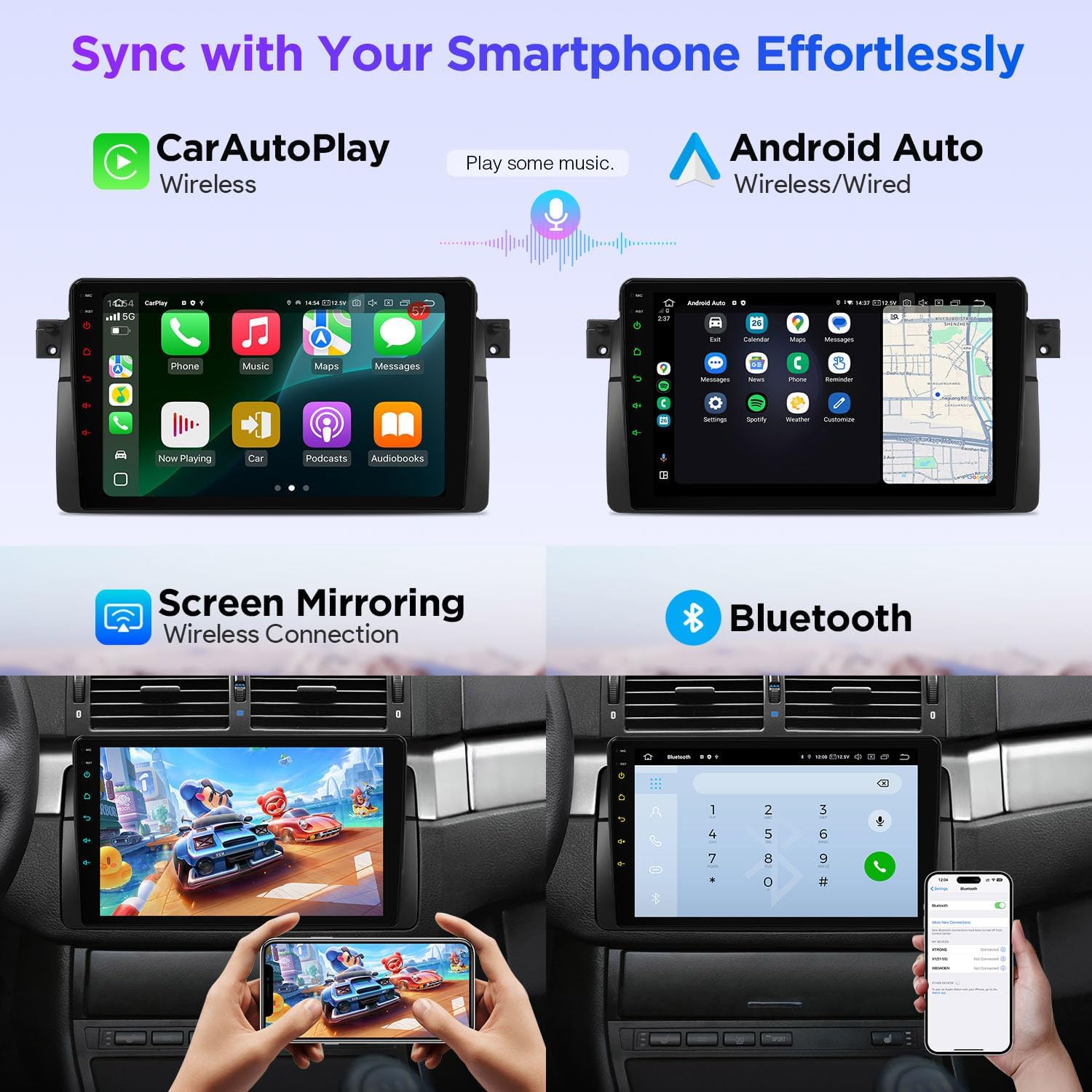
Figure 4: Smartphone Connectivity (CarPlay & Android Auto)

Figure 5: Smart and Intuitive UI with Day/Night Mode
2.2 Аудіофункції

Figure 6: DTS Digital Sound and DSP Controls
2.3 Vehicle Integration
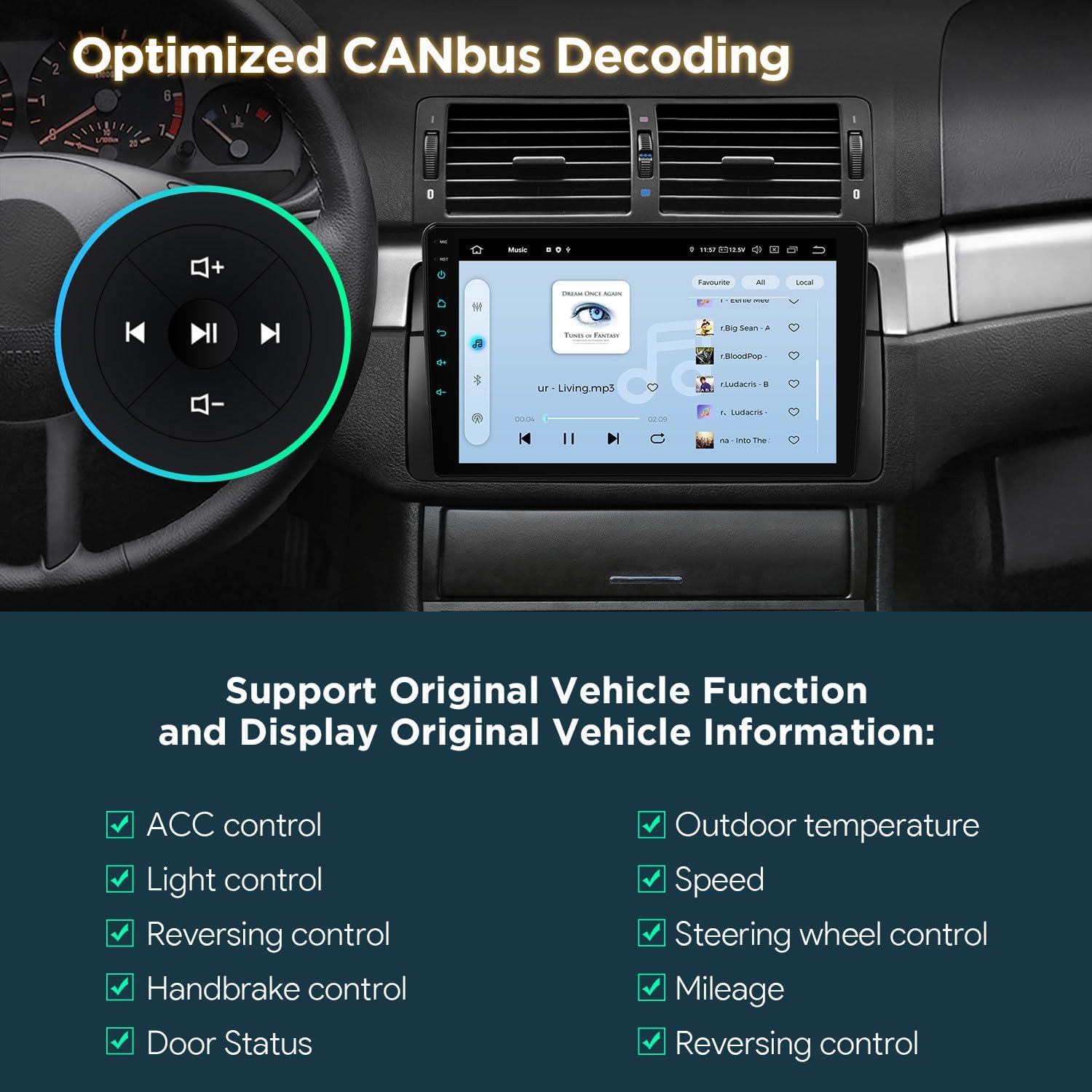
Figure 7: Optimized CANbus Decoding
3. Налаштування та встановлення
Цей розділ містить загальний оглядview of the installation process. For detailed, step-by-step instructions, please refer to the included English Manual and German Manual.
3.1 Розпакування та компоненти

Figure 8: Package Content and Accessories
3.2 Процес встановлення завершеноview
Installation typically involves removing the existing car stereo, connecting the provided wiring harness and accessories, and securing the new head unit. Ensure all connections are secure before reassembling the dashboard.
Video 1: XTRONS 9 Inch Qualcomm Car Stereo for BMW E46 M3 Rover 75 MG ZT - Product Overview and Features. This video provides a visual overview of the product's features and how it integrates into the car environment.
Video 2: Eonon Car Stereo for E46X6S - Installation Guide. This video demonstrates the installation process for a car stereo in a BMW E46, which is highly relevant for this product.
4. Інструкція з експлуатації
4.1 Навігація в інтерфейсі користувача (UI)
The unit features a smart and intuitive UI with customizable day/night modes and quick access toggles for your favorite applications. Navigate through menus by swiping and tapping the QLED touchscreen.
4.2 Інтеграція зі смартфонами (CarPlay та Android Auto)
Connect your smartphone wirelessly via Bluetooth for Wireless Car Auto Play (iPhone) or Wireless & Wired Android Auto (Android phones). This allows access to navigation, calls, music, and voice assistants (Siri/Google Assistant) directly from the head unit.
4.3 Bluetooth 5.0
Utilize Bluetooth 5.0 for hands-free calling and audio streaming. Pair your device through the Bluetooth settings menu on the head unit.
4.4 Built-in DSP Audio Control
Access the built-in Digital Sound Processor (DSP) to fine-tune your audio experience. Adjust equalizer settings, sound field, and other audio parameters to your preference.
4.5 Split Screen & Picture-in-Picture
To activate split-screen mode, long-press an app icon and drag it to one side of the screen. For Picture-in-Picture, start a video and then navigate to another app; the video will continue playing in a small, movable window.
4.6 GPS-навігація
The unit supports various GPS navigation applications. Download your preferred navigation app from the Play Store and follow its instructions for route planning and guidance.
4.7 AHD Camera Input
Connect an AHD (Analog High Definition) camera for clear rearview or front-view display. The system automatically switches to the camera view при русі заднім ходом.
4.8 Dual Band Wi-Fi
Connect to available Wi-Fi networks (2.4GHz or 5GHz) to access online features, download apps, and browse the internet.
5. Технічне обслуговування
To ensure the longevity and optimal performance of your XTRONS car stereo, follow these maintenance guidelines:
- Очищення екрану: Use a soft, lint-free cloth to gently wipe the QLED touchscreen. For stubborn smudges, slightly dampПротріть тканину засобом для чищення екранів, призначеним для електроніки. Уникайте агресивних хімікатів або абразивних матеріалів.
- Оновлення програмного забезпечення: Periodically check for software updates through the unit's settings menu to ensure you have the latest features and performance enhancements.
- Контроль температури: Уникайте тривалого впливу екстремальних температур на пристрій.
- Перевірки підключення: Періодично перевіряйте всі з'єднання проводів, щоб переконатися в їх надійності та відсутності корозії.
6. Вирішення проблем
If you encounter any issues with your car stereo, please refer to the following common troubleshooting steps:
- Немає живлення: Перевірте всі підключення живлення та переконайтеся, що запалювання автомобіля увімкнено. Переконайтеся, що запобіжник справний.
- Немає звуку: Check speaker connections, volume levels, and audio settings (including DSP). Ensure the correct audio source is selected.
- Сенсорний екран не реагує: Спробуйте перезавантажити пристрій. Якщо проблема не зникає, виконайте скидання до заводських налаштувань (примітка: це призведе до видалення всіх даних користувача).
- Втрата сигналу GPS: Переконайтеся, що GPS-антена правильно встановлена та має чіткий сигнал view неба.
- Проблеми з підключенням Bluetooth/Wi-Fi: Ensure Bluetooth/Wi-Fi is enabled on both the head unit and your device. Try re-pairing or reconnecting.
- CANbus Functions Not Working: Verify the CANbus box and cable are correctly installed and configured.
For more detailed troubleshooting or persistent issues, please consult the full English Manual or contact XTRONS customer support.
7. Технічні характеристики
| Особливість | опис |
|---|---|
| Бренд | XTRONS |
| Модель | B0FMJSN8NP |
| Операційна система | Android 14 |
| ЦП | Qualcomm Snapdragon 665 Octa Core |
| ОЗУ | 8 ГБ |
| Ємність пам'яті | 256 ГБ |
| Розмір екрана | 9 дюймів |
| Тип дисплея | QLED, IPS Panel |
| роздільна здатність | 1280*800 |
| Технологія підключення | Bluetooth 5.0, USB, Dual Band Wi-Fi (2.4GHz & 5GHz) |
| Особливості | Bluetooth, Touchscreen, Built-in DSP, Wireless CarPlay, Android Auto, Optimized CANbus Decoding, Split Screen, Picture-in-Picture |
| Підтримувана система супутникової навігації | GPS |
| Спосіб контролю | Дотик, голос |
8. Що в коробці
The following components are included with your XTRONS Car Stereo:
- 1 × ISO Wiring Harness
- 1 × кабель RCA
- 1 × Radio Antenna Cable
- 1 × 4G +Antenna (4G Function not supported in USA)
- 1 × 4G -Antenna
- 1 × GPS-антена
- 2 × USB-кабель
- 1 × CANbus Box
- 1 × Camera Cable
- 1 × CANbus Cable
- 1 × English Manual
- 1 × German Manual
9. Гарантія та підтримка
9.1 Інформація про гарантію
Цей продукт поставляється з a 1 роки гарантії від виробникаБудь ласка, збережіть чек про покупку для гарантійного обслуговування.
9.2 Підтримка клієнтів
For technical assistance, troubleshooting, or warranty inquiries, please contact XTRONS customer support through their official webсайт або контактну інформацію, зазначену на упаковці вашого продукту.