
1. Продукт закінчивсяview
The Kaiser KSB-4008 is a versatile portable Bluetooth speaker designed for powerful audio output and dynamic lighting effects. It features an 8-inch woofer, 2.5-inch tweeter, and mid-range drivers, delivering 40W RMS of balanced sound. Integrated RGB LED lighting enhances the atmosphere for various events. With KSR-Link technology, you can wirelessly connect another compatible speaker for an expanded sound experience. The speaker includes a rechargeable battery, Bluetooth connectivity, and supports USB and Micro SD inputs for diverse music playback options. Its robust and portable design makes it suitable for both indoor and outdoor use.
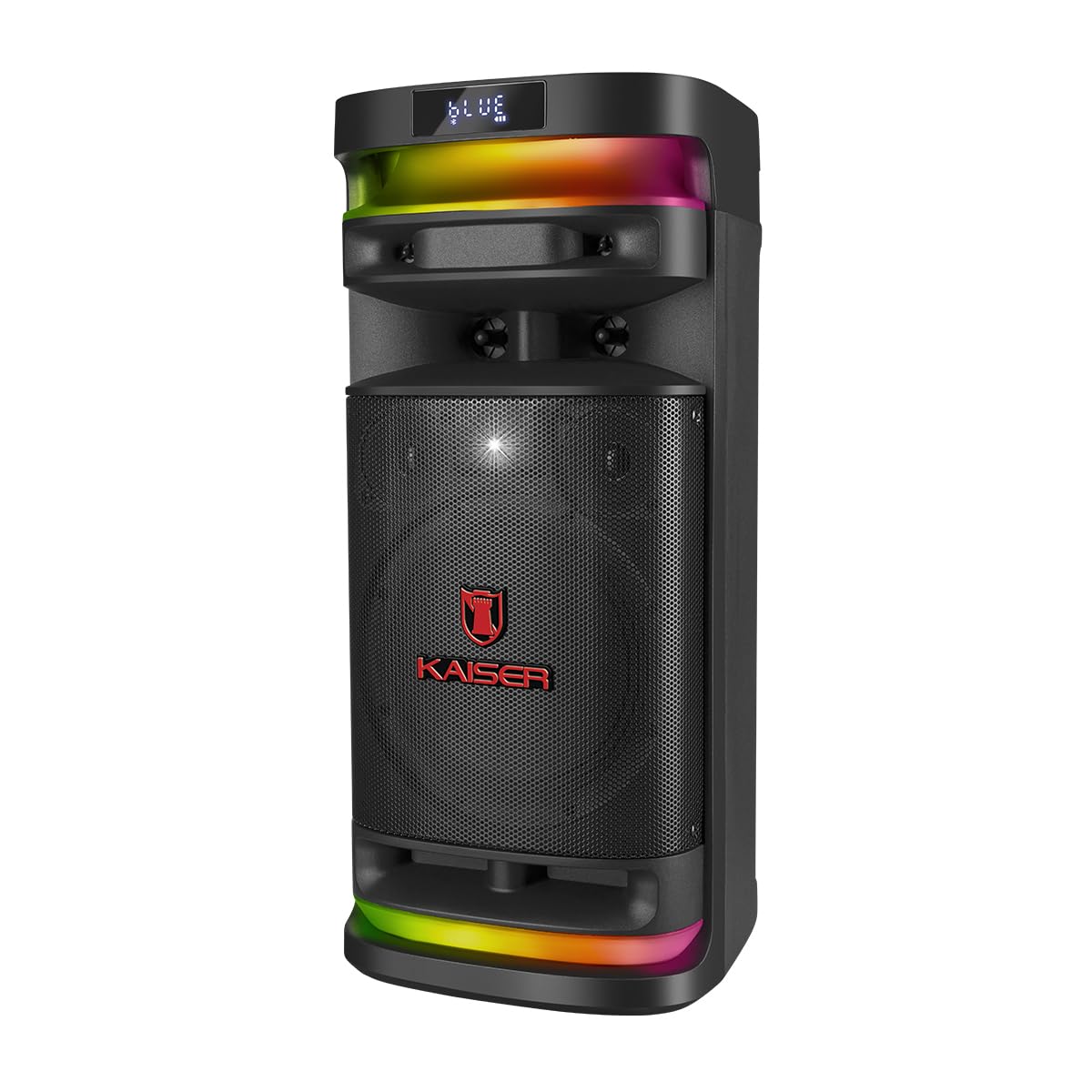
малюнок 1.1: Фронт view of the Kaiser KSB-4008 Portable Bluetooth Speaker, showcasing its speaker grille and RGB LED light strips.
Ключові характеристики:
- Потужність 40 Вт RMS: Provides powerful and balanced audio output.
- Full Speaker Configuration: Includes an 8-inch woofer, 2.5-inch tweeter, and mid-range for comprehensive sound reproduction.
- RGB LED Light Effect: Multi-color lighting creates a vibrant atmosphere.
- KSR-Link Technology: Allows wireless connection to another compatible speaker for ampліфікований звук.
- Універсальний підключення: Supports Bluetooth, USB, and Micro SD for various audio sources.
- Акумуляторна батарея: Enables extended use without constant power connection.
- Portable and Sturdy Design: Easy to transport for indoor or outdoor events.
2. Вміст упаковки
Будь ласка, поставте позначку у відповідному полі для наступних пунктів:
- Kaiser KSB-4008 Portable Bluetooth Speaker
- Бездротовий мікрофон
- Charging Cable (for microphone)
- Посібник користувача (цей документ)

малюнок 2.1: Included wireless microphone and its USB charging cable.
3. Техніка безпеки
To ensure safe operation and prevent damage, please read and follow these safety guidelines:
- Не піддавайте динамік впливу води, вологи або екстремальних температур.
- Уникайте тривалого розміщення динаміка поблизу джерел тепла або під прямими сонячними променями.
- Забезпечте належну вентиляцію; не блокуйте вентиляційні отвори.
- Use only the specified charging cables and power adapters.
- Do not attempt to open, modify, or repair the speaker yourself. Refer all servicing to qualified personnel.
- Тримайте динамік подалі від дітей і домашніх тварин.
- Operate the speaker within its specified voltage та обмеження струму.
- Уникайте прослуховування на надмірно високій гучності протягом тривалого часу, щоб запобігти пошкодженню слуху.
4. Компоненти та елементи керування продуктом
Familiarize yourself with the various parts and controls of your KSB-4008 speaker.
малюнок 4.1: Top Control Panel Layout.
Функції панелі керування:
- Вимикач живлення: Вмикає/вимикає динамік.
- CARGA (Charge) Indicator: Світиться під час заряджання.
- Вхід AUX: 3.5-мм роз'єм для підключення зовнішніх аудіопристроїв.
- Порт USB: Для USB-флеш-накопичувачів.
- Слот Micro SD: Для карт Micro SD.
- Мікрофонний вхід: 6.35mm jack for wired microphone (if used).
- GUIT Input: 6.35mm jack for guitar (if used).
- VOL MIC (Microphone Volume): Adjusts the volume of the microphone.
- VOLUMEN (Master Volume): Регулює загальну гучність динаміка.
- Світлодіодна кнопка: Controls the RGB LED light effects.
- GRAB Button: For recording audio (functionality may vary).
- MIC PRIO (Microphone Priority): Надає пріоритет звуку мікрофона над музикою.
- REPETIR (Repeat) Button: Повторює поточну доріжку або список відтворення.
- Кнопка попереднього треку / перемотування назад: Skips to previous track or rewinds.
- Кнопка відтворення/паузи: Відтворює або призупиняє відтворення аудіо.
- Кнопка «Наступний трек / Перемотування вперед»: Skips to next track or fast forwards.
- MODO BT (Mode/Bluetooth) Button: Switches between input modes (Bluetooth, USB, Micro SD, AUX) and initiates Bluetooth pairing.
5. Налаштування та перше використання
5.1 Заряджання динаміка
- Connect the speaker to a power outlet using a compatible charging cable (not explicitly listed but implied).
- The 'CARGA' indicator light on the control panel will illuminate during charging.
- Once fully charged, the indicator light may change color or turn off. Disconnect the speaker from the power source.
5.2 Увімкнення/вимкнення
- To turn ON the speaker, toggle the ПОТУЖНІСТЬ перемикач у положення «УВІМК.».
- To turn OFF the speaker, toggle the ПОТУЖНІСТЬ перемикач у положення «ВИМК.».
5.3 Налаштування бездротового мікрофона
- Ensure the wireless microphone is charged. Use the provided USB charging cable if necessary.
- Turn on the microphone using its power button.
- The microphone should automatically pair with the speaker. If not, refer to the microphone's specific instructions for pairing.
- Відрегулюйте гучність мікрофона за допомогою ГУЧНІСТЬ МІКРОФОНА knob on the speaker's control panel.
6. Інструкція з експлуатації
6.1 Підключення Bluetooth
- Увімкніть динамік.
- Натисніть MODO BT button repeatedly until 'BLUE' or 'BT' appears on the display, indicating Bluetooth mode. The speaker will enter pairing mode.
- На мобільному пристрої ввімкніть Bluetooth і знайдіть доступні пристрої.
- Select 'Kaiser KSB-4008' (or similar name) from the list.
- Once connected, the speaker will confirm with an audible prompt, and the display will show a stable Bluetooth icon.
6.2 Відтворення з USB / Micro SD
- Insert a USB flash drive or Micro SD card into the respective port/slot.
- The speaker should automatically switch to USB or Micro SD mode and begin playing audio files. Якщо ні, натисніть кнопку MODO BT button to select the correct input mode.
- Використовуйте кнопки «Відтворення/Пауза», «Попередній трек» та «Наступний трек» для керування відтворенням.
6.3 Вхід AUX
- Підключіть зовнішній аудіопристрій (наприклад, смартфон, MP3-плеєр) до ДОП вхід за допомогою аудіокабелю 3.5 мм.
- Натисніть MODO BT button to select AUX input mode.
- Керуйте відтворенням з підключеного пристрою.
6.4 KSR-Link Technology (True Wireless Stereo)
KSR-Link allows you to connect two KSB-4008 speakers wirelessly for a stereo sound experience.
- Ensure both KSB-4008 speakers are powered on and in Bluetooth mode, but not connected to any device.
- На одному з динаміків (це буде основний динамік) натисніть і утримуйте MODO BT button for a few seconds until you hear a confirmation tone, indicating KSR-Link pairing mode.
- Два динаміки автоматично підключаться один до одного. Після підключення ви почуєте ще один звуковий сигнал підтвердження.
- Тепер підключіть свій мобільний пристрій до основного динаміка через Bluetooth, як описано в розділі 6.1.
- Тепер аудіо відтворюватиметься стерео через обидва динаміки.
6.5 RGB LED Light Control
- Натисніть LED button on the control panel to cycle through different light modes or to turn the lights off.
6.6 Регулювання гучності
- Adjust the overall speaker volume using the ОБ'ЄМ ручка.
- Adjust the wireless microphone volume using the ГУЧНІСТЬ МІКРОФОНА ручка.
7. Технічне обслуговування
7.1 Очищення
- Always turn off the speaker and disconnect it from power before cleaning.
- Використовуйте м’яку, суху тканину для протирання зовнішніх поверхонь.
- Не використовуйте абразивні засоби для чищення, віск або розчинники, оскільки вони можуть пошкодити покриття.
- Уникайте потрапляння вологи в будь-які отвори.
7.2 Зберігання
- Зберігайте динамік у прохолодному, сухому місці, подалі від прямих сонячних променів та екстремальних температур.
- Якщо акумулятор зберігатиметься протягом тривалого періоду, заряджайте його приблизно до 50% кожні кілька місяців, щоб підтримувати його в робочому стані.
8. Вирішення проблем
If you encounter issues with your KSB-4008 speaker, refer to the following common problems and solutions:
| проблема | Можлива причина | Рішення |
|---|---|---|
| Динамік не вмикається. | Батарея розряджена. Вимикач живлення вимкнено. | Charge the speaker. Ensure the POWER switch is in the 'ON' position. |
| Немає звуку. | Volume is too low. Incorrect input mode. Device not connected properly. | Збільшити ОБ'ЄМ ручку. Натисніть MODO BT to select the correct input. Reconnect your audio source. |
| Не вдається підключити пристрій Bluetooth. | Гучномовець не в режимі сполучення. Пристрій занадто далеко. Перешкоди. | Ensure speaker is in Bluetooth pairing mode (display shows 'BLUE' or 'BT'). Move device closer to speaker. Turn off other Bluetooth devices. |
| Бездротовий мікрофон не працює. | Microphone battery low. Microphone not turned on. VOL MIC is low. | Charge the microphone. Turn on the microphone. Increase the ГУЧНІСТЬ МІКРОФОНА ручка. |
| KSR-Link connection fails. | Speakers already connected to a device. Incorrect pairing procedure. | Ensure both speakers are not connected to any Bluetooth device. Follow KSR-Link pairing steps carefully. |
9. Технічні характеристики
Technical specifications for the Kaiser KSB-4008 Portable Bluetooth Speaker:

малюнок 9.1: Kaiser KSB-4008 Speaker Dimensions.
| Особливість | Специфікація |
|---|---|
| Бренд | Кайзер |
| Модель | КСБ-4008 |
| Тип динаміка | Атмосферний |
| Peak Power Handling (RMS) | 40 Вт |
| Розмір НЧ-динаміка | 8 дюймів |
| Розмір твітера | 2.5 дюймів |
| Підключення | Bluetooth, USB, Micro SD, AUX |
| Особливості | RGB LED Light, KSR-Link Technology, Rechargeable Battery |
| Розміри продукту (ДxШxВ) | 37.4 x 36.2 x 80 cm (Note: Image shows 56.7 x 26.5 x 25 cm, please verify actual dimensions) |
| Вага товару | 500 г |
| Включені компоненти | Бездротовий мікрофон |
Note: Product dimensions from specifications (37.4 x 36.2 x 80 cm) differ from the provided image (56.7 x 26.5 x 25 cm). Please refer to the product packaging for the most accurate dimensions.
10. Гарантія та підтримка
Щоб отримати інформацію про гарантію та технічну підтримку, зверніться до гарантійного талона, що додається до вашого продукту, або відвідайте офіційний веб-сайт Kaiser. webсайт. Зберігайте чек про покупку як підтвердження покупки для будь-яких гарантійних претензій.