
1. Вступ
The WatchGuard Firebox T185 is a high-performance tabletop firewall designed to provide enterprise-grade security for branch offices and retail environments. This device handles demanding traffic loads and offers flexible connectivity options, including SFP+ fiber, 2.5Gb, and 1Gb Ethernet ports. It integrates advanced threat protection, VPN support, and SD-WAN capabilities to ensure secure and efficient network operations.
2. Інформація про безпеку
- Прочитайте всі інструкції перед використанням пристрою.
- Забезпечте належне заземлення, щоб уникнути ураження електричним струмом.
- Не піддавайте пристрій дії вологи або екстремальних температур.
- Використовуйте лише блок живлення, що постачається з пристроєм.
- Не відкривайте пристрій casinг; зверніться до кваліфікованого персоналу для обслуговування.
- Secure the device physically using the Kensington Lock slot to prevent theft.
3. Вміст упаковки
Перевірте наявність усіх елементів в упаковці:
- WatchGuard Firebox T185 Appliance
- Адаптер живлення
- Кабель Ethernet
- Короткий посібник
4. Фізичний overview
Familiarize yourself with the ports, indicators, and features of your Firebox T185.

This image displays the WatchGuard Firebox T185, highlighting its front and rear panels. The front panel features LED indicators for status and mode. The rear panel includes a DC power input, two USB 3.2 ports, one O/WAN 1/LAN port, four 1 Gbps LAN ports (ports 2-5), two 2.5 Gbps PoE ports (ports 6-7), one 10 Gbps SFP+ port, a reset button, and a power switch. A Kensington lock slot is also visible.

The WatchGuard Firebox T185 is shown held in a hand, illustrating its compact tabletop form factor suitable for various environments.

Детальний view of the rear panel of the Firebox T185, showing the power input, USB ports, 1GbE LAN ports, 2.5GbE PoE ports, and the SFP+ port.
Світлодіодні індикатори
Світлодіоди на передній панелі надають інформацію про стан:
- Індикатор стану: Indicates the operational status of the device.
- Світлодіодний індикатор уваги: Alerts to system warnings or errors.
- Індикатор режиму: Показує поточний режим роботи.
- Світлодіоди портів: Вказує стан з'єднання та активність для кожного мережевого порту.
5. Початкове налаштування
- Розпакуйте пристрій: Carefully remove the Firebox T185 and all accessories from the packaging.
- Підключіть мережеві кабелі:
- Connect your internet source (modem or upstream router) to the O/WAN 1/LAN порт.
- Connect your internal network devices (switches, computers) to the Порти локальної мережі (2-5). For higher speeds, use the 2.5 Gbps PoE ports (6-7) або порт SFP+ в міру необхідності.
- Підключіть живлення: Plug the power adapter into the device's power input and then into a power outlet. Turn on the power switch.
- Увімкнення: The device will power on automatically. Observe the LED indicators for boot-up status.
- Початкова конфігурація: Доступ до пристрою web interface or use WatchGuard Cloud for initial configuration. Refer to the Quick Start Guide for default IP addresses and login credentials.
Це відео пропонує продукт понадview of the WatchGuard Firebox T185, demonstrating its features and potential deployment scenarios. It highlights the device's physical aspects and connectivity options.
6. Інструкція з експлуатації
Once configured, the Firebox T185 operates continuously to protect your network. Management is typically performed through the WatchGuard Cloud platform or a local web інтерфейс.
- Моніторинг: Regularly check the device status through the WatchGuard Cloud dashboard or local interface for alerts and performance metrics.
- Оновлення прошивки: Keep the device firmware updated to ensure the latest security patches and features. Follow WatchGuard's official update procedures.
- VPN-з'єднання: Utilize the VPN features for secure remote access or site-to-site connectivity as configured.
- SD-WAN: Leverage SD-WAN capabilities for optimized traffic routing and network resilience.
7. Технічне обслуговування
- Регулярне прибирання: Keep the device free from dust. Use a soft, dry cloth to clean the exterior. Do not use liquid cleaners.
- Вентиляція: Ensure adequate airflow around the device to prevent overheating. Do not block ventilation openings.
- Управління прошивкою: Periodically check for and apply firmware updates as recommended by WatchGuard.
- Резервне копіювання конфігурації: Regularly back up your device configuration to prevent data loss in case of an issue.
8. Вирішення проблем
- Немає живлення:
- Check the power cable connection and ensure the power outlet is functional. Verify the power switch is in the 'On' position.
- Немає підключення до мережі:
- Verify all Ethernet cables are securely connected. Check the status of the port LEDs. Ensure your internet service is active. Review network configuration settings.
- Повільна продуктивність:
- Check network traffic and resource utilization through the management interface. Ensure firmware is up-to-date. Consider reviewing security policies for potential bottlenecks.
- Перегрів пристрою:
- Ensure the device is placed in a well-ventilated area. Clear any dust from the ventilation openings.
9. Технічні характеристики
| Особливість | Значення |
|---|---|
| IPS Throughput (full scan) | 2.40 Гбіт/с |
| Firewall Throughput (IMIX) | 7.90 Гбіт/с |
| VPN Throughput (IMIX) | 1.14 Гбіт/с |
| HTTPS (IPS enabled, full scan) | 1.00 Гбіт/с |
| Мережеві інтерфейси | 4 x 1 GbE, 4 x 2.5 GbE, 1 x SFP/SFP+ |
| Інтерфейси введення/виведення | 1 Serial/2 USB-A 3.2 |
| Назва моделі | WatchGuard Firebox T185 |
| Особливість | UTM, VPN Support, Integrated SD-WAN |
| Рекомендоване використання | Бізнес |
| Технологія підключення | Ethernet, SFP+ |
| Вага товару | 6.8 фунта |
| Операційна система | Fireware |
| Data Transfer Rate (UTM) | 1830 мегабіт в секунду |
| Максимальна швидкість передачі даних для висхідного потоку | 1830 мегабіт в секунду |
| Пропускна здатність порту локальної мережі | 2500 Мбіт/с |
| Modem Compatible | немає |
| Покриття | Software and emergency support |
| UPC | 654522437150 |
| Виробник | WatchGuard |
| Номер деталі виробника | WGT185000+WGT1850063 |

This image displays a table detailing key performance specifications for the WatchGuard Firebox T185, including IPS, Firewall, VPN, and HTTPS throughputs, as well as network and I/O interfaces.
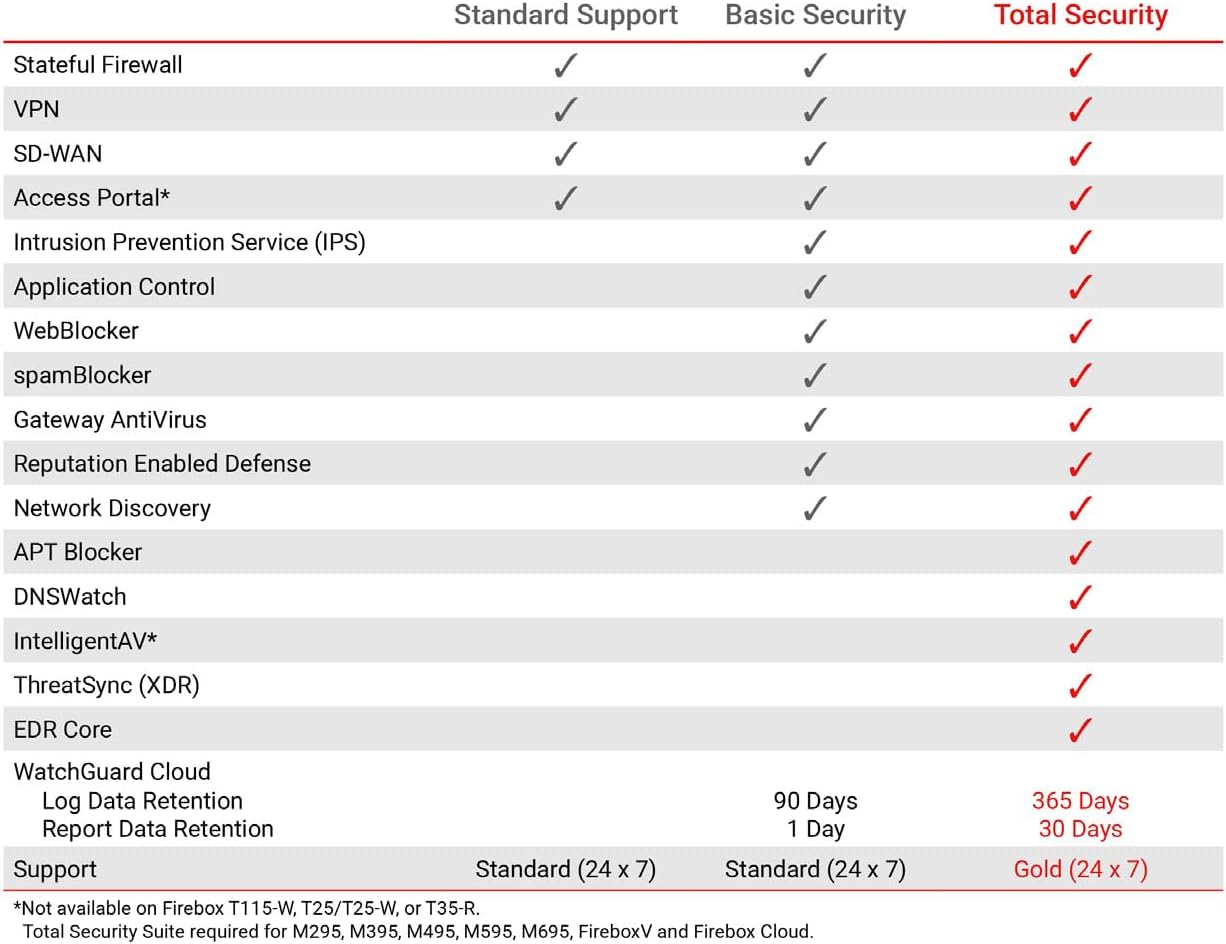
This table compares the security features included with Standard Support, Basic Security Suite, and Total Security Suite for the WatchGuard Firebox T185, showing which features are enabled for each option.
10. Гарантія та підтримка
The WatchGuard Firebox T185 comes with a 3-year Standard Support license (WGT185003).
- Стандартна підтримка: Provides software updates and 24x7 emergency technical assistance, along with business-hours support for routine inquiries.
- Плани захисту: Additional protection plans may be available, such as a 4-Year Protection Plan or a Complete Protect monthly plan. Refer to your purchase documentation for details.
- Підтримка виробника: Для отримання додаткової допомоги зверніться до офіційного WatchGuard support webсайт або зверніться до їхньої служби підтримки клієнтів.