1. Вступ
This manual provides detailed instructions for the safe and effective use of your generic POV Pro 4K Camera. Please read this manual thoroughly before operating the device and retain it for future reference. This camera is designed for capturing high-quality video and photos during various activities, including cycling, pet walking, and other outdoor adventures.
2. Продукт закінчивсяview
The POV Pro 4K Camera is a compact, high-definition action camera featuring 4K video recording, night vision capabilities, and a waterproof design. It is equipped with a 120° wide-angle lens for comprehensive coverage.
2.1 Вміст упаковки
Перевірте наявність усіх предметів у вашій упаковці:
- POV Pro 4K Camera
- Зарядний кабель USB Type-C
- Магнітний шнурок
- Rotatable Spring Back Clip
- Кріплення на шолом
- Bicycle Mounts
- Waterproof Shell (if included in your specific package)
- Інструкція з експлуатації

Image: The POV Pro 4K Camera shown with its various accessories, including mounting kits, charging cable, and lanyard.
2.2 Функції камери
- Запис відео 4K HD: Capture crisp, high-resolution footage.
- Ширококутний об'єктив 120°: Надає широке поле view for immersive recordings.
- Нічне бачення: Покращені можливості запису в умовах слабкого освітлення.
- 30-meter Waterproof Design: Suitable for use in various wet environments.
- Вбудований Wi-Fi: Connects to a dedicated app for real-time preview і обмін.
- Кілька варіантів монтажу: Magnetic base, rotatable clip, helmet, and bicycle mounts.
- Легкий і портативний: Designed for comfortable, all-day wear.

Image: A hand holding the compact black POV Pro 4K Camera, highlighting its small size.
3. Налаштування
3.1 Заряджання камери
- Locate the Type-C interface on the camera. This is typically protected by a small cover.
- Open the cover and connect the provided USB Type-C cable to the camera and a power source (e.g., computer USB port, wall adapter).
- Індикатор заряджання засвітиться. Після повного заряджання світло зміниться або згасне.
Video: This video demonstrates the camera's features, including the Type-C interface, accessory package, helmet mounting, magnetic lanyard, and rotatable back clip. (Note: Video source URL is a placeholder as it was not provided in the JSON data.)
3.2 Вставлення карти MicroSD
A MicroSD card (not always included) is required for storing recordings. The camera supports up to 128GB or 256GB, depending on the model variant.
- With the camera powered off, open the cover protecting the Type-C interface.
- Carefully insert the MicroSD card into the designated slot until it clicks into place. Ensure the correct orientation.
- Close the cover to protect the ports from dust and water.
4. Інструкція з експлуатації
4.1 Увімкнення/вимкнення
- Щоб увімкнути: Натисніть і утримуйте кнопку живлення протягом кількох секунд, поки не засвітиться індикатор.
- Щоб вимкнути: Знову натисніть і утримуйте кнопку живлення, доки індикатор не згасне.
4.2 Базовий запис
- Почати запис: With the camera powered on, press the record button once. The indicator light will typically flash to indicate recording is in progress.
- Зупинити запис: Press the record button again to stop recording. The indicator light will return to a steady state.
4.3 Режими зйомки
The camera supports various shooting modes, including Night, Action, and Sports. Refer to the camera's on-screen menu or companion app for specific mode selection and settings.

Image: Visual comparison demonstrating the clarity of 4K high-definition recording compared to lower resolutions.
5. Варіанти монтажу
The POV Pro 4K Camera offers versatile mounting solutions for various activities.
- Магнітна основа: The camera features a strong magnetic base for quick attachment to metallic surfaces.
- Rotatable Spring Back Clip: Attach the camera to clothing, backpack straps, or other gear for hands-free recording. The clip allows for 360° rotation.
- Кріплення для шолома: Use the provided kits to securely attach the camera to helmets for activities like cycling, skiing, or climbing.
- Bicycle Mounts: Mount the camera to bicycle handlebars or other parts for capturing rides.
- Magnetic Lanyard: Wear the camera around your neck for convenient, hands-free recording, especially useful for pet walking or daily vlogging.

Image: Demonstrates various installation methods, including top of helmet, side of helmet, and handlebar mounting.

Image: Illustrates the use of the magnetic lanyard and portable back clip for hands-free operation.
6. Підключення
6.1 Підключення до Wi-Fi та застосунків
The camera features built-in Wi-Fi for seamless connection to a dedicated mobile application. This allows for:
- Попередньо в режимі реального часуview: View жити footage from your camera on your smartphone.
- Пульт дистанційного керування: Start/stop recording, change settings, and switch modes from your phone.
- File Передача: Download recorded videos and photos directly to your mobile device.
- Обмін: Easily share your content to social media platforms.
- Download the official companion app from your device's app store.
- Power on the camera and activate its Wi-Fi mode (refer to the camera's specific instructions or app for details).
- На смартфоні перейдіть до налаштувань Wi-Fi та підключіться до мережі Wi-Fi камери.
- Open the app and follow the on-screen prompts to connect to your camera.
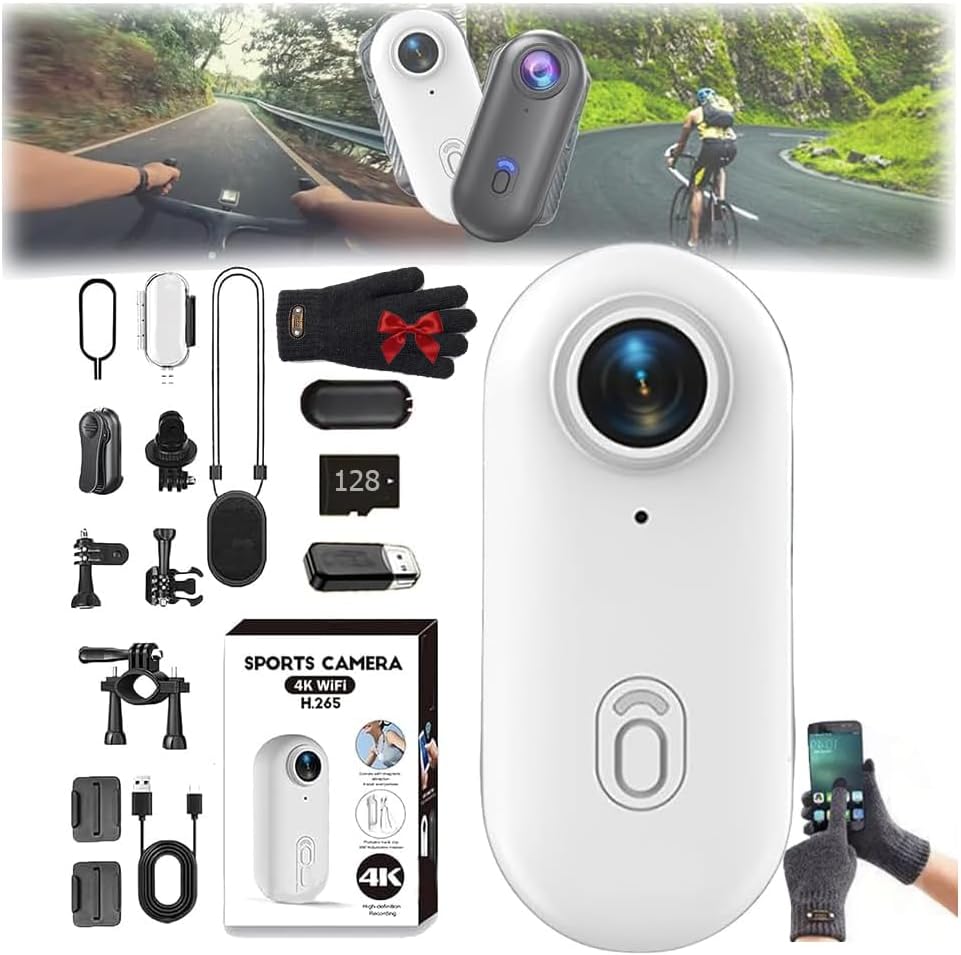
Image: Illustrates the camera's built-in Wi-Fi functionality for one-click download and sharing via a mobile phone app.
7. Гідроізоляція
The POV Pro 4K Camera is designed to be waterproof up to 30 meters. For underwater activities, it is recommended to use the camera with its dedicated waterproof shell (if included) to ensure maximum protection and performance.
- Ensure all port covers are securely closed before exposing the camera to water.
- If using a waterproof shell, ensure it is properly sealed according to its instructions.
- After use in saltwater, rinse the camera and/or waterproof shell with fresh water and allow it to dry completely before opening any compartments.
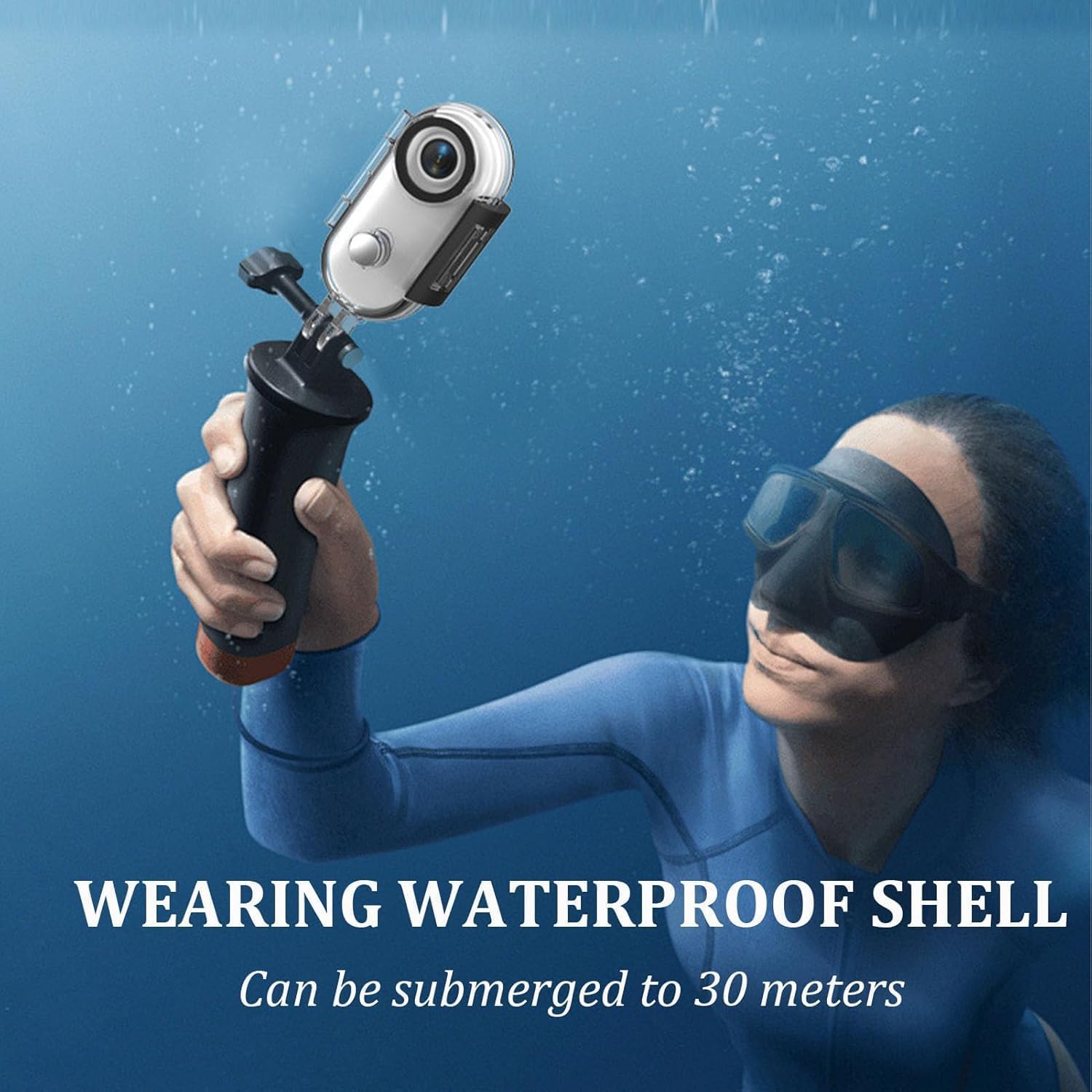
Image: A person using the camera with a waterproof shell while submerged, demonstrating its 30-meter waterproof capability.
8. Технічне обслуговування
- Прибирання: Використовуйте м’яку суху тканину для очищення корпусу камери. Для об’єктива використовуйте спеціальну тканину для очищення об’єктивів та розчин. Уникайте абразивних матеріалів.
- Зберігання: Зберігайте камеру в прохолодному, сухому місці, подалі від прямих сонячних променів та екстремальних температур.
- Догляд за акумулятором: Для оптимального терміну служби акумулятора уникайте частого повного розряджання акумулятора. Регулярно заряджайте камеру, навіть якщо вона не використовується протягом тривалого часу.
- Оновлення прошивки: Перевірте виробника website or the companion app for any available firmware updates to ensure optimal performance and new features.
9. Вирішення проблем
- Камера не вмикається: Переконайтеся, що акумулятор заряджений. Підключіть до джерела живлення та спробуйте ще раз.
- Проблеми із записом: Перевірте, чи правильно вставлено карту MicroSD та чи на ній достатньо вільного місця. Переконайтеся, що карта правильно відформатована (FAT32 або exFAT).
- Проблеми з підключенням до Wi-Fi: Ensure the camera's Wi-Fi is enabled. Restart both the camera and your mobile device. Verify you are connecting to the correct Wi-Fi network.
- Погана якість відео: Check your recording settings (resolution, frame rate). Ensure the lens is clean and free from smudges.
- Перегрів: Prolonged recording, especially in high resolutions or warm environments, can cause the camera to heat up. If it becomes excessively hot, stop recording and allow it to cool down.
If problems persist, consult the manufacturer's support resources or contact customer service.
10. Технічні характеристики
| Особливість | Специфікація |
|---|---|
| Модель | B0FLY14VMV |
| Роздільна здатність захоплення відео | 4K |
| Кут об'єктива | 120° ширококутний |
| Водонепроникна глибина | До 30 метрів |
| Режими зйомки | Night, Action, Sports |
| Тип контролю експозиції | Manual, Aperture-Priority, Shutter-Priority, Automatic |
| Підключення | Wi-Fi |
| Тип носія | Digital8 (Internal processing, uses MicroSD for storage) |
| Колір | чорний |
11. Гарантія та підтримка
Your generic POV Pro 4K Camera comes with a standard manufacturer's warranty. Please refer to the warranty card included in your package or visit the manufacturer's official webсайт для детальних умов.
For technical support, troubleshooting assistance, or warranty claims, please contact the seller or manufacturer directly using the contact information provided with your purchase or on their official support channels.