1. Вступ
This manual provides essential information for the setup, operation, maintenance, and troubleshooting of your ENDGAME GEAR XM2w 4k v2 Wireless Gaming Mouse. Please read these instructions carefully to ensure optimal performance and longevity of your device.
2. Вміст упаковки
Перевірте наявність усіх елементів в упаковці:
- ENDGAME GEAR XM2w 4k v2 Wireless Gaming Mouse
- Бездротовий ключ 4K
- USB-C to USB-A Flex Cord 7.0 Cable (1.8m)
- Інструкція з експлуатації (цей документ)

Image: The XM2w mouse with its USB-C cable and 4K wireless dongle.
3. Налаштування
3.1 Заряджання миші
Before first use, it is recommended to fully charge the mouse. Connect the USB-C end of the provided cable to the mouse and the USB-A end to an available USB port on your computer. The mouse will charge while connected.

Зображення: Порт заряджання USB-C, розташований на передній панелі миші.
3.2 Бездротове підключення
- Plug the 4K Wireless Dongle into an available USB-A port on your computer.
- Ensure the mouse is powered on using the switch on the bottom of the mouse.
- The mouse should automatically connect to the dongle.

Image: The XM2w mouse and its dedicated 4K wireless dongle.
3.3 Дротове підключення
For a wired connection, simply connect the USB-C end of the provided cable to the mouse and the USB-A end to your computer. The mouse will function as a wired device and charge simultaneously.
3.4 Встановлення програмного забезпечення
For advanced customization, including DPI settings, polling rate adjustments, button remapping, and firmware updates, download the official ENDGAME GEAR software from the manufacturer's webсайт. Дотримуйтесь інструкцій на екрані для встановлення.
4. Керування мишею
4.1 Основні функції
- Клацніть лівою кнопкою миші: Кнопка основної дії.
- Клацніть правою кнопкою миші: Кнопка додаткової дії.
- Колесо прокрутки: Scroll up/down for navigation. Press for middle click function.
- Бічні кнопки: Typically configured for forward/backward navigation in web browsers or in-game actions. Customizable via software.
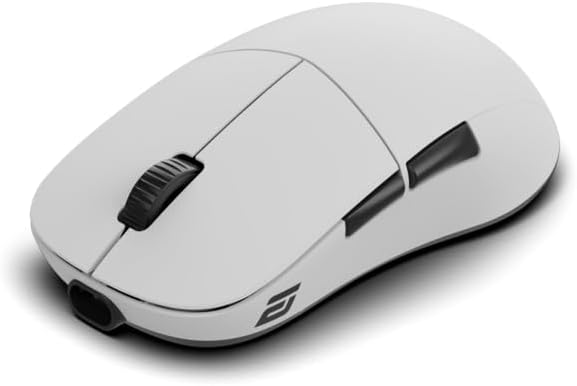
Зображення: Верх view of the XM2w mouse, showing main buttons and scroll wheel.
4.2 DPI/CPI Adjustment
The XM2w features a PixArt PAW3950 sensor capable of up to 30,000 CPI (Counts Per Inch). DPI/CPI settings can be adjusted through the ENDGAME GEAR software to match your preference and gaming style.
4.3 Polling Rate Configuration
The mouse supports multiple polling rates:
- Бездротовий: 4000 Гц, 2000 Гц, 1000 Гц, 125 Гц
- Провідний: 1000 Гц
The polling rate can be selected via the ENDGAME GEAR software to optimize response times for your system and game.

Image: Visual representation of the mouse's low latency performance.
4.4 Відстань відриву (LOD)
The XM2w offers a fine-tunable Lift-Off Distance (LOD) from 0.7mm to 1.7mm, configurable through the software. This allows for precise control during high-speed movements.
4.5 GX Switches
Equipped with pre-sorted GX switches, the mouse provides crisp, tactile feedback and ultra-low latency, rated for 80 million clicks for consistent performance.
4.6 Ергономічний дизайн
The symmetrical, medium-sized shape with a wide rear and gently contoured sides is optimized for a secure claw grip, facilitating fast reactions and precise control.

Зображення: Side profile of the XM2w mouse, showcasing its ergonomic shape.
5. Технічне обслуговування
5.1 Очищення
To clean your mouse, use a soft, dry, lint-free cloth. Avoid using harsh chemicals, cleaning solvents, or abrasive materials, as these can damage the surface or internal components. Do not expose the mouse to excessive moisture.
5.2 Догляд за акумулятором
To prolong battery life, avoid fully discharging the mouse frequently. Charge the mouse regularly. Store the mouse at room temperature and avoid extreme heat or cold.

Image: The bottom of the XM2w mouse with a battery indicator icon.
6. Вирішення проблем
6.1 Миша не реагує
- Переконайтеся, що миша увімкнена.
- Перевірте рівень заряду акумулятора та зарядіть його, якщо необхідно.
- For wireless connection, ensure the 4K dongle is securely plugged into a working USB port. Try a different USB port.
- For wired connection, ensure the USB-C cable is securely connected to both the mouse and the computer. Try a different USB port or cable.
- Перезавантажте комп'ютер.
6.2 Lag or Stuttering
- Ensure the 4K wireless dongle is positioned close to the mouse and not obstructed by metal objects.
- Мінімізуйте перешкоди від інших бездротових пристроїв (наприклад, Wi-Fi-маршрутизаторів, іншої бездротової периферії).
- Update the mouse firmware and software to the latest versions from the ENDGAME GEAR webсайт.
- Try reducing the polling rate in the software to see if performance improves.
6.3 DPI/Polling Rate Settings Not Applying
- Ensure the ENDGAME GEAR software is running and the mouse is properly connected.
- Verify that settings are saved and applied within the software.
- Перезавантажте програмне забезпечення та/або комп’ютер.
7. Технічні характеристики
| Особливість | Деталь |
|---|---|
| Модель | XM2w 4k v2 |
| датчик | Оптичний датчик PixArt PAW3950 |
| Max CPI/DPI | 30,000 CPI |
| Макс. IPS | IPS 750 |
| Макс. Прискорення | 50G |
| Частота опитування (бездротовий зв'язок) | 4000Hz / 2000Hz / 1000Hz / 125Hz |
| Частота опитування (дротовий зв'язок) | 1000 Гц |
| Перемикачі | Pre-sorted GX switches (80 million clicks) |
| Підключення | Radio Frequency (Wireless), USB (Wired) |
| Відстань відриву (LOD) | 0.7mm – 1.7mm (tunable) |
| вага | 61.5г |
| Кабель | 1.8m Flex Cord 7.0 |
| Розміри | 6.89 x 5.35 x 2.4 дюйма (упаковка) |
| Акумулятор | 1 нестандартна батарея (в комплекті) |

Image: The PixArt PAW3950 optical sensor, a key component of the XM2w mouse.
8. Інформація про гарантію
The ENDGAME GEAR XM2w 4k v2 Wireless Gaming Mouse is covered by a manufacturer's warranty. Please refer to the warranty card included with your product or visit the official ENDGAME GEAR webДетальні умови гарантії див. на сайті. Зберігайте підтвердження покупки для гарантійних претензій.
9. Підтримка
For further assistance, technical support, driver downloads, firmware updates, or frequently asked questions, please visit the official ENDGAME GEAR webсайт: