
вступ
The VANPO 1/2-Inch Digital Torque Wrench provides precise torque control for various mechanical applications. This manual outlines the proper setup, operation, maintenance, and troubleshooting to ensure optimal performance and longevity of your tool.
Ключові характеристики:
- Precise Accuracy: Delivers reliable torque control with ±2% accuracy, reducing over-tightening and fastener damage.
- Clear Torque Feedback: Features a large backlit LCD display, audible alerts, LED indicators, and vibration feedback for clear confirmation when preset torque is reached.
- Durable & Bidirectional: Built for repeated use in automotive environments, supporting both clockwise and counterclockwise operation.
- Easy & Efficient Operation: Supports Peak and Track modes, with preset torque values, and a tool-free, quick-access battery compartment.
- Широке застосування: Suitable for vehicle maintenance, home repair, workshop projects, and industrial machinery.
Налаштування
1. Встановлення батареї
The torque wrench requires two AA batteries (included). To install:
- Unscrew the battery cap at the end of the handle.
- Insert two AA batteries, ensuring correct polarity (negative side down, positive side up).
- Replace the battery cap and tighten securely.
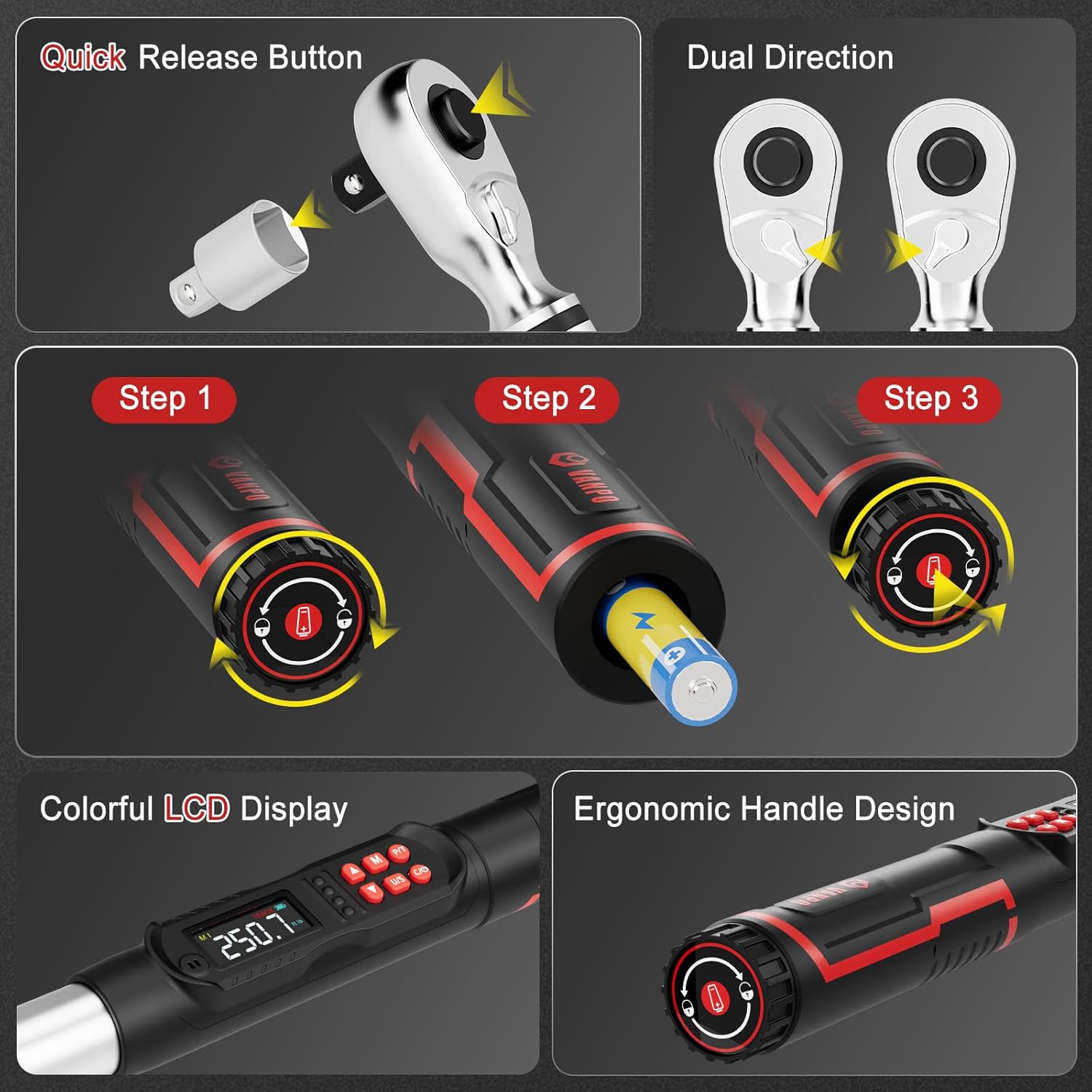
Figure 1: Battery installation and ergonomic handle design.
2. Прикріплення аксесуарів
The wrench comes with a 125mm extension bar and a 1/2" to 3/8" adapter.
- To attach an extension or adapter, press the quick-release button on the ratchet head and insert the accessory.
- Ensure the accessory is securely locked in place before use.
Figure 2: Quick-release button for attaching sockets and accessories.
Інструкція з експлуатації
1. Power On/Off and Unit Selection
- Натисніть УВІМК./ВИМК button to power on the wrench.
- Натисніть НАС button to cycle through measurement units: ft-lb, in-lb, Nm, kg-cm.

Figure 3: LCD display showing selectable measurement units.
2. Setting Target Torque Value
- Використовуйте Up і вниз arrow buttons to adjust the target torque value.
- The LCD will display the current setting.
3. Operating Modes (Peak & Track)
Натисніть P / T button to switch between Peak and Track modes.
- Режим треку: Displays real-time torque values as force is applied.
- Піковий режим: Captures and displays the maximum torque value achieved during the tightening process.

Figure 4: Explanation of Track Mode and Peak Mode.
4. Застосування крутного моменту
Apply force to the wrench. As you approach the preset torque value, the wrench will provide triple feedback:
- Звукове сповіщення: A buzzer will sound.
- Світлодіодні індикатори: Lights on the handle will illuminate (green for 85-90% of target, red for 100%).
- Вібрація: The handle will vibrate.

Figure 5: Triple feedback system for reaching target torque.
5. Функція пам'яті
The wrench can store multiple preset torque values. Use the M button to access and save memory settings.
6. Screen Lock Function
Тривале натискання M button for 3 seconds to lock the screen and buttons, preventing accidental changes during operation. Long press M ще раз, щоб розблокувати.
Технічне обслуговування
- Прибирання: Wipe the wrench with a clean, dry cloth after each use. Do not use abrasive cleaners or solvents.
- Зберігання: Store the torque wrench in its protective case in a dry, cool place away from direct sunlight and extreme temperatures.
- Заміна батареї: Замініть батарейки, коли на РК-дисплеї з’явиться індикатор низького заряду батарейки.
- Калібрування: For optimal accuracy, it is recommended to have the torque wrench calibrated periodically by a certified service center.
Усунення несправностей
| проблема | Можлива причина | Рішення |
|---|---|---|
| Гайковий ключ не вмикається. | Розряджені або неправильно встановлені батареї. | Перевірте полярність батарейок або замініть їх новими батарейками типу АА. |
| Неточні показники крутного моменту. | Wrench needs calibration or improper usage. | Ensure proper technique. Consider professional recalibration. |
| No audible/vibration feedback. | Feedback settings disabled or malfunction. | Check user manual for enabling feedback. Contact support if issue persists. |
Технічні характеристики
| Особливість | Деталь |
|---|---|
| Номер моделі | VP18-340-01 |
| Розмір диска | 1/2 дюйма |
| Діапазон крутного моменту | 12.5–250.8 ft-lb / 17–340 Nm |
| Точність | ±2% |
| Одиниці вимірювання | ft-lb, in-lb, Nm, kg-cm |
| Зворотній зв'язок | Audible, LED, Vibration |
| Режими роботи | Пік, Трек |
| Джерело живлення | 2 батарейок типу АА (у комплекті) |
| матеріал | 40 CR, Chrome Molybdenum Steel, Chrome Vanadium Steel |
| Вага товару | 5.29 фунта |
| Включені компоненти | 1* digital torque wrench, 1*1/2 to 3/8" Adapter, 1*1/2'' 125mm Extension Bar |
Гарантія та підтримка
This VANPO Digital Torque Wrench is backed by a 36-month manufacturer warranty. For warranty claims, technical support, or service inquiries, please refer to the contact information provided with your product packaging or visit the official VANPO webсайт.
A Certificate of Calibration Report is included with your product, detailing the device's accuracy at the time of manufacture.
Відео про продукт
Ключові характеристики закінченоview
Відео: Оверview of the key features and functionalities of the VANPO Digital Torque Wrench.
Detailed Features Demonstration
Video: A demonstration of the various features of the VANPO Digital Torque Wrench, including display and controls.