
вступ
This manual provides detailed instructions for the installation, operation, and maintenance of your Ossuret 7-inch Android 14 Car Stereo. Please read this manual thoroughly before using the product to ensure proper functionality and to prevent damage.
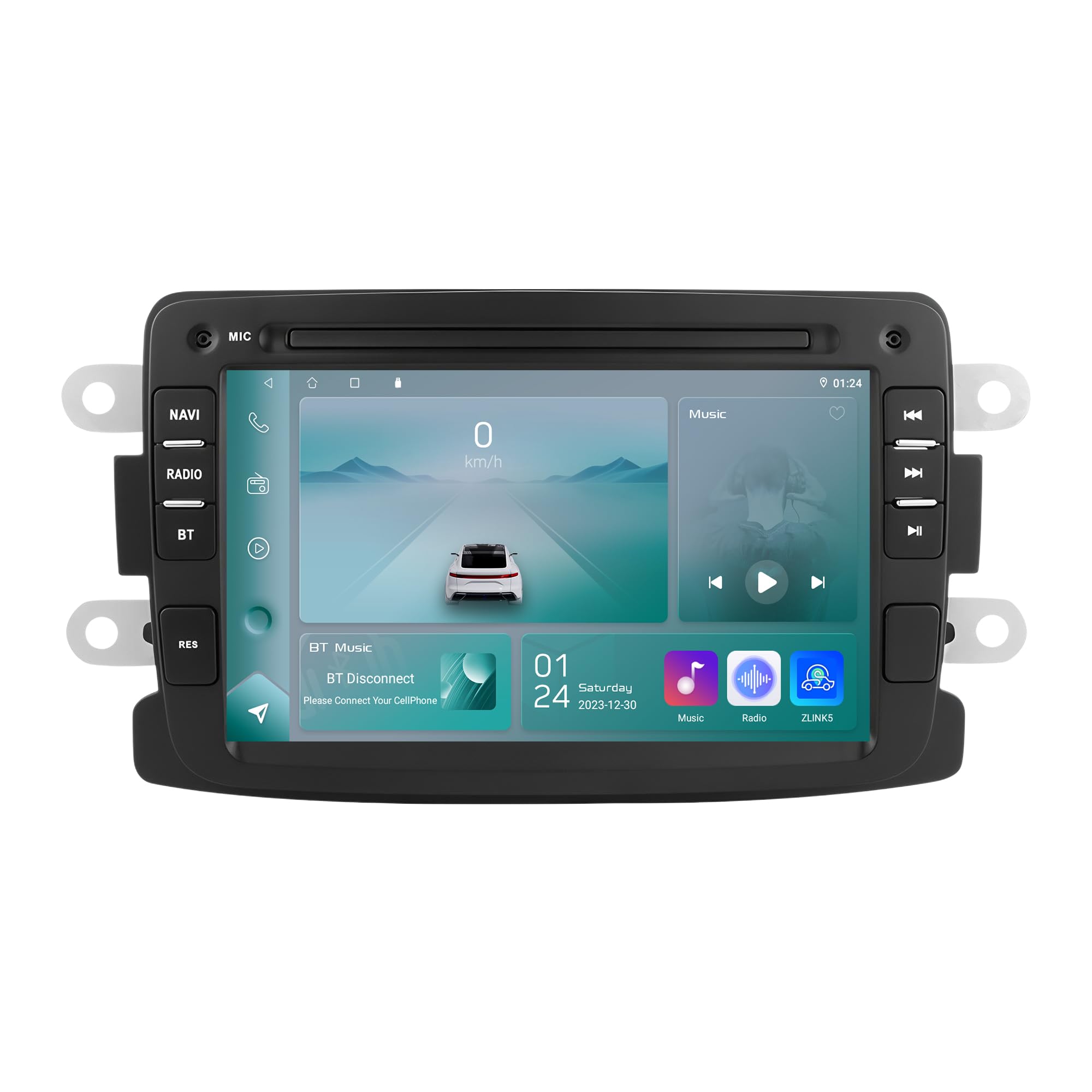
Figure 1: Ossuret 7-Inch Android 14 Car Stereo. This image shows the main unit with its display.
Сумісність з транспортним засобом
This car stereo is designed for specific vehicle models. Please verify your vehicle's compatibility before installation.
- For Dacia: Logan (2012-2017), DOKKER (2012-2017), Duster (2011-2017), Sandero (2012-2017), Lodgy (2012-2017)
- Для Renault: Captur (2013-2017), Symbol (2013-2017)
- For LADA: Xray 2 (Note: Some steering wheel control buttons may not function with LADA Xray 2)
Що в коробці
Ensure all components listed below are present in the package before proceeding with installation.

Рисунок 2: Комплектація. This image displays all items included with your Ossuret car stereo, such as various cables, adapters, and the main unit.
- USB кабель
- Джгут проводів RCA
- GPS антена
- Rear Camera Input RCA Cable
- Зовнішній мікрофон
- 4-контактний USB-кабель
- 6-контактний USB-кабель
- Кабель живлення
- Декодер CANbus
- Кабель-адаптер радіоантени
- Адаптер радіоантени
Керівництво по установці
Professional installation is recommended. Disconnect the vehicle's battery before starting the installation process. Refer to your vehicle's specific wiring diagrams for accurate connections.

Рисунок 3: До та після встановлення. This image illustrates the visual transformation of the dashboard after the Ossuret car stereo is installed, replacing the original unit.
Загальні кроки встановлення:
- Приготування: Переконайтеся, що транспортний засіб вимкнено, а акумулятор від'єднано.
- Видалити старий блок: Обережно зніміть існуючу автомобільну стереосистему та оздоблювальні панелі.
- Підключіть проводку: Connect the power cable, RCA harness, GPS antenna, and other necessary cables to the new Ossuret unit. Ensure all connections are secure.
- Декодер CANbus: If your vehicle requires a Canbus decoder (included), connect it as per the wiring diagram to ensure proper communication with vehicle systems.
- Тест функціональності: Before fully reassembling the dashboard, reconnect the battery and test the basic functions of the stereo (power, audio, touch screen).
- Безпечний підрозділ: Mount the new stereo securely into the dashboard opening.
- Зберіть: Reinstall all trim panels and ensure a neat finish.
Operating Your Car Stereo
Основні операції
- Увімкнення/вимкнення живлення: Натисніть і утримуйте кнопку живлення (зазвичай розташовану на передній панелі), щоб увімкнути або вимкнути пристрій.
- Регулювання гучності: Adjust the volume using the physical knob or the on-screen controls.
- Сенсорний екран: Navigate through menus and applications using the capacitive touch screen.
- Головний екран: Access the main Android interface by pressing the Home button or icon.
Wireless Carplay / Android Auto
The unit supports wireless Apple Carplay and Android Auto via the pre-installed Zlink application. This allows seamless integration of your smartphone's features onto the car stereo display.

Figure 4: Carplay and Android Auto System. This image demonstrates how your smartphone's interface can be mirrored and controlled directly from the car stereo screen.
- Переконайтеся, що на вашому смартфоні увімкнено Wi-Fi та Bluetooth.
- On the car stereo, open the "Zlink" application.
- Follow the on-screen prompts to connect your phone via Bluetooth or Wi-Fi.
- Once connected, your phone's compatible apps will appear on the stereo screen.
функція Bluetooth
Підключіть свій мобільний телефон через Bluetooth для дзвінків у режимі hands-free та потокової передачі аудіо.

Рисунок 5: Функціональність Bluetooth. This image highlights the hands-free calling feature and the built-in microphone for clear communication.
- Сполучення: Перейдіть до налаштувань Bluetooth на стереосистемі та телефоні. шукати available devices and select "Ossuret" (or similar name). Enter the PIN if prompted (usually 0000).
- Дзвінок без використання рук: Once paired, you can make and receive calls directly from the stereo. The built-in microphone captures your voice.
- Bluetooth Music (A2DP): Stream audio from your phone to the car stereo. Control playback (play/pause, skip) from the stereo screen.
- Phonebook Download: The unit supports downloading your phone's contact list for easy access.
GPS навігація
The car stereo features integrated GPS navigation with preloaded European maps and supports online navigation apps.

Рисунок 6: GPS-навігація. This image shows the detailed map interface with navigation guidance and support for various navigation applications.
- Офлайн-навігація: Use the preloaded maps without an internet connection.
- Онлайн-навігація: Connect to Wi-Fi and use popular navigation apps like Google Maps, Waze, etc.
- Голосові підказки: Receive turn-by-turn voice directions.
- Функція подвійної зони: Navigate while listening to music or other audio.
Підключення USB
Connect external USB devices for media playback or data transfer. The unit supports up to 2TB external memory.

Figure 7: USB Connection. Це зображення ілюструє file browsing capability when a USB device is connected, allowing access to various media and data files.
- Вставте USB-накопичувач у призначений USB-порт.
- Доступ до file manager or media player application to browse and play content.
Відтворення мультимедіа
The unit supports a wide range of audio and video formats for an enhanced entertainment experience.

Figure 8: Multimedia Playback. This image shows the car stereo playing a video, indicating its support for various multimedia formats.
- Музичні формати: MP3, WMA, AAC, RM, FLAC, etc.
- Формати відео: MPEG-1/2/4, H264, H263, VC1, RV, RMVB, DivX, Sorenson Spark, Spark, VP8, AVS Stream, etc.
- Формати зображення: JPG/BMP/JEPG/GIF/PNG
Управління кермом
The car stereo is compatible with your vehicle's factory steering wheel controls, allowing you to manage volume, tracks, and channels without taking your hands off the wheel. This feature helps minimize distractions while driving.
Задня View Вхід з камери
Пристрій підтримує задню view camera (not included). When the vehicle is shifted into reverse gear, the display will automatically switch to the rear camera feed, providing a clear view of obstacles behind the vehicle and assisting with safe parking.
Догляд та обслуговування
- Очищення екрану: Use a soft, lint-free cloth to gently wipe the touch screen. Avoid abrasive cleaners or solvents that may damage the screen.
- Генеральне прибирання: Тримайте пристрій чистим від пилу та сміття. Використовуйте м’яку суху тканину для очищення зовнішньої частини.
- температура: Уникайте тривалого перебування пристрою під екстремальними температурами, прямими сонячними променями або високою вологістю.
- Оновлення програмного забезпечення: Періодично перевіряйте дані виробника webсайт для отримання будь-яких доступних оновлень програмного забезпечення, щоб забезпечити оптимальну продуктивність і нові функції.
Усунення несправностей
If you encounter issues, refer to the table below for common problems and their solutions. If the problem persists, contact customer support.
| проблема | Можлива причина | Рішення |
|---|---|---|
| Пристрій не вмикається. | Нещільне з'єднання живлення, перегорілий запобіжник, проблема з акумулятором автомобіля. | Перевірте кабелі живлення та з'єднання. Перевірте запобіжники автомобіля. Переконайтеся, що акумулятор автомобіля заряджений. |
| Ні звуку. | Volume too low, mute activated, incorrect audio source, speaker wiring issue. | Збільште гучність. Перевірте, чи увімкнено вимкнення звуку. Виберіть правильне джерело звуку. Перевірте підключення динаміків. |
| Сенсорний екран не реагує. | Збій програмного забезпечення, проблема з калібруванням екрана. | Restart the unit. If available, perform screen calibration in settings. |
| Проблеми з підключенням Bluetooth. | Телефон не виявлено, неправильне сполучення, перешкоди. | Ensure phone Bluetooth is on and discoverable. Delete previous pairings and re-pair. Move phone closer to the unit. |
| Сигнал GPS втрачено або неточний. | GPS antenna obstruction, poor satellite reception, outdated maps. | Переконайтеся, що GPS-антена має чіткий сигнал view неба. За потреби оновіть карти. |
Технічні характеристики
| Особливість | Специфікація |
|---|---|
| Бренд | Оссурет |
| Операційна система | Android 14 |
| ОЗУ | 2 ГБ |
| ROM | 32 ГБ |
| ЦП | 4Core*A53 1.5Ghz |
| Розмір екрана | 7 дюймів |
| Тип сенсорного екрана | Ємнісний сенсорний екран |
| Роздільна здатність екрана | 1024 х 600 |
| Технологія підключення | Bluetooth, USB, Wi-Fi |
| Особливості | Android Auto, Apple CarPlay, GPS Navigation, Steering Wheel Control, Rear Camera Input |
| Сумісні пристрої | Смартфон |
| Режим аудіовиходу | Стерео |
| Кількість каналів | 2.0 |
| Спосіб контролю | Тактильний |
| USB Port Compatibility | Up to 2TB external memory |
| Гарантія | 1 рік |
| Країна походження | Китай |
Гарантія та підтримка
Інформація про гарантію
This Ossuret car stereo comes with a Гарантія 1 рік з дати покупки. Ця гарантія поширюється на виробничі дефекти та несправності за умов нормального використання. Будь ласка, збережіть чек про покупку для пред'явлення претензій по гарантії.
Підтримка клієнтів
For technical assistance, troubleshooting beyond this manual, or warranty inquiries, please contact Ossuret customer support through the retailer where the product was purchased or visit the official Ossuret webсайт для контактної інформації.