
MUBVIEW Дзвін J7
MUBVIEW Інструкція користувача бездротової відеодомофонної камери Bell J7 2K з дзвінком
Model: Bell J7
1. Вступ
This manual provides detailed instructions for the installation, operation, and maintenance of your MUBVIEW Bell J7 2K Wireless Video Doorbell Camera with Chime. Please read this manual thoroughly before using the product to ensure proper function and safety. This device is designed to enhance your home security with advanced features like 2K video, motion detection, and two-way audio.
2. Що в коробці
Перш ніж продовжити встановлення, перевірте наявність усіх компонентів:
- Camera Doorbell x1
- Chime x1
- Посібник користувача x1
- Зарядний кабель x1
- Акумулятор x3
- Other Accessories (screws, anchors, screwdriver)

Image: Contents of the MUBVIEW Bell J7 package, including the doorbell, chime, and installation tools.
3. Продукт закінчивсяview
Familiarize yourself with the main parts of your video doorbell and chime:
Камера дверного дзвінка
- 2K Camera Lens: Captures high-resolution video.
- Датчик руху PIR: Виявляє рухи людини.
- Мікрофон: Для двостороннього аудіо зв'язку.
- Доповідач: Для двостороннього аудіозв'язку та сирени.
- Кнопка дверного дзвінка: Активує дзвінок та надсилає сповіщення.
- Micro USB-C Port: Для заряджання внутрішнього акумулятора.
- Кнопка скидання: Для скидання налаштувань пристрою.
- Слот для карти Micro SD: For local video storage (up to 128GB, card not included).
- Anti-Theft Button: Triggers an alarm if the doorbell is removed from its mount.
Бездротовий дзвінок
- Доповідач: Видає звук дверного дзвінка.
- Регулювання гучності: Регулює гучність дзвінка.
- Селектор тембру: Changes chime melody.
- Джерело живлення: Живлення від батареї для гнучкого розміщення.

Зображення: спереду view of the MUBVIEW Bell J7 doorbell and chime.
4. Налаштування
Follow these steps to set up your MUBVIEW Bell J7 doorbell camera:
4.1 Заряджання дверного дзвінка
- Before first use, fully charge the doorbell camera using the provided USB charging cable.
- The charging port is located on the side of the doorbell, protected by a rubber flap.
- A full charge can last up to 180 days, depending on usage.
4.2 Встановлення програми та підключення до Wi-Fi
- Завантажити CloudEdge or MUBVIEW додаток з магазину додатків вашого смартфона (Apple App Store або Google Play Store).
- Зареєструйте обліковий запис або увійдіть, якщо він у вас вже є.
- Переконайтеся, що ваш смартфон підключено до Wi-Fi мережа 2.4 ГГц. The doorbell is not compatible with 5GHz Wi-Fi.
- In the app, select "Add Device" and choose "Smart Video Doorbell".
- Follow the on-screen prompts to connect the doorbell to your Wi-Fi network. This typically involves scanning a QR code displayed on your phone with the doorbell camera.
- Once connected, you can name your device and complete the setup.
4.3 Монтаж дверного дзвінка
The doorbell can be mounted using screws or strong adhesive tape (not included for all mounting types).
- Attach the mounting bracket to your desired location on the wall or door frame. Ensure it is at an appropriate height for optimal viewінж.
- Secure the bracket using the provided screws and anchors.
- Slide the doorbell camera into the mounting bracket until it clicks securely into place.
- For added security, a small screw can be inserted from the bottom of the bracket into the doorbell to prevent easy removal.

Image: Installation of the MUBVIEW Bell J7 doorbell camera onto its mounting bracket.
5. Інструкція з експлуатації
5.1 Живий View і двостороннє аудіо
- Відкрийте MUBVIEW app to access the live video feed from your doorbell camera.
- Use the microphone icon in the app to enable two-way audio and speak with visitors at your door.
- The voice changer feature can be activated for added privacy and security.

Image: Demonstrating two-way audio and voice message functionality via the app.
5.2 Виявлення руху та сповіщення
- The doorbell features advanced PIR motion and human detection to minimize false alarms.
- When motion is detected, you will receive instant push notifications on your smartphone.
- Adjust motion detection sensitivity and set custom motion zones within the app to suit your environment.

Image: Smartphone notification for human detection from the doorbell camera.
5.3 Нічне бачення
- The doorbell camera automatically switches to IR night vision in low-light conditions.
- Enhanced night vision provides clear images up to 33 feet.
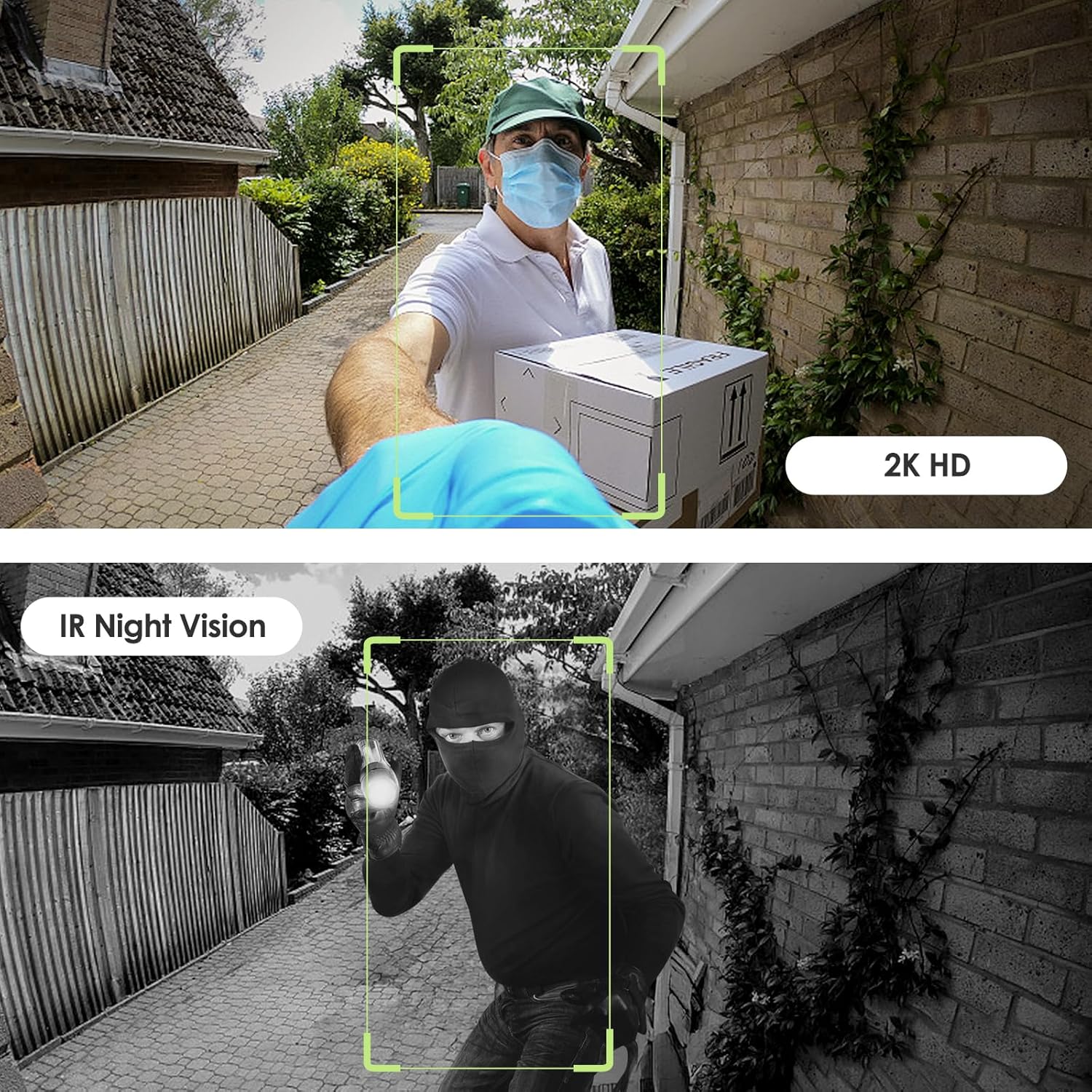
Image: Day and night vision capabilities of the MUBVIEW Bell J7 doorbell.
5.4 Зберігання відео
- Micro SD Card: Insert a micro SD card (up to 128GB, not included) into the designated slot for local storage of recorded footage.
- Хмарне сховище: Enjoy 7-day free cloud loop storage. Optional premium cloud storage plans are available for extended storage and features.

Image: Multiple storage options: local Micro SD card and cloud service.
6. особливості
- 2K Full HD Resolution: Забезпечує чітке та детальне відео.
- Ширококутний об'єктив 145°: Пропонує широкий view біля вашого порогу.
- Живлення від батареї: Ensures easy, wire-free installation.
- З’єднання Wi-Fi 2.4 ГГц: Stable and reliable wireless connection.
- Стійкість до погодних умов IP65: Built to withstand various outdoor conditions (rain, heat, hail, sun, dust).
- Протиугінна сигналізація: Siren sounds if the doorbell is tampеред с.
- Зміна голосу: Enhances privacy during two-way audio.
- Pre-Recorded Voice Messages: Respond quickly with custom messages.
- Сімейний доступ: Supports up to 15 online users and 20 user accounts.
- Сумісність: Працює з Alexa та Google Assistant.

Зображення: Оверview of MUBVIEW Bell J7 features.
7. Технічне обслуговування
7.1 Заряджання акумулятора
The doorbell is powered by rechargeable batteries. Monitor the battery level through the app and recharge as needed. The battery life can extend up to 180 days on a single charge, depending on activity and settings.
7.2 Очищення
Протріть об'єктив камери та зовнішню частину дверного дзвінка м'якою губкоюamp cloth to remove dust and debris. Avoid using harsh chemicals or abrasive materials that could damage the device.
7.3 Стійкість до погодних умов
MUBVIEW Bell J7 is IP65 weather-resistant, designed to endure various outdoor conditions. However, extreme weather conditions may still impact performance or battery life.

Image: IP65 Weather Resistance of the MUBVIEW Bell J7 doorbell.
8. Вирішення проблем
| Випуск | Можливе рішення |
|---|---|
| Дверний дзвінок не підключається до Wi-Fi | Ensure your Wi-Fi is 2.4GHz. Move the doorbell closer to your router during setup. Reset the doorbell and try again. |
| Frequent false motion alarms | Adjust the motion detection sensitivity in the app. Set custom motion zones to exclude busy areas or moving foliage. |
| Погана якість відео | Перевірте силу сигналу Wi-Fi у застосунку. Переконайтеся, що об’єктив камери чистий і не має перешкод. |
| Короткий час автономної роботи | Зменште чутливість виявлення руху або частоту живого view access. Ensure the doorbell is fully charged. |
| Anti-theft alarm not working | Ensure the anti-theft feature is enabled in the app settings. Check if the doorbell is properly seated in its mounting bracket, activating the tampер кнопка. |
9. Технічні характеристики
- Назва моделі: Дзвін J7
- Роздільна здатність захоплення відео: 2K
- Технологія підключення: Бездротовий зв'язок (2.4 ГГц Wi-Fi)
- Джерело живлення: Battery Powered (3 A batteries included)
- Внутрішнє/зовнішнє використання: Відкритий
- Рівень водонепроникності: IP65 Водонепроникний
- Особливості: 2-Way Audio, Built-In Light, HD Resolution, Image Sensor, Motion Sensor, Voice Changer, Anti-Theft Alarm
- Сумісні пристрої: Smartphone (via CloudEdge/MUBVIEW додаток)
- Розміри продукту: 1.37 x 5.27 x 2.2 дюймів
- Вага товару: 15.4 унції
10. Гарантія та підтримка
MUBVIEW is committed to providing quality products and customer satisfaction. For any inquiries or support needs, please refer to the following:
- Обслуговування клієнтів: Available via Call Service (9AM-5PM EST) and Online Email.
- Повернення: 30-day Amazon return policy applies.
- Плани захисту: Доступні для придбання додаткові 2-річні та 3-річні плани захисту.
For detailed contact information, please visit the official MUBVIEW website or refer to the contact details provided in the product packaging.

Image: MUBVIEW Customer Service details.
Ask a question about this manual
Ask about setup, troubleshooting, compatibility, parts, safety, or missing instructions. Manuals+ will review the question and use this page’s manual context to help answer it.