
1. Продукт закінчивсяview
This Ossuret car stereo is designed to upgrade the infotainment system in your Renault Clio 3 (models 2005-2014). It features a 9-inch Android 13 touchscreen, offering modern connectivity and navigation capabilities. The system integrates seamlessly with your vehicle's existing controls and provides a range of multimedia options.

Image: The Ossuret 9-inch Android 13 Car Stereo seamlessly integrated into a Renault Clio 3 dashboard, showcasing its large display and modern interface.
2. Налаштування та встановлення
2.1 Вміст упаковки
Перед встановленням перевірте наявність усіх компонентів:
- Main Head Unit (9-inch Android 13 Car Stereo)
- Кабель живлення
- Зовнішній мікрофон
- GPS антена
- RCA Harness (for WiFi version only)
- USB-кабелі (x2)
- Rear Camera Input RCA Cable
- Декодер CANbus
- Factory USB Adapter
- Кабель-адаптер радіоантени
- Адаптер радіоантени

Image: A comprehensive layout of all included accessories, such as power cables, USB cables, GPS antenna, external microphone, RCA harness, Canbus decoder, and various adapters.
2.2 Сумісність
This car stereo is specifically designed for Renault Clio 3 models manufactured between 2005 and 2014. Ensure your vehicle falls within this range for proper fitment and functionality.
2.3 Етапи встановлення (Загальний посібник)
Installation typically involves removing the factory radio and installing the new head unit using the provided frame and wiring harnesses. Professional installation is recommended.
- Приготування: Перед початком будь-яких електромонтажних робіт від’єднайте акумулятор автомобіля.
- Видалити заводський блок: Carefully remove the existing car stereo and trim panels from your Renault Clio 3 dashboard.
- Підключіть проводку: Connect the provided power cable, RCA harness, USB cables, and antenna adapters to the new head unit and the vehicle's wiring. The Canbus decoder ensures compatibility with factory features like steering wheel controls.
- Встановлення GPS-антени: Встановіть GPS-антену в місці з чітким view неба, зазвичай на приладовій панелі або під лобовим склом.
- Тестові підключення: Before fully reassembling, temporarily connect the battery and test the unit's basic functions (power, audio, display).
- Безпечний підрозділ: Mount the new head unit into the dashboard using the custom frame, ensuring a secure and flush fit.
- Зберіть: Reinstall all trim panels and reconnect the vehicle battery.

Image: A visual comparison showing the original Renault Clio 3 dashboard setup (left) versus the modernized dashboard with the Ossuret 9-inch car stereo installed (right).
3. Інструкція з експлуатації
3.1 Увімкнення/вимкнення живлення та базова навігація
Press and hold the power button (usually located on the front panel or side) to turn the unit on or off. Navigate the Android 13 interface using the responsive 9-inch capacitive touchscreen.

Image: A hand demonstrating interaction with the responsive touchscreen interface of the car stereo.
3.2 Бездротовий CarPlay та Android Auto
The unit supports wireless Apple CarPlay and Android Auto via the pre-installed and activated Zlink application. Connect your smartphone via Wi-Fi or Bluetooth to access phone functions, navigation, music, and messages directly on the car stereo display.
- Підключення: Enable Wi-Fi and Bluetooth on your smartphone. Open the Zlink app on the car stereo and follow the on-screen instructions to pair your device.
- особливості: Access apps like Google Maps, Spotify, Podcasts, and make calls hands-free.

Image: The car stereo displaying the Apple CarPlay and Android Auto interfaces, showing various compatible applications like Phone, Music, Maps, and Messages.
3.3 Функціональність Bluetooth
Підключіть свій мобільний телефон через Bluetooth для дзвінків у режимі hands-free та потокової передачі аудіо.
- Сполучення: Go to the Bluetooth settings on the car stereo and your phone. Select the car stereo from your phone's available devices to pair.
- Дзвінки: Use the built-in microphone for clear hands-free conversations. You can download your phone's contacts to the radio.
- Потокове передавання музики: Відтворюйте аудіо з телефону через динаміки автомобіля.

Image: The car stereo displaying a phone dialer interface, indicating an active Bluetooth connection for hands-free calling, with a built-in microphone for voice input.
3.4 GPS-навігація
The unit features integrated GPS navigation with support for online and offline map applications (e.g., Waze, Navitel, Google Maps). It offers voice guidance and a dual-zone function, allowing navigation to run in the background while other media plays.
- Оновлення карти: Ensure your map data is up-to-date for accurate navigation.
- Онлайн-навігація: Connect to Wi-Fi to use online navigation apps.
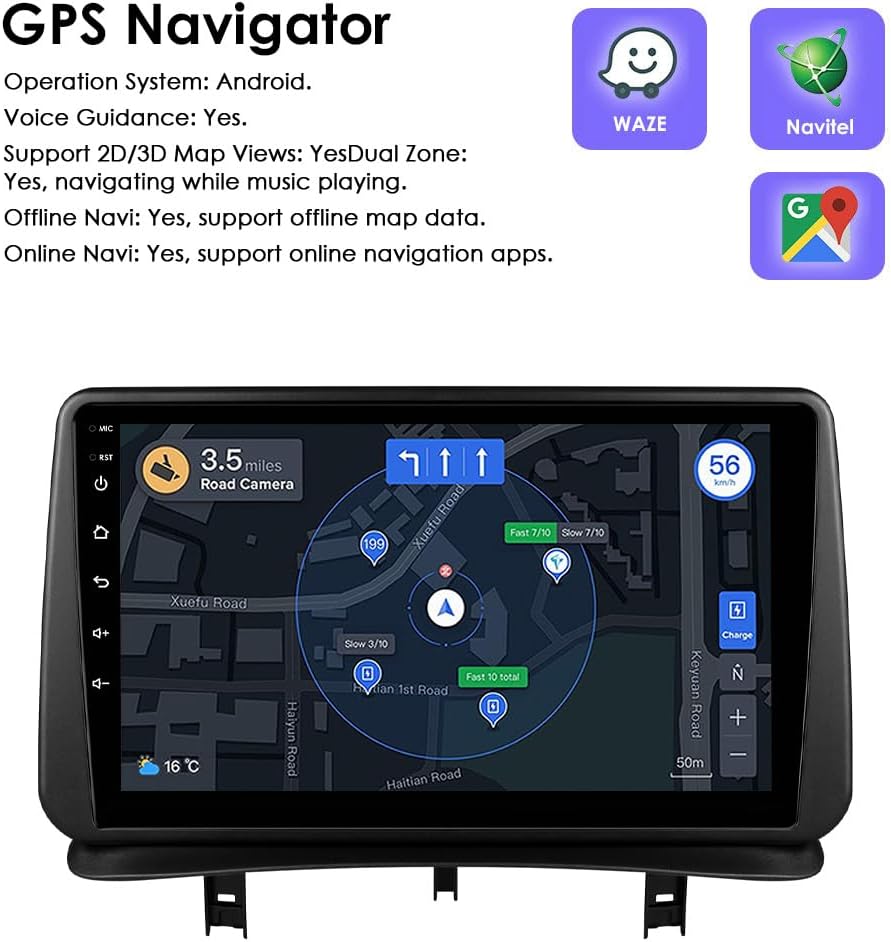
Image: The car stereo displaying a detailed GPS navigation map with route information, current speed, and road camera alerts.
3.5 Відтворення USB-носіїв
Connect external USB devices (up to 2TB) to play audio and video files. The unit supports various multimedia formats.
- Підтримувані аудіоформати: MP3, WMA, AAC, RM, FLAC, etc.
- Підтримувані формати відео: MPEG-1/2/4, H264, H263, VC1, RV, RMVB, DivX, Sorenson Spark, VP8, AVS Stream, etc.

Image: The car stereo displaying a file browser interface for USB storage, showing various folders and files, with two USB ports connected at the bottom.
3.6 FM-радіо
Access the FM radio function to listen to local stations. The interface allows for easy tuning and station saving.

Image: The car stereo displaying the FM radio interface, showing frequency tuning and station presets.
3.7 Кермове керування
The unit is compatible with your vehicle's factory steering wheel controls. This allows you to adjust volume, change tracks, and answer calls without taking your hands off the wheel.

Image: The car stereo displaying media playback controls, indicating compatibility with steering wheel controls for safe operation.
3.8 Вхід для камери заднього виду
The system supports a rear-view camera input. When the vehicle is shifted into reverse, the display automatically switches to the camera feed, providing a clear view of the area behind your car and assisting with parking maneuvers.

Image: A technical diagram illustrating the backup camera display interface on the car stereo, complete with dynamic parking guidelines.
3.9 Розділений екран
Utilize the split-screen feature to run two applications simultaneously, such as navigation and music playback, or a camera feed and music, enhancing multitasking capabilities.

Image: The car stereo displaying a split-screen view, with navigation on one side and music playback on the other, demonstrating simultaneous application usage.
3.10 Голосове керування
The system supports voice commands, allowing you to control various functions hands-free. Voice control sensitivity is enhanced for better responsiveness.

Image: The car stereo interface showing voice command prompts, such as "Hey Siri, find a restaurant" and "OK, Navigate home," indicating active voice control functionality.
3.11 Підключення до Wi-Fi
Connect the car stereo to a Wi-Fi hotspot (e.g., from your smartphone) to access online features, download apps, and browse the internet.

Image: The car stereo displaying a YouTube interface, with a smartphone showing a Wi-Fi signal, illustrating the unit's Wi-Fi connectivity for online content.
3.12 Sound Adjustment (Built-in DSP)
The integrated Digital Sound Processor (DSP) allows for advanced audio customization, including a 48-band EQ adjustment, to optimize sound quality to your preference.

Image: The car stereo displaying a graphic equalizer interface, indicating the presence of a built-in DSP for detailed sound adjustments.
4. Технічне обслуговування
To ensure the longevity and optimal performance of your Ossuret car stereo, follow these maintenance guidelines:
- Прибирання: Використовуйте м’яку суху тканину для очищення сенсорного екрана та зовнішньої частини. Для стійких плям злегкаamp cloth with a mild, non-abrasive cleaner can be used, followed by drying. Avoid harsh chemicals or abrasive materials.
- Оновлення програмного забезпечення: Періодично перевіряйте наявність оновлень програмного забезпечення, щоб забезпечити ефективну роботу системи та наявність найновіших функцій і патчів безпеки.
- температура: Уникайте тривалого впливу екстремальних температур на пристрій.
- Підключення: Переконайтеся, що всі кабелі надійно підключені. Нещільні з'єднання можуть призвести до періодичних проблем.
5. Вирішення проблем
Якщо у вас виникли проблеми з автомобільною стереосистемою, зверніться до наступних поширених проблем та способів їх вирішення:
| проблема | Можлива причина | Рішення |
|---|---|---|
| Пристрій не вмикається. | Нещільне з'єднання живлення, перегорілий запобіжник, проблема з акумулятором автомобіля. | Перевірте з'єднання кабелів живлення. Перевірте запобіжники автомобіля. Переконайтеся, що акумулятор автомобіля заряджений. |
| Немає звуку або спотворений звук. | Speaker wiring issues, incorrect audio settings, volume too low. | Verify speaker connections. Adjust volume and audio settings (EQ, balance). |
| Не працює керування на кермі. | Canbus decoder not correctly installed or configured. | Ensure the Canbus decoder is properly connected and configured in the system settings. Refer to the installation guide for specific wiring. |
| Сигнал GPS слабкий або неточний. | GPS antenna improperly placed, environmental interference. | Перемістіть GPS-антену в місце з чіткішим сигналом view неба. Уникайте перешкод. |
| CarPlay/Android Auto не підключається. | Bluetooth/Wi-Fi off on phone, Zlink app not running, phone compatibility. | Ensure Bluetooth and Wi-Fi are active on your phone. Restart the Zlink app. Check phone compatibility with CarPlay/Android Auto. |
| System is slow or freezes. | Занадто багато запущених програм, мало пам'яті, програмний збій. | Close unnecessary applications. Restart the unit. Check for and install any available software updates. |
6. Технічні характеристики
- Бренд: Оссурет
- Сумісний автомобіль: Renault Clio 3 (2005-2014)
- Розмір екрана: 9 дюймів
- Операційна система: Android 13
- Пам'ять: 2 ГБ оперативної пам’яті + 32 ГБ пам’яті
- Особливості: Wireless CarPlay, Android Auto, GPS Navigation, Bluetooth, Wi-Fi, Steering Wheel Control, Backup Camera Input, Split Screen Display, Voice Control, Built-in DSP
- Технологія підключення: Bluetooth, USB, Wi-Fi
- Метод контролю: Дотик, голос
- Режим аудіовиходу: Стерео
- Сумісні пристрої: Смартфон

Image: A graphic highlighting key specifications such as 48 EQ adjustment, Quad-Core processor, 2GB RAM, and 32GB storage, alongside the car stereo interface.
7. Гарантія та підтримка
7.1 Інформація про гарантію
This Ossuret car stereo comes with a Гарантія 1 рік з дати покупки. Ця гарантія поширюється на виробничі дефекти та несправності за умов нормального використання. Будь ласка, збережіть чек про покупку для пред'явлення претензій по гарантії.
7.2 Підтримка клієнтів
For technical assistance, troubleshooting beyond this manual, or warranty inquiries, please contact Ossuret customer support through the retailer where the product was purchased. You may also visit the official Ossuret webсайт для додаткових ресурсів і контактної інформації.