
1. Вступ
Thank you for choosing the Schneider 43A1 4K UHD LED TV. This television combines advanced display technology with smart features to provide an immersive viewing experience. Featuring a 4K Ultra High Definition display, QLED-LCD technology with Direct LED backlighting, and the VIDAA Smart TV platform, your new TV offers vibrant colors, deep blacks, and access to a wide range of entertainment.
This manual provides essential information for the safe and efficient use of your television. Please read it thoroughly before operating the device and retain it for future reference.
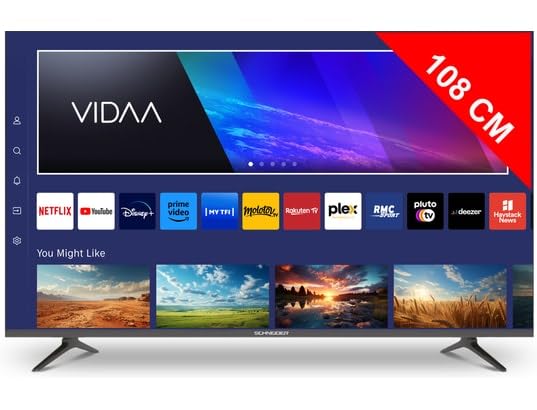
Зображення 1.1: спереду view of the Schneider 43A1 TV with VIDAA interface.
2. Інформація про безпеку
Для забезпечення безпечної роботи та запобігання пошкодженням, будь ласка, дотримуйтесь наступних запобіжних заходів:
- Розміщення: Position the TV on a stable, level surface. Avoid placing it in direct sunlight, near heat sources, or in environments with high humidity or dust.
- Вентиляція: Ensure adequate ventilation around the TV. Do not block ventilation openings. Maintain a minimum distance of 10 cm from walls or other objects.
- Джерело живлення: Використовуйте лише вказаний джерело живленняtage. Ensure the power cord is not pinched or walked on. Disconnect the power plug during lightning storms or when unused for extended periods.
- Прибирання: Від’єднайте телевізор від мережі перед чищенням. Використовуйте м’яку суху тканину. Не використовуйте рідкі або аерозольні засоби для чищення.
- Рідини: Do not expose the TV to dripping or splashing liquids. Do not place objects filled with liquids, such as vases, on the TV.
- діти: Supervise children to ensure they do not climb on the TV or furniture.
- Настінне кріплення: If wall-mounting, use a VESA compatible bracket (200 x 200 mm) and ensure proper installation by qualified personnel to prevent injury.
3. Вміст упаковки
Будь ласка, перевірте наявність усіх предметів та їх належний стан:
- Schneider 43A1 4K UHD LED TV
- Пульт дистанційного керування
- Кабель живлення
- Тумба під телевізор (2 шт.)
- Гвинти для підставки під телевізор
- Посібник користувача (цей документ)
4. Налаштування
4.1 Розпакування
Carefully remove the TV from its packaging. It is recommended to keep the original packaging for potential future transport or service needs.
4.2 Встановлення підставки
If you are not wall-mounting the TV, attach the included stand pieces to the bottom of the TV using the provided screws. Ensure the stand is securely fastened before placing the TV upright.
4.3 Настінне кріплення (додатково)
The Schneider 43A1 is compatible with VESA 200 x 200 mm wall mounts. For safe installation, it is highly recommended to use a professional installer. Refer to your wall mount's instructions for specific details.
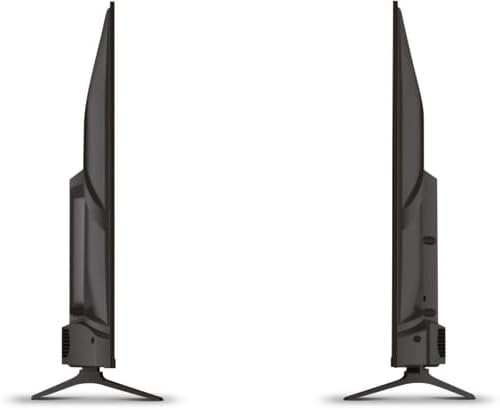
Зображення 4.1: Збоку view of the Schneider 43A1 TV, illustrating its profile for placement or wall mounting.
4.4 Підключення зовнішніх пристроїв
Ваш телевізор пропонує різні варіанти підключення:
- HDMI: Підключіть до трьох пристроїв HDMI 2.0 (наприклад, програвач Blu-ray, ігрову консоль, телеприставку) до портів HDMI.
- USB: Two USB ports are available for connecting USB storage devices to play media.
- AV/Audio Input: For older devices requiring composite video and stereo audio.
- Коаксіальний вихід: Для підключення до зовнішньої аудіосистеми.
- Вхід антени/кабельного телебачення: Connect your antenna or cable TV signal for DVB-T/T2/C/S2 reception.
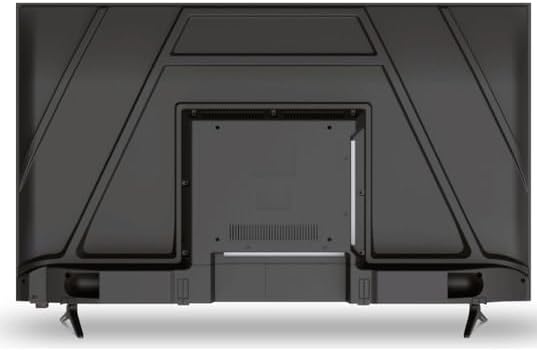
Зображення 4.2: Ззаду view of the Schneider 43A1 TV, highlighting connection ports.
4.5 Підключення живлення
Plug the power cable into the TV's power input, then into a suitable wall outlet.
4.6 Майстер початкового налаштування
Upon first power-on, the TV will guide you through an initial setup process. This includes selecting your language, connecting to a Wi-Fi network, and scanning for available channels (DVB-T/T2/C/S2).
5. Операційна
5.1 Функції дистанційного керування
Пульт дистанційного керування дозволяє керувати функціями телевізора:
- Кнопка живлення: Вмикає або вимикає телевізор.
- Збільшення/зменшення гучності: Регулює рівень звуку.
- Канал вгору/вниз: Змінює телеканали.
- Вхід/Джерело: Selects the input source (HDMI, USB, TV Tuner).
- Кнопки навігації: Для навігації по меню.
- Кнопки Smart TV: Direct access to popular apps like Netflix, Prime Video, YouTube.
5.2 Smart TV (VIDAA)
The integrated VIDAA Smart TV platform provides access to a variety of applications and streaming services. Connect your TV to the internet via Wi-Fi to enjoy features like Netflix, Prime Video, and YouTube. Bluetooth connectivity allows for wireless connection to compatible audio devices.

Зображення 5.1: Кутова передня частина view of the Schneider 43A1 TV, displaying the VIDAA Smart TV interface.
5.3 Вибір входу
Press the 'Input' or 'Source' button on your remote control to switch between connected devices (HDMI 1, HDMI 2, HDMI 3, USB, AV, TV Tuner).
5.4 Налаштування зображення та звуку
Access the TV's menu to adjust picture and sound settings. The 4K UHD resolution, QLED-LCD technology, and Direct LED backlighting ensure a high-quality visual experience. The TV also features upscaling to enhance lower-resolution content. Audio is delivered via 2 x 8 W RMS stereo speakers with Dolby Audio support.
5.5 PC Monitor Mode
The TV can be used as a PC monitor by connecting your computer via an HDMI cable. This mode optimizes the display for computer use.
6. Технічне обслуговування
6.1 Очищення телевізора
Before cleaning, ensure the TV is unplugged from the power outlet.
- екран: Обережно протріть екран м’якою тканиною без ворсу. Для стійких плям злегка протрітьampпротріть тканину водою або спеціалізованим засобом для чищення екранів (не розпилюйте безпосередньо на екран).
- Зовні: Використовуйте м’яку суху тканину для протирання телевізораasing. Уникайте абразивних засобів для чищення або розчинників.
6.2 Оновлення програмного забезпечення
Your TV may receive software updates to improve performance and add new features. Ensure your TV is connected to the internet to receive these updates automatically or check for them manually through the settings menu.
7. Вирішення проблем
Якщо у вас виникли проблеми з телевізором, зверніться до наступних поширених проблем та способів їх вирішення:
- Немає живлення:
- Перевірте, чи кабель живлення надійно підключено до телевізора та розетки.
- Переконайтеся, що розетка працює (перевірте за допомогою іншого пристрою).
- Натисніть кнопку живлення на пульті дистанційного керування або на самому телевізорі.
- Немає зображення/звуку:
- Перевірте, чи вибрано правильне джерело вхідного сигналу (наприклад, HDMI 1, TV).
- Перевірте всі кабельні з’єднання між телевізором та зовнішніми пристроями.
- Переконайтеся, що гучність не вимкнена або встановлена на мінімум.
- Якщо ви використовуєте антену, перевірте підключення антени та виконайте сканування каналів.
- Пульт дистанційного керування не працює:
- Замініть батарейки в пульті дистанційного керування.
- Переконайтеся, що між пультом дистанційного керування та ІЧ-датчиком телевізора немає перешкод.
- Smart TV/Network Issues:
- Перевірте свій Wi-Fi роутер та підключення до Інтернету.
- Go to the TV's network settings to re-connect to your Wi-Fi network.
- Restart the TV and your router.
Якщо проблема не зникає після спроби цих рішень, зверніться до служби підтримки клієнтів.
8. Технічні характеристики
| Особливість | Специфікація |
|---|---|
| Модель | Schneider 43A1 |
| Розмір дисплея | 109 см (43 дюйма) |
| роздільна здатність | 4K Ultra HD (3840 x 2160 пікселів) |
| Технологія дисплея | QLED-LCD with Direct LED Backlight |
| Коефіцієнт контрастності | 1100:1 |
| Яскравість | 200 кд/м² |
| Аудіовихід | 2 x 8 W RMS Stereo |
| Аудіотехнології | Dolby Audio |
| Порти HDMI | 3 2.0 (HDMI XNUMX) |
| USB порти | 2 |
| Інші входи | AV/Audio Input |
| Виходи | Коаксіальний вихід |
| тюнер | DVB-T/T2/C/S2 |
| Платформа Smart TV | VIDAA (Netflix, Prime Video, YouTube) |
| Бездротове підключення | Wi-Fi, Bluetooth |
| Сумісність VESA | 200 х 200 мм |
| вага | 7.5 кілограма |