
вступ
Thank you for choosing the pTron Studio Evo Wireless Over-Ear Headphones. This manual provides essential information for setting up, operating, and maintaining your headphones to ensure optimal performance and longevity. Please read these instructions carefully before use.
Зображення: Оверview of pTron Studio Evo features including sound quality, battery life, driver size, controls, charging, and connectivity modes.
Налаштування
1. Розпакування та компоненти
Carefully remove all items from the packaging. The box should contain:
- pTron Studio Evo Wireless Over-Ear Headphones
- Зарядний кабель USB Type-C
- 3.5mm Audio Cable (Aux-in)
- Посібник користувача (цей документ)
2. Зарядка навушників
Before first use, fully charge your headphones. Connect the provided USB Type-C cable to the charging port on the headphones and the other end to a compatible USB power source (e.g., wall adapter, computer USB port).
- Час зарядки: Приблизно 2 години для повної зарядки.
- Термін служби батареї: До 70 годин відтворення на одному повному заряді.

Image: pTron Studio Evo headphones highlighting 70 hours of playtime and Type-C fast charging.
3. Увімкнення/вимкнення живлення
- Щоб увімкнути: Натисніть і утримуйте кнопку живлення приблизно 3 секунди, доки не засвітиться світлодіодний індикатор.
- Щоб вимкнути: Натисніть і утримуйте кнопку живлення приблизно 3 секунди, доки світлодіодний індикатор не згасне.
4. Підключення Bluetooth
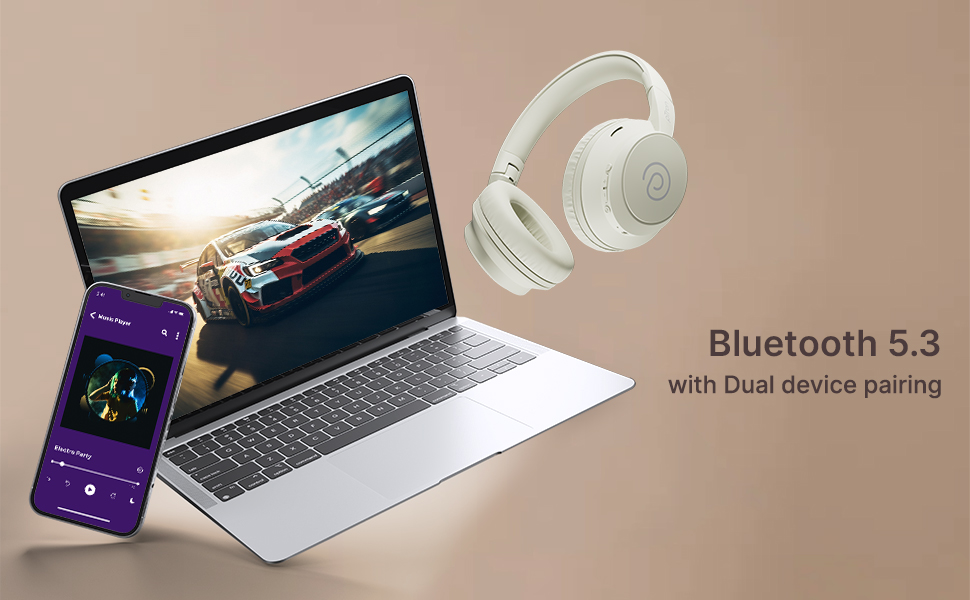
The pTron Studio Evo headphones utilize Bluetooth 5.3 for stable wireless connectivity.
- Переконайтеся, що навушники вимкнено.
- Натисніть і утримуйте кнопку живлення протягом 5-7 секунд, доки світлодіодний індикатор не почне блимати по черзі червоним і синім кольором, що вказує на режим сполучення.
- На вашому пристрої (смартфоні, ноутбуці тощо) увімкніть Bluetooth та виконайте пошук доступних пристроїв.
- Select "pTron Studio Evo" from the list of found devices.
- Після підключення світлодіодний індикатор почне постійно світитися синім світлом або повільно блимати синім.
Сполучення двох пристроїв: These headphones support connecting to two devices simultaneously. After pairing with the first device, disable Bluetooth on that device, then pair with the second device. Re-enable Bluetooth on the first device, and the headphones should connect to both. You can then switch audio playback between the two devices.

Image: Headphones connected to both a phone and a laptop, demonstrating Bluetooth 5.3 dual device pairing.
5. Дротове підключення (Aux-in)
For a wired connection, use the provided 3.5mm audio cable. Plug one end into the headphone's 3.5mm jack and the other end into your audio source's auxiliary output. The headphones will automatically switch to wired mode when the cable is connected.
Інструкція з експлуатації
1. Контрольview
The headphones feature integrated buttons for easy control of music, calls, and modes.
Зображення: Детальне view of the integrated control buttons on the pTron Studio Evo headphones.
- Кнопка живлення: Натисніть і утримуйте, щоб увімкнути/вимкнути живлення. Короткочасне натискання для відтворення/паузи музики або відповіді/завершення дзвінків.
- Збільшення гучності (+): Коротке натискання для збільшення гучності. Довге натискання для наступного треку.
- Зменшення гучності (-): Коротке натискання для зменшення гучності. Довге натискання для попереднього треку.
- Кнопка EQ: Short press to cycle through EQ modes (Bass, Movie, Pop, Vocal).
2. Режими еквалайзера
The pTron Studio Evo headphones offer multiple low-latency EQ modes optimized for different audio experiences:
- Режим гри: Зменшує затримку звуку для більш синхронізованого ігрового процесу.
- Режим фільму: Enhances dialogue clarity and cinematic sound effects.
- Музичний режим: Забезпечує збалансований професійний звукfile для загального прослуховування музики.
- Режим баса: Boosts low frequencies for a deeper bass response.
- Режим поп-формату: Optimized for pop music genres.
- Вокальний режим: Enhances vocal clarity, ideal for podcasts or audiobooks.
Press the EQ button to switch between these modes.
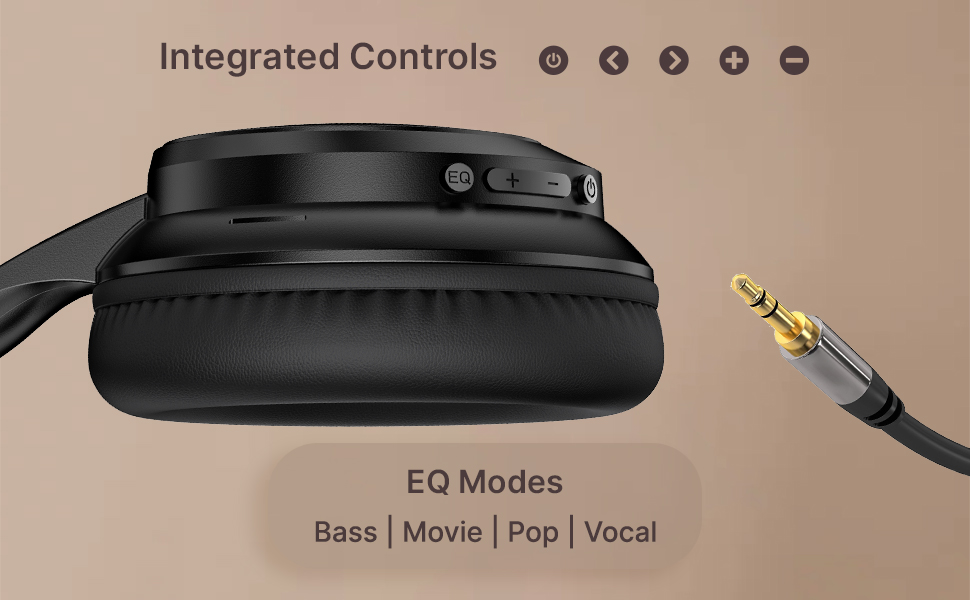
Image: User engaging in gaming with headphones, demonstrating low-latency sync for game mode.
3. Здійснення та отримання дзвінків
The headphones include a built-in HD microphone for hands-free calls.
- Відповісти/закінчити виклик: Коротко натисніть кнопку живлення.
- Відхилити виклик: Натисніть і утримуйте кнопку живлення протягом 2 секунд.
4. Голосовий помічник
Access your device's voice assistant (e.g., Siri, Google Assistant) by double-pressing the Power button.
5. Носіння навушників
The pTron Studio Evo headphones feature an ergonomic design with soft earcups and an adjustable head beam for comfortable all-day listening. Adjust the head beam to position the earcups exactly over your ears for the best fit and sound isolation.
Технічне обслуговування
1. прибирання
Regularly clean your headphones to maintain hygiene and performance.
- Use a soft, dry cloth to wipe the earcups and headband.
- Не використовуйте абразивні засоби чи розчинники.
- Avoid getting moisture into the charging port or audio jack.
2. Водонепроникність
The headphones are IPX5 water-resistant, meaning they can withstand splashes and sweat. Do not submerge them in water or expose them to heavy rain.
3. Зберігання
The foldable design allows for easy storage. Fold the headphones when not in use to protect them from damage and save space. Store them in a cool, dry place away from direct sunlight and extreme temperatures.
Усунення несправностей
- Немає живлення: Переконайтеся, що навушники повністю заряджені. Підключіть до джерела живлення та спробуйте ще раз.
- Не вдається створити пару: Make sure Bluetooth is enabled on your device and the headphones are in pairing mode (flashing red and blue LED). Try restarting both devices.
- Немає звуку: Check the volume levels on both the headphones and your connected device. Ensure the correct audio output is selected on your device. If using a wired connection, ensure the 3.5mm cable is fully inserted.
- Погана якість звуку: Ensure the headphones are within the Bluetooth range (up to 10 meters) of your device. Avoid obstacles that may interfere with the signal. Try switching EQ modes.
- Мікрофон не працює: Ensure the headphones are properly connected and selected as the input device on your call application.
Технічні характеристики
| Особливість | Специфікація |
|---|---|
| Назва моделі | Студія |
| Технологія підключення | Бездротовий (Bluetooth) |
| Технологія бездротового зв'язку | Bluetooth 5.3 |
| Діапазон Bluetooth | 10 метрів |
| Розмір звукового драйвера | 40 міліметрів |
| Термін служби батареї | 70 години |
| Час зарядки | 2 години |
| Гніздо для навушників | 3.5 мм джек |
| Рівень водонепроникності | Водонепроникність IPX5 |
| Спосіб контролю | Кнопка, голос |
| Контроль шуму | Звукоізоляція |
| матеріал | Акрилонітрилбутадієнстирол (АБС) |
| Вага товару | 157 грамів |
| Розміри продукту | 19.2 х 15.8 х 7.9 см |
Гарантія та підтримка
1. Гарантія виробника
The pTron Studio Evo headphones come with a Гарантія від виробника 1 рік from the date of purchase. This warranty covers manufacturing defects only. Please retain your proof of purchase for warranty claims.
2. Підтримка клієнтів
З будь-якими питаннями, технічною допомогою або гарантійними претензіями звертайтеся до служби підтримки клієнтів pTron:
- Електронна пошта: support@ptron.in
- телефон: 040-67138888