
1. Вступ
This manual provides detailed instructions for setting up, operating, maintaining, and troubleshooting your Beelink SER5 MAX Mini PC. Please read this manual thoroughly before using the device to ensure proper functionality and to prevent damage.
2. Вміст упаковки
Перевірте, чи всі перелічені нижче предмети входять до вашої упаковки:
- Beelink SER5 Mini PC ×1
- Адаптер живлення × 1
- Настінний кронштейн ×1
- Посібник користувача ×1
- HDMI Cable (100CM) ×1
3. Продукт закінчивсяview
3.1 Передні та задні порти
The Beelink SER5 MAX Mini PC features a variety of ports for connectivity. The front panel provides easily accessible ports for common peripherals, while the rear panel offers ports for display outputs, network, and power.

Передня панель містить:
- 2x USB 3.2 Gen2 ports (10Gbps)
- 1 порти USB 2.0
- 1x Type-C port (Data & Video output)
- 1x Headphone Jack
- 1x кнопка живлення
Задня панель містить:
- 1x DC Jack
- 1x HDMI port (max 4K 60Hz)
- 1x DisplayPort (DP 1.4, max 4K 144Hz)
- 2x USB 3.2 Gen2 ports (10Gbps)
- 1 порти USB 2.0
- 1x RJ45 LAN port (1000Mbps)
4. Посібник із налаштування
4.1 Початкове підключення
- Connect your monitor(s) to the HDMI, DisplayPort, or Type-C video outputs on the Mini PC.
- Підключіть клавіатуру та мишу до доступних USB-портів.
- Connect the power adapter to the DC Jack on the Mini PC and then plug it into a power outlet.
- Натисніть кнопку живлення на передній панелі, щоб увімкнути міні-ПК.
4.2 Встановлення кріплення VESA
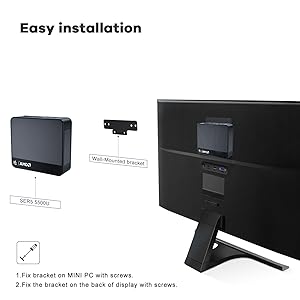
The Beelink SER5 MAX Mini PC can be mounted to the back of a compatible monitor using the included VESA mount bracket. This saves desk space and provides a cleaner setup.
- Secure the VESA bracket to the Mini PC using the provided screws.
- Attach the Mini PC with the bracket to the VESA mounting holes on the back of your display using the appropriate screws.

5. Інструкція з експлуатації
5.1 Увімкнення/вимкнення живлення
- Щоб увімкнути: Натисніть кнопку живлення на передній панелі міні-ПК.
- Щоб вимкнути: Use the operating system's shutdown function. Alternatively, press and hold the power button for 5-7 seconds for a forced shutdown (use only when necessary).
5.2 Доступ до BIOS
To access the BIOS settings or boot options:
- Введіть налаштування BIOS: Press the "Delete" key repeatedly at the Beelink logo during boot-up.
- Enter Boot Options Menu: Press the "F7" key repeatedly at the Beelink logo during boot-up.
5.3 Налаштування трьох дисплеїв
The Beelink SER5 MAX supports connecting up to three displays simultaneously, enhancing productivity for various tasks. Utilize the HDMI, DisplayPort, and Type-C video outputs for this configuration.
5.4 Підключення до мережі
The Mini PC offers robust network connectivity options:
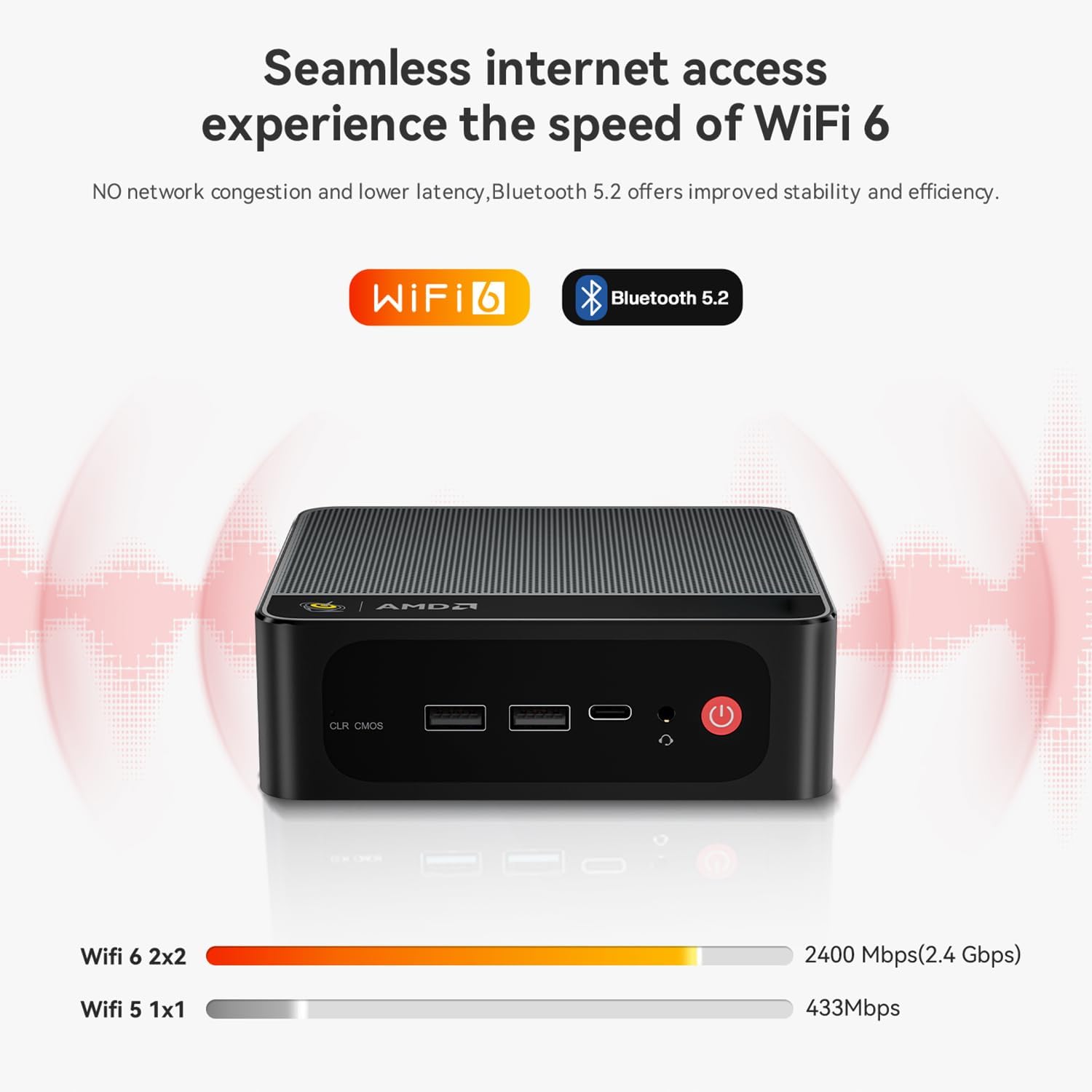
- Wi-Fi 6: Provides faster wireless speeds and lower latency compared to previous Wi-Fi standards.
- Bluetooth 5.2: For stable and efficient connection to various wireless devices such as keyboards, mice, and audio peripherals.
- RJ45 LAN: A Gigabit Ethernet port for a stable wired network connection.

6. Розширення пам'яті та обсягу пам'яті
6.1 Розширення сховища
The Beelink SER5 MAX Mini PC comes with a 500GB M.2 NVMe 2280 SSD. It supports dual M.2 2280 PCIe 4.0 SSD slots, each supporting up to 4TB of storage. Additionally, there is space for a 2.5-inch SSD/HDD inside the bottom lid for further storage expansion.

7. Система охолодження
The SER5 MAX Mini PC is equipped with an efficient MSC2.0 cooling system, featuring a cooling fan, dual heat conduction tubes, and a heat sink to maintain optimal operating temperatures and ensure stable performance.

7.1 CPU Temperature & Noise Test Data
The following table presents typical CPU temperature and noise levels under various workloads. Note that actual performance may vary due to environmental conditions and specific configurations.
| Гра | температура | FPS on AVG | Шум |
|---|---|---|---|
| Надзор | 81°C | 47 FPS | 34.6–35.2 дБ |
| Forza Horizon 5 | 65°C | 53 FPS | 35–37.1 дБ |
| CS:GO | 73°C | 44 FPS | 35.3–37 дБ |
| DOTA2 | 73°C | 65 FPS | 34.6–37.2 дБ |
| Ліга Легенд | 72°C | 64 FPS | 34–36.5 дБ |
| PUBG | 79°C | 41 FPS | 33.7–37.8 дБ |
Test Configurations: AMD Ryzen™ 7 6800H Processor, Radeon™ 680M Graphics, 32GB(16GB*2) LPDDR5 RAM, PCIe 1TB SSD, 1080p low quality, 27°C ambient temperature. Test data from Beelink lab, and the actual performance may fluctuate due to environmental and configuration changes.
8. Вирішення проблем
У цьому розділі розглядаються поширені проблеми, з якими ви можете зіткнутися під час використання міні-ПК Beelink SER5 MAX.
- Q: What should I do if I find the Mini PC defective?
A: Please contact customer support immediately. They will provide assistance and a satisfactory solution. - Q: What should I do if I need to update the Mini PC?
A: Please contact customer support, and they will provide the necessary tutorial files and guidance for updates. - Q: How do I set up Auto Power On?
A: To enable the Auto Power On feature, please send the barcode located at the bottom of your machine to customer support. They will provide the corresponding tutorial file.
9. Технічні характеристики
Детальні технічні характеристики міні-ПК Beelink SER5 MAX:
| Особливість | опис |
|---|---|
| Бренд | Білінк |
| Назва моделі | SER5 |
| Операційна система | ОС (попередньо встановлена) |
| Модель процесора | AMD Ryzen 7 6800U (8 ядер, 16 потоків) |
| Швидкість ЦП | Up to 4.7 GHz (Max Boost Clock) |
| Графічний співпроцесор | Графіка AMD Radeon 12 ядер 2200 МГц |
| Встановлена оперативна пам'ять | 32 ГБ LPDDR5 |
| Швидкість пам'яті | 5200 МГц |
| Доступні слоти пам'яті | 2 (LPDDR5 is typically soldered, this might refer to M.2 slots for storage) |
| Ємність пам'яті | 500 GB M.2 NVMe SSD |
| Опис жорсткого диска | SSD (M.2 NVMe 2280, expandable up to 8TB; supports 2.5-inch SSD/HDD) |
| Відеовихід | HDMI, DisplayPort, Type-C (Supports 4K Triple Display) |
| Максимальна роздільна здатність дисплея | 3840x2160 (4K) |
| Технологія підключення | Bluetooth 5.2, Ethernet (RJ45), HDMI, USB, Wi-Fi 6 |
| Загальна кількість портів USB | 4 (2x USB 3.2 Gen2, 2x USB 2.0) + 1x Type-C |
| Вага товару | 0.89 кг |
| Виробник | Shenzhen AZW Technology Co., Ltd. |
10. Гарантія та підтримка
10.1 Інформація про гарантію
The Beelink SER5 MAX Mini PC comes with a Гарантія 1 рік з дати покупки. Ця гарантія поширюється на виробничі дефекти та несправності обладнання за умов нормального використання. Будь ласка, збережіть підтвердження покупки для пред'явлення претензій по гарантії.
10.2 Технічна підтримка
For technical assistance, troubleshooting, or any questions regarding your Beelink SER5 MAX Mini PC, please contact Beelink customer support. You can typically find contact information on the official Beelink webсайт або через вашу платформу для покупок.
Beelink provides professional after-sales service and lifetime technical support. If a replacement is needed during the warranty period, it will be provided.


