
1. Вступ
Thank you for choosing the roborock Q10 S5 Robot Vacuum and Mop Cleaner. This manual provides essential information for setting up, operating, and maintaining your device to ensure optimal performance and longevity. Please read this manual thoroughly before using the product and keep it for future reference.
2. Інформація про безпеку
To reduce the risk of injury, electric shock, fire, or damage, please observe the following safety precautions:
- Цим пристроєм можуть користуватися діти віком від 8 років і особи з обмеженими фізичними, сенсорними чи розумовими здібностями або з недостатнім досвідом і знаннями, якщо вони перебувають під наглядом або отримали інструкції щодо безпечного користування пристроєм і розуміють небезпеку, пов’язану з цим. .
- Слідкуйте за дітьми, щоб переконатися, що вони не граються з пристроєм.
- Чищення та технічне обслуговування не повинні виконуватися дітьми без нагляду.
- Do not use the robot in areas with open flames or fragile objects.
- Переконайтеся, що зарядна док-станція розміщена на рівній поверхні біля стіни.
- Використовуйте лише оригінальний адаптер живлення, що постачається з пристроєм.
- Do not expose the robot to direct sunlight or moisture.
- Before cleaning, remove power cords, small objects, and fragile items from the floor.
3. Продукт закінчивсяview
Familiarize yourself with the components of your roborock Q10 S5 robot vacuum.
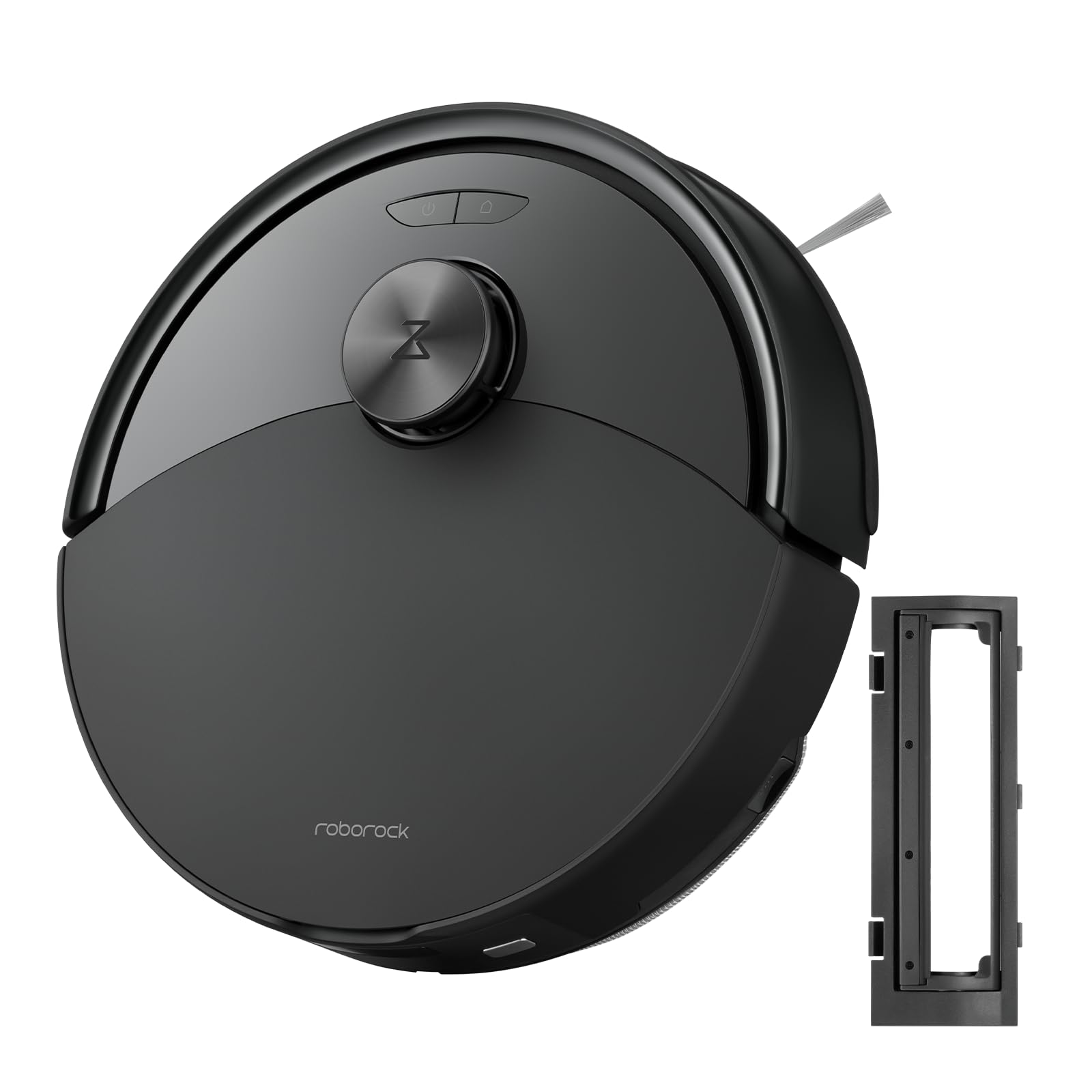
малюнок 1: The roborock Q10 S5 Robot Vacuum and Mop Cleaner. This image shows the top view of the robot, highlighting its sleek black design and main control buttons.
Компоненти робота:
- Верхня обкладинка: Lifts to reveal the dustbin and Wi-Fi indicator.
- Кнопка живлення/очищення: Press to start/pause cleaning, hold to turn on/off.
- Dock/Spot Clean Button: Press to send the robot back to the dock, hold for spot cleaning.
- Датчик LDS: Для навігації та картографії.
- Бампер: Виявляє перешкоди.
- Бічна щітка: Змітає сміття з країв та кутів.
- Основна щітка: Collects dirt and debris from floors. Features a floating design for better contact.
- Всеспрямоване колесо: For movement.
- Контакти для зарядки: Підключається до зарядної док-станції.
- Датчики обриву: Запобігає падінню робота зі сходів.
- Резервуар для води та швабра: For mopping functionality.
Док-станція для зарядки:
- Dock Location Beacon: Helps the robot locate the dock.
- Контакти для зарядки: Transfers power to the robot.
- Порт кабелю живлення: Підключає адаптер живлення.
4. Налаштування
- Розпакуйте робота: Carefully remove the robot and all accessories from the packaging. Remove any protective films or shipping materials.
- Install the Side Brush: Press the side brush onto its post until it clicks into place.
- Розмістіть зарядну док-станцію:
- Place the charging dock on a hard, level surface against a wall.
- Ensure there is at least 0.5 meters (1.6 feet) of clear space on both sides and 1.5 meters (4.9 feet) in front of the dock.
- Connect the power cable to the charging dock and plug it into a wall outlet.
- Початкова оплата: Place the robot on the charging dock. The robot will automatically turn on and begin charging. For first-time use, fully charge the robot before operation (approximately 4-6 hours). The power indicator light will breathe white during charging and turn solid white when fully charged.
- Завантажте додаток: шукати "Roborock" in the App Store or Google Play Store, or scan the QR code on the packaging to download and install the app.
- Підключіться до Wi-Fi:
- Open the Roborock app and follow the on-screen instructions to add your device.
- Переконайтеся, що ваш телефон підключено до мережі Wi-Fi 2.4 ГГц.
- Натисніть і утримуйте Док і потужність buttons simultaneously for 3 seconds until you hear the "Resetting Wi-Fi" voice alert.
- Follow the app's instructions to complete the connection.
5. Інструкція з експлуатації
Початок прибирання:
- Від Робота: Натисніть потужність button once. The robot will start cleaning.
- З програми: Open the Roborock app and tap the "Clean" button.
Pausing/Resuming/Stopping:
- Пауза: Press any button on the robot or tap "Pause" in the app.
- резюме: Натисніть потужність button or tap "Resume" in the app.
- Стій: To stop a cleaning cycle, press the Док button to send the robot back to the charging dock, or tap "Stop" in the app.
Функція прибирання:
- Заповнити резервуар для води: Open the water tank cover, fill with clean water, and close securely.
- Прикріпіть накладку для швабри: Wet the mop pad and wring it out. Slide it into the mop pad slot until it is securely attached.
- Start Mopping: The robot will automatically detect the mop module and switch to mopping mode. You can adjust water flow levels in the app.
Особливості програми:
- Управління картою: Create and save maps, set no-go zones, virtual walls, and invisible barriers.
- Вибіркове прибирання кімнат: Choose specific rooms to clean.
- Планове прибирання: Встановіть графіки прибирання на різний час та дні.
- Custom Cleaning Modes: Відрегулюйте силу всмоктування та рівень потоку води.
- Пульт дистанційного керування: Керуйте рухом робота вручну.
6. Технічне обслуговування
Regular maintenance ensures your roborock Q10 S5 operates efficiently. Always turn off the robot and unplug the charging dock before performing any maintenance.
Dustbin and Filter (Weekly):
- Підніміть верхню кришку робота.
- Зніміть смітник.
- Відкрийте кришку пилозбірника та висипте його вміст у сміттєвий бак.
- Remove the filter. Tap it gently to remove dust. The filter can be rinsed with water; ensure it is completely dry before reinstallation (allow 24 hours).
- Rinse the dustbin with water if necessary and allow it to dry completely.
- Reinstall the dry filter and dustbin.
Main Brush (Weekly):
- Переверніть робота.
- Press the tabs to remove the main brush cover.
- Вийміть основну щітку.
- Використовуйте інструмент для чищення (якщо є в наявності) або ножиці, щоб обрізати та видалити волосся чи сміття, що заплуталося навколо щітки.
- Reinstall the main brush and cover, ensuring it clicks into place.
Side Brush (Monthly):
- Відкрутіть бічну щітку.
- Видаліть будь-яке волосся або сміття.
- Reattach and tighten the screw.
Sensors and Charging Contacts (Monthly):
- Протріть усі датчики (датчики обриву, датчик стіни, вікно датчика LDS) та зарядні контакти як на роботу, так і на док-станції м’якою сухою тканиною.
Mop Pad (After Each Use):
- Вийміть швабру з ємності для води.
- Rinse thoroughly with water and allow it to air dry completely before next use.
7. Вирішення проблем
If you encounter issues with your robot, please refer to the following table before contacting support.
| проблема | Можлива причина | Рішення |
|---|---|---|
| Робот не вмикається. | Низький заряд батареї або вона не заряджена. | Помістіть робота на зарядну док-станцію та переконайтеся, що він заряджається. |
| Робот не може підключитися до Wi-Fi. | Incorrect Wi-Fi password, 5GHz network, or poor signal. | Ensure correct 2.4GHz Wi-Fi, reset Wi-Fi on robot, move closer to router. |
| Робот часто застрягає. | Obstacles, tangled cables, or dirty sensors. | Clear floor, clean sensors, use no-go zones in app. |
| Погана ефективність очищення. | Full dustbin, dirty filter, tangled brushes. | Empty dustbin, clean/replace filter, clean main/side brushes. |
| Робот видає незвичайний звук. | Debris in main brush, side brush, or wheels. | Inspect and clean all brushes and wheels for obstructions. |
If the problem persists, please refer to the Roborock app for more detailed error messages or contact customer support.
8. Технічні характеристики
| Особливість | Деталь |
|---|---|
| Модель | Q10 S5 |
| Розміри | Приблизно 353 x 350 x 96.5 мм (13.9 x 13.8 x 3.8 дюйма) |
| вага | прибл. 3.7 кг (8.16 фунта) |
| Акумулятор | Lithium-Ion (Capacity not specified, typical for robot vacuums) |
| Номінальна потужність | Approx. 60W (Typical for robot vacuums) |
| Ємність смітника | Approx. 470 ml (Typical for robot vacuums) |
| Ємність резервуара для води | Approx. 300 ml (Typical for robot vacuums) |
| Потужність всмоктування | Up to 10,000 Pa (HyperForce Suction Power from feature bullets) |
| Підключення Wi-Fi | 2.4 ГГц |
Примітка: Технічні характеристики можуть бути змінені без попередження.
9. Гарантія та підтримка
roborock products are manufactured to the highest quality standards. For detailed warranty information, please refer to the warranty card included in your product packaging or visit the official roborock website. For technical support, troubleshooting assistance, or to purchase replacement parts, please contact roborock customer service through the app or their official webсайт.
Офіційний Webсайт: www.roborock.com