
вступ
The RAPOO E9050L is a versatile wireless keyboard designed for seamless connectivity across multiple devices and operating systems. Its ultra-slim profile, quiet keys, and long-lasting rechargeable battery make it ideal for various environments, from office to travel. This manual provides detailed instructions for setup, operation, maintenance, and troubleshooting to ensure optimal use of your keyboard.
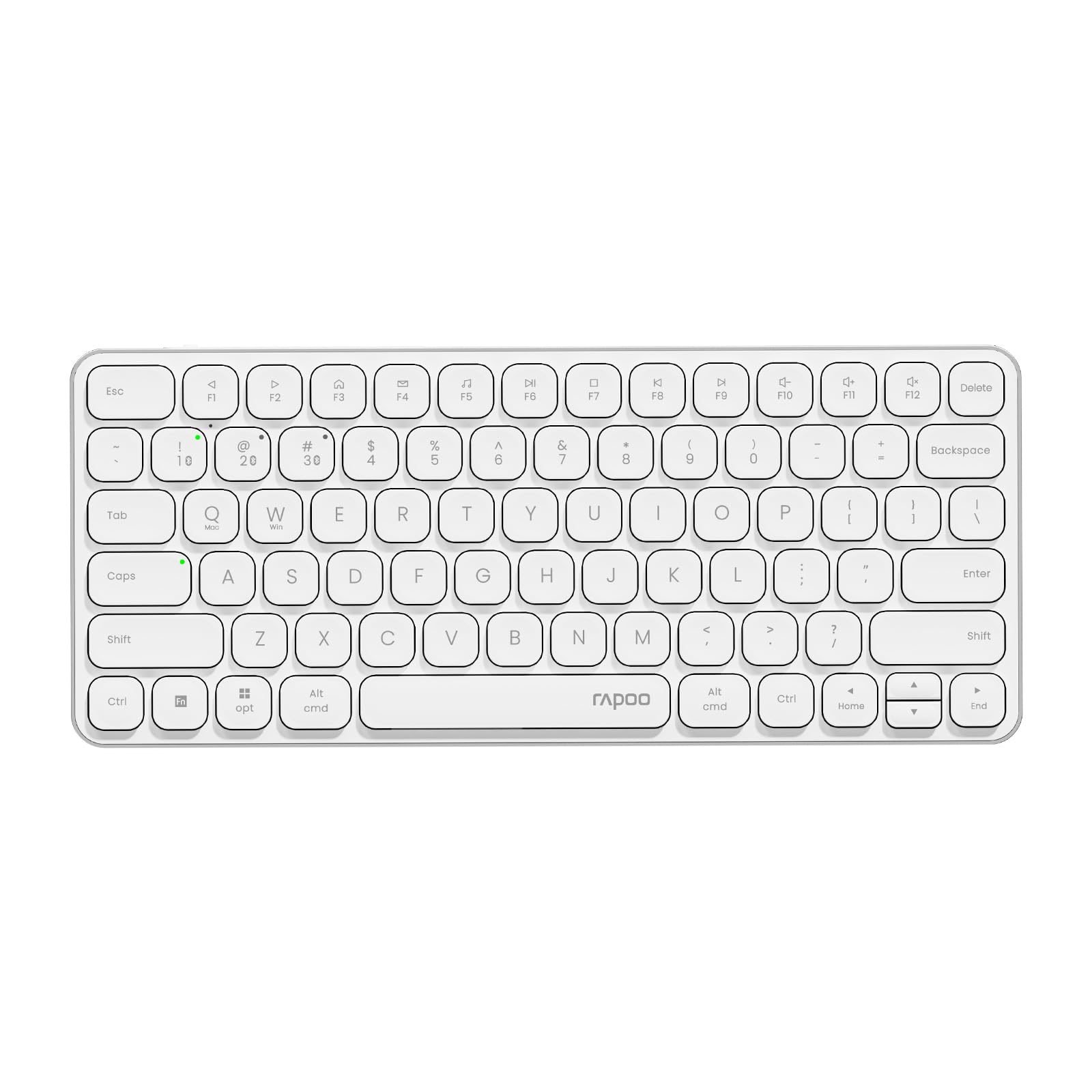
Image: The RAPOO E9050L Wireless Keyboard, showcasinйого елегантний дизайн.
Налаштування
Вміст упаковки
- RAPOO E9050L Wireless Keyboard
- Зарядний кабель USB-C
- Посібник користувача
Зарядка клавіатури
The E9050L features a built-in rechargeable battery. Before first use, fully charge the keyboard using the provided USB-C cable. A full charge can provide up to 90 days of continuous use. A quick 10-minute charge can provide enough power for one day of use.

Image: Diagram illustrating the rechargeable battery and charging indicators.
Connecting to Devices (Multi-Device & Multi-OS)
The keyboard supports wireless connection via 2.4GHz USB receiver or Bluetooth 5.0/4.0, allowing connection to up to 4 devices simultaneously. You can seamlessly switch between a notebook PC, desktop PC, tablet, or smartphone.

Image: Visual representation of multi-device and multi-OS connectivity options.
- Бездротове підключення 2.4 ГГц:
Insert the USB receiver into an available USB port on your computer. The keyboard should connect automatically. - Підключення Bluetooth:
Press and hold the Bluetooth pairing key (usually indicated by a Bluetooth icon or a specific Fn key combination) until the indicator light flashes. On your device (PC, tablet, smartphone), enable Bluetooth and search for "RAPOO E9050L". Select it to pair. - Перемикання між пристроями:
Use the dedicated device switching keys (e.g., Fn + 1, Fn + 2, Fn + 3, Fn + 4) to switch between your paired devices. The corresponding indicator light will show which device is currently active.

Image: Icons representing compatibility with various operating systems including Windows, Mac OS, Linux, iOS, Android, and Chrome OS.
Інструкція з експлуатації
Key Functions and Multimedia Hotkeys
The E9050L features a compact 78-key layout with 12 multimedia hotkeys for quick access to common functions like play/pause, volume control, and email. These functions are accessed by pressing the Fn key in combination with the corresponding F-keys (F1-F12).

Image: Diagram showing the multimedia hotkeys and their functions when used with the Fn key.
Перемикання ОС
The keyboard supports dual system compatibility. To switch between Windows and Mac OS layouts, use the following key combinations:
- Для Windows: Натисніть Fn + W
- For Mac OS: Press Fn + Q
Світлові індикатори
The keyboard includes indicator lights for device connection, Caps Lock status, and battery level. These lights provide clear visual feedback on the keyboard's current state, addressing user feedback for improved clarity.

Зображення: Крупний план view of the device indicator lights and Caps Lock indicator.
Досвід друку
The E9050L utilizes thin chiclet keycaps and a scissor-switch mechanism, providing a quiet and comfortable typing experience. The ultra-thin design (0.2 inches / 0.53 cm) reduces wrist strain, eliminating the need for a separate palm rest.

Зображення: Детальне view of the thin chiclet keycaps and scissor-switch mechanism.
Технічне обслуговування
To ensure the longevity and optimal performance of your RAPOO E9050L keyboard, follow these maintenance guidelines:
- Прибирання: Злегка протріть м’якою тканиною без ворсу dampened with water or a mild cleaning solution to wipe the keycaps and surface. Avoid harsh chemicals or abrasive materials.
- Видалення пилу: Використовуйте стиснене повітря, щоб видалити пил та сміття між клавішами.
- Уникайте рідин: Do not expose the keyboard to excessive moisture or submerge it in liquids. In case of spills, immediately disconnect the keyboard and allow it to dry completely before reuse.
- Зберігання: Зберігайте клавіатуру в прохолодному, сухому місці, подалі від прямих сонячних променів та екстремальних температур.
Усунення несправностей
If you encounter issues with your RAPOO E9050L keyboard, refer to the following common solutions:
- Клавіатура не підключається:
- Переконайтеся, що клавіатура заряджена.
- Verify that the 2.4GHz USB receiver is properly inserted or that Bluetooth is enabled and paired on your device.
- Спробуйте повторно підключити Bluetooth-з’єднання або повторно вставити USB-приймач.
- Ensure you are on the correct device channel (Fn + 1/2/3/4).
- Keys Not Responding or Delayed Response:
- Перевірте рівень заряду батареї; низький заряд батареї може вплинути на продуктивність.
- Ensure the keyboard is within range of your device (for Bluetooth/2.4GHz).
- Interference from other wireless devices can cause issues; try moving closer to your device or away from other wireless sources.
- Перезавантажте комп’ютер або пристрій.
- Incorrect Key Output (e.g., @ key types "):
- This often indicates an incorrect keyboard layout setting on your operating system. Ensure your device's keyboard settings match the US layout of the E9050L.
- Verify the correct OS mode is selected on the keyboard (Fn + W for Windows, Fn + Q for Mac).
- Caps Lock / Device Indicator Not Working:
- Переконайтеся, що клавіатура увімкнена та підключена.
- If the issue persists, try restarting the keyboard and your device.
Технічні характеристики
| Особливість | Деталь |
|---|---|
| Бренд | РАПОО |
| Номер моделі | E9050L |
| Сумісні пристрої | Smartphones, Tablets, Notebook PCs, Desktop PCs |
| Технологія підключення | Bluetooth, USB (2.4GHz) |
| Опис клавіатури | Інтегрований |
| Рекомендоване використання | Personal, Business, Student, Everyday Use |
| Особливості | Ergonomic, Silent |
| Колір | Білий |
| Розміри продукту (Д x Ш x В) | 28.4 см x 11.9 см x 1.3 см (11.18 дюйма x 4.69 дюйма x 0.51 дюйма) |
| матеріал | Plastic (with aluminum frame) |
| Джерело живлення | Живлення від батареї (перезаряджається) |
| Тип перемикача | Mechanical (Scissor-switch) |
| Розкладка клавіатури | QWERTY (розкладка США) |
| Підтримувані операційні системи | Linux, Windows, Mac OS, iOS, Android, Chrome OS |
| Кількість клавіш | 78 |

Image: Diagram showing the precise dimensions of the RAPOO E9050L keyboard.
Гарантія та підтримка
Інформація про гарантію
The RAPOO E9050L Wireless Keyboard comes with a 1-річна гарантія виробника з дати покупки. Ця гарантія поширюється на дефекти матеріалів та виготовлення за умов нормального використання. Будь ласка, збережіть підтвердження покупки для пред'явлення претензій за гарантією.
Підтримка клієнтів
For technical assistance, troubleshooting, or warranty inquiries, please contact RAPOO customer support through the official website or your retailer. Detailed contact information can typically be found on the product packaging or the RAPOO official support page.