
1. Вступ
This manual provides essential information for setting up, operating, maintaining, and troubleshooting your Lenovo Laptop Computer 2026 Edition, Model IdeaPad Slim 3. Please read this manual thoroughly before using your device to ensure proper function and longevity.
2. Вміст упаковки
Перевірте наявність усіх предметів у вашій упаковці:
- Lenovo Laptop Computer 2026 Edition (IdeaPad Slim 3)
- Адаптер живлення
- Пристрій для читання карт SD
- Короткий посібник користувача (якщо включено)
- Warranty Information Card (if included)
3. Продукт закінчивсяview
Familiarize yourself with the components and features of your Lenovo IdeaPad Slim 3 laptop.
3.1 Основні характеристики

This image displays the Lenovo IdeaPad Slim 3 laptop and highlights its primary features. It includes an Intel Core i7-13620H processor, a 15.3-inch WUXGA IPS display (1920x1200 resolution), and an HD camera with a privacy shutter. The laptop is 0.70 inches thin and weighs 3.51 lbs. It comes with 24GB DDR5 RAM, upgradable to 40GB, and a 512GB SSD, upgradable to 4TB. Audio is provided by dual 2W speakers. The device supports Rapid Charge Boost and features a Metal A Cover for durability, meeting Military Grade standards.
3.2 Дисплей та клавіатура

This image focuses on the laptop's display and keyboard. The 15.3-inch WUXGA IPS display offers a 1920x1200 resolution, 300 nits brightness, anti-glare properties, and a 16:10 aspect ratio. It boasts up to a 90% active area ratio and is an Eyesafe Display, TÜV Rheinland Certified for low blue light. The keyboard is non-backlit and includes a numeric keypad.
3.3 Power and Audio
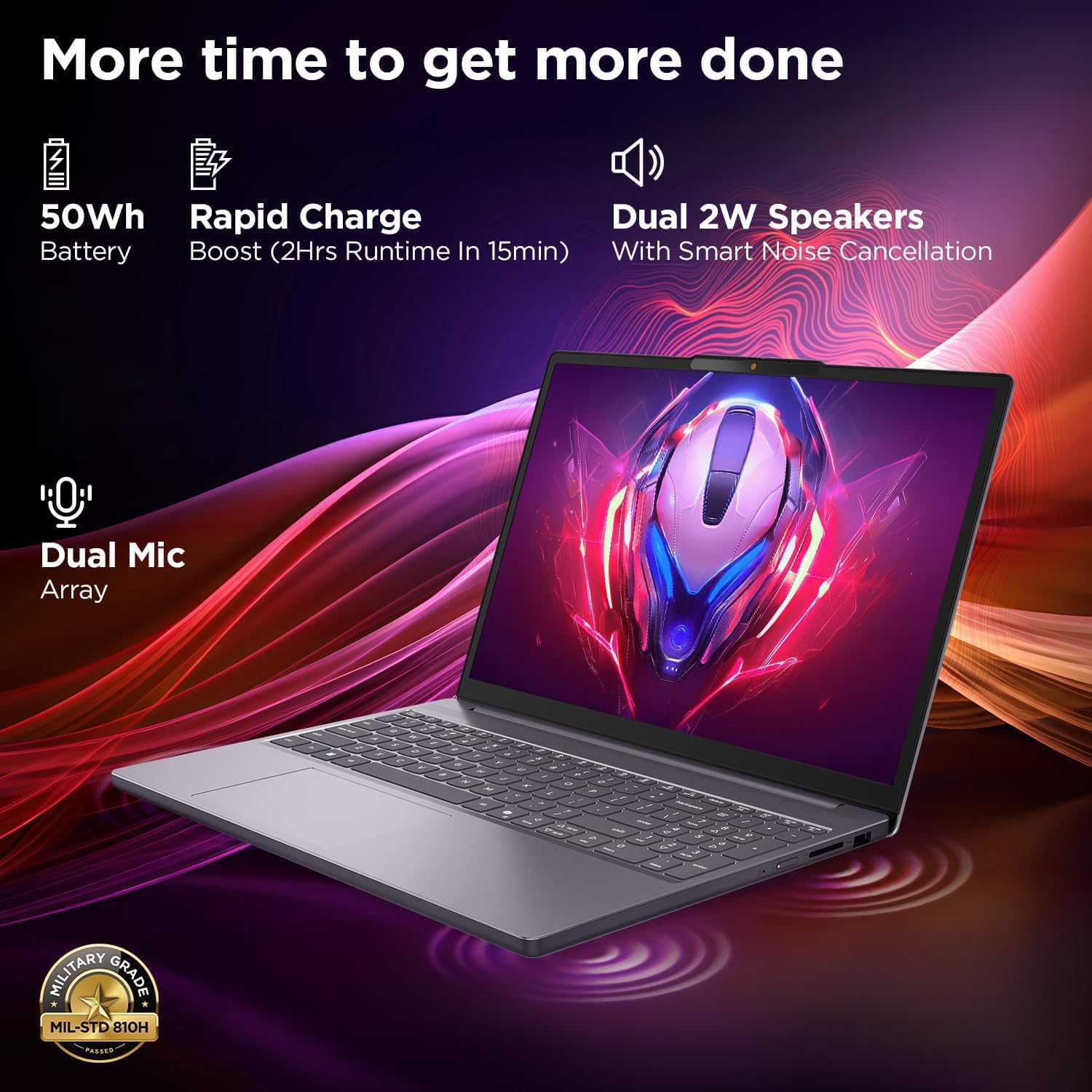
This image highlights the laptop's power and audio capabilities. It features a 50Wh battery with Rapid Charge Boost, providing 2 hours of runtime from a 15-minute charge. Dual 2W speakers with Smart Noise Cancellation and a Dual Mic Array enhance audio quality. The laptop also meets Military Grade MIL-STD 810H durability standards.
3.4 Порти та підключення

This image illustrates the various ports available on the Lenovo IdeaPad Slim 3. These include a power button, an SD card reader, a power connector, two USB-A ports (5Gbps), an HDMI port, and a USB-C port (5Gbps) with USB Power Delivery 3.0 and DisplayPort 1.2 support for data transfer and external displays. A headphone/microphone combo jack (3.5mm) is also present.
3.5 Keyboard and Touchpad Layout
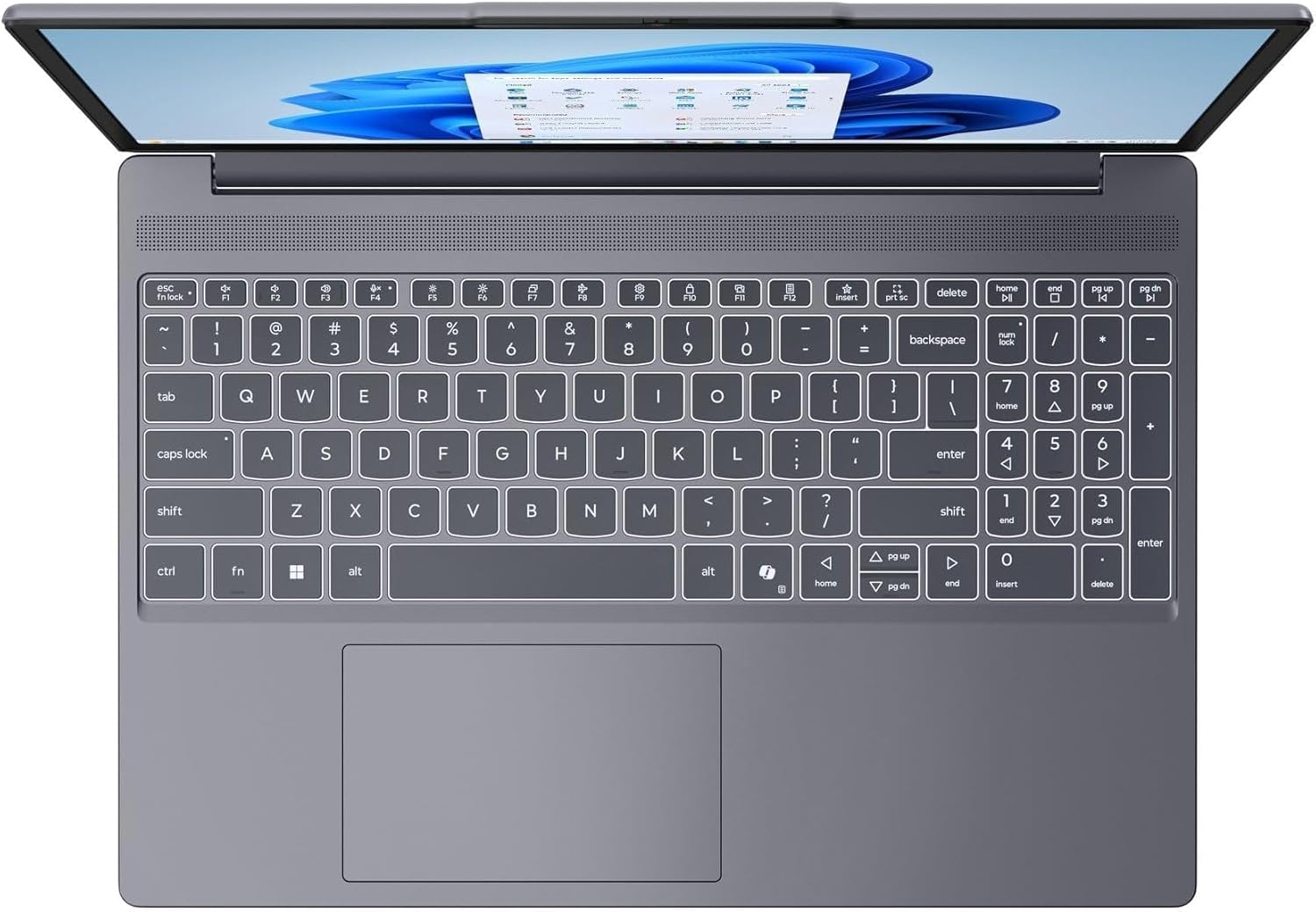
Це зображення забезпечує вид зверху вниз view of the laptop's full-size keyboard with a numeric keypad and the integrated touchpad. It shows the standard QWERTY layout along with function keys and dedicated navigation keys.
3.6 Laptop Exterior (Closed)
This image shows the top cover of the Lenovo IdeaPad Slim 3 laptop when closed, featuring the Lenovo brand logo centrally placed on the grey metallic surface.
3.7 Laptop Bottom View

This image displays the bottom panel of the Lenovo IdeaPad Slim 3 laptop, showing the ventilation grilles for cooling and rubber feet for stability.
4. Налаштування
4.1 Початкове увімкнення та заряджання
- Підключіть адаптер живлення: Plug the power adapter into the laptop's power connector and then into a wall outlet.
- Зарядіть батарею: Перед першим використанням дайте ноутбуку зарядитися щонайменше 30 хвилин або доки індикатор заряду батареї не покаже достатній рівень заряду.
- Увімкнення: Open the laptop lid and press the power button located on the side or keyboard deck.
- Налаштування Windows: Дотримуйтесь інструкцій на екрані, щоб завершити налаштування Windows 11 Home, включаючи мову, регіон, мережеве підключення та створення облікового запису користувача.
4.2 Підключення до мережі
- Wi-Fi: During Windows setup or later, click the Wi-Fi icon in the taskbar, select your network, enter the password, and click Connect.
- Ethernet (if applicable via adapter): Connect an Ethernet cable from your router/modem to a compatible USB-C adapter (not included) and then to the laptop's USB-C port.
5. Інструкція з експлуатації
5.1 Використання клавіатури та сенсорної панелі
- Клавіатура: The laptop features a full-size keyboard with a numeric keypad. Use the Fn key in combination with function keys (F1-F12) for special functions like adjusting brightness, volume, or enabling/disabling Wi-Fi.
- Сенсорна панель: The integrated touchpad supports multi-touch gestures for navigation, scrolling, and zooming. Refer to Windows settings for customizing touchpad gestures.
5.2 Підключення зовнішніх пристроїв
- USB пристрої: Connect USB peripherals (mouse, keyboard, external drives) to the available USB-A or USB-C ports.
- HDMI/DisplayPort: Use the HDMI port or USB-C (with DP 1.2 support) to connect an external monitor or projector.
- Пристрої Bluetooth: Enable Bluetooth in Windows settings to pair wireless headphones, speakers, or other Bluetooth accessories.
- SD-карта: Insert an SD card into the dedicated SD card reader slot for data transfer.
5.3 Керування живленням
- Режим сну: Close the lid or press the power button briefly to put the laptop into sleep mode.
- Вимкнути: Click the Start button, then Power, and select "Shut down" to turn off the laptop completely.
- Перезапуск: Click the Start button, then Power, and select "Restart" to reboot the laptop.
6. Технічне обслуговування
6.1 Очищення ноутбука
- екран: Злегка протріть м’якою тканиною без ворсу dampводою або засобом для чищення екранів. Не розпилюйте рідину безпосередньо на екран.
- Клавіатура та корпус: Використовуйте м’яку, суху тканину. Для стійкого бруду злегкаamp можна використовувати тканину, змочену м’яким мильним розчином, переконавшись, що рідина не потрапила в отвори.
- Вентиляція: Періодично очищуйте вентиляційні решітки стисненим повітрям, щоб запобігти накопиченню пилу, який може вплинути на ефективність охолодження.
6.2 Догляд за акумулятором
- Уникайте екстремальних температур.
- Не розряджайте акумулятор часто повністю.
- Якщо ви зберігаєте ноутбук протягом тривалого часу, зарядіть акумулятор приблизно до 50-60%.
6.3 Оновлення програмного забезпечення
- Регулярно перевіряйте наявність оновлень Windows через Налаштування > Оновлення Windows.
- Відвідайте офіційну службу підтримки Lenovo website for driver and firmware updates specific to your IdeaPad Slim 3 model.
7. Вирішення проблем
| проблема | Можливе рішення |
|---|---|
| Ноутбук не вмикається. | Ensure the power adapter is securely connected and the outlet is functional. Try a different outlet. If the battery is completely drained, allow it to charge for a while before attempting to power on. |
| Display is blank or black. | Check if the laptop is powered on. Adjust screen brightness using function keys. Connect an external monitor to check if the issue is with the laptop's internal display. |
| Проблеми з підключенням до Wi-Fi. | Ensure Wi-Fi is enabled in Windows settings. Restart your router/modem. Check for updated Wi-Fi drivers on the Lenovo support webсайт. |
| Повільна продуктивність. | Close unnecessary applications. Check Task Manager for resource-intensive processes. Ensure Windows and drivers are up to date. Run a disk cleanup. |
| Клавіатура або тачпад не реагують. | Restart the laptop. Check for driver updates. Ensure no physical obstructions are present. |
8. Технічні характеристики
| Особливість | Деталь |
|---|---|
| Бренд | Lenovo |
| Назва моделі | IdeaPad Slim 3 |
| Розмір екрана | 15.3 Inches WUXGA IPS |
| роздільна здатність | 1920 x 1200 пікселів |
| Процесор | 13th Gen Intel Core i7-13620H (2.4 GHz, up to 4.9 GHz) |
| ОЗУ | 24GB DDR5 RAM (Upgradable to 40GB) |
| Зберігання | 1TB NVMe M.2 SSD (Upgradable to 4TB) |
| Операційна система | Windows 11 Домашня |
| Графіка | Інтегрований |
| Бездротове підключення | Wi-Fi 6 (802.11ax) |
| Bluetooth | Bluetooth 5.2 |
| Порти | 2x USB-A (5Gbps), 1x USB-C (5Gbps, PD 3.0, DP 1.2), 1x HDMI, 1x Headphone/Mic Combo, 1x SD Card Reader, Power Connector |
| Webкулачок | HD Camera with Privacy Shutter |
| Аудіо | Dual 2W Speakers with Smart Noise Cancellation, Dual Mic Array |
| Акумулятор | 50Wh, Rapid Charge Boost |
| Розміри (Д х Ш х Г) | 13.52 см x 9.43 см x 0.7 см |
| вага | 3.51 фунтів |
| Особливості | Privacy Shutter, Power Delivery, Military Grade Durability (MIL-STD 810H) |
9. Інформація про гарантію
Your Lenovo Laptop Computer 2026 Edition (IdeaPad Slim 3) comes with a Обмежена гарантія. The specific terms and duration of your warranty may vary by region and purchase date. For detailed warranty information, including coverage, terms, and conditions, please refer to the warranty card included with your product or visit the official Lenovo support webсайт:
https://support.lenovo.com/warranty
Рекомендується зареєструвати ваш продукт на Lenovo website to facilitate warranty claims and receive important updates.
10. Підтримка
For further assistance, technical support, or to download the latest drivers and manuals, please visit the official Lenovo Support webсайт:
You may also contact Lenovo customer service directly. Contact information can typically be found on the support webсайт для вашого конкретного регіону.