
1. Вступ
Thank you for choosing the Nocpix Vista H35R LRF 35-640 Thermal Monocular. This device is engineered to provide superior thermal imaging performance for various applications, including observation, hunting, and surveillance. Featuring an advanced thermal sensor, integrated laser rangefinder, and a high-resolution AMOLED display, the Vista H35R delivers exceptional clarity and detail. This manual provides essential information for the proper setup, operation, and maintenance of your device.
2. Продукт закінчивсяview
The Nocpix Vista H35R LRF 35-640 is a high-performance handheld thermal monocular designed for detailed observation in challenging conditions. Key features include:
- Розширена оптика: Equipped with an f/0.9 germanium objective lens for unmatched clarity.
- Датчик високої роздільної здатності: Features a 640x512 thermal sensor with 15 mK NETD sensitivity for detailed images.
- Integrated Laser Rangefinder: Accurately detects distances up to 1,200 yards with 1-yard precision.
- Яскравий дисплей: 1.03-inch 2560x2560 round AMOLED display for a smooth, sharp picture.
- Електронна стабілізація зображення: Ensures stable viewing even during movement.
- Removable Battery Pack: Utilizes the Nocpix IBP-7 Removable Battery Pack with direct USB-C charging.
- Можливості запису: Built-in photo, video, and audio recording.
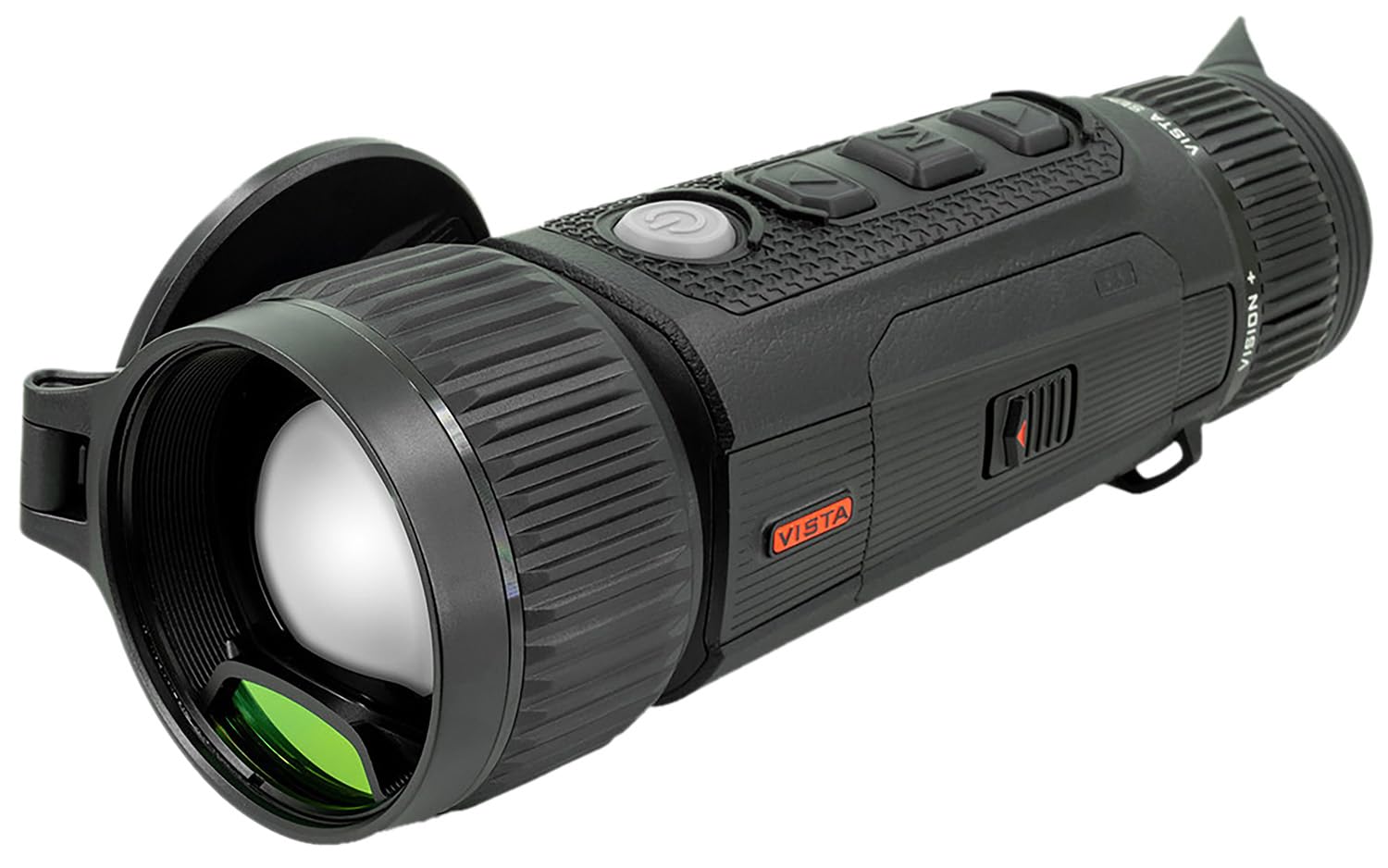
Figure 2.1: The Nocpix Vista H35R LRF 35-640 Thermal Monocular. This image shows the device from a side angle, highlighting its ergonomic design and objective lens.
3. Налаштування
3.1. Встановлення батареї
- Знайдіть батарейний відсік на пристрої.
- Відкрийте кришку батарейного відсіку.
- Insert the Nocpix IBP-7 Removable Battery Pack, ensuring correct polarity.
- Надійно закрийте кришку батарейного відсіку.
3.2. Зарядка батареї
The Nocpix IBP-7 battery can be charged directly via the USB-C port on the device.
- Підключіть наданий кабель USB-C до порту USB-C пристрою.
- Підключіть інший кінець кабелю USB-C до сумісного адаптера живлення USB (не входить до комплекту) або USB-порту комп’ютера.
- The charging indicator will illuminate, typically red during charging and green when fully charged.
3.3. Початкове увімкнення
After installing a charged battery, press and hold the power button (refer to the device diagram for location) for approximately 3 seconds until the display illuminates.
4. Інструкція з експлуатації
4.1. Увімкнення/вимкнення живлення
- Увімкнення: Натисніть і утримуйте кнопку живлення протягом 3 секунд.
- Вимкнення живлення: Press and hold the power button for 3 seconds until the shutdown prompt appears, then confirm.
4.2. Регулювання фокусу
Use the ergonomic objective focus dial located on the device to achieve a clear image. Rotate the dial clockwise or counter-clockwise until the image on the AMOLED display is sharp.
4.3. Using the Laser Rangefinder (LRF)
The integrated laser rangefinder can be activated for single measurements or continuous scanning.
- Одиночне вимірювання: Briefly press the LRF button (refer to device diagram) to measure the distance to the target. The distance will be displayed on the screen.
- Безперервне сканування: Press and hold the LRF button to activate continuous scanning. The distance will update as you move the device across different targets. Release the button to stop scanning.
4.4. Photo, Video, and Audio Recording
The Vista H35R allows for capturing images, videos, and audio.
- Фото: Press the photo capture button (refer to device diagram) to take a still image.
- Відео: Press the video recording button to start recording. Press it again to stop.
- Аудіо: Audio recording is integrated with video recording. Ensure the microphone is not obstructed.
4.5. Навігація по меню та налаштування
The device features an intuitive interface for accessing various settings. Use the navigation buttons (up, down, select) to browse through menus and adjust parameters such as color palettes, brightness, contrast, and electronic image stabilization.
5. Технічне обслуговування
5.1. Очищення пристрою
- Об'єктив: Use a soft, lint-free cloth specifically designed for optical lenses. Gently wipe the lens surface. Avoid abrasive materials or excessive pressure.
- Тіло: Протріть корпус пристрою м’якою тканиноюamp тканина. Не використовуйте агресивні хімікати або розчинники.
5.2. Догляд за акумулятором
- Зберігайте батареї в прохолодному сухому місці, коли вони не використовуються.
- Уникайте повного розряджання акумулятора протягом тривалого часу.
- Charge the battery regularly, even if not in frequent use, to maintain its lifespan.
5.3. Зберігання
When storing the device for extended periods, ensure it is clean, dry, and the battery is partially charged. Store it in its protective case in a stable environment, away from extreme temperatures and humidity.
6. Вирішення проблем
If you encounter issues with your Nocpix Vista H35R, please refer to the following common solutions:
- Пристрій не вмикається: Ensure the battery is correctly installed and fully charged. Try charging the device for at least 30 minutes.
- Image Unclear/Blurred: Adjust the objective focus dial until the image is sharp. Ensure the lens is clean and free from smudges or debris.
- Laser Rangefinder Not Working: Ensure there are no obstructions between the device and the target. Check if the LRF function is enabled in the settings menu.
- Короткий термін служби батареї: Ensure the battery is fully charged before use. Reduce screen brightness or disable unnecessary features to conserve power.
- Пристрій не відповідає: Perform a soft reset by holding the power button for 10-15 seconds until the device restarts. If the issue persists, contact customer support.
7. Технічні характеристики
| Особливість | Специфікація |
|---|---|
| Номер моделі | VISTA-H35R |
| Роздільна здатність теплового датчика | 640x512 |
| NETD Sensitivity | <15 мК |
| Об'єктив | 35mm, f/0.9 Germanium |
| Тип дисплея | AMOLED |
| Роздільна здатність дисплея | 2560x2560 |
| Діапазон лазерного далекоміра | Up to 1,200 yards (1-yard accuracy) |
| Тип батареї | Nocpix IBP-7 Removable Battery Pack |
| Інтерфейс зарядки | USB-C |
8. Гарантія та підтримка
Nocpix products are manufactured to high-quality standards. For information regarding warranty coverage, please refer to the warranty card included with your product or visit the official Nocpix website. For technical support, service, or inquiries, please contact Nocpix customer service through their official channels. Please have your model number (VISTA-H35R) and purchase information ready when contacting support.