
1. Вступ
Thank you for choosing the Fame SPD Hybrid Wave Sample Pad. This versatile digital drum and sample pad is designed for musicians seeking a powerful and flexible percussion instrument. This manual will guide you through the setup, operation, and maintenance of your device, ensuring optimal performance and longevity.
2. Інформація про безпеку
Будь ласка, прочитайте та дотримуйтесь наступних запобіжних заходів, щоб запобігти пошкодженню пристрою або травмам:
- Джерело живлення: Only use the approved AC adapter provided with this unit. Using an unauthorized adapter may cause malfunction or damage.
- Вплив вологи: Do not expose the product to rain, moisture, or any liquids. Avoid using it in damp середовищ.
- Вентиляція: Забезпечте належну вентиляцію навколо пристрою. Не блокуйте вентиляційні отвори.
- Розміщення: Розмістіть пристрій на стійкій, рівній поверхні. Уникайте розміщення його поблизу джерел тепла або прямих сонячних променів.
- Прибирання: Disconnect the power adapter before cleaning. Use a soft, dry cloth. Do not use liquid cleaners or aerosols.

Малюнок 2.1: Нижня частина view of the unit, highlighting safety warnings and power input details (DC 9V 2A).
3. Продукт закінчивсяview
The Fame SPD Hybrid Wave Sample Pad features a robust design with responsive pads and intuitive controls for dynamic performance.
3.1 Передня панель та елементи керування

Малюнок 3.1: Верх view of the SPD Hybrid Wave Sample Pad, illustrating the layout of pads and controls.
- Прокладки: Six velocity-sensitive pads for triggering sounds and sampлес.
- Дисплей: LCD screen for navigating menus and viewпараметри.
- Майстер ручка: Регулює загальну гучність виводу.
- Phone Knob: Регулює гучність виходу навушників.
- FX Knobs (FX1, FX2): Control parameters for built-in effects.
- Кнопки навігації: (HOME, SAMPLE, TEMPO, PAD EDIT, KIT SET, UTIL, SYSTEM, BT) For accessing various functions and settings.
- Кнопки напрямку та OK: Для навігації та вибору в меню.
- Кнопка живлення: Вмикає або вимикає пристрій.
3.2 Підключення задньої панелі

Figure 3.2: Rear panel connections, including power, audio, MIDI, USB, and trigger inputs.
- DC IN: Power adapter input (9V 2A).
- MASTER OUT (L/MONO, R): Stereo audio outputs for connecting to an amplifier, мікшер або аудіоінтерфейс.
- LINE IN (L/MONO, R): Stereo audio inputs for connecting external audio sources.
- ПІДИМОК: Adjusts the input level for the LINE IN.
- USB-A: For connecting USB storage devices (e.g., USB flash drives).
- USB-B: Для підключення до комп'ютера для передачі MIDI та аудіоданих.
- MIDI-вхід/вихід: Standard MIDI connections for external MIDI devices.
- TRIGGER IN (1/2, 3/4, 5/6, 7/8): Inputs for connecting external drum triggers or pads.
- PEDAL IN (1, 2): Inputs for connecting footswitches or expression pedals.
4. Налаштування
Follow these steps to set up your Fame SPD Hybrid Wave Sample Pad:
- Підключення живлення: Connect the approved AC adapter to the DC IN port on the rear panel, then plug the adapter into a power outlet.
- Аудіовихід:
- For stereo output, connect cables from the MASTER OUT (L/MONO, R) jacks to your amplifier, мікшер або аудіоінтерфейс.
- For mono output, connect a cable from the MASTER OUT (L/MONO) jack.
- For personal monitoring, connect headphones to the PHONE jack on the front panel.
- External Triggers/Pedals (Optional): Connect external drum triggers or pads to the TRIGGER IN jacks (1/2, 3/4, 5/6, 7/8) and footswitches or expression pedals to the PEDAL IN jacks (1, 2) as needed.
- USB-підключення (додатково):
- To connect to a computer for MIDI/audio, use a USB-B cable to connect the USB-B port to your computer.
- To use a USB flash drive for importing/exporting samples, connect it to the USB-A port.
- Увімкнення: Press the POWER button on the front panel to turn on the unit.
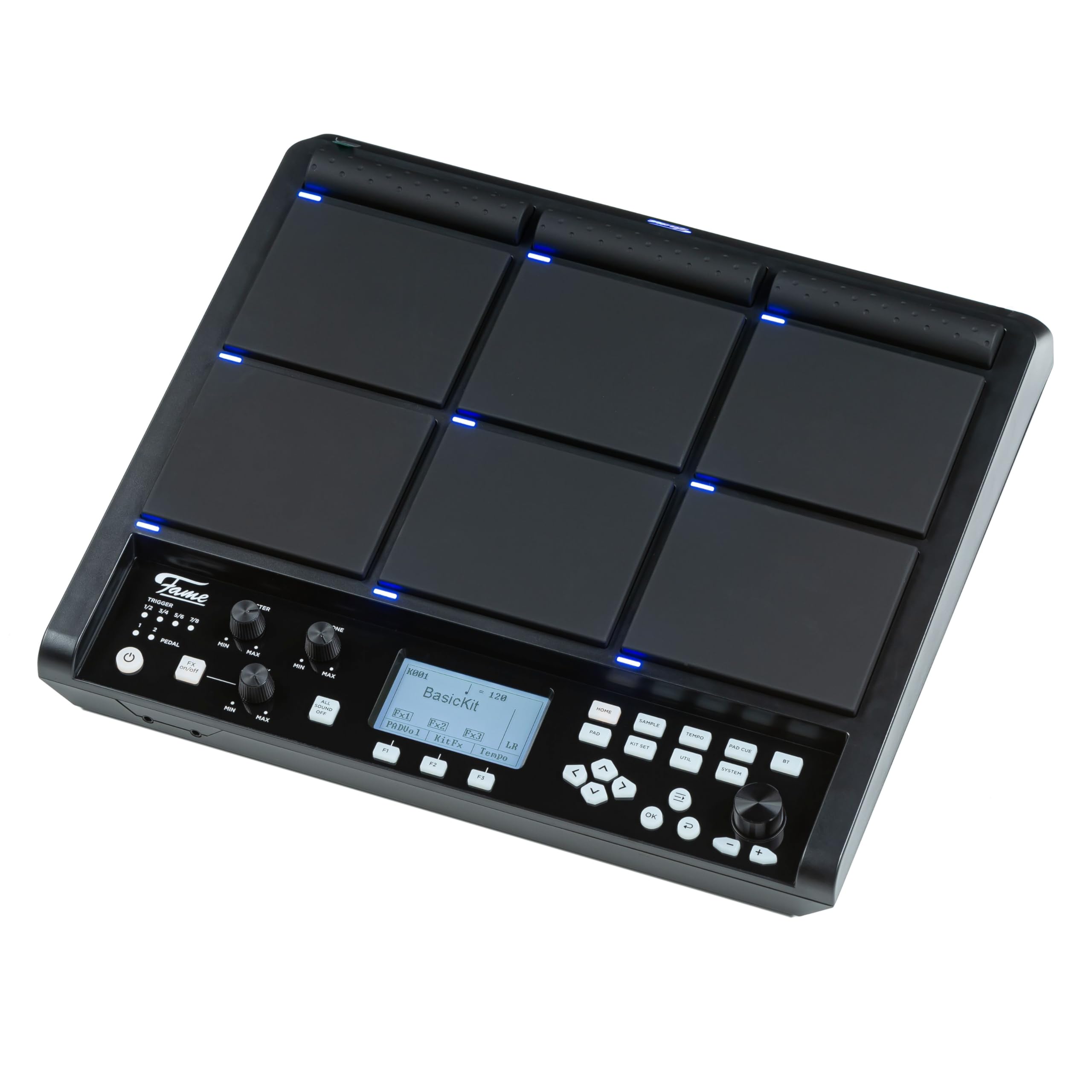
Figure 4.1: The SPD Hybrid Wave Sample Pad connected to its power adapter.
5. Інструкція з експлуатації
5.1 Основна операція
- Регулювання гучності: Use the MASTER knob to control the main output volume and the PHONE knob for headphone volume.
- Гральні колодки: Strike the pads to trigger assigned sounds. The pads are velocity-sensitive, meaning the sound will vary based on how hard you strike them.
- Навігація по меню: Use the directional buttons (left, right, up, down) to navigate through menu options on the LCD display. Press the OK button to confirm selections.
- Доступ до функцій: Use the dedicated function buttons (HOME, SAMPLE, TEMPO, PAD EDIT, KIT SET, UTIL, SYSTEM, BT) to quickly access different modes and settings.
5.2 Kit Selection and Editing
- Selecting Kits: Press the KIT SET button to enter the Kit Selection mode. Use the directional buttons to browse through available drum kits. Press OK to load a kit.
- Editing Pads: Press the PAD EDIT button to assign sounds, adjust volume, pitch, and other parameters for individual pads.
- Saving Kits: After making changes to a kit, navigate to the UTIL (Utility) menu and select the 'Save Kit' option to store your custom settings.
5.3 Sampling and Effects
- Sampлінг: Натисніть клавішу SAMPLE button to enter the sampling mode. Follow the on-screen instructions to record new samples via the LINE IN or internal microphone (if available).
- Застосування ефектів: Use the FX1 and FX2 knobs to adjust the parameters of the built-in effects. The specific effect and its parameters can be configured in the SYSTEM or UTIL menus.
5.4 Tempo and Metronome
- Adjusting Tempo: Press the TEMPO button to adjust the playback tempo. Use the directional buttons or a dedicated data entry knob (if present) to change the BPM (beats per minute).
- Метроном: The TEMPO menu also allows you to activate and configure the metronome for practice.
6. Технічне обслуговування
Proper maintenance ensures the longevity and optimal performance of your SPD Hybrid Wave Sample Pad.
- Прибирання: Regularly wipe the unit with a soft, dry cloth. For stubborn dirt, slightly dampпрополощіть тканину водою. Уникайте абразивних засобів для чищення, розчинників або воску.
- Зберігання: When not in use for extended periods, store the unit in a clean, dry place away from extreme temperatures and direct sunlight.
- Догляд за прокладками: Avoid striking the pads with excessive force or sharp objects, as this can damage the sensors.
7. Вирішення проблем
If you encounter issues with your SPD Hybrid Wave Sample Pad, refer to the following common problems and solutions:
| проблема | Можлива причина | Рішення |
|---|---|---|
| No sound from main outputs |
|
|
| Колодки не реагують |
|
|
| Пристрій не включається |
|
|
| External trigger not working |
|
|
8. Технічні характеристики
- модель: Fame SPD Hybrid Wave Sample Pad
- Прокладки: 6 педів, чутливих до швидкості
- Дисплей: ЖК
- Потужність: DC 9V, 2A (via included AC adapter)
- входи:
- LINE IN (L/MONO, R)
- TRIGGER IN (x4, supporting 8 triggers)
- PEDAL IN (x2)
- MIDI IN
- USB-B (for computer connection)
- USB-A (for USB storage)
- Виходи:
- MASTER OUT (L/MONO, R)
- PHONE OUT (Stereo)
- MIDI OUT
- Підключення: Bluetooth (BT button indicates functionality)
9. Гарантія та підтримка
Fame products are designed for quality and reliability. This product comes with a standard manufacturer's warranty against defects in materials and workmanship. Please refer to the warranty card included with your purchase for specific terms and conditions.
For technical support, service, or warranty claims, please contact your authorized Fame dealer or visit the official Fame webсайт для контактної інформації.