
1. Вступ
The Thunderobot L1 Computer Monitor Lamp is designed to provide optimal lighting for your workspace, focusing on eye comfort and visual clarity. It features an asymmetric light source, high color rendering (Ra≥95), flicker-free illumination, low blue light protection, and adjustable color temperature and brightness levels.
2. Інформація про безпеку
- Переконайтеся, що lamp is securely placed on the monitor to prevent accidental falls.
- Не піддавайте lamp до води або надмірної вологи.
- Avoid disassembling the product. Contact support for repairs.
- Use only the provided USB cable for power.
- Зберігати в недоступному для дітей місці.
3. Вміст упаковки
Перевірте наявність усіх елементів в упаковці:
- Thunderobot L1 Computer Monitor Lamp
- USB кабель живлення
- Посібник користувача
4. Інструкції з налаштування
- Позиціонування Lamp: Gently place the Thunderobot L1 Monitor Lamp on top of your computer monitor. The gravity-activated clamping mechanism and silicone anti-slip stabilizers will help secure it in place. Adjust the lamp's angle using the dual-pivot adjustment system to direct light onto your workspace without screen glare.
- Підключення живлення: Connect the provided USB cable to the USB-C port on the lamp and plug the other end into an available USB port on your computer or a USB power adapter (not included). The lamp увімкнеться.

Image: The Thunderobot L1 lamp features a gravity-activated clamp, silicone stabilizers, and a dual-pivot adjustment system for secure and flexible positioning.
Video: This video demonstrates the assembly and installation of the Thunderobot L1 Computer Monitor Lamp, showing how to attach it to a monitor and connect the power cable.
5. Інструкція з експлуатації
The Thunderobot L1 Monitor Lamp features intuitive touch controls located on the top surface of the lamp.
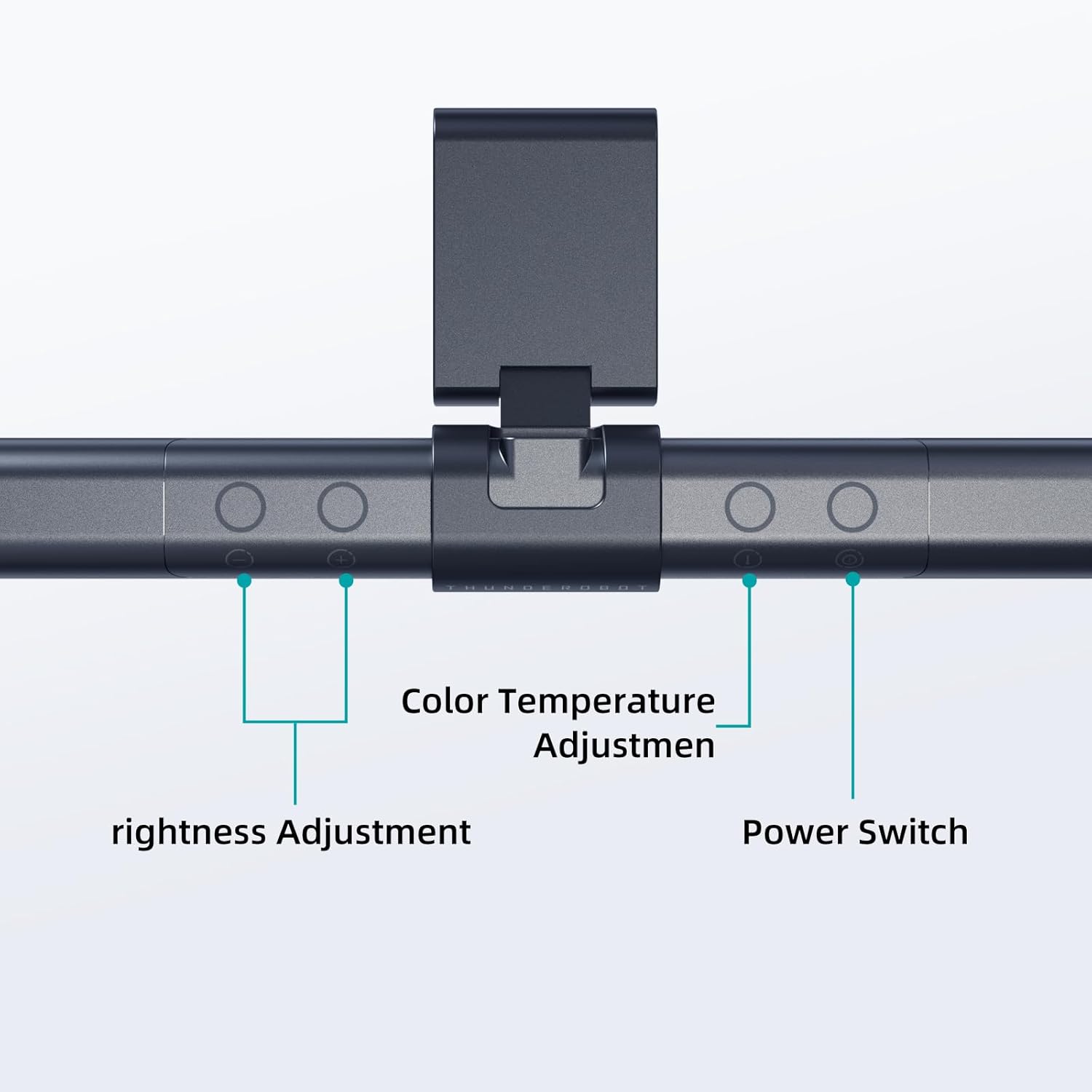
Image: The touch controls include buttons for brightness adjustment, color temperature adjustment, and power.
- Увімкнення/вимкнення живлення: Натисніть кнопку живлення (O), щоб повернути lamp увімкнути або вимкнути.
- Регулювання яскравості: Use the brightness adjustment buttons (+ і -) to cycle through ten levels of brightness.
- Регулювання температури кольору: Натисніть кнопку колірної температури (i) to switch between six different color temperature settings.

Зображення: The lamp offers six adjustable color temperatures, ranging from 3000K (Warm Light) to 6000K (Cool White Light), suitable for various activities like movie viewing, reading, studying, and working.
6. Ключові характеристики
- Asymmetric Light Source: The advanced asymmetric light design ensures uniform light distribution across the workspace, eliminating screen glare and shadows. This optimizes the light path for comfortable, prolonged use.
- Ra≥95 High Color Rendering: With a color rendering index of Ra≥95, the lamp accurately reproduces colors, providing a vivid and true-to-life visual experience for various tasks.
- Освітлення без мерехтіння: Equipped with flicker-free technology, this lamp provides constant, stable illumination, reducing eye strain and headaches associated with traditional lighting.
- Low Blue Light Protection: Advanced low blue light technology reduces harmful blue wavelengths, alleviating eye strain, dryness, and fatigue, especially during extended screen time.
- Six Color Temperatures: Offers a versatile range of six color temperature options, from warm white to cool white, allowing users to customize the lighting atmosphere for different scenarios and preferences.
- Ten-Level Dimming: Provides ten adjustable brightness levels for precise control over illumination intensity.

Image: The Ra≥95 High CRI ensures colors are displayed accurately and vibrantly, as demonstrated by the fruit comparison.

Зображення: The lamp provides low blue light protection, reducing harmful blue light exposure for eye comfort.
7. Технічні характеристики
| Особливість | Деталь |
|---|---|
| Розміри продукту | 3.5" Г x 17.7" Ш x 3.85" В |
| Вага товару | 16 унції |
| Lamp Тип | Письмовий стіл Lamp |
| Колір відтінку | чорний |
| Матеріал абажура | Поліестер |
| Тип перемикача | Кнопка |
| Технологія підключення | USB (для живлення) |
| томtage | 12 вольт |
| Колір | чорний |
| Форма | Плоский |
| Тип матеріалу | Полікарбонат |
| Номер моделі | TH-L1-B2 |
8. Технічне обслуговування
- Прибирання: Від’єднайте живлення перед чищенням. Використовуйте м’яку суху тканину, щоб протертиamp. Не використовуйте абразивні засоби чи розчинники.
- Зберігання: Якщо виріб не використовується протягом тривалого часу, зберігайте йогоamp у прохолодному сухому місці.
9. Вирішення проблем
- Lamp не вмикається:
- Переконайтеся, що USB-кабель надійно підключено до обох lamp і джерело живлення.
- Verify that the power source (USB port or adapter) is functional.
- Мерехтіння світла:
- Перевірте підключення живлення.
- Якщо мерехтіння не зникає, зверніться до служби підтримки клієнтів.
- Controls are unresponsive:
- Disconnect and reconnect the power cable to reset the lamp.
- Переконайтеся, що ваші пальці чисті та сухі, коли користуєтеся сенсорним керуванням.
10. Гарантія та підтримка
Thunderobot provides 1-year product quality support for the L1 Computer Monitor Lamp. For warranty claims or technical assistance, please contact Thunderobot customer service.