
Блукар К9129
Акумуляторна головка Blukar K9129amp Посібник користувача
Модель: K9129
вступ
Thank you for choosing the Blukar K9129 Rechargeable Headlamp. This manual provides essential information for the safe and efficient use of your headlampБудь ласка, уважно прочитайте його перед початком експлуатації та збережіть для подальшого використання.
Продукт закінченийview
Ключові характеристики
- Подвійна колірна температура: Features both white and warm light options for various environments.
- Кілька режимів освітлення: Offers 12 modes, including standard and motion sensor modes, with XPG White, XPG Warm, COB White, XPG+COB White, COB Red, and COB Red Strobe.
- Управління датчиком руху: Allows hands-free operation by waving your hand within 15cm.
- Перезаряджається USB-C: Built-in 1200mAh battery provides up to 30 hours of runtime on a single charge.
- Регульована яскравість: Stepless dimming from 100% to 30% with memory function.
- Adjustable & Comfortable: 45° регульований lamp head and a comfortable, washable elastic headband.
- IPX5 водонепроникний: Designed to resist water splashes from all angles.
Вміст упаковки
- Blukar K9129 Headlamp
- Зарядний кабель USB-C
- Helmet Clips (4x)
- Посібник користувача (цей документ)
Налаштування
1. Початкове заряджання
Перед першим використанням повністю зарядіть головкуamp. Connect the provided USB-C charging cable to the headlamp's charging port and to a USB power source (e.g., AC charger, power bank, computer). The 4 battery indicators will show charging progress. A full charge typically takes 2-3 hours.
Зображення: Заголовокamp being charged via its USB-C port. It can be connected to various USB power sources like an AC adapter, power bank, or computer.
2. Регулювання оголов'я
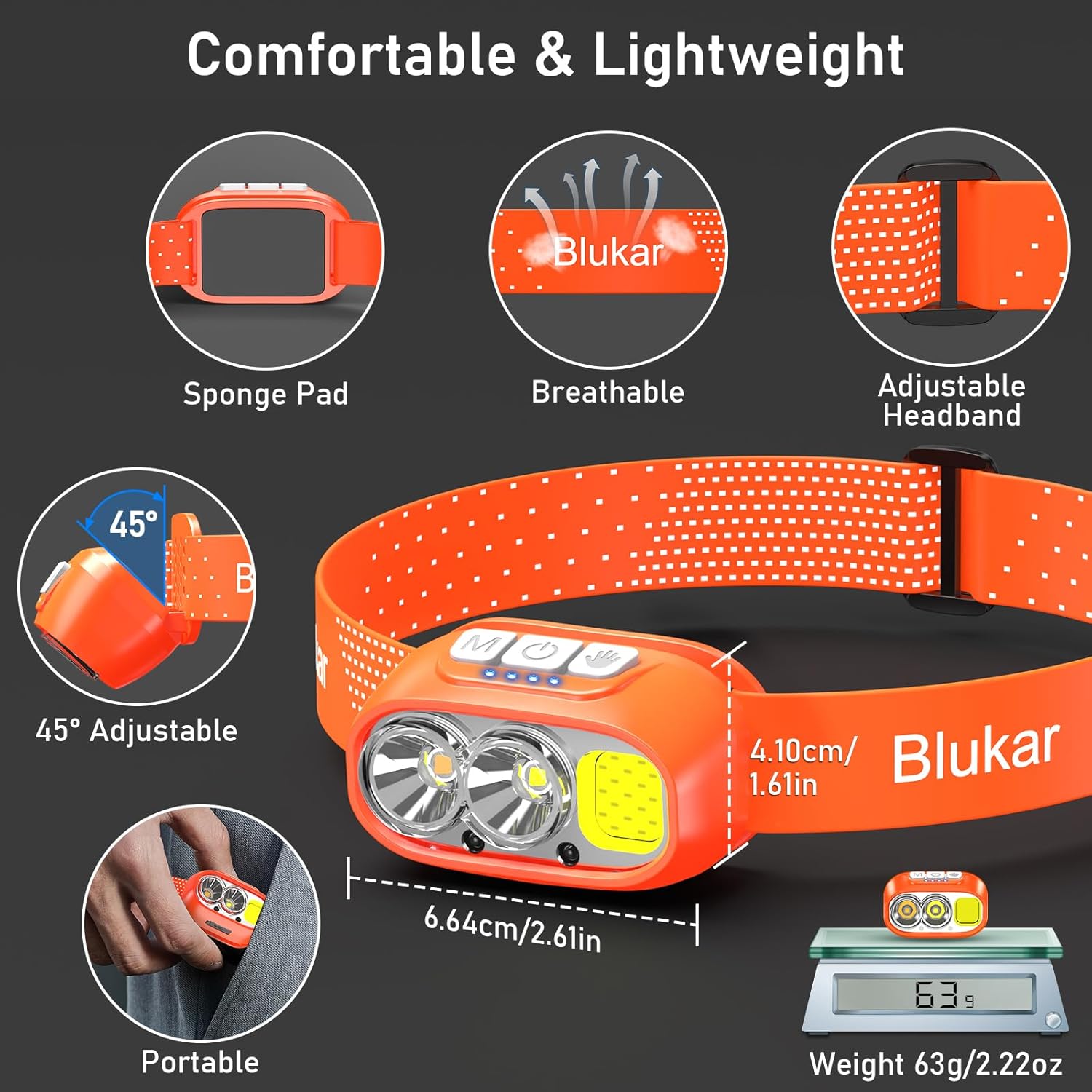
The elastic headband is adjustable to fit various head sizes. Adjust the length for a comfortable and secure fit. The headband is also removable and washable for hygiene.

Image: Details of the headlamp's comfortable and lightweight design, showing the adjustable headband, sponge pad, and 45-degree tilt capability.
3. Attaching to a Helmet (Optional)
Use the included 4 helmet clips to securely attach the headlamp to a helmet for a stable fit during activities.
Інструкція з експлуатації
Функції кнопок

Зображення: Крупний план головиamp's top panel, highlighting the three independent control buttons: 'M' for Normal Mode, a hand icon for Sensor Mode, and a power icon for Power & Dimmer.
- Normal Mode Button (M): Short press to cycle through standard lighting modes.
- Sensor Mode Button (Hand Icon): Short press to activate motion sensor mode (green light indicates activation). Once active, wave your hand within 15cm to turn the light on/off.
- Power & Dimmer Button (Power Icon):
- Short press to turn the light on/off.
- Long press to adjust brightness steplessly (100%-30%).
- Features a memory function for the last used brightness and mode.
Режими освітлення
Хедлamp offers 12 lighting modes, accessible via the Normal Mode button and Sensor Mode button.

Image: Visual representation of the 12 lighting modes available, including various white light combinations, red light, and sensor modes. It also illustrates the stepless dimming function.
- Standard Modes (6): XPG White Light, XPG Warm Light, COB White Light, XPG+COB White Light, COB Red Light, COB Red Light Strobe.
- Sensor Modes (6): The same 6 modes as above, activated by the Sensor Mode button.
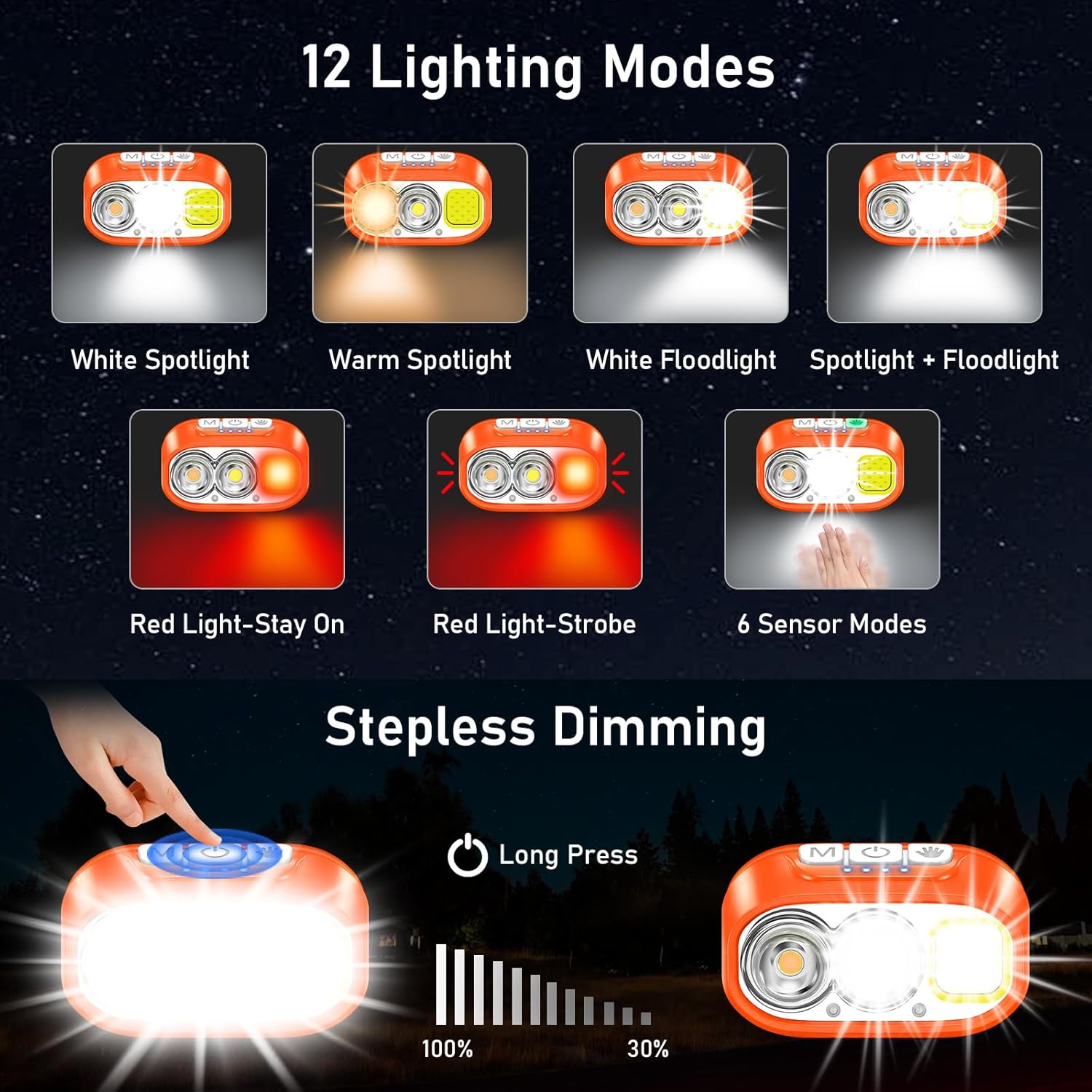
Image: Illustration of the three main light sources: White Light for general use, Warm Light for challenging weather conditions like fog or snow, and Red Light for specialized uses like night fishing or emergency signaling.
Робота датчика руху
To use the motion sensor, press the Sensor Mode button. A green indicator light will illuminate. Once active, simply wave your hand within 15cm (approximately 6 inches) in front of the headlamp to toggle the light on or off without touching the buttons.
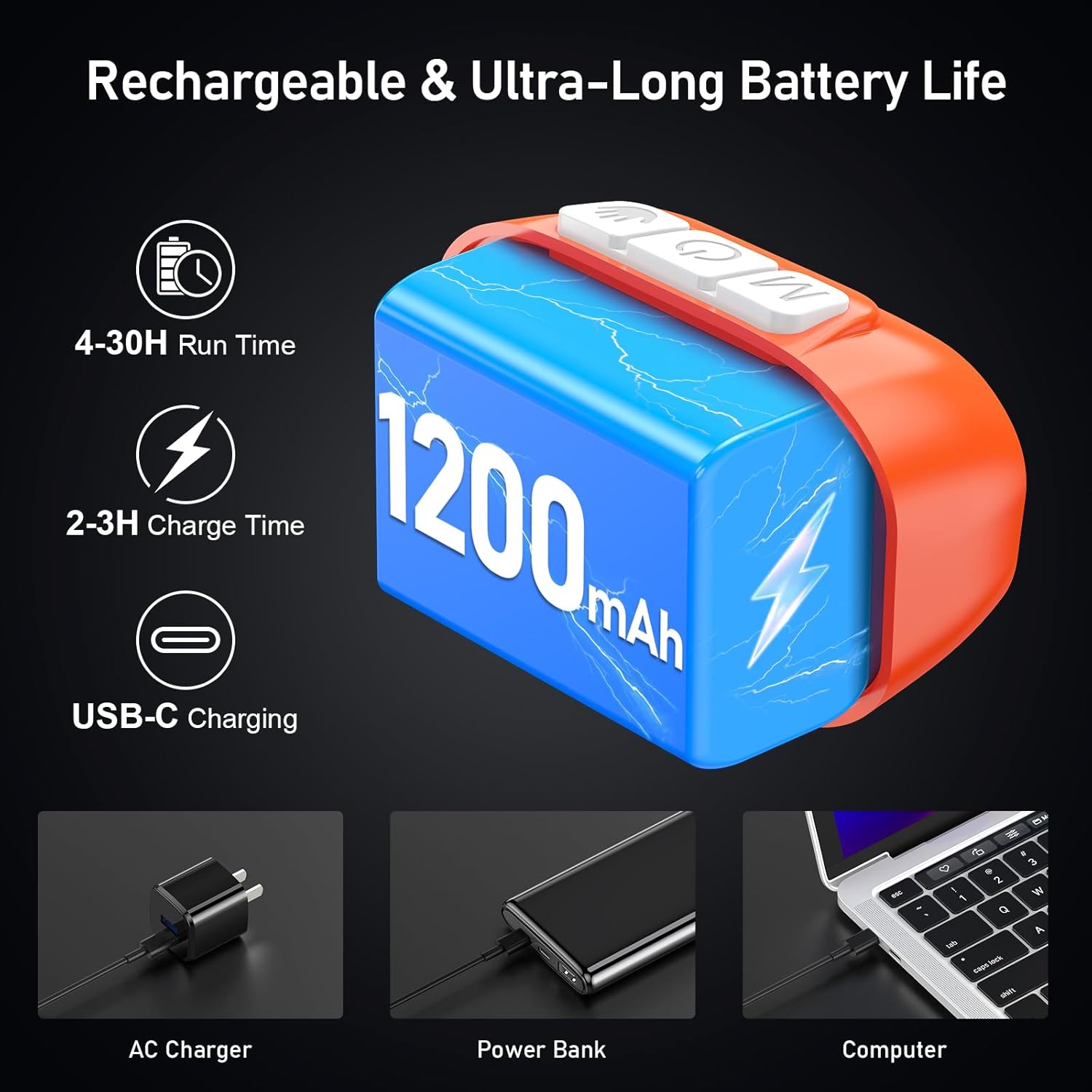
Image: A person demonstrating the motion sensor mode, turning the headlamp on and off with a hand wave while working on a car engine, highlighting the 15cm sensing distance.
Регулювання кута променя
Хедлamp unit can be tilted up or down by 45° to direct the light precisely where needed.
Зображення: Заголовокamp unit is shown with an arrow indicating its 45-degree adjustable tilt capability.
Технічне обслуговування
- Прибирання: The elastic headband is removable and washable. Clean the headlamp тіло з м'яким, damp тканина. Не використовуйте абразивні засоби чи розчинники.
- Догляд за акумулятором: Щоб подовжити термін служби батареї, зарядіть головкуamp regularly, even if not in frequent use. Avoid fully discharging the battery for extended periods.
- Зберігання: Зберігайте головуamp у прохолодному, сухому місці, подалі від прямих сонячних променів і екстремальних температур.
- Водонепроникність: Хедлamp is IPX5 waterproof, meaning it can resist water splashes. Do not submerge the headlamp у воді.
Зображення: Заголовокamp is shown with water splashing over it, illustrating its IPX5 waterproof capability, which protects against water jets from any direction.
Усунення несправностей
| проблема | Можлива причина | Рішення |
|---|---|---|
| Хедлamp turns off unexpectedly in sensor mode. | Sensor reacting to unintended movement or objects. | Switch off the sensor mode if not needed, or ensure no objects are passing within 15cm of the sensor. |
| Хедлamp не включається. | Акумулятор розрядився. | Зарядити головуamp повністю використовуючи наданий кабель USB-C. |
| Світловий потік слабкий. | Low battery or dimming function activated. | Recharge the battery. Long press the Power & Dimmer button to increase brightness. |
| Хедлamp не заряджається. | Несправний кабель або джерело живлення. | Try a different USB-C cable or a different USB power source. Ensure the cable is securely connected. |
Технічні характеристики
| Номер моделі | K9129 |
| Бренд | Блукар |
| матеріал | ABS |
| Колір | Помаранчевий |
| Розміри продукту | 2.61" Г x 1.61" Ш x 1.38" В |
| Вага товару | 84 грамів (2.96 унції) |
| Ємність акумулятора | 1200 мАг |
| Тип батареї | Літій-полімер |
| Час зарядки | 2-3 годин |
| Час виконання | Up to 4 hours (ultra-bright mode), up to 30 hours (soft light mode) |
| Рейтинг водонепроникності | IPX5 |
| Включені компоненти | USB кабель |
Гарантія та підтримка
Blukar products are designed for reliability and performance. For any questions, technical support, or warranty inquiries, please contact Blukar customer service through the retailer where the product was purchased or visit the official Blukar webсайт.
Зберігайте підтвердження покупки для гарантійних претензій.
Ask a question about this manual
Ask about setup, troubleshooting, compatibility, parts, safety, or missing instructions. Manuals+ will review the question and use this page’s manual context to help answer it.