
вступ
This manual provides detailed instructions for the installation, operation, and maintenance of your UNITOPSCI Single Din Car Stereo, Model 6886C. This unit features a 6.86-inch HD touchscreen, Apple CarPlay, Android Auto, Bluetooth 5.0, FM radio, USB connectivity, and support for a backup camera. Please read this manual thoroughly before use to ensure proper functionality and safety.
Вміст упаковки
Перевірте, чи всі перелічені нижче предмети входять до вашої упаковки:
- 1 х Автомагнітола
- 1 x камера резервного копіювання
- 1 х кабель живлення
- 1 кабель динаміка
- 1 х пульт дистанційного керування (батарейка не входить до комплекту)
- 1 х посібник користувача
- 1 х мікрофон

Image: All components included in the UNITOPSCI car stereo package.
Продукт закінченийview
The UNITOPSCI 6886C is a single DIN car stereo featuring a 6.86-inch HD touchscreen. Its compact design allows for installation in standard single DIN openings.
Розміри та з'єднання
The unit measures approximately 187mm (7.3 inches) in length and 52mm (2.0 inches) in height. The screen itself is 6.86 inches. The rear panel includes various ports for power, speakers, microphone, video output, camera input, and GPS antenna.

Зображення: Спереду та ззаду view with dimensions and connection ports labeled.
Налаштування та встановлення
Рекомендується професійне встановлення. Перед початком встановлення переконайтеся, що живлення автомобіля відключено.
Кроки встановлення:
- Prepare Dash Opening: Confirm your vehicle's dash opening is suitable for a single DIN unit (187mm x 52mm). A suitable dash kit may be required if the opening is not standard.
- Підключення проводів: Connect the power cable and speaker cable to the corresponding ports on the car stereo and your vehicle's wiring harness. Refer to the wiring diagram in the included user manual for specific connections.
- Резервна камера: Connect the backup camera cable to the 'CAMIN' port on the rear of the stereo. Ensure the camera's power is correctly wired to the vehicle's reverse light circuit for automatic activation.
- Мікрофон: Connect the external microphone to the 'MIC' port for improved hands-free calling audio quality.
- GPS антена: If applicable, connect the GPS antenna to the 'GPS' port.
- Безпечний підрозділ: Mount the car stereo securely into the dash opening.
- Знову підключіть живлення: Знову підключіть акумулятор автомобіля та перевірте всі функції.
Інструкція з експлуатації
This section details the primary functions and features of your car stereo.
1. Apple CarPlay & Android Auto (Wired Connection)
Connect your iPhone or Android smartphone via a USB cable to access Apple CarPlay or Android Auto. This allows you to use navigation, make calls, send messages, and listen to music directly from your phone's interface displayed on the stereo screen. Voice control (Siri for CarPlay, Google Assistant for Android Auto) is supported for hands-free operation.

Image: Apple CarPlay, Android Auto, and Mirror Link functionality via wired USB connection.
2. Bluetooth 5.0
Pair your mobile device with the stereo via Bluetooth 5.0 for hands-free calling and wireless audio streaming. Access your phonebook and dial directly from the stereo's touchscreen. The Bluetooth name for pairing is 'CAR BT'.
3. FM-радіо
Tune into FM radio stations (frequency range 87.5-108MHz). The unit supports 18 preset stations, allowing quick access to your favorite channels for news, music, and traffic updates.
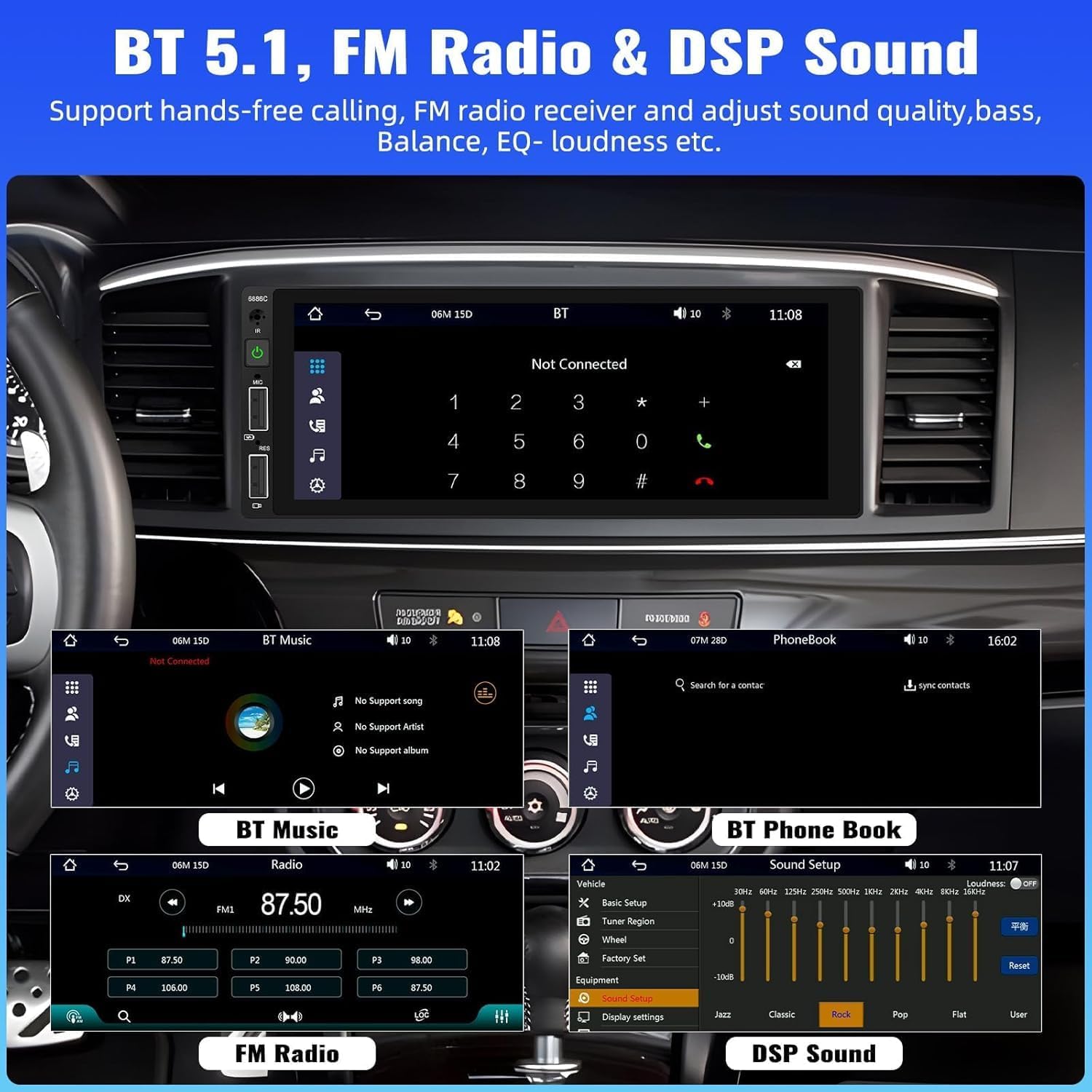
Image: Bluetooth, FM Radio, and Digital Sound Processing (DSP) settings interface.
4. Дзеркальне посилання
Utilize the Mirror Link function to display your smartphone's screen directly on the car stereo. Connect your device using its original USB cable. This feature is useful for viewing maps or playing videos from your phone.
5. Відтворення та заряджання через USB
The stereo features dual USB slots. Use these ports for media playback from USB drives or for fast charging your mobile devices. The unit also supports DVR connection via USB (DVR not included).

Image: Multiple playback options including USB charging and DVR support.
6. EQ Sound Feature
Adjust the audio output to your preference using the built-in EQ sound feature. Customize settings for bass, balance, and loudness to optimize your listening experience.
7. Керування на кермі (SWC)
If your vehicle supports it, connect the steering wheel control wires to easily manage radio functions, adjust volume, and handle calls without taking your hands off the wheel. This enhances driving safety.
8. Вхід резервної камери
When the vehicle is shifted into reverse gear, the stereo automatically displays the video feed from the connected backup camera. The included camera features 4 LED lights for clear night vision and parking lines to assist with safer parking maneuvers.

Image: Backup camera input and steering wheel control interface.
9. Seven Color Backlight
Customize the button backlight color to match your vehicle's interior or your personal preference. Choose from seven available colors.
10. Пам'ять вимкнення живлення
The unit retains the last playing state (e.g., radio station, music track) when powered off and resumes from that point upon restart.
Технічне обслуговування
Щоб забезпечити довговічність та оптимальну роботу вашої автомобільної стереосистеми, дотримуйтесь цих правил технічного обслуговування:
- Прибирання: Використовуйте м’яку суху тканину для очищення екрана та зовнішньої поверхні. Уникайте абразивних засобів для чищення або розчинників.
- температура: Уникайте впливу на пристрій екстремальних температур.
- вологість: Тримайте пристрій сухим та подалі від вологи.
- Оновлення прошивки: Перевірте виробника website periodically for any available firmware updates to improve performance and add features.
Усунення несправностей
Якщо у вас виникли проблеми з автомобільною стереосистемою, зверніться до наступних поширених проблем та способів їх вирішення:
| проблема | Можлива причина | Рішення |
|---|---|---|
| Немає живлення | Неправильна проводка; перегорілий запобіжник; низький заряд акумулятора автомобіля. | Перевірте підключення живлення; замініть запобіжник; перевірте акумулятор автомобіля. |
| Немає звуку | Дроти динаміків відключені; Гучність занадто низька; Функція вимкнення звуку активована. | Verify speaker connections; Increase volume; Deactivate mute. |
| Bluetooth не підключається | Bluetooth not enabled on device; Incorrect pairing process. | Ensure Bluetooth is on; Re-attempt pairing (Bluetooth name: CAR BT). |
| CarPlay/Android Auto не працює | Несправний USB-кабель; телефон несумісний; проблема з програмним забезпеченням. | Use original USB cable; Check phone compatibility; Restart phone and stereo. |
| Backup Camera No Display | Camera not powered; Video cable disconnected; Incorrect trigger wire. | Check camera power supply; Verify video cable connection; Ensure reverse trigger wire is connected. |
Технічні характеристики
Detailed technical specifications for the UNITOPSCI 6886C car stereo:
- модель: 6886C
- томtage: DC12V
- система: Здригатися
- CPU Chip: F133
- Розмір екрана: 6.86 дюймів
- Роздільна здатність екрану: 1280*480
- Дзеркальне посилання: Підтримується
- Радіогрупа: FM
- Радіочіп: QN8035
- Вихідна потужність: 45W*4 (180 Watts total)
- Робоча температура: -10~60 ℃
- Версія Bluetooth: 5.0
- Назва Bluetooth: АВТОМОБІЛЬ БТ
- Барвиста підсвітка: Підтримується
- Реверсивний вхід: CVBS
- потужність Ampчіп ліфіера: TDA7388
- Радіочастота: 87.5-108 МГц
- Підтримка аудіоформату: MP3 / WMA / WAV / APE / FLAC
- Підтримка форматів відео: RM/RMVB/AVI/MP4/MKV/3GP
- Picture Format Support: JPG BMP PNG
- Підтримувані мови: Англійська, китайська, іспанська, португальська, російська, італійська, німецька, французька, турецька, чеська, арабська, польська, іврит
Гарантія та підтримка
Ваша автомобільна стереосистема UNITOPSCI постачається з Гарантія 2 рік from the date of purchase, covering manufacturing defects. For technical assistance, troubleshooting, or warranty claims, please contact our support team.
Інтернет-підтримка: UNITOPSCI@126.com