
1. Продукт закінчивсяview
The WESECUU Light Bulb Security Camera offers comprehensive home surveillance with easy installation. Designed for both indoor and outdoor use, this camera provides a 360° panoramic view, motion tracking, and AI detection for enhanced security.
- Легке встановлення: Screws into a standard light bulb socket, requiring no drilling or complex wiring.
- 360 ° панорамний View & Auto Motion Tracking: Provides full-area coverage and automatically follows detected movement.
- Розумне виявлення AI: Distinguishes between people and other movements to reduce false alerts.
- Двостороннє аудіо: Features a built-in speaker and microphone for real-time communication.
- 24/7 Day & Night Monitoring: Ensures continuous surveillance in various lighting conditions.

2. Вміст упаковки
Будь ласка, перевірте наявність усіх предметів у вашій упаковці:
- Камера безпеки WESECUU з лампочкою
- Інструкція з експлуатації (цей документ)
3. Інструкції з налаштування
3.1 Фізичне встановлення
The camera is designed for simple installation into a standard E27/E26 light bulb socket.
- Ensure the power to the light socket is turned off at the circuit breaker before installation.
- Carefully screw the WESECUU Light Bulb Security Camera into the light bulb socket until it is secure. Do not overtighten.
- Turn the power back on at the circuit breaker. The camera will power on and initiate its startup sequence.
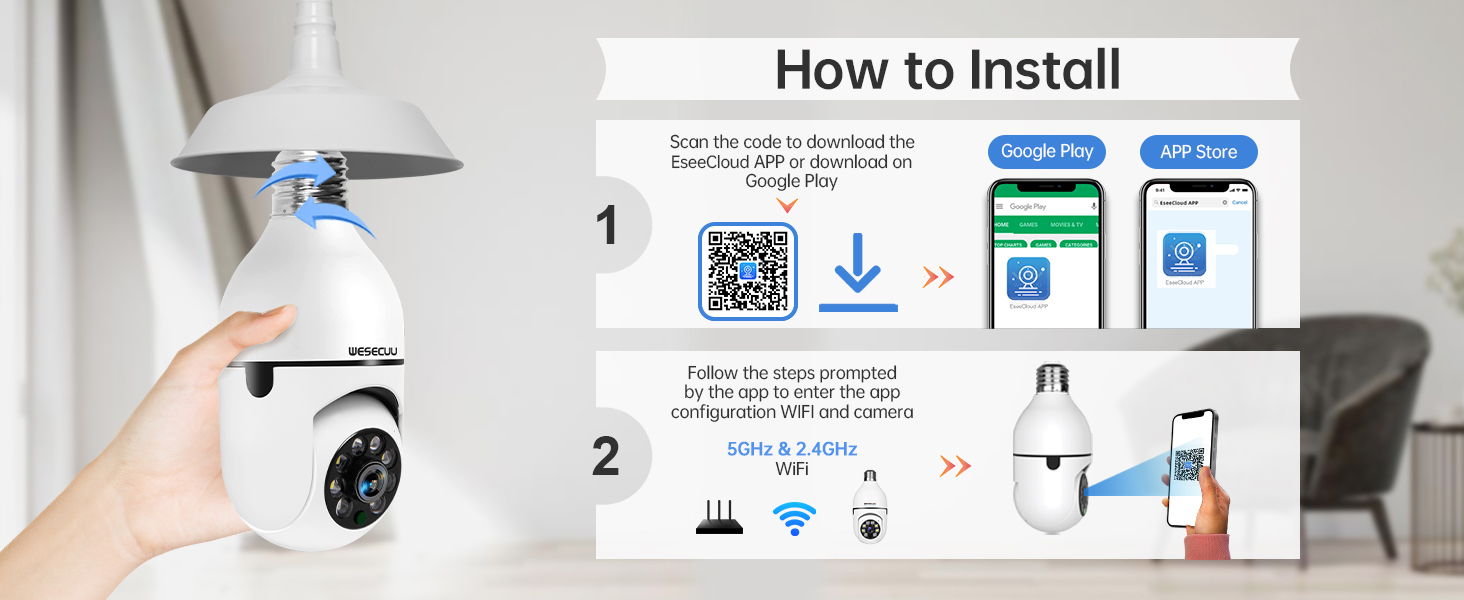
3.2 App Download and Camera Pairing
To operate your camera, you need to download the EseeCloud APP and pair the device.
- Download the EseeCloud APP from the Google Play Store or Apple App Store. You can also scan the QR code provided in the installation image below or visit http://www.e-seenet.com/download/indexm.php?p=tjesee.
- Open the EseeCloud APP and create an account or log in.
- Follow the in-app instructions to add your new camera. Ensure your smartphone is connected to a 2.4GHz or 5GHz Wi-Fi network during the pairing process. The camera supports both 2.4GHz and 5GHz Wi-Fi.
- Once successfully paired, you can access the live feed and camera settings through the app.
4. Інструкція з експлуатації
4.1 Живий View і Відтворення
Access the EseeCloud APP to view the live feed from your camera. You can also review записаний footage from the SD card (if installed) or cloud storage (if subscribed).

4.2 Виявлення та відстеження руху
The camera features advanced motion detection and automatic tracking. When motion is detected, the camera will pan and tilt to follow the subject, ensuring continuous coverage. Alerts will be sent to your smartphone.

4.3 AI Detection Alerts
The integrated AI technology helps differentiate between human movement and other sources of motion, such as pets or passing vehicles, reducing irrelevant notifications.

4.4 Двосторонній аудіозв'язок
Utilize the two-way audio feature to communicate through the camera. This allows you to speak to visitors, deter intruders, or comfort pets remotely.

4.5 Нічне бачення
The camera provides both full-color night vision and infrared night vision modes for clear monitoring in low-light conditions.

4.6 Варіанти зберігання
The camera supports local storage via an SD card (16-128GB, not included) and offers optional cloud storage plans for continuous recording and advanced features.

5. Технічне обслуговування
Щоб забезпечити оптимальну роботу та довговічність вашої камери безпеки WESECUU Light Bulb, дотримуйтесь цих інструкцій з технічного обслуговування:
- Очищення лінз: Gently wipe the camera lens with a soft, dry microfiber cloth to remove dust or smudges. Avoid abrasive cleaners.
- Джерело живлення: Ensure the camera receives a stable power supply. Avoid frequent power interruptions.
- Оновлення прошивки: Regularly check the EseeCloud APP for available firmware updates to ensure your camera has the latest features and security enhancements.
- Умови навколишнього середовища: While designed for outdoor use, avoid direct exposure to extreme weather conditions if possible, and ensure the light socket is weather-protected.
6. Вирішення проблем
If you encounter issues with your WESECUU Light Bulb Security Camera, refer to the following common solutions:
- Камера не підключається до Wi-Fi:
- Переконайтеся, що ваша мережа Wi-Fi працює на частоті 2.4 ГГц або 5 ГГц та стабільна.
- Перевірте, чи правильно введено пароль Wi-Fi у застосунку.
- Під час налаштування перемістіть камеру ближче до маршрутизатора Wi-Fi.
- Перезавантажте роутер і камеру.
- Немає зображення або чорний екран:
- Check if the camera is properly powered on and the light socket has power.
- Ensure the camera lens is not obstructed.
- Restart the camera by turning off and on the power to the socket.
- Виявлення руху не працює:
- Check motion detection settings in the EseeCloud APP.
- Ensure the detection sensitivity is set appropriately.
- Verify that notification permissions are enabled for the app on your smartphone.
- Погана якість зображення:
- Очистіть об'єктив камери.
- Ensure adequate lighting for optimal image clarity, especially for color night vision.
- Check your internet connection speed, as a slow connection can affect streaming quality.

Figure 10: Visual comparison demonstrating the superior clarity of WESECUU's 3MP resolution compared to other standard resolutions.
7. Технічні характеристики
| Особливість | Специфікація |
|---|---|
| Номер моделі | TP-8052BW3 |
| Бренд | ВЕСЕКУУ |
| Використання в приміщенні/зовні | Відкритий |
| Технологія підключення | Бездротовий (Wi-Fi) |
| Протокол підключення | Wi-Fi (2.4 ГГц та 5 ГГц) |
| Джерело живлення | Провідний електричний |
| Роздільна здатність захоплення відео | 4K |
| Тип монтажу | Стельове кріплення |
| Особливість | Регульована |
| Сумісні пристрої | Amazon Alexa |
| Тип контролера | Amazon Alexa |
| Розміри продукту (Д x Ш x В) | 1 x 1 x 1 дюймів |
| Вага товару | 7.2 унцій (0.21 кілограма) |
8. Інформація про гарантію
For detailed warranty information, please refer to the warranty card included with your product packaging or visit the official WESECUU webсайт. Гарантійні умови можуть відрізнятися залежно від регіону та дати придбання.
9. Підтримка клієнтів
If you require further assistance or have questions not covered in this manual, please contact WESECUU customer support:
- Гаряча лінія для клієнтів: +1-888-9716718
- години роботи: Тихоокеанський стандартний час 6:00 - 3:00, з понеділка по п'ятницю
- Інтернет-підтримка: Visit the official WESECUU webсайт із поширеними запитаннями, ресурсами підтримки та контактними формами.