
1. Вступ
This manual provides comprehensive instructions for the installation, operation, and maintenance of your B2 Audio SixTen 10-Channel Digital Signal Processor (DSP). Please read this manual thoroughly before using the device to ensure proper functionality and to maximize its performance.
2. Продукт закінчивсяview
The B2 Audio SixTen DSP is an advanced digital signal processor designed for precise audio customization in car audio systems. It features 6 inputs and 10 outputs, offering extensive control over your sound environment.
Ключові характеристики:
- Advanced Digital Signal Processing: 6-input, 10-output DSP with 96 kHz, 32-bit resolution for clear audio and precise tuning.
- Бездротове управління: Adjust settings via Bluetooth using the dedicated iOS & Android application for real-time customization.
- High-Voltage Вихід: Each of the 10 output channels delivers a 4-volt signal for optimal performance.
- Компактний дизайн: Engineered for seamless integration with a space-saving form factor of 4.5” x 5.75” x 1.5”.
- Звук професійного рівня: Designed for precise frequency control, low distortion, and superior sound stagінж.

Зображення: Кутове view of the B2 Audio SixTen DSP, highlighting its compact design and various connection points.
Що в коробці:
- (1) B2 Audio SixTen 6-Input, 10-Output 4V DSP

Image: The retail packaging for the B2 Audio SixTen DSP, indicating the product is ready for installation.
3. Інформація про безпеку
Дотримуйтесь наступних запобіжних заходів під час встановлення та експлуатації:
- Завжди від'єднуйте акумулятор автомобіля перед початком будь-яких електромонтажних робіт.
- Забезпечте належне заземлення, щоб запобігти небезпеці ураження електричним струмом.
- Do not expose the DSP to moisture or extreme temperatures.
- Якщо ви не впевнені щодо будь-якої частини процесу встановлення, зверніться до професійного установника.
- Use appropriate gauge wiring for power and signal connections.
4. Налаштування та встановлення
Proper installation is crucial for optimal performance. This section outlines the steps for physically installing and connecting the DSP.
4.1 Фізичне встановлення
- Choose a dry, well-ventilated location in your vehicle, away from direct heat sources or moving parts.
- Mount the DSP securely using appropriate fasteners to prevent vibration.
- Ensure sufficient space around the unit for air circulation and cable management.
4.2 Підключення проводів
The B2 Audio SixTen DSP features 6 RCA inputs and 10 RCA outputs, along with a power terminal block.
- Підключення живлення: Connect the power terminal block to a fused 12V constant power source, ground, and a remote turn-on lead from your head unit.
- Вхідні з'єднання: Connect your audio source (e.g., head unit, auxiliary input) to the RCA input jacks (AUX1-AUX6).
- Вихідні з'єднання: Connect the RCA output jacks (OUT1-OUT10) to your amplifiers. Each output can be configured for specific channels (e.g., front left, front right, subwoofer).

Image: Front panel of the DSP, illustrating the RCA input connections (AUX1-AUX6) and the power terminal block.

Image: Rear panel of the DSP, displaying the 10 RCA output connections (OUT1-OUT10).
5. Інструкція з експлуатації
The B2 Audio SixTen DSP is primarily controlled via a dedicated mobile application available for iOS and Android devices.
5.1 Підключення Bluetooth
- Ensure the DSP is powered on. The "BT" indicator light on the unit should be active.
- На смартфоні або планшеті увімкніть Bluetooth і знайдіть доступні пристрої.
- Select the B2 Audio SixTen DSP from the list of devices. Follow any on-screen prompts to complete pairing.
- Open the B2 Audio DSP application. The app should automatically detect and connect to the paired DSP.
5.2 Використання мобільного застосунку
The application provides a graphical interface for all DSP functions, including:
- Маршрутизація вводу/виводу: Assign specific inputs to desired output channels.
- Еквалайзер (EQ): Adjust the frequency response for each channel using a multi-band equalizer.
- Кросовери: Set high-pass, low-pass, and band-pass filters for each output to direct specific frequency ranges to appropriate speakers.
- Вирівнювання часу: Adjust the delay for each channel to ensure sound from all speakers arrives at the listening position simultaneously.
- Gain Control: Fine-tune the output level for each channel.
- Обмежувач: Monitor and manage output levels to prevent clipping and speaker damage. The unit features "CLIP L" and "CLIP R" indicators.
- Керування попередніми настройками: Save and recall multiple audio configurations for different listening preferences or music genres.
Refer to the in-app help or tutorials for detailed guidance on specific tuning parameters.
6. Технічне обслуговування
The B2 Audio SixTen DSP requires minimal maintenance to ensure long-term performance.
- Тримайте пристрій чистим та без пилу та сміття. Використовуйте м’яку суху тканину для очищення.
- Переконайтеся, що всі з'єднання надійно закріплені. Періодично перевіряйте проводку на наявність будь-яких ознак зносу або корозії.
- Уникайте тривалого перебування пристрою під екстремальними температурами або прямими сонячними променями.
- Ensure adequate ventilation around the unit to prevent overheating, especially during prolonged operation.
7. Вирішення проблем
If you encounter issues with your B2 Audio SixTen DSP, refer to the following common problems and solutions:
| проблема | Можлива причина | Рішення |
|---|---|---|
| Немає живлення / Пристрій не вмикається | Неправильне підключення проводки, перегорілий запобіжник, недостатнє живлення. | Check power, ground, and remote connections. Verify fuse integrity. Ensure vehicle battery is charged. |
| Немає аудіовиходу | Incorrect input/output routing, muted channels, incorrect gain settings, faulty RCA cables. | Verify input source and output connections. Check app settings for muted channels or low gain. Test RCA cables. |
| Спотворений звук | Input signal too high, output gain too high, clipping. | Reduce input sensitivity or output gain. Monitor "CLIP L/R" indicators and adjust levels to prevent clipping. |
| Проблеми з підключенням Bluetooth | DSP not in pairing mode, interference, app issues. | Ensure DSP is powered on. Restart the app and your mobile device. Try re-pairing the device. Move closer to the DSP. |
| Пристрій нагрівається | Insufficient ventilation, prolonged high-power operation. | Ensure adequate airflow around the unit. Reduce output levels if operating at maximum for extended periods. |
If the problem persists after attempting these solutions, contact B2 Audio customer support for further assistance.
8. Технічні характеристики
The following are the technical specifications for the B2 Audio SixTen DSP:
| Особливість | Специфікація |
|---|---|
| Номер моделі | B2-DSP-SIXTEN-BK |
| Вхідні дані | 6 (3 Left / 3 Right) |
| Вхідні роз’єми | RCA |
| Максимальний вхідний рівень | 4.00 Vrms (+14dBu) |
| Виходи | 10 |
| Максимальний вихідний рівень | 3.50 Vrms (+13dBu) |
| АЧХ | від 10 Гц до 24 кГц (-1 дБ) |
| Повне гармонічне спотворення + шум (THD + N) | <0.01% |
| Затримка сигналу | <0.6 мс |
| Бітрейт | 32-розрядний |
| SampЛінг Частота | 96 кГц |
| Робочий випtage DC | 9.5 - 15 В постійного струму |
| Максимальне споживання струму | 350 мА |
| Технологія підключення | Bluetooth, RCA |
| Тип контролера | Bluetooth |
| Сумісні пристрої | Smartphone, Speaker, Tablet, iPhone |
| Розміри продукту (Д x Ш x В) | 4.5 x 5.75 x 1.5 дюймів |
| Вага товару | 1.06 фунта |
| Колір | чорний |
| Режим аудіовиходу | Mono (Note: Configurable for multi-channel output via DSP software) |
| Конфігурація каналу об’ємного звуку | 5.1 (Note: Configurable for various channel setups via DSP software) |
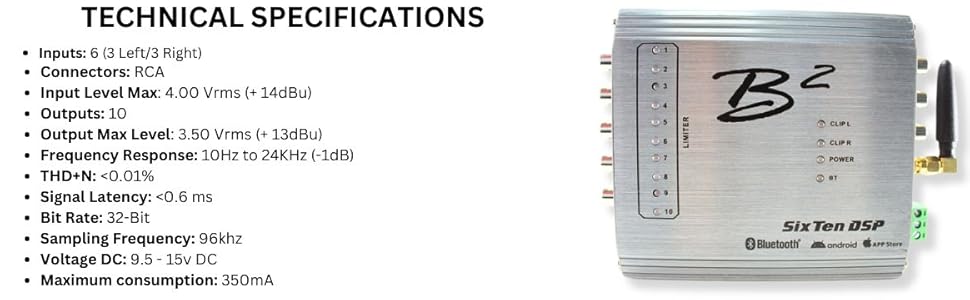
Image: A visual representation of the B2 Audio SixTen DSP's technical specifications, including input/output details and performance metrics.
9. Гарантія та підтримка
For warranty information and technical support, please refer to the official B2 Audio webсайт або зверніться до авторизованого дилера. Зберігайте чек про покупку як підтвердження покупки для гарантійних претензій.
Виробник: B2 Audio
Webсайт: www.b2audio.com