
1. Продукт закінчивсяview
The Cooler Master Elite 490 is a compact mATX computer case designed for high-performance builds. It features a 270° tempered glass panel for showcasing components, efficient cooling options, and modern connectivity.
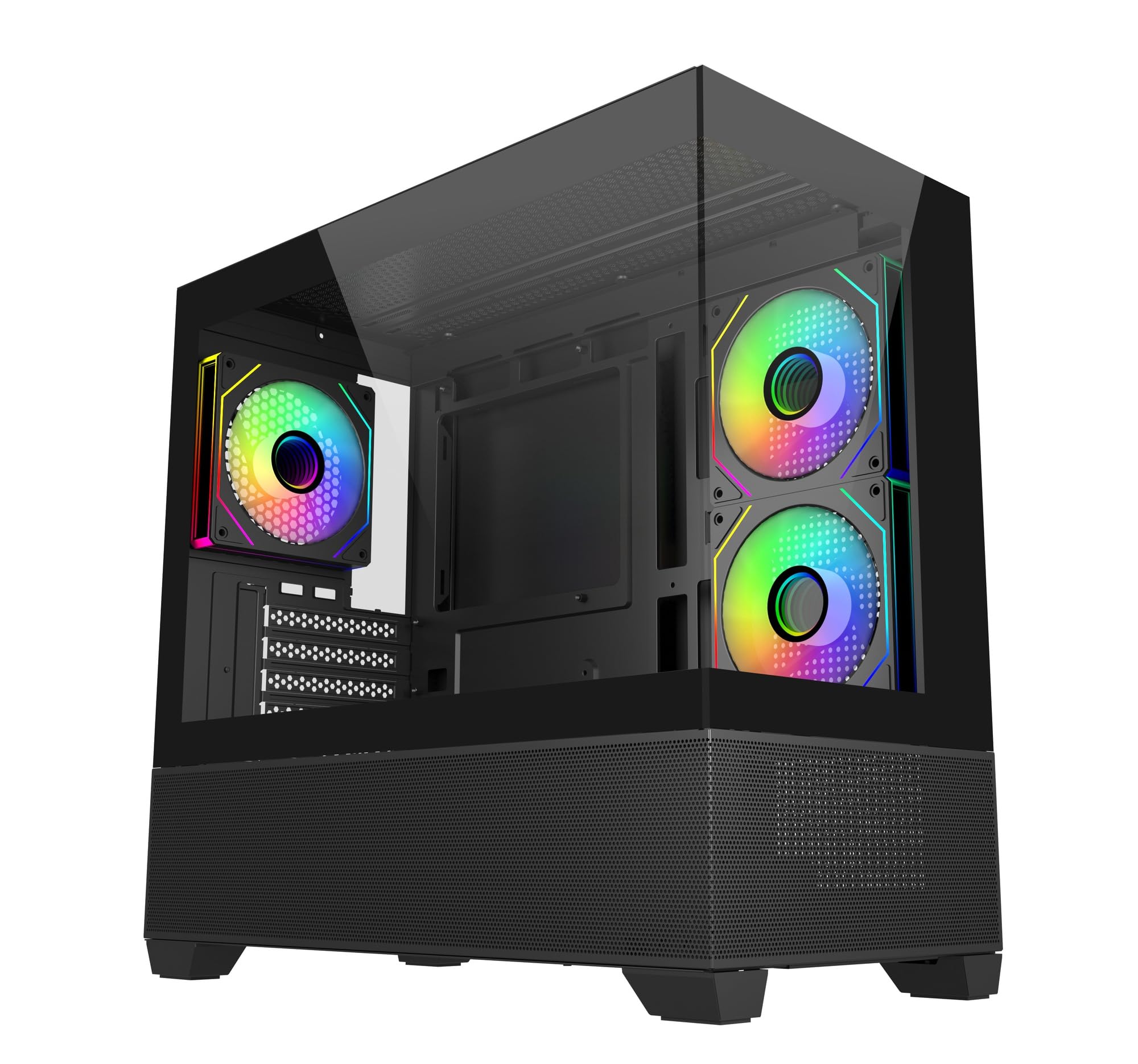
Зображення: Кутове view of the Cooler Master Elite 490 computer case, showcasing its tempered glass panels and internal components with ARGB lighting.
Ключові характеристики:
- 270° Tempered Glass Panels: Dual tempered glass panels with seamless beveled edges provide a wide-angle view вашої системи.
- Compact mATX Form Factor: Designed for desks or tight spaces without compromising on cooling or GPU compatibility.
- High-End Radiator Support: Supports up to a 360mm radiator for advanced liquid cooling solutions.
- Vertical Cooling Configuration: Accommodates up to 9 fans with a bottom-to-top airflow layout for efficient heat dissipation.
- Попередньо встановлені ARGB-вентилятори: Includes 3 ARGB fans (2 reverse-blade side intake, 1 rear exhaust) with daisy-chain connectors and motherboard sync support.
- Top and Bottom Mesh Ventilation: Large mesh zones ensure unobstructed airflow.
- Підтримка відеокарт серії RTX 50: GPU clearance up to 410mm for next-generation graphics cards.
- Оновлена високошвидкісна панель вводу/виводу: Features dual USB 3.0 Type-A ports and a USB 3.2 Gen 2x2 Type-C port (up to 20Gbps).
2. Налаштування та встановлення
This section provides general guidelines for assembling your computer components within the Cooler Master Elite 490 case. Always refer to your component manuals for specific installation instructions.
2.1 Розпакування та перевірка
- Обережно вийміть футляр з упаковки.
- Inspect the case for any signs of damage during transit. Contact your retailer immediately if any damage is found.
- Зніміть усі захисні плівки з панелей із загартованого скла.
- Identify the accessory box, which typically contains screws, zip ties, and other mounting hardware.

Зображення: спереду view of the Cooler Master Elite 490 case, showing the tempered glass and mesh bottom panel.
2.2 Встановлення материнської плати
- Lay the case on its side.
- Install the I/O shield (if not pre-installed on your motherboard).
- Align your mATX motherboard with the standoffs inside the case. Ensure all standoffs match the motherboard's mounting holes.
- Secure the motherboard with the appropriate screws provided in the accessory kit.

Зображення: Внутрішнє view of the Elite 490 case highlighting motherboard support for ITX/Micro ATX form factors.
2.3 Встановлення блоку живлення (БП)
- Mount your PSU in the designated bottom compartment.
- Закріпіть блок живлення гвинтами ззаду корпусу.
- Прокладіть необхідні кабелі живлення через вирізи для кабелів до материнської плати та інших компонентів.
2.4 Встановлення відеокарти та плати розширення
- Зніміть необхідні кришки слотів PCIe із задньої частини корпусу.
- Вставте відеокарту або інші карти розширення у відповідні слоти PCIe на материнській платі.
- Secure the cards with screws. The Elite 490 supports GPUs up to 410mm in length.

Зображення: Внутрішнє view of the Elite 490 case demonstrating compatibility with large graphics cards, indicating it is ready for RTX 50 Series GPUs.
2.5 Встановлення накопичувача
The case provides internal bays for storage drives. Refer to the case diagram for specific mounting locations for 2.5" SSDs and 3.5" HDDs.
2.6 Cooling System Installation (Optional)
The Elite 490 supports various cooling configurations:
- Фанати: Up to 9 fans can be installed for optimal airflow. The case comes with 3 pre-installed ARGB fans.
- радіатори: Supports radiators up to 360mm.

Зображення: Внутрішнє view of the Elite 490 case showing a liquid cooling radiator installed at the top, illustrating high-end radiator support.

Зображення: Внутрішнє view of the Elite 490 case demonstrating the vertical cooling layout with multiple fans for effective heat management.
2.7 Організація кабелів
Використовуйте канали для прокладання кабелів та точки кріплення за лотком материнської плати для організації кабелів. Це покращує потік повітря та естетику.
3. Інструкція з експлуатації
Після встановлення та підключення всіх компонентів можна ввімкнути систему.
3.1 Увімкнення
- Переконайтеся, що всі зовнішні кабелі (живлення, монітора, периферійних пристроїв) надійно підключені.
- Press the power button located on the front I/O panel.
3.2 Front I/O Panel Usage
Передня панель вводу/виводу забезпечує зручний доступ до:
- Кнопка живлення: Щоб увімкнути або вимкнути систему.
- Кнопка скидання: Для перезавантаження системи.
- Порти USB 3.0 типу A (x2): Для підключення USB-пристроїв.
- USB 3.2 Gen 2x2 Type-C Port (x1): For high-speed data transfer (up to 20Gbps) with compatible devices.
- Аудіороз'єми: Для навушників та мікрофонів.

Зображення: Крупний план view of the Elite 490's top I/O panel, highlighting the USB 3.2 Gen 2x2 Type-C port and dual USB 3.0 ports.
3.3 Керування вентилятором ARGB
The pre-installed ARGB fans can be controlled via your motherboard's ARGB software (e.g., ASUS Aura Sync, MSI Mystic Light, Gigabyte RGB Fusion, ASRock Polychrome Sync) if connected to a compatible ARGB header. Refer to your motherboard manual for specific software instructions.
4. Технічне обслуговування
Регулярне технічне обслуговування допомагає забезпечити оптимальну продуктивність та довговічність компонентів вашого комп'ютера.
4.1 Очищення пилового фільтра
The Elite 490 features removable dust filters on the top and bottom panels. Regularly clean these filters to prevent dust buildup and maintain good airflow.
- Gently slide out the dust filters.
- Використовуйте стиснене повітря або м’яку щітку для видалення накопиченого пилу.
- Надійно встановіть фільтри назад.
4.2 Зовнішнє очищення
Протріть зовнішні поверхні, включаючи панелі із загартованого скла, м’якою губкоюamp тканиною. Уникайте абразивних засобів для чищення або розчинників, які можуть пошкодити покриття.
5. Вирішення проблем
У цьому розділі розглядаються поширені проблеми, з якими ви можете зіткнутися.
5.1 Система не вмикається
- Перевірте, чи кабель живлення надійно підключений як до блоку живлення, так і до розетки.
- Переконайтеся, що перемикач блоку живлення знаходиться в положенні «УВІМК.».
- Verify that the front panel power button cable is correctly connected to the motherboard's F_PANEL header.
- Confirm that all internal power cables (24-pin ATX, CPU, GPU) are properly seated.
5.2 Fans Are Not Spinning / ARGB Not Lighting Up
- Check if the fan power cables are securely connected to the motherboard fan headers or a fan controller.
- For ARGB lighting, ensure the ARGB cables are connected to a compatible motherboard ARGB header or a dedicated ARGB controller.
- Перевірте, чи правильно встановлено та налаштовано програмне забезпечення ARGB вашої материнської плати.
5.3 Передні порти вводу/виводу не працюють
- Ensure the USB and audio cables from the front panel are correctly connected to the corresponding headers on your motherboard.
- Check your motherboard manual for the correct header locations.
6. Технічні характеристики
Detailed technical specifications for the Cooler Master Elite 490 Computer Case.
| Особливість | Специфікація |
|---|---|
| Бренд | Cooler Master |
| Назва моделі | E490 |
| Номер моделі | E490-KHNN-S00 |
| Тип корпусу | Середній вежі |
| Сумісність материнської плати | Micro ATX |
| Розміри (Д x Ш x В) | 53.1 Г x 54.4 Ш x 26.1 В сантиметрів |
| Вага товару | 5800 грамів |
| Матеріал корпусу | Алюміній |
| Спосіб охолодження | повітря |
| Попередньо встановлені вентилятори | 3 ARGB Fans (2 reverse-blade side intake, 1 rear exhaust) |
| Максимальна підтримка вентилятора | До 9 вентиляторів |
| Максимальна підтримка радіатора | До 360 мм |
| Очищення GPU | До 410 мм |
| Total USB 3.0 Ports | 2 |
| USB 3.2 Gen 2x2 Type-C Port | 1 (20 Гбіт/с) |
| Internal Bays Quantity | 3 |
| Other Special Features | Customizable Inter-changeable Panels, 270° Tempered Glass |
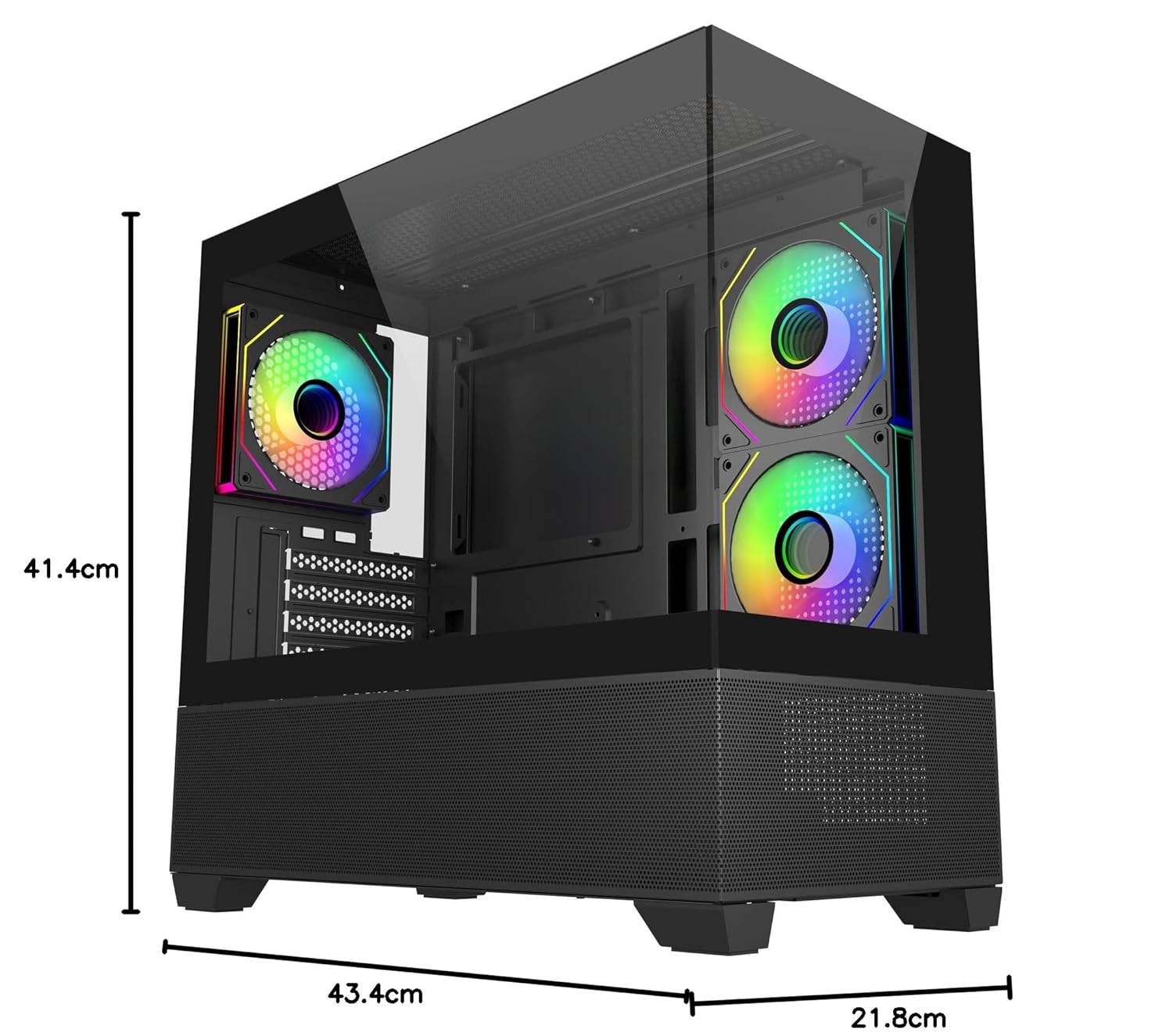
Image: Diagram showing the dimensions of the Cooler Master Elite 490 computer case: 41.4cm height, 43.4cm depth, and 21.8cm width.
7. Гарантія та підтримка
7.1 Інформація про гарантію
The Cooler Master Elite 490 Computer Case comes with a 2 років warranty from the date of purchase. Please retain your proof of purchase for warranty claims.
7.2 Технічна підтримка
For technical assistance, troubleshooting, or warranty inquiries, please contact Cooler Master support:
- Виробник: Cooler Master
- Імпортер: Creative New Tech
- Відвідайте офіційний сайт Cooler Master website for support resources and contact details: www.coolermaster.com