
1. Вступ
Дякуємо за покупкуasing the AIKELA ZJ-027 5-in-1 Induction Bluetooth Speaker. This versatile device combines a wireless induction speaker, Bluetooth speaker, power bank, phone stand, and LED light, designed to enhance your audio and mobile experience. Please read this manual carefully to ensure proper use and optimal performance.
2. Інформація про безпеку
- Тримайте пристрій подалі від води, вологи та екстремальних температур.
- Не намагайтеся самостійно розібрати або відремонтувати пристрій. Зверніться по допомогу до служби підтримки клієнтів.
- Використовуйте лише наданий зарядний кабель або його сертифікований еквівалент.
- Уникайте розміщення важких предметів на пристрої.
- Зберігати в недоступному для дітей місці.
3. Вміст упаковки
Перевірте наявність усіх предметів у вашій упаковці:
- AIKELA 5-in-1 Induction Speaker (Model: ZJ-027) x 1
- Зарядний кабель Type-C x 1
- Посібник користувача x 1
- Короткий посібник x 1

Image: What you will receive with your AIKELA ZJ-027 speaker.
4. Продукт закінчивсяview
The AIKELA ZJ-027 is a multifunctional device designed for convenience and enhanced audio. It features:
- Induction Speaker: Play audio by simply placing your phone on the stand, no Bluetooth pairing needed.
- Динамік Bluetooth: Connect wirelessly via Bluetooth 5.3 for stable, high-quality audio.
- Підставка для телефону: Adjustable 360° vertical rotation for optimal viewкути.
- Сильний банк: Built-in 3500mAh battery for emergency phone charging.
- Світлодіодне світло: Барвисте амбієнтне підсвічування з кількома режимами.

Image: The AIKELA ZJ-027 5-in-1 Induction Speaker in use, highlighting its multiple functions.

Зображення: Детальне view of the speaker driver, illustrating its capability for massive, booming sound with crystal-clear quality.
5. Налаштування
5.1 Заряджання динаміка
Before first use, fully charge the speaker. Connect the provided Type-C cable to the charging port on the speaker and the other end to a USB power adapter (not included). A full charge takes approximately 2 hours and provides 5-8 hours of playtime, depending on volume levels.

Image: Battery life and charging time information.
5.2 Adjusting the Phone Stand
The integrated phone stand can be rotated 360° vertically to achieve your desired viewing angle. Ensure the non-slip silicone on the base, back, and slot keeps your phone secure.
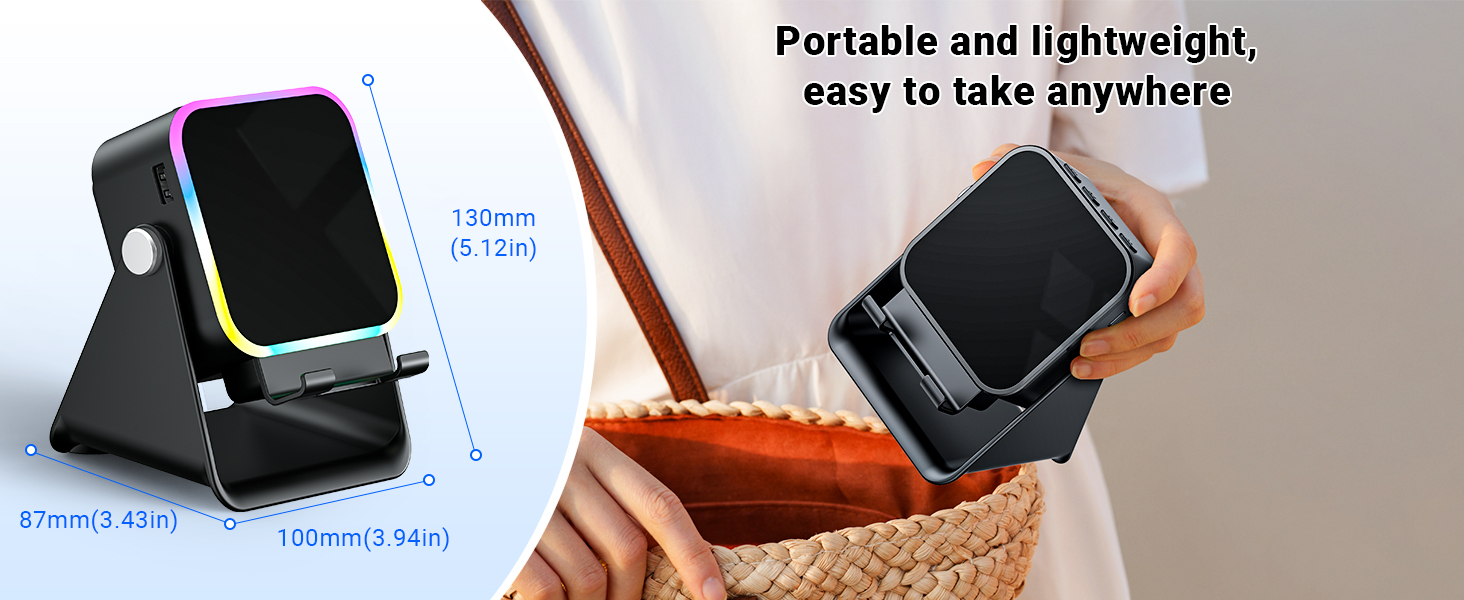
Image: Adjustable stand with 360° rotation and non-slip base for stability.
6. Операція
6.1 Увімкнення/вимкнення живлення
Тривале натискання кнопки живлення (⏻), щоб увімкнути або вимкнути пристрій.
6.2 Switching Modes (Induction / Bluetooth)
After powering on, the device will typically start in Induction Mode. To switch between Induction Mode and Bluetooth Mode, short press the 'M' button.
Video: Demonstrates how to use both Induction and Bluetooth modes, including switching between them and proper phone placement.
6.3 Режим індукції
In Induction Mode, no Bluetooth connection is required. Simply place your smartphone correctly on the stand. The speaker's inductive chip will capture and amplify audio directly from your phone.
- Розміщення телефону: Ensure your phone is placed correctly on the stand, typically in portrait orientation, for optimal sound transfer.
- Регулювання гучності: Adjust your phone's volume to 50% or higher for the best playback experience. You can also use the volume buttons on the speaker.
- Сумісність: Induction mode is primarily compatible with smartphones. It does not support iPads or tablets.
- Автовимкнення: The speaker will automatically turn off after 10 minutes of standby in Induction Mode.

Image: Guide on how to correctly place your phone and adjust volume for Induction Mode.
6.4 Режим Bluetooth
For wireless audio streaming, switch to Bluetooth Mode:
- Натисніть і утримуйте кнопку живлення, щоб увімкнути динамік.
- Short press the 'M' button to switch to Bluetooth Mode (you will hear an audible prompt).
- On your phone or tablet, go to Bluetooth settings and search for "ZJ-027".
- Select "ZJ-027" to pair. For Android devices, enable "Sync volume with phone" in Bluetooth settings after pairing for optimal control.
- Після підключення ви можете відтворювати аудіо з вашого пристрою через динамік.
In Bluetooth mode, you can place your phone horizontally or vertically on the stand. The Bluetooth range is approximately 10 meters.

Image: Visual representation of Induction Mode (no Bluetooth) and Bluetooth Mode (10m range).
6.5 Функції світлодіодного світла
The speaker features colorful LED lights:
- Перемикання режимів освітлення: Single-click the 'M' button to cycle through different light colors and patterns.
- Увімкнення/вимкнення світла: Long-press the 'M' button to turn the LED lights on or off.

Image: Multiple light strip patterns to choose from.
6.6 Power Bank Function (Emergency Charge)
The speaker can act as an emergency power bank for your phone. Connect your phone's charging cable (not included) to the USB-A output port on the speaker and to your phone. This is a wired charging function, not wireless charging.
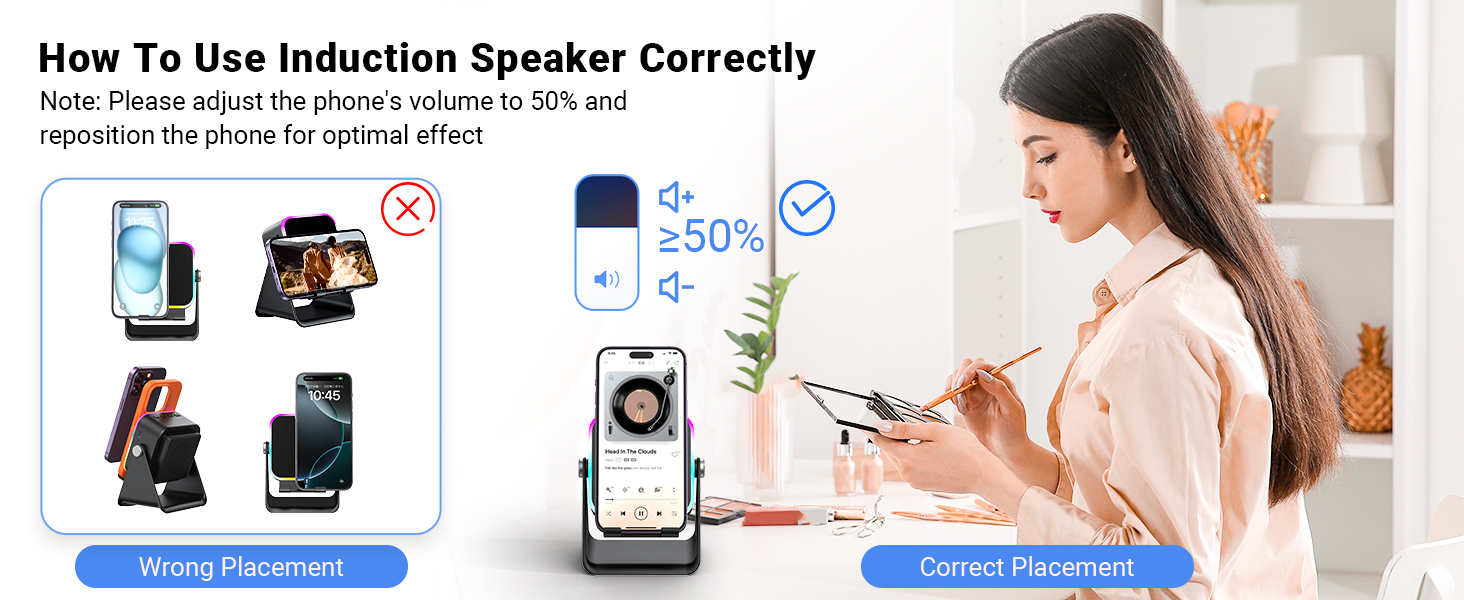
Image: The speaker's 3500mAh power bank function for emergency charging.
7. Технічне обслуговування
- Протирайте пристрій м’якою сухою тканиною. Не використовуйте абразивні засоби для чищення або розчинники.
- Уникайте тривалого впливу прямого сонячного світла на пристрій.
- Зберігайте пристрій у прохолодному сухому місці, коли він не використовується.
8. Вирішення проблем
Q1: What should I do if the volume is too low?
- If in Induction mode, place the phone correctly on the holder, and then adjust the phone's volume to 50% or higher.
- If you are using an Android device and using Bluetooth mode, first pair the Bluetooth device. Then enable "Sync volume with phone" in your phone's Bluetooth settings.
Q2: What should I do if the sound cuts in and out in Induction mode?
- Ensure the phone is correctly placed on the holder.
- The working principle of Induction mode is that the speaker's inductive chip captures audio from the phone and amplifies it through the speaker. The louder the phone's volume, the louder the speaker's output. Therefore, we recommend setting the phone's volume to 50% or higher to ensure uninterrupted playback.
9. Технічні характеристики
| Особливість | Деталь |
|---|---|
| Назва моделі | ZJ-027 |
| Тип динаміка | Портативний динамік |
| Особливості | Bluetooth Speaker, Built-In Powerbank, Induction Speaker, LED Light, Phone Stand |
| Сумісні пристрої | Android Phone, iPad, iPhone |
| Колір | чорний |
| Розміри продукту | 5" Г x 2" Ш x 3" В |
| Вага товару | 0.34 кілограма (12 унції) |
| Максимальний радіус дії Bluetooth | 10 метрів |
| Акумулятор | Потрібен 1 акумулятор (входить в комплект) |
| Виробник | АЙКЕЛА |
| Максимальна вихідна потужність динаміка | 1 Вт |
| Технологія підключення | Bluetooth, Induction |
| матеріал | Акрилонітрилбутадієнстирол (АБС) |
10. Гарантія та підтримка
AIKELA provides 12 months of support for your Phone Amplifier Speaker. If you encounter any issues or have questions, please contact customer service. You can typically find contact information by navigating to 'Find Order' on the platform where you purchased the product.