
вступ
This manual provides essential information for the safe and efficient use of your SUPVAN T50M Pro Label Maker. Please read these instructions carefully before operating the device and retain them for future reference.
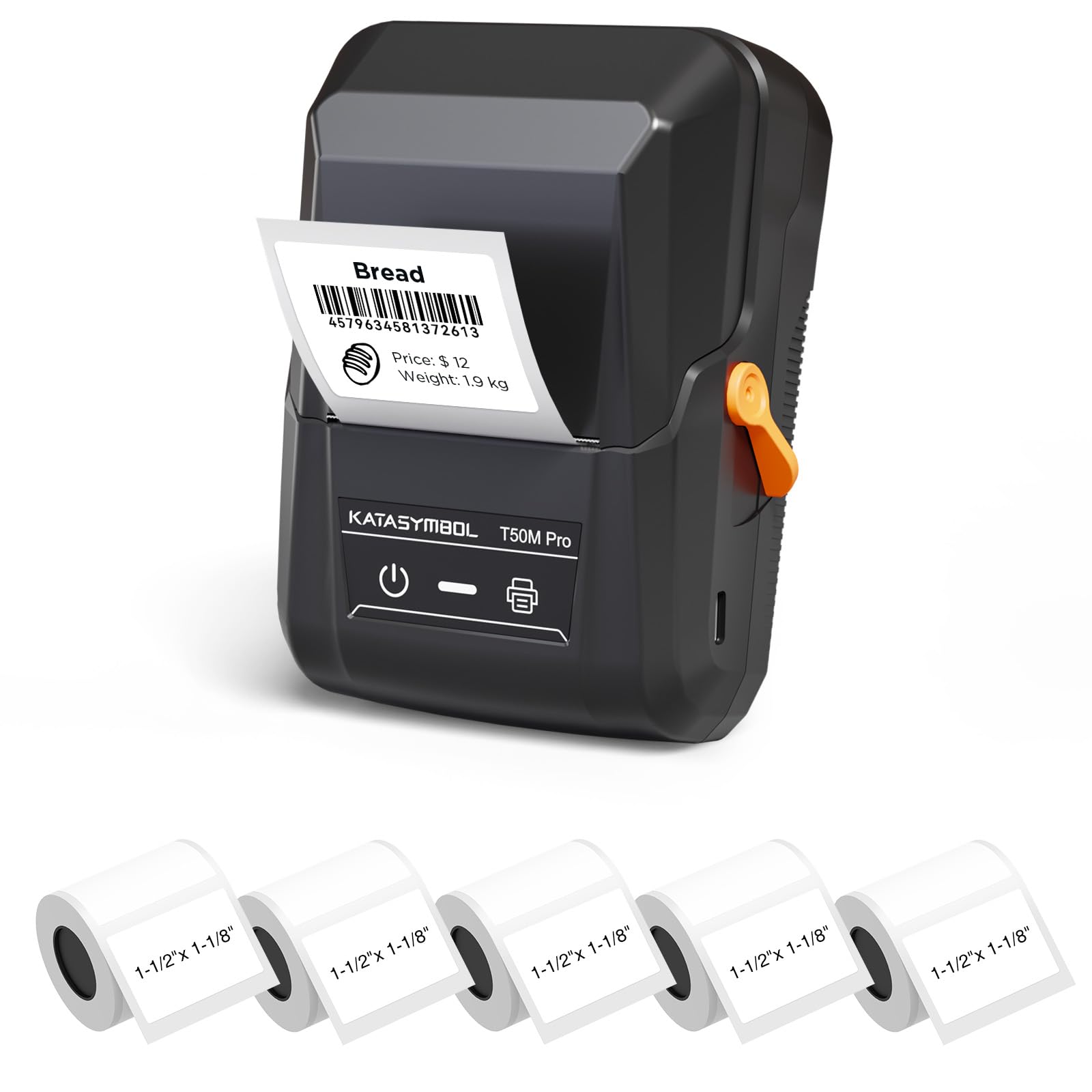
Image: The SUPVAN T50M Pro Label Maker, a compact thermal printer.
Вміст упаковки
Перевірте наявність усіх предметів у вашій упаковці:
- SUPVAN T50M Pro Label Maker
- 5 rolls of 1.57'' × 1.18'' (40mm × 30mm) white labels (250 labels/roll)
- USB Cable (for charging and connectivity)
- Посібник користувача (цей документ)
Посібник із налаштування
1. Зарядка пристрою
Before first use, fully charge the label maker using the provided USB cable. The device features a 1200 mAh built-in rechargeable battery, offering extended use on a single charge.
2. Installing the Label Roll
The T50M Pro uses thermal paper, eliminating the need for ink or toner. Follow these steps to install a label roll:
- Відкрийте кришку відсіку для етикеток.
- Вставте рулон етикеток друкованою стороною догори.
- Ensure the label edge is aligned with the printer's feed mechanism.
- Close the cover. The device's Smart RFID Auto-Detection will recognize the label size automatically.

Image: Illustration of loading thermal paper into the label maker. The device uses thermal printing technology, requiring no ink or toner.
3. Встановлення та підключення програми
Download the official SUPVAN app from your device's app store. The app provides all editing functions and is free to use.
- Увімкніть пристрій для виготовлення етикеток.
- Open the SUPVAN app on your smartphone or tablet.
- Follow the in-app instructions to connect to your T50M Pro via Bluetooth or USB.
Інструкція з експлуатації
1. Створення етикеток за допомогою застосунку
The SUPVAN app offers a comprehensive suite of editing tools:
- Редагування тексту: Choose from over 40 fonts.
- Image & Picture Integration: Add custom images and logos.
- Шаблони: Access over 140 free, constantly updated templates for various uses.
- Auto Label Size Recognition: The app automatically detects the loaded label size, reducing errors.

Image: The SUPVAN app's editing interface, demonstrating font choices, image integration, and automatic label size detection.

Image: A selection of over 140 free templates available within the SUPVAN app, suitable for diverse labeling needs.
2. Друк етикеток
After designing your label in the app, select the "Print" option. Ensure the label maker is connected and has sufficient battery. The T50M Pro supports various label styles and sizes, printing 3/4 to 2-inch wide labels.

Зображення: Прamples of labels created with the T50M Pro, including address labels, price tags, and decorative labels, demonstrating support for various styles.

Image: A visual comparison highlighting the high-quality image output from the SUPVAN T50M Pro's app compared to other label makers.
3. Загальні застосування
The SUPVAN T50M Pro is suitable for a wide range of labeling tasks:
- Малий бізнес: Shipping addresses, product information, QR codes, brand logos.
- Office & School: Ім'я tags, folder labels, documentation, asset tagпішов.
- Організація дому: Pantry labels, storage bins, personal items.

Image: Demonstrates diverse uses for the label maker, such as labeling containers in a pantry, creating product labels, printing shipping labels, and organizing school supplies.
Технічне обслуговування
1. Очищення друкуючої головки
Щоб забезпечити оптимальну якість друку, періодично очищуйте термодрукувальну головку. Використовуйте м’яку тканину без ворсу, злегка промокнутуampened with isopropyl alcohol. Do not use abrasive cleaners or sharp objects.
2. Догляд за акумулятором
Recharge the device when the battery indicator is low. Avoid fully discharging the battery frequently to prolong its lifespan. Store the device in a cool, dry place when not in use for extended periods.
3. Зберігання етикеток
Зберігайте рулони етикеток у прохолодному, сухому місці, подалі від прямих сонячних променів та тепла, щоб запобігти руйнуванню термоматеріалу.
Усунення несправностей
1. Пристрій не вмикається
- Переконайтеся, що пристрій повністю заряджений. Підключіть його до джерела живлення за допомогою USB-кабелю.
- Натисніть і утримуйте кнопку живлення кілька секунд.
2. Printing Issues (Blank or Faint Prints)
- Check if the label roll is installed correctly with the printing surface facing up.
- Ensure the label roll is not empty.
- Очистіть друкувальну головку, як описано в розділі «Технічне обслуговування».
- Verify that the label type is compatible with the T50M Pro.
3. App Connectivity Problems
- Переконайтеся, що Bluetooth увімкнено на вашому мобільному пристрої.
- Make sure the label maker is turned on and within range.
- Перезапустіть і етикетувальник, і програму.
- Якщо проблеми не зникають, спробуйте перевстановити програму.
4. Label Misalignment
- Переконайтеся, що рулон етикеток правильно встановлений та вирівняний у відсіку.
- The Smart RFID Auto-Detection should prevent most misalignment issues; if not, try re-seating the roll.
Технічні характеристики
| Особливість | Деталь |
|---|---|
| Назва моделі | T50M Pro |
| Бренд | СУПВАН |
| Технологія друку | Теплові |
| Технологія підключення | USB, Bluetooth |
| Апаратний інтерфейс | USB |
| Вихід на принтер | Monochrome (Black Ink Color) |
| Максимальний розмір носія | 1.57'' × 1.18'' (40mm × 30mm) - 3/4 to 2-inch wide labels supported |
| Особливість | Portable, Smart RFID Auto-Detection, BPA-free labels |
| Акумулятор | Вбудована акумуляторна батарея на 1200 мАг |
| Розміри | Приблизно 5 дюйма x 3.7 дюйма x 2.3 дюйма |
| вага | Прибл. 0.6 фунтів |
| Включені компоненти | Label Maker, Labels, USB Cable |

Image: The compact design of the T50M Pro, highlighting its portability, lightweight nature, and 1200 mAh rechargeable battery.
Гарантія та підтримка
Інформація про гарантію
For detailed warranty information, please refer to the warranty card included with your product or visit the official SUPVAN webсайт. Гарантійні умови можуть відрізнятися залежно від регіону та продавця.
Підтримка клієнтів
If you encounter any issues or have questions regarding your SUPVAN T50M Pro Label Maker, please contact SUPVAN customer support through their official webсайт або роздрібний продавець, де було придбано товар.
Ви також можете відвідати SUPVAN Store on Amazon для отримання додаткової інформації про продукт та ресурсів підтримки.