
1. Вступ
This manual provides detailed instructions for the installation, operation, and maintenance of your UNITOPSCI A4196H1MI2 Android Car Stereo. Please read this manual thoroughly before using the product to ensure proper functionality and to prevent damage. This unit is designed for Chevrolet Cruze J300 models manufactured between 2009 and 2015.
2. Інформація про безпеку
- Завжди використовуйте пристрій відповідально та відповідно до місцевих правил дорожнього руху. Неуважність водія може призвести до аварій.
- Do not attempt to install or repair the unit if you are not qualified. Improper installation can cause damage to the vehicle's electrical system or the unit itself.
- Переконайтеся, що вся проводка правильно підключена та ізольована, щоб запобігти короткому замиканню.
- Тримайте пристрій подалі від води та надмірної вологи.
- Уникайте тривалого перебування пристрою під екстремальними температурами або прямими сонячними променями.
- Протирайте екран м’якою сухою тканиною. Не використовуйте абразивні засоби для чищення.
3. Вміст упаковки
Перевірте, чи всі перелічені нижче предмети входять до вашої упаковки:
- Автомобільна стереосистема Android
- Резервна камера
- Кабель живлення
- Small Horn
- RCA кабель
- Вхідний кабель задньої камери
- Радіо Антена
- мікрофон
- Canbus Box
- GPS антена
- 4/6 Pin USB Cable
- Посібник користувача (цей документ)
- Кабель USB-адаптера
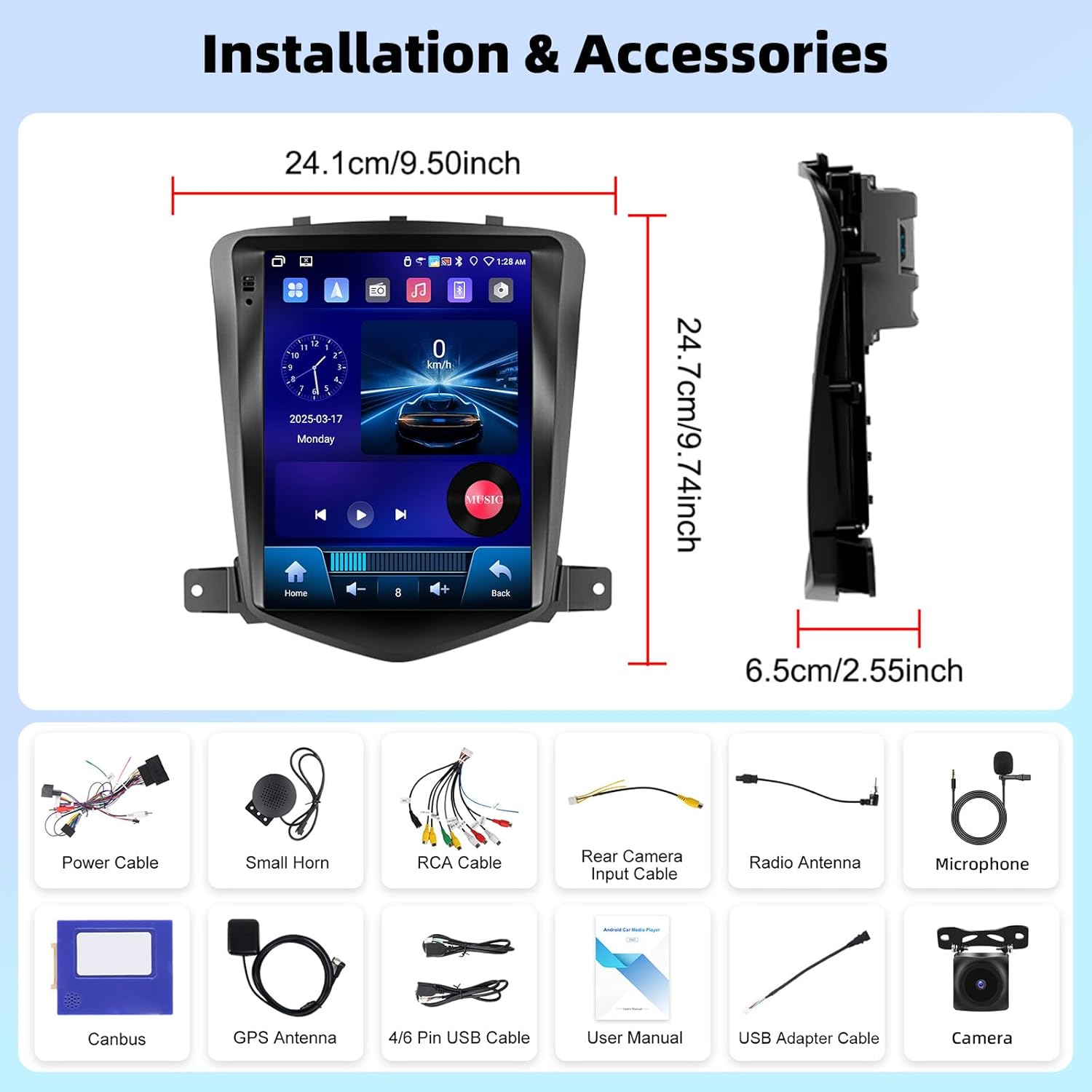
Зображення 3.1: закінченоview of the UNITOPSCI A4196H1MI2 car stereo dimensions and included accessories, such as power cables, antennas, and the backup camera.
4. Монтаж
4.1. Перевірки перед встановленням
- Ensure your vehicle is a Chevrolet Cruze J300 model (2009-2015).
- Перед початком будь-яких електромонтажних робіт від’єднайте акумулятор автомобіля.
- Перевірте наявність усіх компонентів, перелічених у розділі 3.
4.2. Зняття оригінального радіо
Обережно зніміть декоративні панелі та гвинти, що кріплять заводську магнітолу. Зверніться до посібника з обслуговування вашого автомобіля, щоб отримати конкретні інструкції щодо розбирання приладової панелі.
4.3. Підключення проводів
- Кабель живлення: Connect the provided power harness to the vehicle's wiring. Ensure correct polarity.
- Кабелі RCA: Підключення аудіовиходу (наприклад, зовнішнього amplifier) if applicable.
- GPS антена: Встановіть GPS-антену в місці з чітким view неба, зазвичай на приладовій панелі або під лобовим склом.
- Радіоантена: Підключіть радіоантену автомобіля до пристрою.
- Мікрофон: Connect the external microphone for improved call quality. Position it near the driver.
- Резервна камера: Connect the rear camera input cable to the unit and route the camera cable to the rear of the vehicle. Connect the camera's power to the reverse light circuit for automatic activation.
- USB кабелі: Connect the USB extension cables for external storage or wired CarPlay/Android Auto.
- Коробка CANbus: Connect the Canbus box as instructed to ensure proper communication with the vehicle's systems, including steering wheel controls.
4.4. Монтаж пристрою
Secure the UNITOPSCI A4196H1MI2 unit into the dashboard opening using the provided brackets and screws. Reassemble the dashboard trim panels.

Image 4.1: Visual comparison of the Chevrolet Cruze J300 dashboard, illustrating the appearance before and after the UNITOPSCI A4196H1MI2 Android car stereo is installed.
5. Інструкція з експлуатації
5.1. Увімкнення/вимкнення живлення
To power on the unit, start your vehicle. The unit will typically power on automatically. To power off, turn off your vehicle's ignition. The unit may have a soft power-off feature that allows it to resume quickly.
5.2. Інтерфейс сенсорного екрана
The unit features a 9.7-inch HD touchscreen with a resolution of 1024*600. Navigate through menus and applications by tapping, swiping, and pinching gestures, similar to a smartphone or tablet.
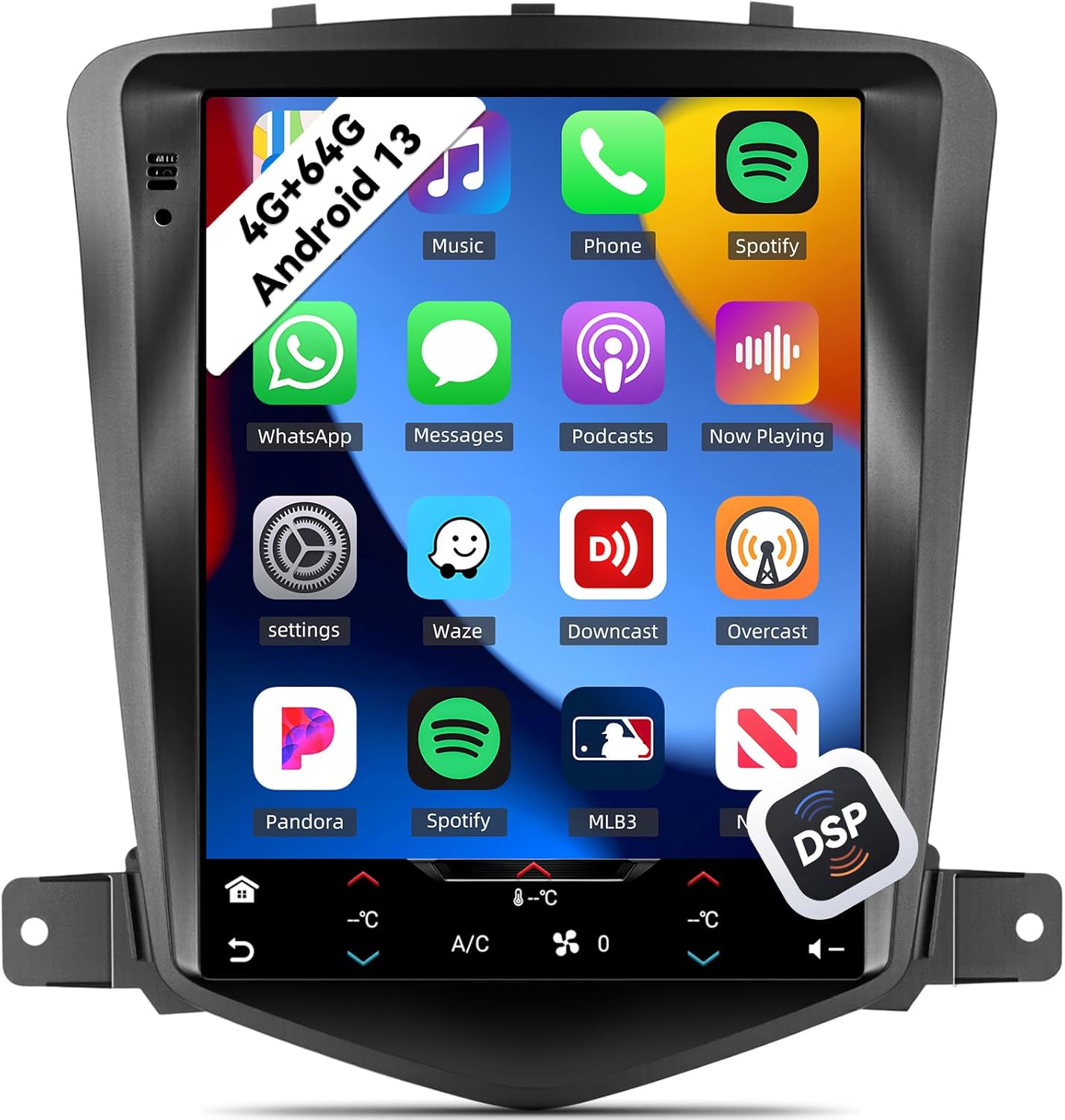
Image 5.1: The main interface of the UNITOPSCI A4196H1MI2 unit, displaying a grid of application icons for music, phone, Spotify, messages, and other functions.
5.3. Система Android 13
The stereo operates on the Android 13 operating system, featuring a quad-core processor, 4GB RAM, and 64GB ROM. This configuration provides a responsive user experience and ampсховище для програм і медіафайлів.

Image 5.2: A visual representation of the Android 13 system's core components, highlighting the 4-core CPU, 4GB RAM, and 64GB ROM for enhanced performance.
5.4. Бездротовий CarPlay та Android Auto
The unit supports both wireless Apple CarPlay and Android Auto. Connect your compatible smartphone wirelessly to access navigation, music, calls, and messages directly on the stereo's display.
- Для CarPlay: Ensure Wi-Fi and Bluetooth are enabled on your iPhone. Follow the on-screen prompts to pair.
- Для Android Auto: Ensure Wi-Fi and Bluetooth are enabled on your Android phone. Open the Android Auto app on your phone and follow the pairing instructions.
5.5. Дзеркальне посилання
Mirror Link allows you to display your smartphone's screen directly onto the car stereo. This feature is compatible with most Android and iOS phones, excluding some Samsung models.
- Access the Mirror Link application on the stereo.
- Дотримуйтесь інструкцій, щоб підключити телефон через USB або Wi-Fi.

Image 5.3: The car stereo display demonstrating the integration of CarPlay, Android Auto, and Mirror Link functionalities, allowing seamless smartphone connectivity.
5.6. Bluetooth 5.0
The built-in Bluetooth 5.0 module enables hands-free calling and wireless audio streaming. An external microphone is included for clear voice transmission.
- Сполучення: Перейдіть до налаштувань Bluetooth на стереосистемі та телефоні. шукати available devices and select the stereo's name to pair.
- Дзвінок без використання рук: Once paired, you can make and receive calls directly from the stereo interface. The phonebook can be automatically downloaded.
- Потокове аудіо: Play music from your phone through the car's speakers wirelessly.

Image 5.4: The stereo's display showing the Bluetooth 5.0 interface for hands-free calling and music playback, along with the Digital DSP processor's 32-band equalizer.
5.7. FM/RDS-радіо
Access local radio stations with the integrated FM/RDS tuner. You can save up to 18 preset stations.
- Navigate to the Radio application.
- Використовуйте функцію сканування, щоб знайти станції або налаштуватися на частоту вручну.
- Натисніть і утримуйте кнопку попередньої налаштування, щоб зберегти поточну станцію.
5.8. GPS-навігація та Wi-Fi
The unit supports GPS, GLONASS, and Beidou navigation systems. You can use pre-installed offline maps or connect to Wi-Fi/hotspot for online navigation apps like Google Maps or Waze.
- Офлайн-карти: Access the navigation app and select your desired region.
- Онлайн-карти: Connect the unit to a Wi-Fi network or your phone's hotspot via the Wi-Fi settings. Then, open your preferred online navigation application.

Image 5.5: The stereo's capabilities for built-in Wi-Fi, allowing access to various online applications, and GPS navigation, supporting both online and offline maps.
5.9. DSP 32-Band EQ
Customize your audio experience with the Digital Sound Processor (DSP) and its 32-band equalizer. This allows for precise tuning of sound frequencies, time correction, and speed-compensated volume.
- Access the EQ settings from the main menu or audio settings.
- Adjust individual frequency bands to match your audio preferences.
- Explore preset equalizer modes or create custom profiles.
5.10. Функціональність розділеного екрана
Функція розділеного екрана дозволяє одночасно запускати дві програми на 9.7-дюймовому дисплеї, такі як навігація та відтворення музики.
- Відкрийте першу програму.
- Long-press the recent apps button or swipe from the bottom (depending on Android version) to activate split-screen mode.
- Select the second application to display alongside the first.

Image 5.6: The 9.7-inch HD screen showcasinйого широкий viewing angle and the split-screen feature, allowing two applications to be viewред. одночасно.
5.11. Керування на кермі (SWC)
The unit supports steering wheel controls, allowing you to manage volume, tracks, and calls without taking your hands off the wheel. This functionality is enabled via the Canbus box.
- Access the Steering Wheel Control settings in the unit's menu.
- Дотримуйтесь інструкцій на екрані, щоб запрограмувати кожну кнопку на кермі на потрібну функцію.
5.12. Камера заднього виду
Вбудована AHD-камера заднього виду забезпечує чітке view of the area behind your vehicle when reversing. The display automatically switches to the camera feed when the reverse gear is engaged.
- Ensure the backup camera is correctly installed and wired to the reverse light circuit.
- When shifting into reverse, the camera feed will appear on the screen.

Image 5.7: The AHD backup camera module and its clear display on the car stereo screen, alongside an illustration of the steering wheel control interface for programming functions.
6. Технічне обслуговування
- Очищення екрану: Використовуйте м’яку тканину без ворсу, щоб обережно протерти сенсорний екран. Для стійких плям злегкаampПротріть тканину водою або засобом для чищення екранів. Уникайте агресивних хімікатів.
- Оновлення програмного забезпечення: Періодично перевіряйте наявність оновлень програмного забезпечення від виробника, щоб забезпечити оптимальну продуктивність і доступ до нових функцій.
- Загальний догляд: Тримайте пристрій чистим від пилу та сміття. Забезпечте належну вентиляцію навколо пристрою, щоб запобігти перегріву.
7. Вирішення проблем
7.1. Немає живлення
- Перевірте запобіжники: Inspect the vehicle's fuse box and the unit's inline fuse for any blown fuses.
- Електропроводка: Ensure the power cable is securely connected and has proper voltage.
- запалювання: Перевірте, чи увімкнено запалювання автомобіля.
7.2. Немає звуку
- обсяг: Перевірте, чи гучність збільшена на максимум і чи не вимкнена.
- Підключення динаміків: Ensure all speaker wires are correctly connected to the unit and not shorted.
- Джерело звуку: Verify the correct audio source (e.g., FM, Bluetooth, CarPlay) is selected.
7.3. GPS Not Working
- Антена: Переконайтеся, що GPS-антена правильно підключена та встановлена в місці з чітким view неба.
- Сигнал: Allow time for the unit to acquire a GPS signal, especially after initial installation or in areas with poor reception.
- Карти: Verify that maps are installed or that the unit is connected to Wi-Fi for online navigation.
7.4. CarPlay/Android Auto Connection Issues
- Bluetooth/Wi-Fi: Переконайтеся, що Bluetooth та Wi-Fi увімкнено як на стереосистемі, так і на вашому смартфоні.
- Сумісність: Confirm your phone model and operating system version are compatible.
- USB-кабель: If using wired connection, try a different, high-quality USB cable.
7.5. Не відображається зображення з камери заднього виду
- Електропроводка: Check the camera's power and video signal connections. Ensure the trigger wire is correctly connected to the reverse light circuit.
- Налаштування: Verify that the camera input is enabled in the stereo's settings.
8. Технічні характеристики
| Особливість | Специфікація |
|---|---|
| Номер моделі | A4196H1MI2 |
| Операційна система | Android 13 |
| Пам'ять (RAM) | 4 ГБ |
| Зберігання (ROM) | 64 ГБ |
| Розмір дисплея | 9.7 дюймів |
| Роздільна здатність екрана | 1024*600 |
| Підключення | Bluetooth 5.0, Wi-Fi |
| Навігація | GPS/GLONASS/Beidou (North America, Worldwide maps) |
| Функції аудіо | DSP 32-Band EQ, Stereo Output |
| Особливості | Wireless Apple CarPlay, Android Auto, Mirror Link, Split Screen, Backup Camera Input, Steering Wheel Control |
| Розміри продукту | 2.55 см (Д) x 9.5 см (Ш) x 9.74 см (В) |
| Вага товару | 3.3 фунта |
9. Гарантія та підтримка
9.1. Гарантія виробника
This UNITOPSCI A4196H1MI2 car stereo comes with a Гарантія від виробника 1 рік з дати покупки. Ця гарантія поширюється на дефекти матеріалів та виготовлення за умов нормального використання. Будь ласка, збережіть підтвердження покупки для пред'явлення претензій за гарантією.
9.2. Підтримка клієнтів
For technical assistance, troubleshooting, or warranty inquiries, please contact UNITOPSCI customer support. You can reach them via email at UNITOPSCI@126.com. Please provide your model number (A4196H1MI2) and a detailed description of your issue for efficient service.
Additional protection plans may be available for purchase from your retailer, offering extended coverage beyond the manufacturer's warranty.


