
ChongXiao WXGN301
ChongXiao WXGN301 Brushless Controller and LCD Display User Manual
Model: WXGN301 | Brand: ChongXiao
Продукт закінченийview
This manual provides detailed instructions for the installation, operation, and maintenance of your ChongXiao WXGN301 Brushless Controller and accompanying LCD Display. This system is designed for electric bikes and e-scooters, supporting universal voltage ranges from 36V to 72V and power outputs from 500W to 1000W.

малюнок 1: The ChongXiao WXGN301 Brushless Controller and LCD Display kit, including the controller unit, LCD display, and various wiring harnesses.
Монтаж і проводка
Careful wiring is essential for proper function and safety. Follow these steps for connecting the controller and LCD display.
Controller Wiring Connections

малюнок 2: Детальний view of the controller's wiring harness with numbered labels indicating each connection point.
- Phase Line Connection: Connect the motor's phase lines to the controller's phase lines, matching colors (e.g., green to green, blue to blue, yellow to yellow).
- Hall Line Connection: Connect the motor's Hall sensor lines to the controller's Hall lines, matching colors. Ensure your motor has 5 Hall wires.
- Підключення акумулятора: Connect the battery lines. The red wire is for battery positive (+), and the black wire is for battery negative (-). Ensure correct polarity.
- LCD Line and Ignition Switch: Connect the controller's LCD line. If your throttle does not have an ignition switch, the two ignition wires on the controller must be shorted together to power on the system.
- Intelligent Recognition (Self-Learning):
- Вимкніть живлення.
- Connect the two intelligent recognition lines together.
- Turn on the power. The wheel will rotate forward or reverse.
- If the wheel rotates forward, separate the intelligent recognition lines.
- If the wheel rotates in reverse, separate the intelligent recognition lines, then connect them together again. If the wheel now rotates forward, separate the intelligent recognition lines.
- This function allows the controller to automatically identify the battery voltage and motor rotation direction.
- Примітка: When using the throttle, the intelligent recognition lines must be separated.
- Інші підключення: Connect other functions as needed, such as high-level brake, brake light power, throttle handle, reverse gear, low brake, linear brake (thumb brake), PAS, headlight/taillight power, and regenerative brake. Refer to Figure 2 for connection points.

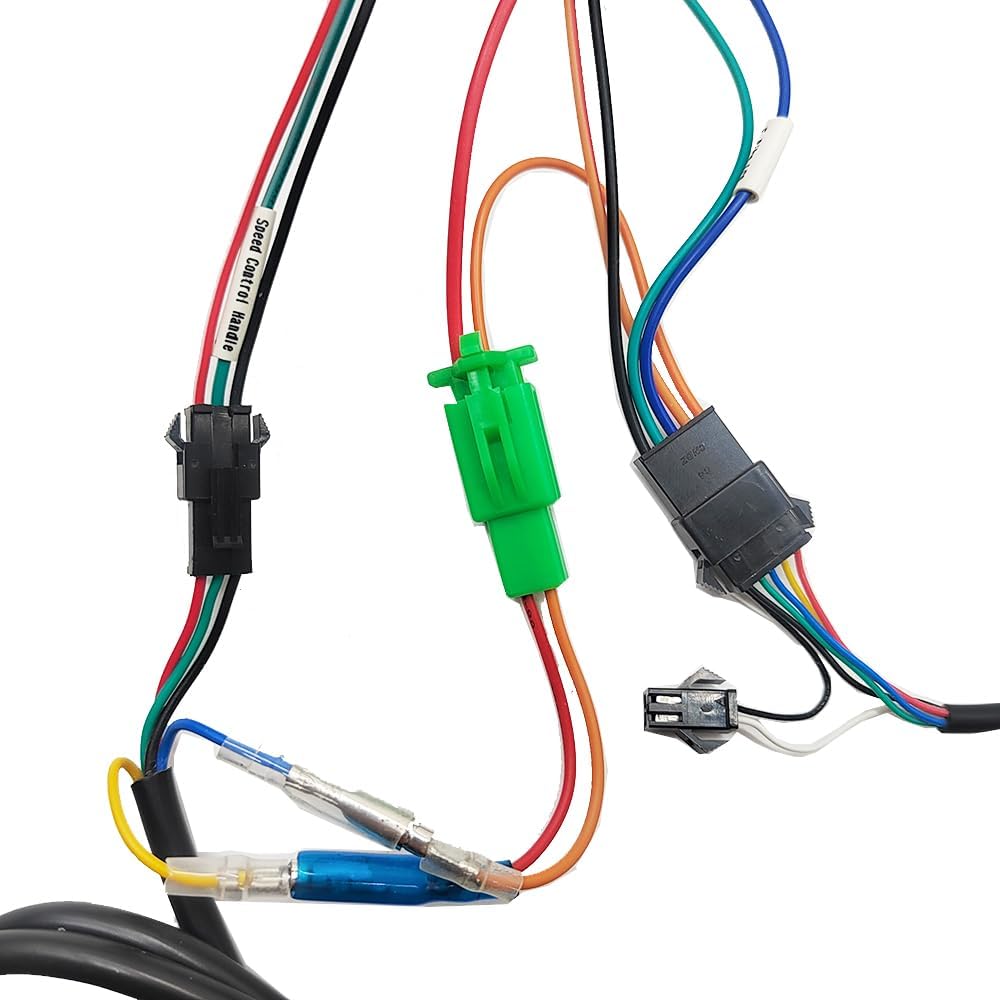
малюнок 3: Examples of specific connectors for the LCD display, light power, and speed control handle.
Інструкція з експлуатації
РК-дисплей надview (WXGN301)
The LCD display communicates with the controller using the UART protocol. It provides real-time riding data and allows for parameter adjustments.

малюнок 4: The WXGN301 LCD Display and its integrated control buttons.
LCD 5-Wire Interface
- Червоний: Метровий шнур живлення
- Синій: Провід управління живленням контролера
- Чорний: Instrument ground wire
- Зелений: Лінія прийому даних лічильника
- Жовтий: Data transmission line of the meter
Кнопка Введення
The display features an 'M' (Mode/Power) button, an 'Up' button, and a 'Down' button. Operations are categorized into short press, long press, and combination long press.
- Коротке натискання: Used for quick actions (e.g., changing assist/speed gear, switching display data).
- Single Button Long Press: Used for mode or state switching (e.g., turning display on/off).
- Combination Key Long Press: Used for parameter settings to prevent accidental changes.
Специфічні операції
- Увімкнення/вимкнення живлення: Long press the 'M' (power) button to turn the display on or off.
- Перемикання режимів відображення: After the display is on, short press the 'M' button to cycle through different display data (e.g., ODO, Trip, Voltagд).
- Modify Assist Ratio/Electric Gear:
- Short press the 'Up' button to increase the assist level.
- Short press the 'Down' button to decrease the assist level.
- Switch Speed Display Mode: Long press the 'M' and 'Up' buttons simultaneously to switch between different speed display modes (e.g., average speed, max speed).
- Turn On/Off Headlights: Long press the 'Up' button to toggle the headlights on or off.
Parameter Settings (P01-P18)
To enter the parameter setting interface, press and hold the 'Up' and 'Down' buttons simultaneously. Use the 'Up' or 'Down' buttons to adjust values. Short press the 'M' button to move to the next parameter. To exit and save, long press 'Up' and 'Down' simultaneously, or the system will auto-save and exit after 10 seconds of inactivity.
| Код параметра | опис | Range/Notes |
|---|---|---|
| P01 | Яскравість підсвічування | 0001 (darkest) to 0003 (brightest) |
| P02 | Одиниця пробігу | 0000: КМ; 0001: MILE |
| P03 | томtage Рівень | 24V, 36V, 48V, 52V, 60V, 72V (Default: 36V) |
| P04 | Час сну | 0: No sleep; 1-60: Sleep time in minutes |
| P05 | Power-Assist Gear | Adjustable: 3rd, 5th, or 9th gears |
| P06 | Діаметр колеса | Unit: inches; Precision: 0.1 |
| P07 | Number of Speed Measuring Magnets | Діапазон: 1-255 |
| P08 | Обмеження швидкості | Range: 0-100 km/h (100 means max speed limit). Note: Displayed mile speed limit may not convert automatically from km/h setting. |
| P09 | Режим запуску | 0: Zero start; 1: Non-zero start |
| P10 | Налаштування режиму драйву | 0000: Power-assisted drive (throttle invalid). 0001: Electric drive (throttle active, assist invalid). 0002: Power-assisted and electric drive coexist (zero start invalid). |
| P11 | Boost Sensitivity | Діапазон: 1-24 |
| P12 | Power-Assisted Start Strength | Діапазон: 1-5 |
| P13 | Power-Assisted Magnetic Steel Discs | 5, 8, or 12 magnets |
| P14 | (0 gear) | Value: 1 (excluding 0 gear) |
| P15 | Функція круїзу | Value: 0 (does not cruise) |
| P16 | Total Mileage Reset | ODO reset |
| P17 | Скидання до заводських налаштувань | Resets all parameters to default settings. |
| P18 | Значення за замовчуванням | Неможливо змінити. |
Примітка: Due to potential production batch differences, some parameters may vary slightly from this description but will not affect general usage.
Усунення несправностей
The LCD display can show error codes to indicate system issues. Refer to the table below for common error codes and their potential solutions.
| Код | Значення | Рекомендована дія |
|---|---|---|
| 6 | Акумулятор Undervoltage | Charge the battery or check battery connections. |
| 7 | Відмова двигуна | Check if the motor Hall sensor has 5 wires and if they are connected color-to-color. Inspect motor wiring for damage. |
| 8 | Throttle Handle Failure | Inspect throttle wiring and ensure it is properly connected. Test throttle functionality. |
| 9 | Збій контролера | Check all controller connections. If the issue persists, the controller may require replacement. |
| 10 | Помилка прийому зв'язку | Check the green data receiving line of the meter and its connection to the controller. |
| 11 | Помилка надсилання зв’язку | Check the yellow data transmission line of the meter and its connection to the controller. |
| 12 | Збій зв'язку BMS | Verify the battery management system (BMS) connection and functionality. |
| 13 | Несправність фари | Check headlight wiring and bulb/LED. Ensure the headlight power connection is secure. |
Технічні характеристики продукту
Технічні характеристики контролера
- томtage: 36V / 48V / 52V / 60V / 72V (Universal)
- поточний: 26A - 33A
- Number of Transistors: 12
- Номінальна потужність: 500W - 1000W (Compatible)
- матеріал: Алюмінієвий сплав casing для розсіювання тепла
- Функції безпеки: Вбудована перенапругаtagе/підобtage protection, overheating protection, short circuit protection, anti-runaway function.


малюнок 5: Controller label detailing voltage and current, and physical dimensions.
LCD Display Specifications (WXGN301)
- Робочий випtage: 36V, 48V, 52V, 60V, 72V (Default: 36V, user adjustable)
- Протокол зв'язку: UART
- Розміри: Приблизно 110 мм (довжина) x 60 мм (ширина)
- особливості: High-definition display, real-time speed, battery level, mileage, fault codes, night backlight function.

малюнок 6: The WXGN301 LCD Display showing its approximate dimensions.
Загальна інформація про продукт
- Включені компоненти: 1x Brushless Controller, 1x LCD Display
- колір: Red (Controller casing)
- Вага товару: Приблизно 862 г
- Виробник: Jiangsu Wuxi Bull Technology Co. Ltd
Технічне обслуговування
To ensure the longevity and optimal performance of your controller and display, follow these general maintenance guidelines:
- Прибирання: Regularly wipe the controller and display with a soft, dry cloth. Avoid using harsh chemicals or excessive moisture.
- Огляд: Periodically check all wiring connections for looseness or damage. Ensure the controller is securely mounted.
- Захист навколишнього середовища: Protect the components from extreme temperatures, direct sunlight, and heavy rain. While the controller has an aluminum alloy casing for heat dissipation, prolonged exposure to harsh conditions can affect performance.
Гарантія та підтримка
For warranty information or technical support, please refer to the documentation provided at the point of purchase or contact your retailer. Keep your purchase receipt as proof of purchase.
Пов'язані документи - WXGN301
 |
SPD-481500BLDC 48-72V 1500W Brushless DC Motor Controller Wiring Guide Technical specifications and wiring instructions for the SPD-481500BLDC 1500 Watt Brushless DC Motor Controller, supporting 48V, 60V, and 72V battery packs. |
 |
48V-72V 1200W-1500W Universal Intelligent Dual-mode Electric Vehicle Brushless Controller Technical specifications and features for the diymore universal intelligent dual-mode electric vehicle brushless controller, supporting 48V-72V and 1200W-1500W. |
 |
ZJMZYM Wind Generator Product Information закінченоview of the ZJMZYM Wind Generator package contents and product disclaimer regarding design updates. |
 |
Electric Controller Wiring Guide Comprehensive wiring instructions for 48V-72V electric scooter and e-bike controllers, covering motor, power, brake, and accessory connections. |
 |
Brushless Motor Controller Kit 80A 60V/72V with S966 LCD Display Комплексний оглядview and package list for the 80A Brushless Motor Controller Kit, compatible with 60V/72V motors, featuring an S966 LCD display and 20X speed adjustment throttle. |
 |
Electric Bike Controller Instruction Manual - Specifications and Safety Instruction manual for a brushless electric bike controller, detailing specifications, functions, safety information, and applicable regulations for use with electric bicycles, scooters, and similar vehicles. |
Ask a question about this manual
Ask about setup, troubleshooting, compatibility, parts, safety, or missing instructions. Manuals+ will review the question and use this page’s manual context to help answer it.