
вступ
The Surfans F28 is a high-fidelity portable music player designed to deliver an immersive audio experience. Featuring dual ESS9018 DACs, a 4.4mm balanced output, and comprehensive Bluetooth 5.2 support including LDAC and aptX HD, the F28 supports a wide range of lossless audio formats. This manual provides detailed instructions for setting up, operating, maintaining, and troubleshooting your device to ensure optimal performance and longevity.

Рисунок 1: Передня та задня частини view of the Surfans F28 HiFi Music Player.
Вміст упаковки
Будь ласка, перевірте, чи всі перелічені нижче предмети присутні у вашій упаковці:
- 1x Surfans F28 HiFi Music Player
- 1x зарядний кабель USB-C
- 1x 128GB Micro SD Card (pre-installed or included separately)
- 1x Посібник користувача (цей документ)

Рисунок 2: Ілюстрація типового вмісту упаковки.
Продукт закінченийview
Familiarize yourself with the various components and controls of your F28 music player.
Ключові характеристики:
- Dual ESS9018 DACs: For high-resolution audio decoding and minimal distortion.
- 4.4 мм збалансований вихід: Provides enhanced audio quality and power for demanding headphones.
- 3.5-мм односторонній вихід: Standard audio output for common headphones.
- Двонаправлений Bluetooth 5.2: Supports LDAC and aptX HD for high-quality wireless audio transmission and reception.
- 3.5-дюймовий сенсорний IPS-екран: For intuitive navigation and control.
- ALPS Analog Volume Knob: For precise volume adjustments.
- Розширюване сховище: Підтримує карти Micro SD об'ємом до 512 ГБ.
- Порт USB-C: Для зарядки та передачі даних.

Figure 3: The F28 player showcasing its display and audio capabilities.

Figure 4: The dual ESS9018K2M DAC chips, central to the F28's high-fidelity audio.

Figure 5: Top panel with 4.4mm balanced and 3.5mm single-ended audio outputs, and the ALPS analog volume knob.
Налаштування
1. Зарядка пристрою
Before first use, fully charge the F28. Connect the included USB-C cable to the player's USB-C port and the other end to a USB power adapter (5V/1A recommended) or a computer's USB port. The charging indicator will show the charging status. A full charge typically takes several hours.
2. Вставлення карти Micro SD
The F28 supports Micro SD cards up to 512GB. Locate the Micro SD card slot on the bottom of the device. Gently insert the Micro SD card with the gold contacts facing down until it clicks into place. To remove, push the card in slightly until it springs out.

Figure 6: Inserting the Micro SD card and connecting via USB-C for data transfer.
3. Перенесення музики Files
Connect the F28 to your computer using the USB-C cable. The player will appear as a removable storage device. You can then drag and drop your music files directly into the Micro SD card's folders. The F28 supports various lossless formats including DSD (DSF/DFF), FLAC/WAV (up to 384kHz), AIFF/APE, as well as MP3/AAC.

Figure 7: Supported audio file formats for the F28 player.
Інструкція з експлуатації
1. Увімкнення/вимкнення живлення
- Увімкнення: Натисніть і утримуйте кнопку живлення (розташовану збоку), доки екран не підсвітиться.
- Вимкнення живлення: Натисніть і утримуйте кнопку живлення, доки не з’явиться запит на вимкнення живлення, потім підтвердіть.
2. Основна навігація
The F28 features a 3.5-inch IPS touchscreen for primary navigation. Swipe gestures and taps are used to select options and move between menus. Physical buttons on the side provide additional control for playback (play/pause, next/previous track) and menu navigation.
3. Відтворення музики
From the main menu, select "My Music" or "Folder" to browse your audio files. Tap on a song to begin playback. The playback screen displays track information, progress, and playback controls.
4. Регулювання гучності
Adjust the volume using the gold-colored ALPS analog knob located on the top right of the device. Rotate clockwise to increase volume and counter-clockwise to decrease. The volume level will be displayed on the screen.
5. Підключення Bluetooth
The F28 supports Bidirectional Bluetooth 5.2 with LDAC and aptX HD codecs for high-quality wireless audio. To pair with Bluetooth headphones or speakers:
- Go to "System Settings" and select "Bluetooth".
- Увімкніть Bluetooth.
- Плеєр просканує доступні пристрої. Виберіть свій пристрій зі списку для сполучення.
The F28 can also act as a Bluetooth receiver, allowing you to stream audio from your phone or PC to the player.

Figure 8: The F28 features a Bluetooth 5.2 chip for stable and high-quality wireless connections.
6. Налаштування еквалайзера
The F28 includes an equalizer to customize your sound. Navigate to the "Equalizer" option in the settings. You can choose from various presets or create a custom sound profile by adjusting the frequency bands.
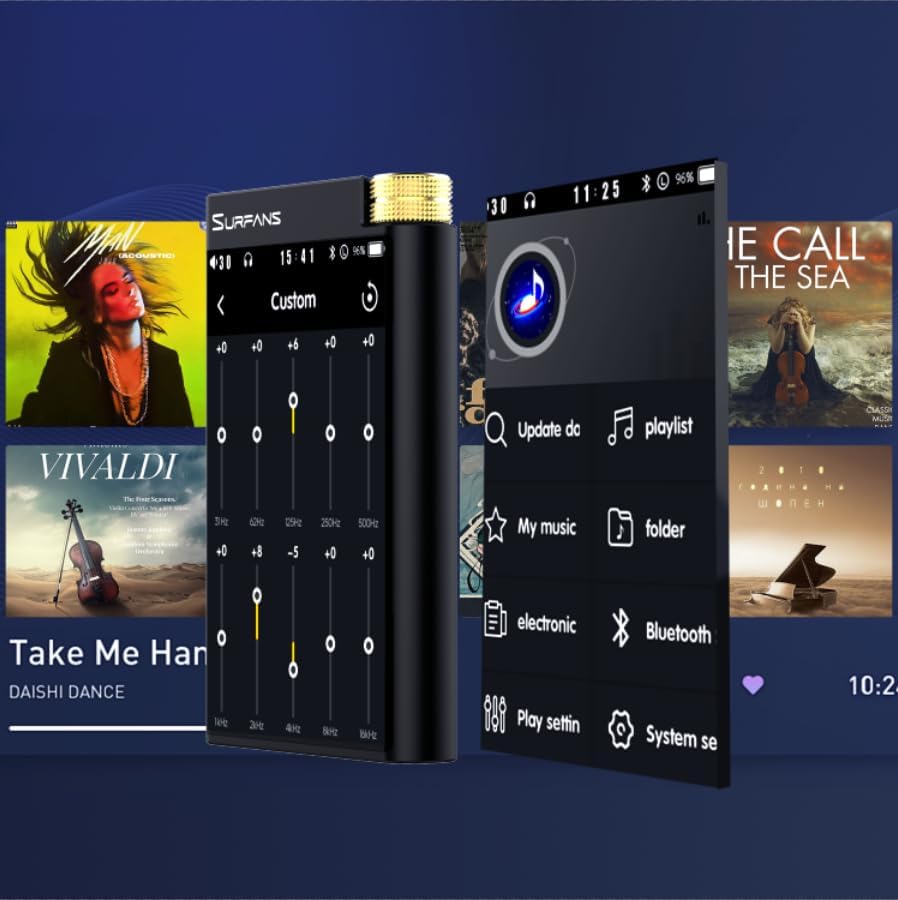
Figure 9: Customizing audio with the built-in equalizer.
7. Підключення до зовнішніх пристроїв
Use the 4.4mm balanced or 3.5mm single-ended output to connect to headphones, amplifiers, or speakers. The USB-C port also supports USB DAC functionality, allowing the F28 to act as an external sound card for your computer.

Figure 10: The F28 can be connected to various audio systems, including acting as a USB DAC for computers.
Технічне обслуговування
- Прибирання: Використовуйте м’яку суху тканину для очищення пристрою. Уникайте використання абразивних засобів для чищення або розчинників.
- Зберігання: Зберігайте програвач у прохолодному, сухому місці, подалі від прямих сонячних променів та екстремальних температур.
- Догляд за акумулятором: Щоб продовжити термін служби акумулятора, уникайте частого повного розряджання. Якщо ви зберігаєте його протягом тривалого часу, заряджайте акумулятор приблизно до 50% кожні кілька місяців.
Усунення несправностей
| проблема | Можлива причина | Рішення |
|---|---|---|
| Пристрій не включається. | Низький заряд батареї; пристрій завис. | Charge the device for at least 30 minutes. If still unresponsive, try holding the power button for 10-15 seconds for a hard reset. |
| Touchscreen is unresponsive or slow. | Тимчасовий збій програмного забезпечення; перешкоди, пов'язані з захисним екраном. | Restart the device. Ensure the screen is clean and free of debris. If using a screen protector, ensure it is properly applied and not too thick. |
| Проблеми зі сполученням Bluetooth. | Device not in pairing mode; distance; interference. | Ensure both devices are in pairing mode and within range. Turn off and on Bluetooth on both devices. Clear previous pairings if necessary. |
| Low volume via Bluetooth. | Volume settings on both devices; codec compatibility. | Increase volume on both the F28 and the connected Bluetooth device. Ensure optimal codec (LDAC/aptX HD) is selected if supported by the receiving device. |
| музика files not recognized or played in incorrect order. | Пошкоджений files; file system indexing issue. | Забезпечити files are in supported formats. Re-scan the music library from the player's settings. If issues persist, try reformatting the Micro SD card (backup data first) and re-transferring files. Note: Some players may sort by filename alphabetically rather than track number metadata. |
Технічні характеристики
| Особливість | Деталь |
|---|---|
| Назва моделі | F28 128G |
| Розміри продукту | 0.7 x 2.6 x 4.7 дюймів |
| Вага товару | 9.6 унції |
| Чіп ЦАП | Dual ESS9018K2M |
| Підтримувані аудіоформати | DSD (DSF/DFF), FLAC/WAV (up to 384kHz/32-bit), AIFF/APE, MP3/AAC, WMA Lossless |
| Версія Bluetooth | 5.2 (Bidirectional, supports LDAC/aptX HD) |
| Розмір екрана | 3.5-дюймовий сенсорний IPS-екран |
| Внутрішня пам'ять | 128GB (included Micro SD card) |
| Розширюване сховище | Up to 512GB via Micro SD card |
| Акумулятор | 1x 12V battery (included), approx. 12-hour playback |
| Вихідні порти | 4.4 мм балансний, 3.5 мм односторонній |
| Технологія підключення | Aux, Bluetooth 5.2, USB-C |
| Особливість | Еквалайзер |
Гарантія та підтримка
For warranty information and technical support, please refer to the official Surfans webсайт або зверніться безпосередньо до служби підтримки клієнтів. Зберігайте чек про покупку як підтвердження покупки для гарантійних претензій.
You can visit the official Surfans Store on Amazon for more information and support: Surfans Audio Store