вступ
This manual provides essential information for setting up, operating, maintaining, and troubleshooting your Thunderobot Zero 18 Pro 5070 Ti Gaming Laptop. Please read this guide thoroughly to ensure optimal performance and longevity of your device.
Що в коробці
Після розпакування перевірте наявність усіх перелічених нижче предметів:
- THUNDEROBOT Zero Laptop
- Адаптер живлення
- Посібник користувача (цей документ)
- Гарантійний талон
If any items are missing or damaged, contact your retailer or Thunderobot customer support immediately.
Налаштування
Початкове ввімкнення
- Connect the power adapter to the laptop's power input port and then to a wall outlet.
- Відкрийте кришку ноутбука.
- Натисніть кнопку живлення, щоб увімкнути ноутбук.
- Дотримуйтесь інструкцій на екрані, щоб завершити налаштування Windows 11 Home.
Підключення периферійних пристроїв
Utilize the available ports to connect external devices such as a mouse, keyboard, external display, or other accessories. Refer to the "Connectivity (Ports)" section for port details.
Інструкція з експлуатації
Увімкнення/вимкнення живлення
- To power on: Press the power button located on the keyboard deck.
- To shut down: Click the Start button, then Power, and select "Shut down".
- To restart: Click the Start button, then Power, and select "Restart".
- To sleep: Close the laptop lid or click the Start button, then Power, and select "Sleep".
Keyboard and RGB Lighting
The laptop features a full-size keyboard with per-key customizable RGB backlighting and a dedicated numeric keypad.
- Per-Key RGB Backlight: Customize individual key lighting through the AI Intelligent Control Center software.
- Функціональні клавіші: Використовуйте Fn key in combination with other keys for various functions (e.g., volume control, screen brightness, keyboard backlight adjustment).
- Performance Mode Switching: Dedicated keys (Fn+Space) allow for quick toggling between performance profiles.
- One-Click Cooling: A dedicated key (often near the numeric keypad) can activate maximum cooling. Ensure cooling mode is exited before using the first three keys to switch modes.
Функції дисплея
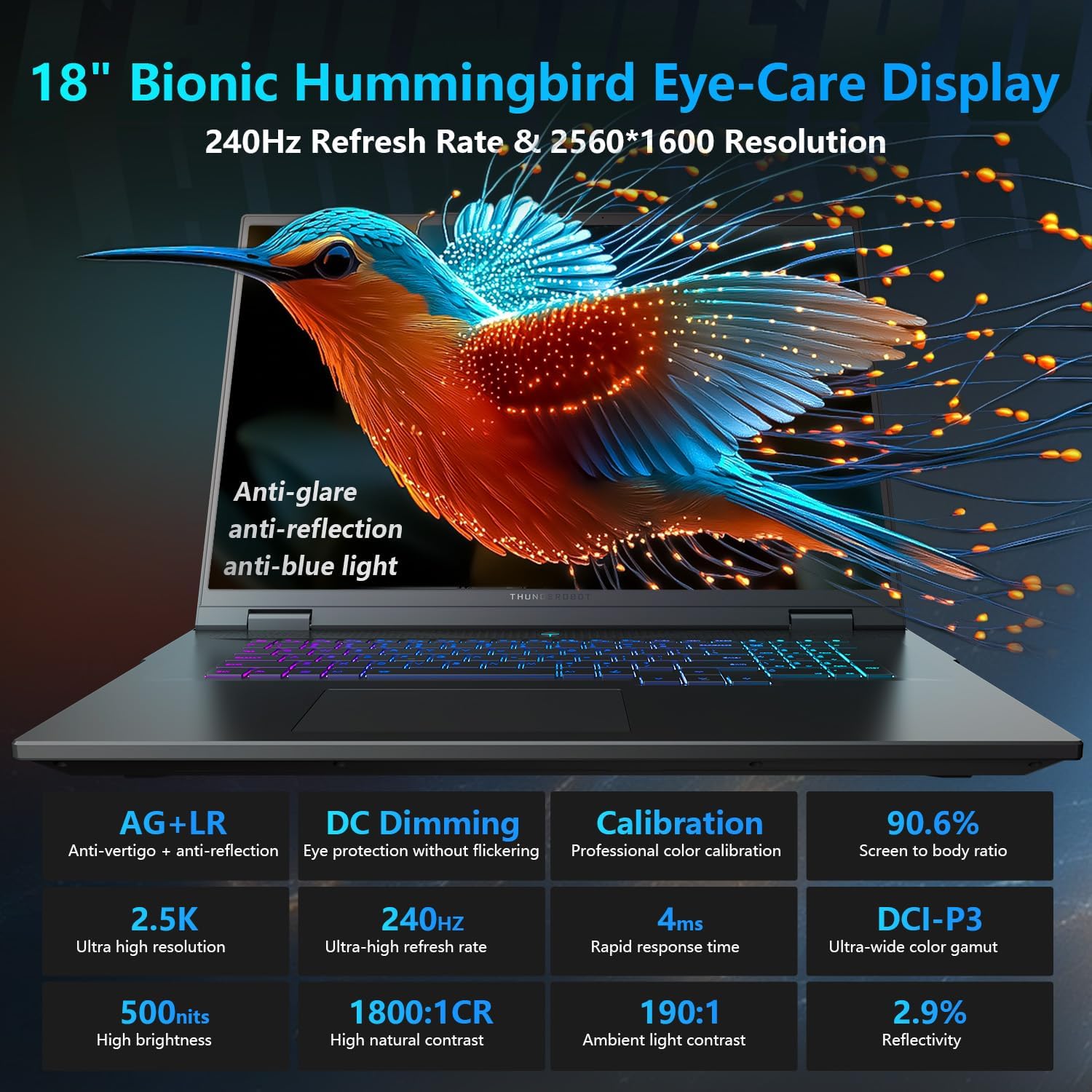
The 18-inch QHD+ (2560x1600) Bionic Hummingbird Eye-Care display offers a 240Hz refresh rate and 4ms response time for clear and fluid visuals. It includes anti-glare, anti-reflection, and anti-blue light technologies for eye comfort.

Connectivity (Ports)
The laptop is equipped with various ports for extensive connectivity:
- 3 x Superspeed USB Type-A ports
- 2 x Superspeed USB Type-C ports (including Thunderbolt 5 support)
- 1 x HDMI port (HDMI 2.1)
- 1 x RJ-45 Ethernet port
- 1 x Audio Port (3.5mm)
- Пристрій для читання SD-карт UHS-II
- Wi-Fi 6E for high-speed wireless internet
- Bluetooth for wireless peripheral connections

Система охолодження
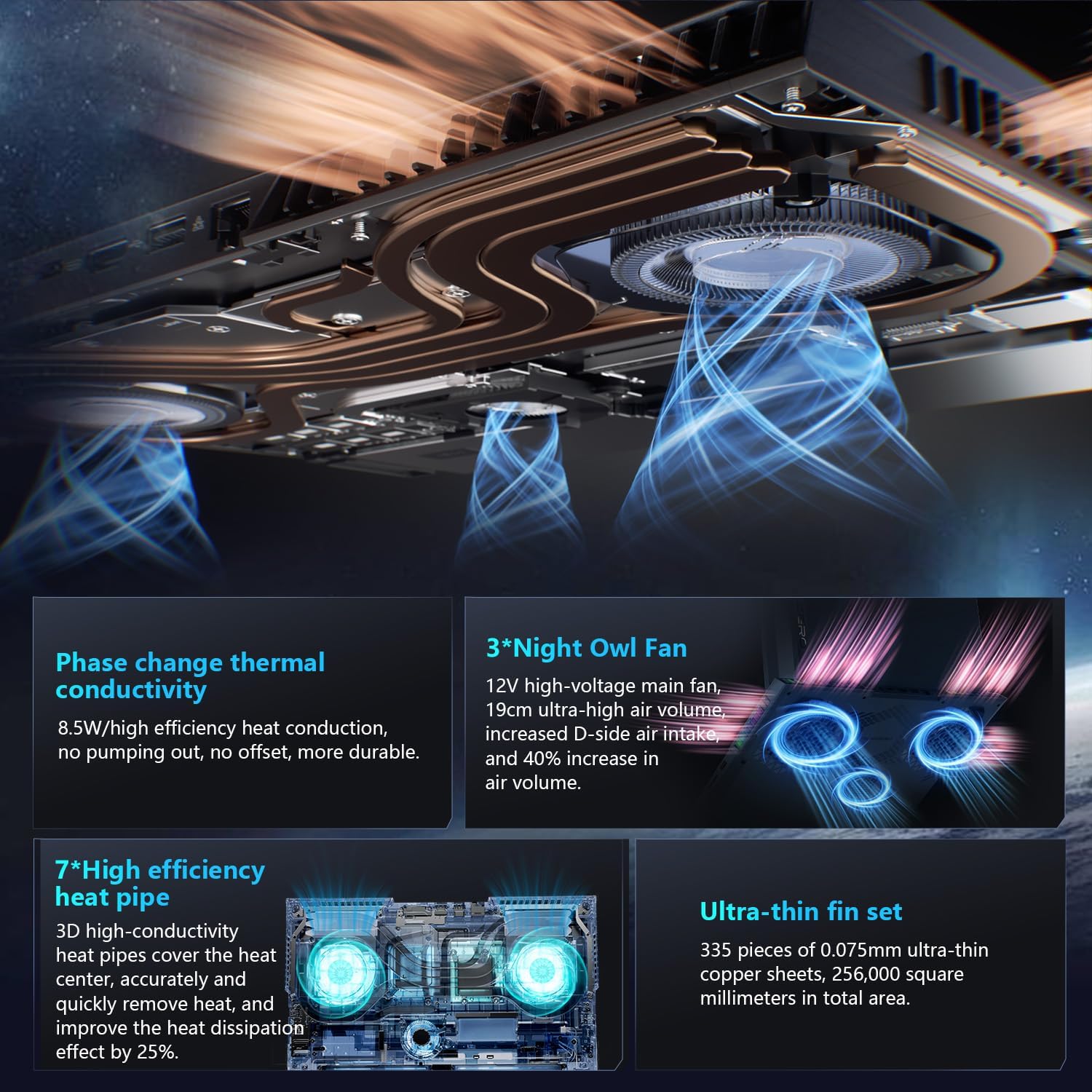
The advanced cooling system features 3 Night Owl fans, 7 high-efficiency heat pipes, and 338 ultra-thin copper fins to ensure optimal thermal management during intensive use, allowing for 270W super performance release.
AI Intelligent Control Center
The AI Intelligent Control Center software allows for comprehensive system management, including performance tuning, intelligent light adjustment, and personalized customization. This includes monitoring CPU/GPU temperatures and fan speeds.
- Налаштування продуктивності: Adjust power settings for quiet, balanced, or turbo modes.
- Intelligent Light Adjustment: Customize keyboard, strip, and logo RGB lighting effects.
- Системний моніторинг: View real-time CPU and GPU status.
Note: System mode switching in Control Center requires the device to be connected to a power source.
Технічне обслуговування
Очищення ноутбука
- екран: Злегка протріть м’якою тканиною без ворсу dampводою або засобом для чищення екранів. Уникайте агресивних хімікатів.
- Клавіатура та корпус: Використовуйте м’яку тканину для протирання поверхонь. Для видалення пилу в щілинах використовуйте стиснене повітря.
- Віддушини: Періодично очищуйте вентиляційні отвори для охолодження стисненим повітрям, щоб запобігти накопиченню пилу, який може вплинути на продуктивність.
Догляд за акумулятором
- Уникайте частого повного розряджання акумулятора.
- Зберігайте ноутбук у прохолодному, сухому місці, якщо він не використовується протягом тривалого часу.
- Для оптимального стану акумулятора уникайте екстремальних температур.
Оновлення програмного забезпечення
Regularly check for and install operating system updates (Windows Update) and driver updates (via Thunderobot's official website or the AI Intelligent Control Center) to ensure system stability and performance.
Усунення несправностей
| проблема | Можлива причина | Рішення |
|---|---|---|
| Ноутбук не вмикається. | Немає живлення, розряджений акумулятор або проблеми з обладнанням. |
|
| Екран порожній або чорний. | Проблема з налаштуваннями дисплея, підключеним зовнішнім монітором або обладнанням. |
|
| Перегрів під час використання. | Blocked vents, high performance settings, or dust buildup. |
|
| Проблеми з підключенням до Wi-Fi. | Вимкнено Wi-Fi, проблеми з драйвером або проблеми з маршрутизатором. |
|
For further assistance, please contact Thunderobot customer support.
Технічні характеристики
| Особливість | Деталь |
|---|---|
| Назва моделі | Zero 18 Pro |
| Процесор | Intel Core Ultra 9 275HX (24 Cores, 24 Threads, up to 5.40GHz) |
| Графіка | NVIDIA GeForce RTX 5070 Ti (8 GB GDDR6 Dedicated) |
| ОЗУ | 32 ГБ DDR5 (4800 МГц) |
| Зберігання | Твердотільний накопичувач PCIe M.2 ємністю 2 ТБ |
| Дисплей | 18-inch QHD+ (2560x1600) 240Hz Bionic Hummingbird Eye-Care Display |
| Операційна система | Windows 11 Домашня |
| Підключення | Wi-Fi 6E, Bluetooth, 3x USB-A, 2x USB-C (Thunderbolt 5), HDMI 2.1, RJ-45, Audio Port |
| Клавіатура | Per-Key RGB Backlit, Numeric Keypad |
| Розміри (ДxШxВ) | 16.04 x 11.78 x 1.41 дюймів |
| Вага товару | 15 фунта |
| Джерело живлення | AC & батарея |
Гарантія та підтримка
Every Thunderobot laptop includes a Гарантія 12 місяців, offering expert support, thorough diagnostics, and genuine parts if a repair is needed. Additionally, a Гарантія 90 днів is provided on all warranty replacement parts, ensuring hassle-free repairs. Your complete satisfaction is our commitment.
For technical support, warranty claims, or service inquiries, please visit the official Thunderobot website or contact their customer service department. Keep your purchase receipt and serial number handy for faster service.