
1. Вступ
This manual provides detailed instructions for the installation, operation, and maintenance of your Potegrap Outdoor Security Camera (Model T-CQ1052-W20V). Please read this manual thoroughly before using the product to ensure proper function and safety. Keep this manual for future reference.
The Potegrap T-CQ1052-W20V is a high-definition outdoor security camera designed for comprehensive home surveillance. It features 2K resolution, dual-band 2.4GHz and 5GHz WiFi connectivity, 360-degree pan and tilt functionality, advanced motion detection with tracking, color night vision, two-way audio, and optional AI-powered features with cloud storage.
2. Інформація про безпеку
- Переконайтеся, що адаптер живлення підходить для вашої місцевої електромережі та належним чином заземлений.
- Do not expose the camera to extreme temperatures outside its operating range (-4°F to 122°F / -20°C to 50°C).
- Уникайте розміщення камери поблизу сильних електромагнітних полів.
- Не намагайтеся розбирати або модифікувати камеру. Це призведе до анулювання гарантії.
- Зберігайте камеру та її аксесуари у недоступному для дітей місці.
- Clean the camera lens with a soft, dry cloth only.
3. Вміст упаковки
Будь ласка, перевірте упаковку на наявність наступних предметів:
- Potegrap Outdoor Security Camera (Model T-CQ1052-W20V) - 2 units
- Адаптери живлення
- Монтажні гвинти та анкери
- Шаблон кріплення
- Посібник користувача (цей документ)

малюнок 3.1: Two Potegrap T-CQ1052-W20V outdoor security cameras, highlighting their 2K resolution, 5G WiFi capability, and US-based cloud storage option. A smartphone screen displays a live view з камери.
4. Продукт закінчивсяview
4.1 Основні характеристики
- Роздільна здатність 2K HD: Забезпечує чітке та детальне відеоtage (2560x1440).
- Дводіапазонний Wi-Fi: Supports both 2.4GHz and 5GHz networks for flexible and stable connectivity.
- Покриття 360°: Features 355° horizontal pan and 90° vertical tilt for comprehensive area monitoring.
- Advanced Motion Detection & Tracking: Automatically detects and follows moving objects.
- Кольорове нічне бачення: Забезпечує повнокольорове відео навіть в умовах слабкого освітлення.
- Двостороннє аудіо: Вбудований мікрофон і динамік для зв'язку в режимі реального часу.
- Режим конфіденційності: Physically rotates the camera lens for enhanced privacy when needed.
- Гнучке зберігання: Supports local TF (Micro SD) card storage (up to 128GB, not included) and optional US-based cloud storage.
- AI Features (Subscription Required): Includes person, vehicle, and animal detection, along with a 911 emergency alarm integration.
- Стійкий до погодних умов: Designed to operate in various outdoor conditions, from -4°F to 122°F (-20°C to 50°C).

малюнок 4.1: A banner image promoting the Potegrap AI-Powered WiFi Camera, emphasizing its smart and safe features including 911 Emergency Alarm, US-Based Cloud storage, and integrated AI capabilities.

малюнок 4.2: This image explains the camera's dual-band WiFi support, indicating that it can connect to both 2.4GHz (longer transmission distance) and 5GHz (superior network performance) networks.
5. Налаштування
5.1 Встановлення програми та створення облікового запису
- Download the official Potegrap security camera application from your smartphone's app store (available for iOS and Android).
- Відкрийте програму та дотримуйтесь інструкцій на екрані, щоб створити новий обліковий запис або увійти, якщо він у вас вже є.
5.2 Фізичне встановлення
The camera is designed for both indoor and outdoor use. Choose a location that provides the desired viewкут нахилу та має доступ до розетки.
- Use the provided mounting template to mark the drill holes on your chosen surface (wall or ceiling).
- Просвердліть отвори та вставте анкери для стіни, якщо кріплення виконується на гіпсокартон або цегляну кладку.
- Закріпіть монтажний кронштейн камери за допомогою наданих гвинтів.
- Прикріпіть камеру до монтажного кронштейна.
- Підключіть адаптер живлення до камери та увімкніть його в розетку.

малюнок 5.1: This banner emphasizes the camera's easy installation for both indoor and outdoor environments, showing a person installing it outdoors and examples of its placement inside a home and outside.
5.3 Підключення до Wi-Fi
- Ensure your smartphone is connected to the same Wi-Fi network (2.4GHz or 5GHz) you intend to connect the camera to.
- У застосунку натисніть «Додати пристрій» або значок «+».
- Select your camera model and follow the in-app instructions, which typically involve scanning a QR code displayed on your phone with the camera or entering Wi-Fi credentials.
- Wait for the camera to connect to the network. A voice prompt or LED indicator will confirm successful connection.
5.4 SD Card Installation (Optional)
For local storage, insert a TF (Micro SD) card (up to 128GB, not included) into the designated slot on the camera. Ensure the camera is powered off before inserting or removing the card. Format the SD card via the app after installation for optimal performance.
6. Робота з камерою
6.1 Живий View та керування панорамуванням/нахилом
Open the Potegrap app and select your camera to access the live view. Use the on-screen controls to pan (rotate horizontally 355°) and tilt (rotate vertically 90°) the camera lens to adjust your viewкут.
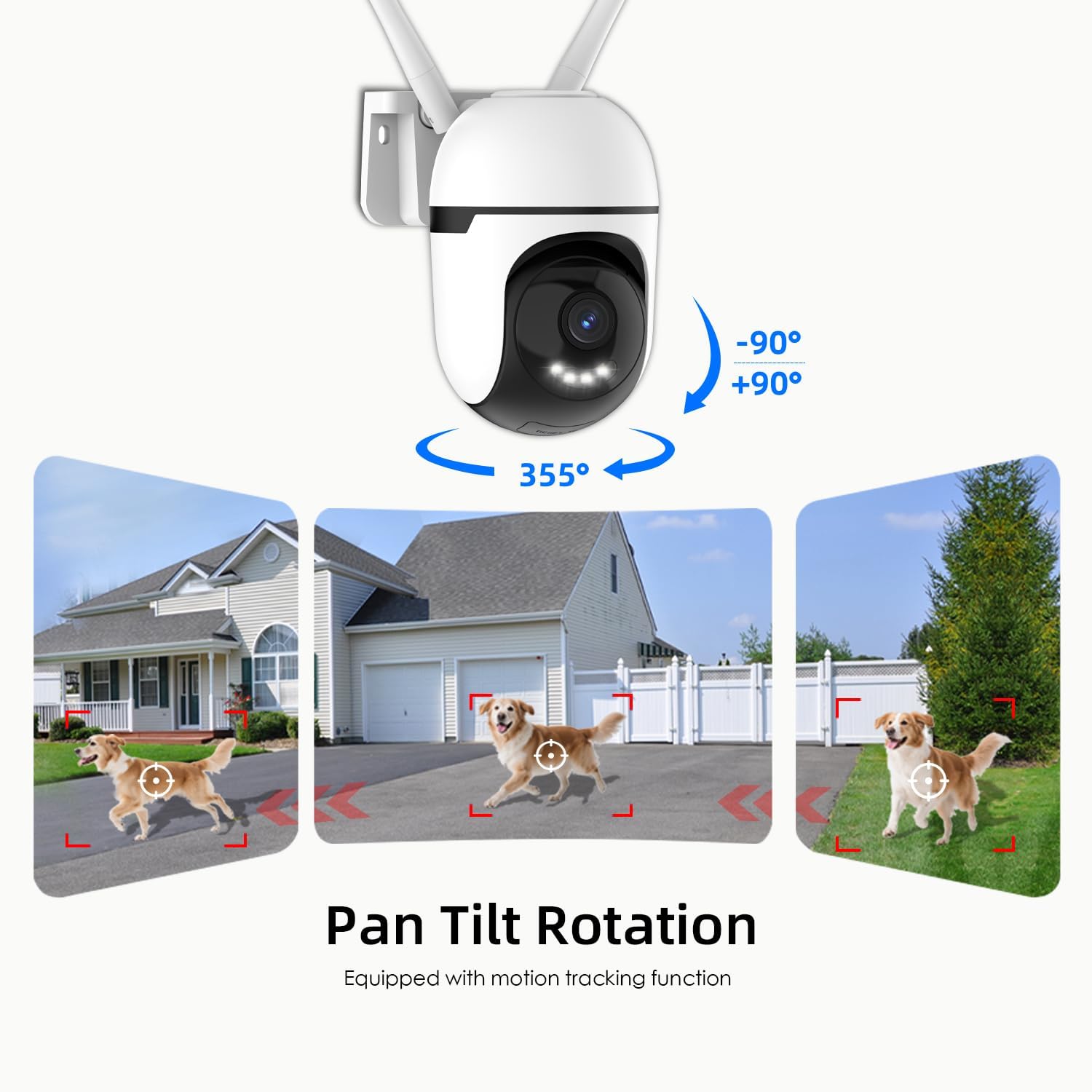
малюнок 6.1: This graphic demonstrates the camera's pan and tilt functionality, allowing for a 360-degree horizontal view (355°) and vertical adjustment (90°), illustrated by different perspectives of a dog in a yard.

малюнок 6.2: This image highlights the camera's 360-degree coverage (355° pan, 90° tilt) and motion tracking, showing its ability to monitor a wide area including children playing and a dog.
6.2 Виявлення та відстеження руху
The camera can detect motion and automatically track moving objects within its field of view. You will receive real-time alerts on your smartphone when motion is detected.
- Увімкнути/вимкнути: Access camera settings in the app to turn motion detection on or off.
- Чутливість: Налаштуйте чутливість виявлення руху, щоб мінімізувати хибні тривоги.
- Зони виявлення: Встановіть певні області в межах камери view for motion detection to focus on, ignoring irrelevant areas.

малюнок 6.3: This image illustrates the camera's auto-tracking motion detection, showing the camera following a moving subject (a child) within its field of view.

малюнок 6.4: An illustration of how to set up custom detection zones to reduce unnecessary alerts, showing a dog within a defined zone and a corresponding motion detection notification.
6.3 2-Way Talk
Use the two-way audio feature to communicate with individuals near the camera. Tap the microphone icon in the live view to speak, and listen through the camera's speaker.

малюнок 6.5: This image illustrates the two-way talk feature, enabling real-time audio communication between a person near the camera outdoors and another person using the mobile app indoors.
6.4 Нічне бачення
The camera offers multiple night vision modes:
- Classic IR Night Vision: Standard black and white infrared view.
- Кольорове нічне бачення: Utilizes built-in lights to provide full-color video in low-light conditions.
- Інтелектуальне нічне бачення: Stays in IR mode and switches to color night vision upon detection of motion.
Adjust night vision settings in the app to suit your preferences.

малюнок 6.6: This image compares the camera's night vision capabilities: classic infrared (black and white), full-color night vision, and intelligent night vision that activates color upon detection.
6.5 Режим конфіденційності
Activate Privacy Mode via the app to physically rotate the camera lens downwards, ensuring your privacy when the camera is not needed for surveillance.

малюнок 6.7: The camera's privacy mode is shown, where the lens physically rotates to obscure the view, and the mobile application confirms the mode is active.
6.6 Запис і зберігання
The camera supports 24/7 continuous recording and event-triggered recording. Footage можна зберігати двома способами:
- Local TF Card Storage: Insert a Micro SD card (up to 128GB) for local storage without a subscription. Ensure the card is formatted through the app.
- US-Based Cloud Storage: An optional subscription service provides cloud storage, often including advanced AI analysis features.
Доступ до записаного footage through the playback section of the Potegrap app.

малюнок 6.8: This image details the storage options: US-based cloud storage (subscription needed for AI functions) and local TF card storage (up to 128GB, not included) for secure data.
6.7 AI Features (Subscription Required)
Enhance your security with AI-powered features, available with a cloud storage subscription:
- Виявлення особи: Differentiates human shapes from other moving objects.
- Виявлення транспортного засобу: Identifies vehicles, reducing irrelevant alerts.
- Animal Detection: Recognizes animals, useful for pet monitoring or filtering wildlife alerts.
- 911 Emergency Alarm: Integrates with emergency services for rapid response during critical events.

малюнок 6.9: The camera's intelligent alarm feature is depicted, showing a detected person and an option within the mobile application to initiate a 911 emergency call.
7. Технічне обслуговування
- Прибирання: Регулярно протирайте об’єктив та корпус камери м’якою сухою тканиною, щоб видалити пил і бруд. Не використовуйте агресивні хімікати або абразивні засоби для чищення.
- Оновлення прошивки: Check the app periodically for firmware updates. Keeping your camera's firmware updated ensures optimal performance and security.
- Цикл живлення: Якщо з камерою виникли проблеми, спробуйте відключити її від джерела живлення на 10 секунд, а потім знову підключити.
8. Вирішення проблем
| проблема | Можлива причина | Рішення |
|---|---|---|
| Камера не може підключитися до Wi-Fi. | Incorrect Wi-Fi password; camera too far from router; router settings (e.g., firewall). | Verify Wi-Fi password. Move camera closer to router. Ensure router supports 2.4GHz or 5GHz. Temporarily disable firewall for setup. Reset camera and try again. |
| Погана якість відео або розмите зображення. | Брудний об'єктив; недостатнє освітлення; проблеми з пропускною здатністю мережі. | Clean the camera lens. Ensure adequate lighting for optimal color night vision. Check your internet speed. |
| Сповіщення про виявлення руху надходять занадто часто або не працюють. | Sensitivity set too high/low; detection zone not configured correctly. | Налаштуйте чутливість виявлення руху в застосунку. Налаштуйте певні зони виявлення, щоб зосередитися на відповідних областях. |
| не можу view записаний footage from SD card. | SD card not formatted; SD card full or corrupted; app issue. | Ensure the SD card is correctly inserted and formatted via the app. Check if the SD card is full. Some advanced playback features or continuous recording may require a cloud subscription. |
| AI features (person/vehicle detection, 911 alarm) are not active. | Subscription required for AI features. | These advanced AI features typically require an active cloud storage subscription. Check your subscription status in the app. |
| Камера не реагує. | Проблема з живленням; програмний збій. | Check power connection. Perform a power cycle (unplug and replug). If issues persist, perform a factory reset (refer to app for instructions). |
9. Технічні характеристики
| Особливість | Деталь |
|---|---|
| Номер моделі | T-CQ1052-W20V |
| Бренд | Потеграп |
| роздільна здатність | 2K HD (2560x1440), 3 MP |
| Підключення | Dual-band 2.4GHz & 5GHz WiFi |
| Джерело живлення | Провідний електричний |
| Діапазон повороту/нахилу | 355° по горизонталі, 90° по вертикалі |
| Нічне бачення | Color Night Vision, IR Night Vision, Intelligent Night Vision |
| Параметри зберігання | TF (Micro SD) Card (up to 128GB, not included), US-Based Cloud Storage (subscription required) |
| Аудіо | Two-Way Talk (Built-in microphone and speaker) |
| Робоча температура | Від -4°F до 122°F (від -20°C до 50°C) |
| Розміри (Д x Ш x В) | 3.9 x 3.1 x 4.3 дюймів |
| Вага товару | 1.57 фунта (0.71 кілограма) |
| Сумісні пристрої | Смартфон (iOS, Android) |
10. Гарантія та підтримка
For warranty information, please refer to the documentation included with your purchase or contact Potegrap customer support. Protection plans may be available for extended coverage.
If you encounter any issues or have questions regarding your Potegrap security camera, please contact our customer support team through the official Potegrap webсайт або контактну інформацію, надану в додатку.