
1. Продукт закінчивсяview
The DROK LM2596 LED Display Buck Converter is a DC-DC step-down module designed to convert a higher input voltage to a lower, adjustable output voltage. It features an integrated LED display for monitoring input voltage, об'єм виходуtage, and output current, along with buttons for mode selection and output control. This module is suitable for various electronic projects requiring a stable and adjustable power supply.
Ключові характеристики:
- Вхідний об'ємtage Діапазон: Постійний струм 4.0В-32.0В
- Вихідний випtage Діапазон: DC 1.25V-30.0V (adjustable)
- Максимальний вихідний струм: 3A
- Continuous Operating Current: 1.5A (total output power within 20W)
- Дисплей: LED screen showing input voltage, об'єм виходуtagе, і вихідний струм.
- захист: Input reverse connection protection and short circuit protection.

Figure 1: DROK LM2596 Buck Converter with key dimensions. The module measures approximately 6.0cm (2.4in) in length, 3.4cm (1.34in) in width, and 1.3cm (0.51in) in height.
2. Налаштування та підключення
Proper wiring is essential for the safe and correct operation of the buck converter. Refer to the diagram below for connection points.
Інструкції з підключення:
- В+: Connect the positive terminal of your DC input power source.
- В-: Connect the negative terminal of your DC input power source.
- OUT+: Connect the positive terminal of your load (device to be powered).
- ВИХІД-: Connect the negative terminal of your load.
Важливо: Переконайтеся, що вхід обtage is at least 2V higher than the desired output voltage for proper step-down conversion.

Figure 2: Component descriptions and wiring terminals. The input positive (IN+) and negative (IN-) terminals are on the left, and output positive (OUT+) and negative (OUT-) terminals are on the right.
3. Операція
Регулювання вихідної гучностіtage:
Вихідний обtage is adjusted using the potentiometer located on the module. Use a small screwdriver to turn the screw on top of the potentiometer.
- Turning the screw за годинниковою стрілкою буде збільшення вихідний обtage.
- Turning the screw проти годинникової стрілки буде зменшення вихідний обtage.
It is recommended to adjust the voltage while monitoring the output on the LED display or with an external multimeter for precise setting.
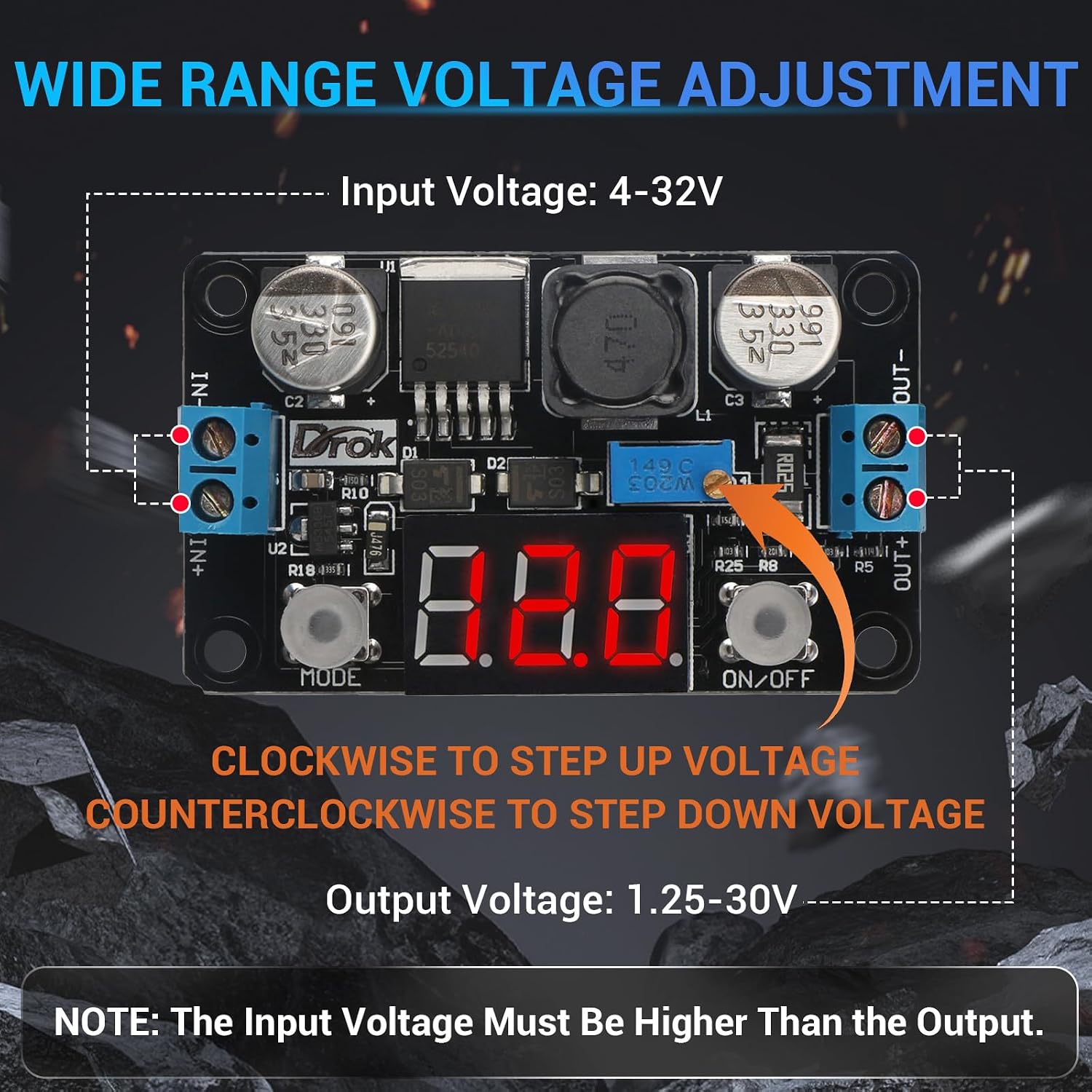
Figure 3: Illustration of the potentiometer for voltage adjustment. Turn clockwise to increase voltage, counter-clockwise to decrease.
Display Mode Button (MODE):
Press the "MODE" button to cycle through the displayed values on the LED screen:
- Вихідний випtage
- Вихідний струм
- Вхідний об'ємtage
The module will automatically memorize the last selected display mode.
Output ON/OFF Button:
Press the "ON/OFF" button to alternately turn the output voltage on or off. When the output is off, the display will show "OFF". The module will automatically memorize the last switch status.
4. Технічні характеристики
| Параметр | Значення |
|---|---|
| Бренд | ДРОК |
| Номер моделі | 180057_2x |
| Вхідний об'ємtage Дальність | Постійний струм 4.0 В - 32.0 В |
| Вихідний випtage Дальність | DC 1.25V - 30.0V (Adjustable) |
| Максимальний вихідний струм | 3A |
| Continuous Operating Current | 1.5A (Total output power within 20W) |
| томtage Точність вимірювання | ± (1% + 2 цифр) |
| Точність вимірювання струму | ± 2 цифр |
| Розміри продукту (Д x Ш x В) | 6.0 x 3.4 x 1.3 см (2.3 x 1.3 x 0.5 дюйма) |
| Джерело живлення | DC |
5. Особливості захисту
The DROK LM2596 Buck Converter includes built-in protection mechanisms to ensure safe operation and protect connected devices:
- Input Reverse Connection Protection: Prevents damage to the module if the input power source polarity is accidentally reversed.
- Захист від короткого замикання: Safeguards the module and connected load from damage in case of an output short circuit.
6. Технічне обслуговування
The DROK LM2596 Buck Converter is designed for reliable operation with minimal maintenance. To ensure longevity and optimal performance:
- Тримайте модуль чистим та без пилу та сміття.
- Ensure adequate ventilation, especially when operating at higher currents, to prevent overheating.
- Уникайте впливу вологи або екстремальних температур на модуль.
- Регулярно перевіряйте з'єднання проводів, щоб переконатися в їх надійності та відсутності корозії.
7. Вирішення проблем
| проблема | Можлива причина | Рішення |
|---|---|---|
| No display or output power. |
|
|
| Вихід обtage нестабільне або неправильне. |
|
|
| Module gets excessively hot. |
|
|
8. Інформація про гарантію
This DROK LM2596 LED Display Buck Converter is covered by a Гарантія від виробника 1 рік з дати покупки. Ця гарантія поширюється на дефекти матеріалів та виготовлення за умов нормального використання. Вона не поширюється на пошкодження, спричинені неправильним використанням, нещасним випадком, несанкціонованою модифікацією або неправильним встановленням.
Зберігайте підтвердження покупки для гарантійних претензій.
9. Підтримка клієнтів
For technical assistance, troubleshooting, or warranty inquiries, please contact DROK customer support through the official DROK store on Amazon or their official website. When contacting support, please provide your product model number (180057_2x) and a detailed description of the issue.
DROK Store Link: Visit the DROK Store