
1. Вступ
This manual provides detailed instructions for the setup, operation, and maintenance of your Transformers GK01 Wireless Mechanical Keyboard. The GK01 is a versatile keyboard featuring tri-mode connectivity (Bluetooth 5.0, 2.4GHz wireless, and USB-C wired), a 101-key layout, RGB backlighting, and hot-swappable switches for a customizable typing experience.

Figure 1.1: Transformers GK01 Wireless Mechanical Keyboard.
2. Вміст упаковки
Будь ласка, перевірте, чи всі перелічені нижче предмети входять до вашої упаковки:
- Transformers GK01 Wireless Mechanical Keyboard
- Кабель USB-C – USB-A
- Бездротовий USB-адаптер 2.4 ГГц
- Клавіша 2-в-1 і знімач перемикача
- Посібник користувача (цей документ)
- Запасні вимикачі (2 шт.)
- Чохол для клавіатури
3. Налаштування та підключення
3.1. Tri-Mode Connection Overview
The GK01 keyboard supports three connection modes: USB-C wired, 2.4GHz wireless, and Bluetooth 5.0. You can connect to up to five devices simultaneously and switch between them seamlessly.

Figure 3.1: Tri-Mode Connection Capabilities.
3.2. Дротове підключення USB-C
- Знайдіть порт USB-C на клавіатурі.
- Підключіть один кінець наданого кабелю USB-C до клавіатури.
- Connect the other end of the USB-C cable to an available USB-A port on your computer.
- Клавіатуру буде автоматично розпізнано та готово до використання.
3.3. Бездротове з'єднання 2.4 ГГц
- Locate the 2.4GHz wireless USB dongle.
- Plug the dongle into an available USB-A port on your computer.
- On the keyboard, ensure the mode switch (usually on the side or back) is set to 2.4GHz mode.
- Клавіатура має підключитися автоматично. Якщо ні, натисніть Fn + R щоб розпочати створення пари.

Figure 3.2: USB-C Port and 2.4GHz Dongle Location.
3.4. Підключення Bluetooth 5.0
The keyboard supports connecting to up to three Bluetooth devices (BT1, BT2, BT3).
- On the keyboard, set the mode switch to Bluetooth mode.
- Щоб увійти в режим сполучення для певного каналу Bluetooth, натисніть і утримуйте Fn + Q (для BT1), Fn + W (для BT2), або Fn + E (for BT3) for 3-5 seconds until the indicator light flashes rapidly.
- On your device (PC, tablet, smartphone), open Bluetooth settings and search for new devices.
- Select "Transformers GK01" from the list of available devices.
- Once connected, the indicator light on the keyboard will stop flashing.
- Щоб перемикатися між сполученими пристроями Bluetooth, просто натисніть Fn + Q, Fn + W, або Fn + E.
4. Основна операція
4.1. Keyboard Layout and Anti-Ghosting
The GK01 features a 101-key layout, providing a full set of keys including a numeric keypad. All keys are equipped with anti-ghosting technology, ensuring that every keystroke is registered accurately, even when multiple keys are pressed simultaneously.
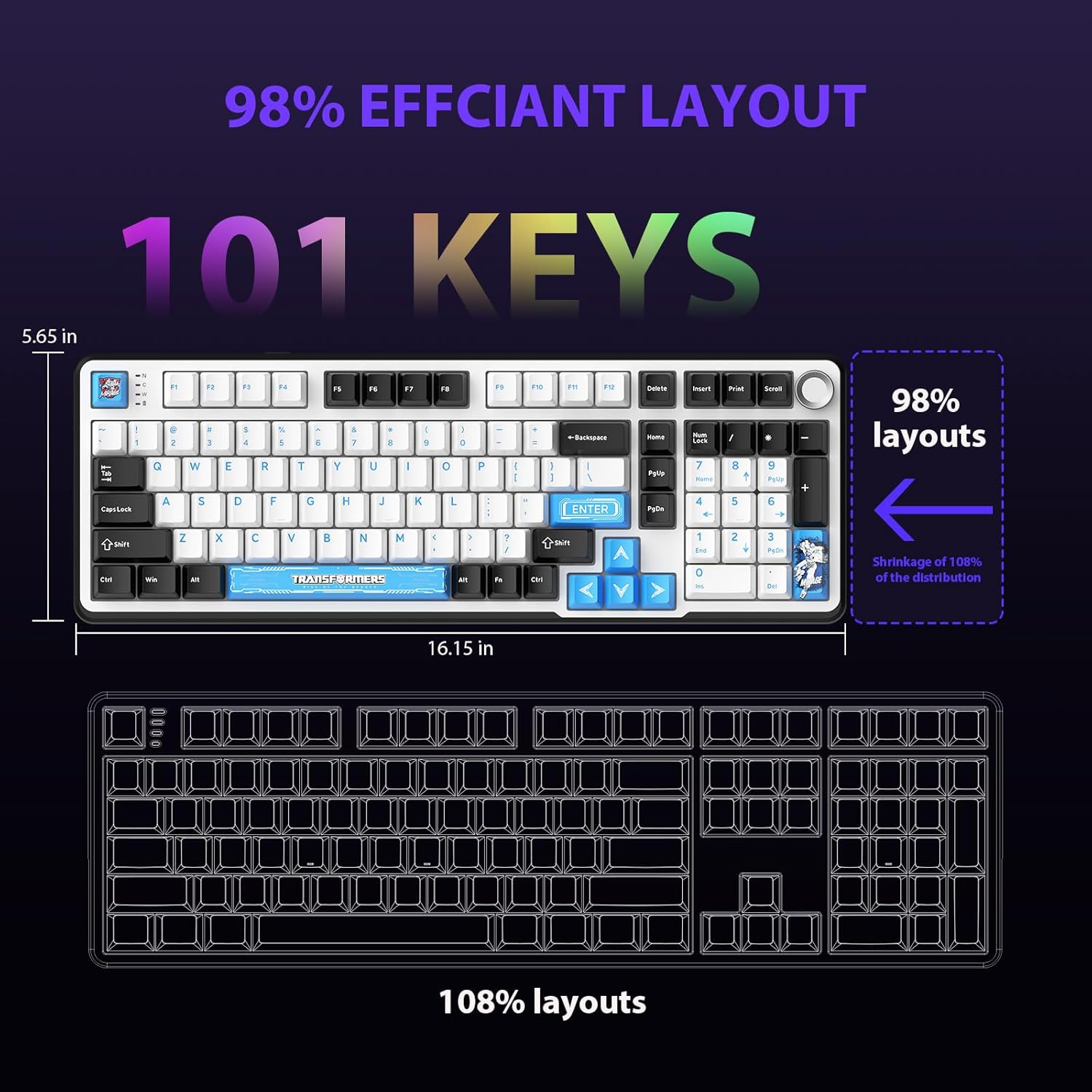
Figure 4.1: 101-Key Layout.
4.2. Ручка керування мультимедіа
The dedicated knob located on the top right of the keyboard provides convenient multimedia control:
- Повернути за годинниковою стрілкою: Збільшити гучність.
- Повернути проти годинникової стрілки: Зменшити гучність.
- Натиснути: Вимкнути/увімкнути звук.
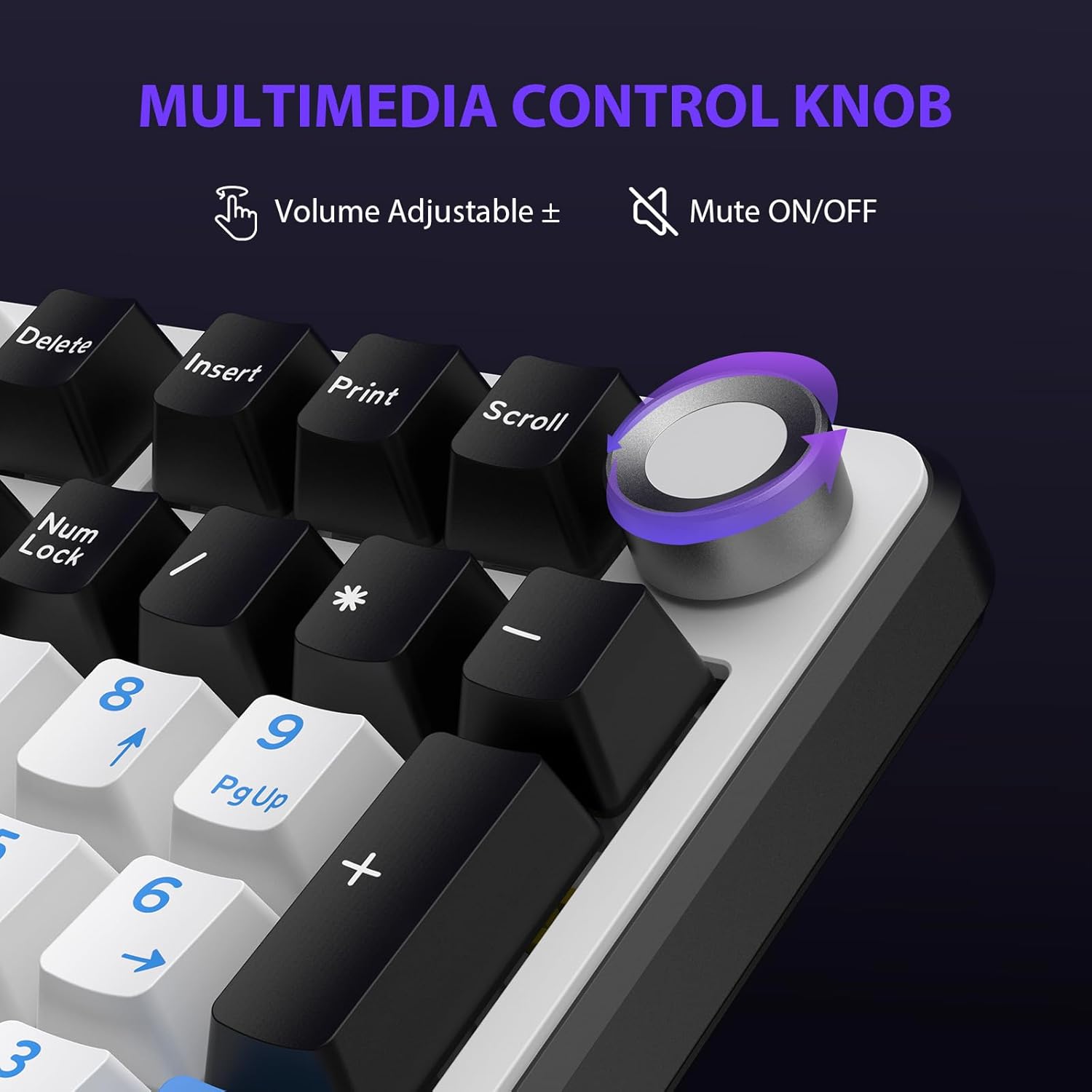
Figure 4.2: Multimedia Control Knob.
4.3. Керування RGB-підсвічуванням
The GK01 keyboard features 16.8 million color RGB backlighting with various effects.
- Fn + [Right Arrow]: Adjust 5 brightness levels.
- Fn + [Left Arrow]: Adjust 5 speed levels for dynamic effects.
- Fn + [Вставити]: Перемикайтеся між 20 різними режимами підсвічування.
- Fn + [Enter]: Switch color order within certain modes.
- Fn + [X]: Turn off light / activate power-saving mode.
- Fn + [Backspace]: Switch color order within certain modes.

Figure 4.3: RGB Backlight Controls.
5. Розширені функції
5.1. Комутатори з можливістю гарячої заміни
The GK01 keyboard is equipped with pre-lubricated Cybertron linear switches and supports solder-free hot-swapping. This allows you to easily replace switches with compatible 3-pin or 5-pin mechanical switches without soldering.
Щоб замінити вимикач:
- Using the provided 2-in-1 keycap and switch puller, gently remove the keycap from the desired switch.
- Insert the switch puller onto the switch, ensuring it grips the top and bottom clips of the switch.
- Обережно потягніть перемикач прямо вгору, щоб зняти його з друкованої плати.
- Вирівняйте контакти нового перемикача з отворами на друкованій платі. Переконайтеся, що контакти розташовані прямо, щоб уникнути згинання.
- Міцно натисніть на новий перемикач, доки він не клацне.
- Знову прикріпіть ковпачок клавіші.

Figure 5.1: Hot-Swappable Switch Replacement.
5.2. Програмоване програмне забезпечення
The GK01 supports custom software for advanced customization, including key remapping, macro creation, and detailed RGB lighting effects.
- The software is compatible only with the Windows operating system.
- The keyboard must be connected via USB-C wired mode to use the software.
- For driver download, please visit the official Transformers Keyboard website or refer to the link provided in the product packaging.
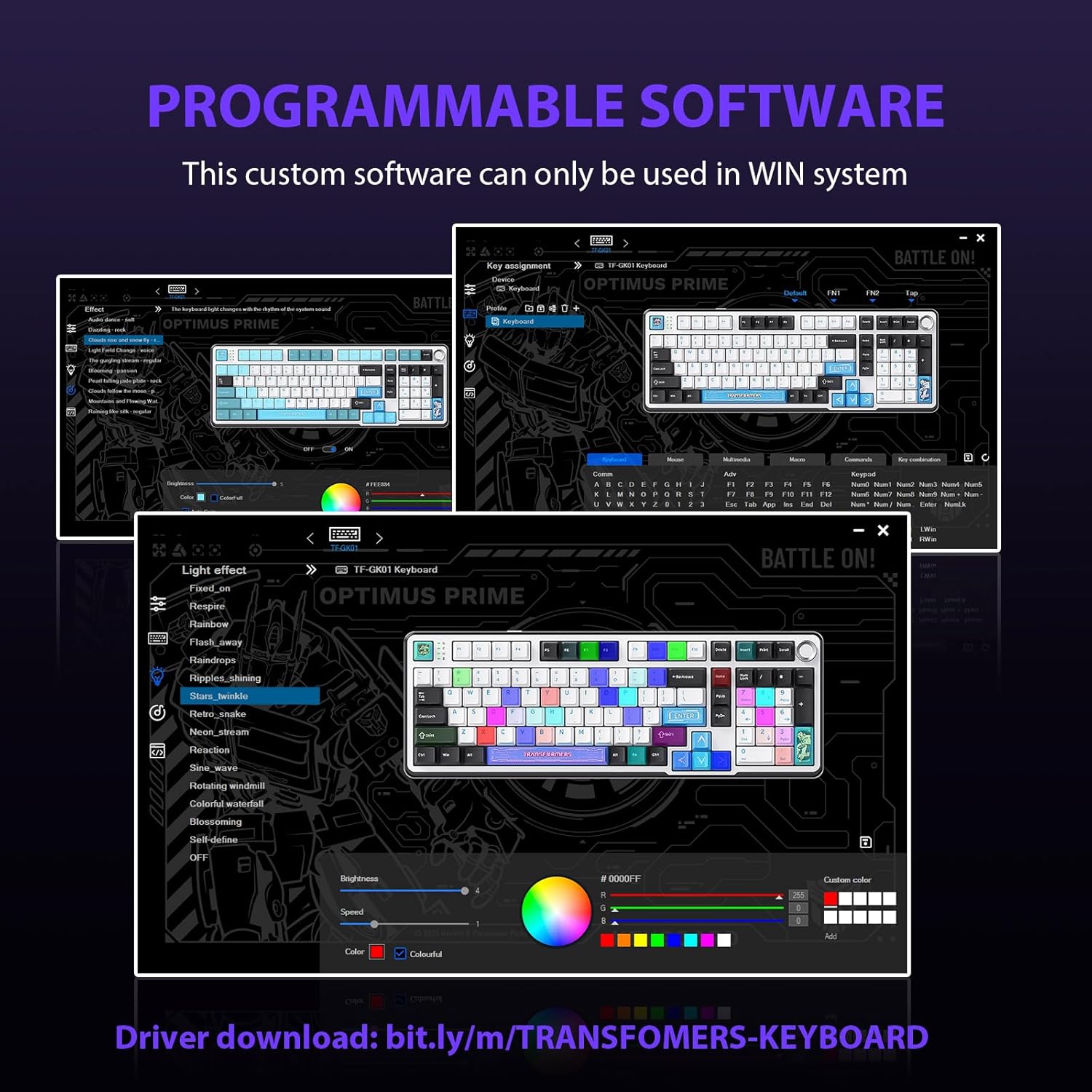
Figure 5.2: Programmable Software Interface.
5.3. Gasket Mounted Structure
The keyboard features a five-layer sound-absorbing and shock-absorbing gasket mounted structure. This design effectively reduces hollow noise and provides a softer, more consistent typing feel by isolating the plate from the case.
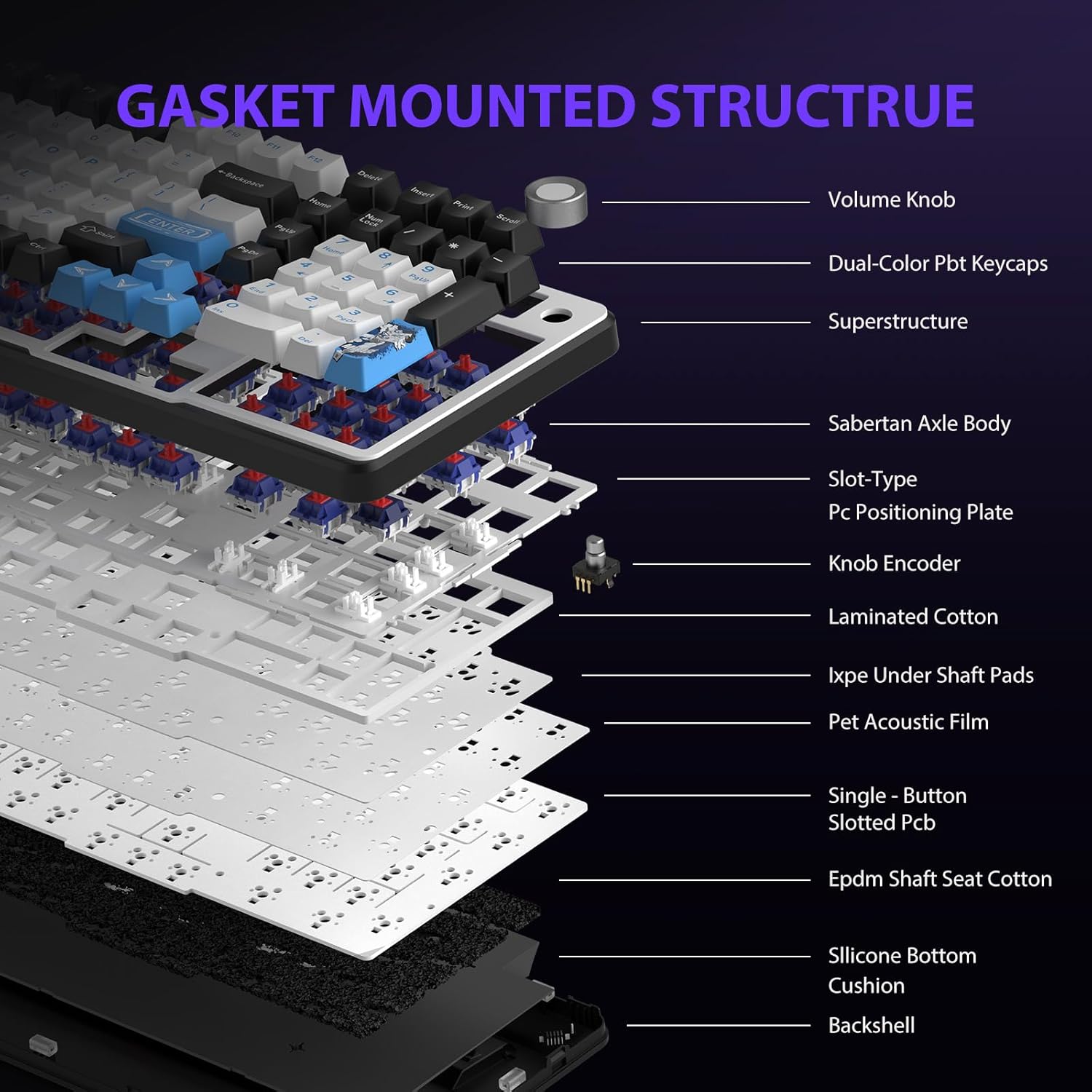
Figure 5.3: Gasket Mounted Structure Components.
6. Керування батареєю
The GK01 keyboard is equipped with a 4000mAh rechargeable battery.
- Зарядка: Connect the keyboard to a USB power source using the provided USB-C cable. The indicator light will show charging status.
- Термін служби батареї: A fully charged battery provides extended usage time. Actual battery life may vary based on usage patterns and RGB lighting intensity.
- Енергозбереження: The keyboard will enter a power-saving sleep mode after a period of inactivity to conserve battery. Press any key to wake it up.
7. Технічне обслуговування
7.1. Очищення клавіатури
- Перед чищенням від’єднайте клавіатуру від усіх джерел живлення.
- Злегка протріть м’якою тканиною без ворсу dampводою або м’яким миючим розчином, щоб протерти ковпачки клавіш і корпус.
- Для видалення пилу та сміття між клавішами використовуйте стиснене повітря або невелику щітку.
- Уникайте використання агресивних хімікатів або абразивних матеріалів.
7.2. Keycap and Switch Care
- The PBT keycaps are designed for durability and fade resistance.
- Refer to Section 5.1 for instructions on safely removing and replacing keycaps and switches.
- Ensure the keyboard feet are clean and free of debris for stable placement.

Figure 7.1: Adjustable Keyboard Feet.
8. Вирішення проблем
| проблема | Можлива причина | Рішення |
|---|---|---|
| Клавіатура не реагує в бездротовому режимі. | Low battery, incorrect mode selected, dongle not connected, Bluetooth not paired. | Charge the keyboard. Ensure the mode switch is set correctly (2.4GHz or BT). Re-insert the 2.4GHz dongle. Re-pair Bluetooth connection. Try wired mode to confirm keyboard functionality. |
| Клавіші не реєструються або друкуються двічі. | Loose switch, software issue, debris under keycap. | Ensure switches are fully seated. Clean under keycaps. If using programmable software, ensure it's updated or try resetting keyboard settings. |
| RGB-підсвічування не працює або зависає. | Backlight turned off, software conflict. | Прес Fn + X to toggle backlight. Check programmable software settings. |
| Не вдається підключитися через Bluetooth. | Клавіатура не в режимі сполучення, Bluetooth пристрою вимкнено, є перешкоди. | Ensure keyboard is in Bluetooth pairing mode (Fn + Q/W/E long press). Ensure device Bluetooth is on and discoverable. Move closer to the device. |
9. Технічні характеристики
| Особливість | Деталь |
|---|---|
| Номер моделі | TF-GK01 |
| Підключення | Bluetooth 5.0, бездротовий зв'язок 2.4 ГГц, дротовий USB-C |
| Тип клавіатури | Механічний |
| Макет | 101 Keys (Full-size) |
| Перемикачі | Pre-lubed Cybertron Linear Switches, Hot-Swappable (3-pin/5-pin compatible) |
| Клавіатури | Heat-sublimated PBT |
| Підсвічування | RGB (16.8 Million Colors, 20 modes, music rhythm effects via driver) |
| Ємність акумулятора | 4000 мАг |
| Розміри продукту | 16.15 x 5.65 x 1.63 дюйми (41.02 x 14.35 x 4.14 см) |
| Вага товару | 2.24 фунта (1.02 кг) |
| Сумісні пристрої | Ноутбук, ПК, смартфон, планшет |
| Особливості | Anti-Ghosting (all keys), Multimedia Control Knob, Programmable Keys (via software), Rechargeable |
10. Гарантія та підтримка
For information regarding warranty coverage, technical support, or service inquiries, please refer to the warranty card included with your product or visit the official Transformers Keyboard webсайт.
Виробник: трансформери