
1. Вступ
The MAONO DM40 Wireless USB Microphone is designed for high-quality audio capture in various scenarios, including gaming, streaming, podcasting, and recording. It offers both wired and wireless connectivity, advanced noise cancellation, AI voice changing capabilities, and customizable RGB lighting to enhance your audio experience.
2. Вміст упаковки
Будь ласка, поставте позначку у відповідному полі для наступних пунктів:
- Ігровий мікрофон DM40 зі стійкою, амортизатором та поп-фільтром
- USB-C роз'єм
- Адаптер USB-A
- Кабель живлення 2 в 1 (3.3 м)
- Посібник користувача

Image: All components included in the MAONO DM40 Wireless USB Microphone package.
Video: Unboxing and initial setup of the MAONO DM40 Wireless USB Microphone, demonstrating how to unpack and identify all included accessories.
3. Продукт закінчивсяview & Особливості
- Миттєве бездротове з'єднання: Experience clear, interference-free audio with up to 40 hours of continuous use. The wireless design eliminates cable clutter, offering greater freedom of movement for gaming, streaming, or recording.
- Шумозаглушення одним дотиком: Features a one-touch button with three adjustable levels (light, medium, high) for precise and efficient noise reduction. This can also be controlled via the Maono Link app, ensuring clear audio in various environments.
- Чудова якість звуку компакт-диска: Captures rich audio details with a 24-bit/48kHz sampling rate, minimizing background noise and distortion for professional-grade recordings. Includes one-tap scene presets for quick optimization across different scenarios.
- Зміна голосу за допомогою штучного інтелекту: Unlock creative possibilities with the AI voice-changing feature available through the Maono Link app. Transform your voice into various characters for gaming, live streaming, or chatting.
- Легке керування та моніторинг: Manage recording needs with the Maono Link software, offering control over EQ settings, AI voice changers, noise cancellation, volume, gain, mute, real-time monitoring, and RGB lighting.
- Підключи та працюй і широка сумісність: Connects effortlessly to computers, PCs, laptops, phones, and Macs via the 2-in-1 USB-C cable or wireless USB-C dongle. Supports flexible switching between wired and wireless modes for diverse recording needs.
- Приголомшливе RGB-підсвічування: Customize your setup with 3 modes and 8 vibrant colors. The lighting can shift to match activity, enhancing the visual atmosphere during streaming or gaming.
- Потужний і простий у використанні: Features one-touch mute, gain adjustment, and zero-latency monitoring for full control over your sound.

Image: The MAONO DM40 microphone highlighting its wireless freedom and extended battery life.

Image: Illustration of the AI voice changer feature with various character options.
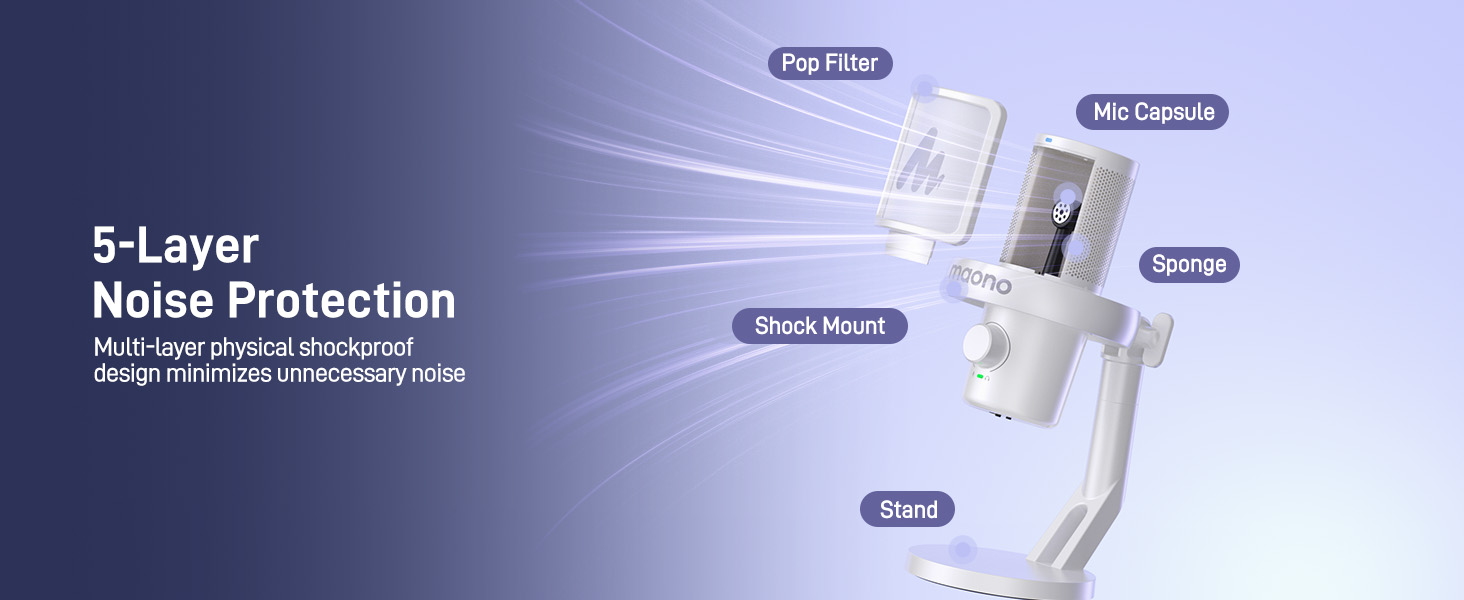
Image: Diagram illustrating the 5-layer noise protection technology of the MAONO DM40 microphone.
4. Налаштування
4.1 Desktop Setup
The DM40 microphone comes with a pre-assembled desktop stand, shock mount, and pop filter. Simply place it on your desk for immediate use. No additional installation is required for the desktop model.

Image: MAONO DM40 microphone securely placed on its desktop stand.
4.2 Boom Arm Setup (Optional)
If you prefer to use a boom arm (not included), follow these steps:
- Fix the desktop clamp of your boom arm to the edge of your desk.
- Mount the cantilever bracket onto the clamp і закрутіть гвинти.
- Прикріпіть мікрофон DM40 до стійки-кронштейна.
4.3 Дротове підключення
Connect the microphone to your computer, laptop, or smartphone using the provided 2-in-1 USB-C cable. If your computer only has USB-A ports, use the included USB-A adapter.

Image: MAONO DM40 microphone connected to a device using the USB-C cable.
4.4 Бездротове підключення
Plug the wireless USB-C dongle into your computer or smartphone. The DM40 microphone will automatically pair and connect with the receiver. The receiver also features a charging port to charge your smartphone simultaneously.

Image: MAONO DM40 microphone demonstrating wireless connection via USB-C dongle to a laptop.
5. Інструкція з експлуатації
5.1 Power Button & RGB Control
Press and hold the power button to turn the microphone on or off. Once on, short press the power button to cycle through the various RGB lighting modes. The DM40 will automatically pair with the receiver when powered on.

Image: Close-up of the MAONO DM40 microphone's power and RGB control buttons.
5.2 Ручка регулювання посилення мікрофона та гучності навушників
The knob on the microphone controls both microphone gain and headphone volume. The green indicator light signifies microphone gain adjustment. Rotate the knob to increase or decrease the microphone gain. The light will flash when reaching maximum or minimum gain. A short press on the knob switches to headphone volume adjustment, indicated by a blue light. Rotate the knob to adjust headphone volume. The light will flash when reaching maximum or minimum volume.

Зображення: Детальне view of the MAONO DM40 microphone's multi-function knob for gain and headphone volume.
5.3 Кнопка відключення звуку
Tap the mute button on top of the microphone to instantly mute or unmute. When muted, the indicator light turns red.
5.4 Кнопка шумозаглушення
Tap the noise cancellation button on top to cycle through three noise reduction levels: low, medium, and high. A green indicator light signifies custom noise cancellation, allowing you to define the noise reduction level using the Maono Link software. No light indicates noise cancellation is turned off.
5.5 Headphone Jack & Monitor Switch
The 3.5mm headphone jack is compatible with TRS and TRRS headphones. Once headphones are plugged in, you can monitor the audio captured by the microphone as well as the sound played by your device. Use the microphone monitor switch to turn off direct monitoring of your own voice if desired; this will not affect hearing sound from your phone or computer.
5.6 Maono Link Software
The Maono Link software (compatible with Mac OS and Windows) provides advanced control over your microphone settings, including:
- Спеціальні налаштування еквалайзера
- AI Voice Changer effects
- Adjustable noise cancellation intensity
- Volume and gain control
- One-tap scene presets for various applications (gaming, recording, podcasting)
- Controllable RGB lighting

Image: Screenshot of the Maono Link software interface, showing various customization options for the DM40 microphone.
Відео: Кінецьview of the DM40 AI Wireless/USB Microphones, demonstrating key features and software integration.
6. Технічне обслуговування
To ensure the longevity and optimal performance of your MAONO DM40 microphone, please follow these maintenance guidelines:
- Keep the microphone clean by gently wiping it with a soft, dry cloth.
- Уникайте впливу екстремальних температур, вологості або прямих сонячних променів на мікрофон.
- Do not disassemble the microphone, as this may void the warranty.
- Store the microphone in a safe place when not in use to prevent damage.
7. Вирішення проблем
If you encounter any issues with your MAONO DM40 microphone, please refer to the following common troubleshooting tips:
- Немає вихідного звуку: Ensure the microphone is properly connected (wired or wireless dongle) and powered on. Check your device's audio input settings to confirm the DM40 is selected as the default input device. Verify microphone gain is not set to minimum.
- Погана якість звуку: Adjust the microphone gain to an appropriate level. Ensure the pop filter is correctly positioned to reduce plosives. Experiment with different noise cancellation levels or use the Maono Link app for custom settings.
- Проблеми з бездротовим підключенням: Ensure the wireless USB-C dongle is securely plugged in and within range. Restart both the microphone and your device.
- RGB-освітлення не працює: Short press the power button to cycle through RGB modes. If the issue persists, check settings in the Maono Link app.
- Maono Link App Not Recognizing Microphone: Ensure the microphone is connected to your computer via USB and powered on. Restart the app and/or your computer.
For further assistance, please contact MAONO customer support.
8. Технічні характеристики
| Бренд | MAONO |
| Назва моделі | DM40 Wireless Microphone |
| Технологія підключення | Бездротовий USB/USB C |
| Тип роз'єму | Бездротовий USB/USB C |
| Особливості | 3-Level Noise Reduction, Battery Indicator Light, 40H Long Battery Life, MAONO Link Software, AI Voice Changer, Adjustable RGB, One-tap Mute, Gain Knob, 3.5mm Headphone Jack, Volume Control, Custom EQ, Scene Presets, Mute Function, Wireless Connection, Plug and Play |
| Сумісні пристрої | Ноутбук, ПК, планшет, настільний комп'ютер, смартфон, диктофон, персональний комп'ютер, ігрова консоль PS5 PS4 |
| Колір | Білий |
| Полярний візерунок | Односпрямований |
| Аудіо Чутливість | 73 децибели |
| Джерело живлення | Працює від батареї, електричний |
| Співвідношення сигнал-шум | 73 дБ |
| АЧХ | 20 Гц-20 кГц |
| Матеріал корпусу | Метал, пластик |
9. Гарантія та підтримка
The MAONO DM40 Wireless USB Microphone comes with a 12-month warranty.
For product or software questions, please contact us at support@maono.com.
Video: An unboxing video for the MAONO DM40 Pro Wireless Microphone, providing a visual guide to the product and its components.