
1. Продукт закінчивсяview
The Orbic Speed (RC400L) is a compact and portable 4G LTE MiFi Mobile Hotspot Router designed to provide secure and reliable Wi-Fi connectivity on the go. It allows you to connect up to 10 Wi-Fi enabled devices simultaneously, offering high-speed internet access for various activities such as checking email, streaming media, and working remotely. This device features a long-lasting rechargeable battery and dual-band 802.11ac Wi-Fi for optimal performance and range.
Ключові характеристики
- Unlocked Connectivity: Compatible with various carriers (originally Verizon).
- Подовжений термін служби батареї: До 12 годин безперервної роботи на одному заряді.
- Fast Wi-Fi: Dual-band 802.11ac Wi-Fi for high-speed data and extended range.
- Підтримка кількох пристроїв: Securely connect up to 10 Wi-Fi enabled devices.
- Компактний і портативний: Lightweight design for easy travel and discreet placement.
- Інформативний РК-дисплей: Provides real-time status updates of the mobile hotspot.
Що в коробці
- Orbic Speed (RC400L) Mobile Hotspot Router
- USB кабель
- Літій-іонний акумулятор (попередньо встановлений або окремо)
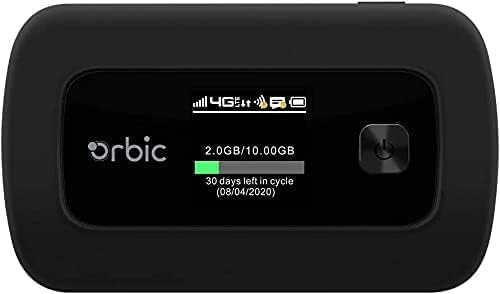
Figure 1: Orbic Speed (RC400L) Front View з дисплеєм
2. Початок роботи: Налаштування
2.1. Зарядка пристрою
Before initial use, fully charge your Orbic Speed hotspot. Connect the provided USB cable to the device's charging port and the other end to a compatible USB power adapter (not included) or a computer's USB port. The device's display will indicate charging status.
- Використовуйте лише схвалені зарядні аксесуари.
- Avoid leaving the device plugged in for extended periods after it is fully charged to prolong battery life.
2.2. Вставлення SIM-картки
The Orbic Speed (RC400L) requires a compatible 4G LTE SIM card (not included) to access cellular data networks. Follow these steps to insert the SIM card:
- Переконайтеся, що пристрій вимкнено.
- Carefully remove the back cover of the device. The back cover is designed to snap off easily without tools.
- Знайдіть слот для SIM -карти.
- Insert the SIM card into the slot with the gold contacts facing down and the notched corner aligned correctly. Push gently until it clicks into place.
- Встановіть задню кришку назад, переконавшись, що вона надійно зафіксована.

Figure 2: Orbic Speed (RC400L) Back View (SIM card slot is under the cover)
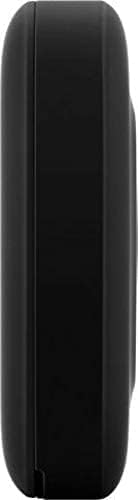
Figure 3: Orbic Speed (RC400L) Side View (Charging port location)
2.3. Увімкнення/вимкнення живлення
- Щоб увімкнути: Press and hold the Power button (usually located on the front or side) until the display lights up.
- Щоб вимкнути: Press and hold the Power button until the "Power Off" option appears on the display, then confirm. Alternatively, hold the power button for several seconds until the device shuts down.
3. Керування точкою доступу
3.1. Підключення пристроїв через Wi-Fi
Once your Orbic Speed hotspot is powered on and has established a cellular connection, you can connect your Wi-Fi enabled devices (laptops, tablets, smartphones, etc.) to it.
- На своєму пристрої відкрийте налаштування Wi-Fi.
- Скануйте доступні мережі Wi-Fi.
- Select the network name (SSID) displayed on your Orbic Speed's screen.
- Enter the Wi-Fi password (Key) also displayed on the hotspot's screen.
- Тепер ваш пристрій має бути підключений до Інтернету через точку доступу.
The Orbic Speed supports both 2.4GHz and 5GHz Wi-Fi bands. You can switch between these or configure them via the web інтерфейс адміністрування.
3.2. Доступ до Web Інтерфейс адміністрування
For advanced settings, network monitoring, and configuration, you can access the Orbic Speed's web administration interface from a connected device.
- Ensure your device is connected to the Orbic Speed's Wi-Fi network.
- Відкрийте a web браузер (наприклад, Chrome, Firefox, Edge).
- In the address bar, type the default IP address for the hotspot (commonly 192.168.1.1 or 192.168.0.1, refer to your device's display or packaging for the exact address).
- Enter the administrator username and password when prompted. Default credentials are often "admin" for both, but it is highly recommended to change these for security.
Від web interface, you can manage Wi-Fi settings, view connected devices, monitor data usage, change passwords, and configure other network parameters.
3.3. Розуміння РК-дисплея
The Orbic Speed's LCD display provides essential information at a glance:
- Потужність сигналу: Bars indicating the strength of the cellular network signal.
- Тип мережі: Icons for 4G LTE, 3G, etc.
- Статус Wi-Fi: Показує, чи активний Wi-Fi та чи підключені пристрої.
- Рівень заряду батареї: Icon showing remaining battery charge.
- Використання даних: Displays current data consumption (e.g., GB used out of total plan).
- Підключені пристрої: Number of devices currently connected to the hotspot.
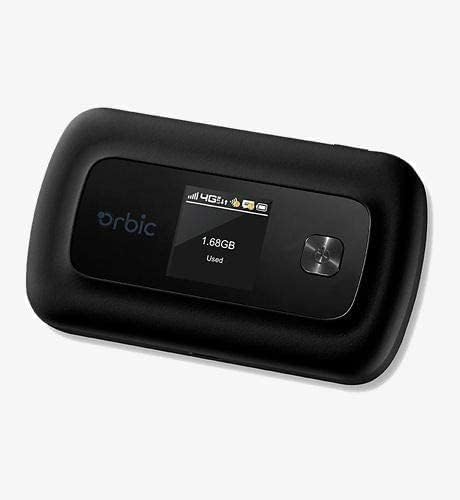
Figure 4: Orbic Speed (RC400L) Display in Use
4. Технічне обслуговування
4.1. Догляд за акумулятором
To maximize the lifespan of your device's battery:
- Уникайте екстремальних температур.
- Do not leave the device continuously plugged in for extended periods (e.g., 24/7) if not necessary, as this can degrade battery health over time.
- If storing the device for a long time, charge it to about 50% before storage.
- The battery is designed for easy replacement. Should replacement be necessary, the back casing can be snapped off to access the battery without tools.
4.2. Очищення пристрою
Use a soft, dry, lint-free cloth to clean the exterior of the device. Do not use liquid cleaners or aerosols directly on the device.
4.3. Оновлення програмного забезпечення
Періодично перевіряйте наявність оновлень програмного забезпечення через web administration interface. Updates can improve performance, add features, and enhance security.
5. Вирішення проблем
| проблема | Можлива причина | Рішення |
|---|---|---|
| Немає підключення до Інтернету | No SIM card, SIM not activated, poor cellular signal, data plan exhausted. |
|
| Пристрій не вмикається | Low battery, faulty charger/cable. |
|
| Низька швидкість Wi-Fi | Poor cellular signal, too many connected devices, interference. |
|
| Немає доступу Web UI | Incorrect IP address, not connected to hotspot Wi-Fi. |
|
If problems persist, consider performing a factory reset (refer to the web administration interface for instructions, as this will erase all custom settings) or contact customer support.
6. Технічні характеристики
| Особливість | Деталь |
|---|---|
| Назва моделі | Orbic Speed (RC400L) |
| Технологія підключення | USB, Wi-Fi (4G LTE) |
| Бездротовий стандарт | 802.11ac (Dual-Band) |
| Сумісні пристрої | Laptop, Tablet, Smartphone, etc. |
| Колір | чорний |
| Вага товару | 7.8 унції |
| Розміри упаковки | 5.75 x 3.46 x 2.2 дюймів |
| Акумулятор | 1 літій-іонний акумулятор (у комплекті) |
| Особливість | Світлодіодний індикатор |
| Виробник | Орбічний |
7. Гарантія та підтримка
Цей продукт продається як Amazon поновлено item. Amazon Renewed products are pre-owned and refurbished by qualified suppliers to work and look like new. They come with the Amazon Renewed Guarantee, which provides a replacement or refund within 90 days of receipt if the product does not work as expected.
For technical support or warranty claims, please refer to the Amazon Renewed program details or contact the seller directly through your Amazon order history. For general product inquiries or advanced troubleshooting not covered in this manual, you may also visit the official Orbic support webсайт, якщо є.
For additional information regarding your purchase, please visit your Amazon Order History.


