
1. Вступ
Дякуємо за покупкуasing the JVC XS-N1154B Bluetooth Speaker. This manual provides essential information for the safe and efficient operation of your device. Please read it thoroughly before use and retain it for future reference.
2. Інформація про безпеку
- Не піддавайте динамік впливу екстремальних температур, прямих сонячних променів або високої вологості.
- Уникайте падіння та сильних ударів динаміка.
- Не намагайтеся розбирати або модифікувати динамік. Це призведе до анулювання гарантії.
- Тримайте динамік подалі від води та рідин, незважаючи на його водонепроникність, щоб запобігти пошкодженню внутрішніх компонентів.
- Використовуйте лише зазначений зарядний кабель та адаптер живлення.
- Протирайте динамік м’якою сухою тканиною. Не використовуйте абразивні засоби для чищення або розчинники.
3. Вміст упаковки
Переконайтеся, що всі предмети присутні в упаковці:
- JVC XS-N1154B Bluetooth Speaker
- Зарядний кабель
- Посібник користувача
- Пульт дистанційного керування (якщо є)
4. Продукт закінчивсяview
Ознайомтеся з компонентами та елементами керування динаміка.
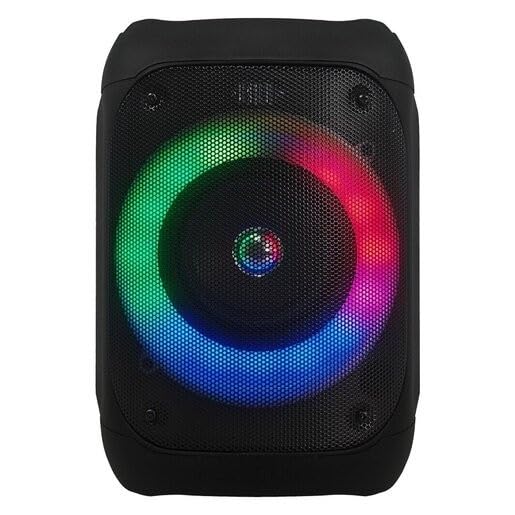
малюнок 1: Фронт view of the JVC XS-N1154B Bluetooth Speaker, showcasing the speaker grille and integrated music-activated LED lights.
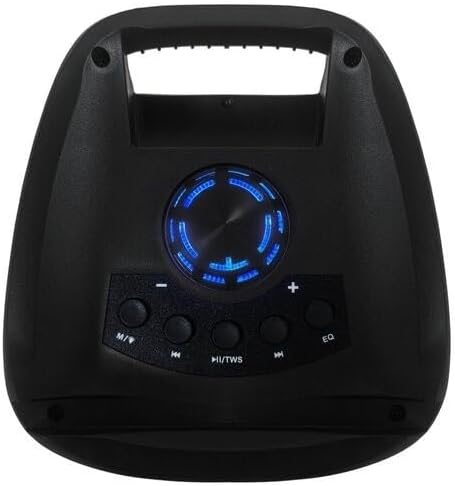
малюнок 2: Топ view of the JVC XS-N1154B Bluetooth Speaker, displaying the control panel with various buttons and the volume knob.
Функції панелі керування:
- Кнопка живлення: Вмикає або вимикає динамік.
- Кнопка режиму (M): Switches between Bluetooth, USB, SD Card, and FM Radio modes.
- Play/Pause (►||) / TWS Button: Plays or pauses audio. Long press for TWS (True Wireless Stereo) pairing.
- Previous Track (◀◀) Button: Skips to the previous track or tunes down in FM mode.
- Next Track (►►) Button: Skips to the next track or tunes up in FM mode.
- Кнопка EQ: Перемикає попередньо встановлені налаштування еквалайзера.
- Регулятор гучності: Rotates to adjust the volume level.
5. Налаштування
5.1 Заряджання динаміка
- Підключіть зарядний кабель до зарядного порту динаміка.
- Підключіть інший кінець кабелю до відповідного USB-адаптера живлення (не входить до комплекту) або до порту USB з живленням.
- Індикатор заряджання світитиметься, зазвичай червоним, під час заряджання.
- Після повного заряджання індикатор може змінити колір (наприклад, вимкнутися або стати синьо-зеленим). Від’єднайте динамік від джерела живлення.
5.2 Увімкнення/вимкнення
- Щоб увімкнути: Press and hold the Power button until the speaker powers on and you hear an audible prompt.
- Щоб вимкнути: Press and hold the Power button again until the speaker powers off.
6. Інструкція з експлуатації
6.1 Створення пари Bluetooth
- Ensure the speaker is powered on and in Bluetooth mode. If not, press the Mode (M) button to switch to Bluetooth mode. The speaker will indicate it is ready for pairing (e.g., a blinking LED or audible prompt).
- На мобільному пристрої (смартфоні, планшеті, ноутбуці) увімкніть Bluetooth та знайдіть доступні пристрої.
- Select "JVC XS-N1154B" from the list of devices.
- Once paired, the speaker will provide an audible confirmation, and the Bluetooth indicator light will become solid.
- Тепер ви можете відтворювати аудіо з вашого пристрою через динамік.
6.2 Відтворення з USB/SD-карти
- Insert a USB flash drive or an SD card (with supported audio files) у відповідний порт на динаміку.
- The speaker will automatically switch to USB or SD card mode and begin playing audio. If not, press the Mode (M) button to select the correct input.
- Use the Previous Track (◀◀), Next Track (►►), and Play/Pause (►||) buttons to control playback.
6.3 Робота FM-радіо
- Натисніть кнопку Mode (M), щоб переключитися в режим FM-радіо.
- To auto-scan and save available stations, press and hold the Play/Pause (►||) button. The speaker will scan and store stations automatically.
- Use the Previous Track (◀◀) and Next Track (►►) buttons to navigate between saved FM stations.
6.4 світлодіодних режимів освітлення
The speaker features music-activated LED lights. These lights typically synchronize with the audio playback. There may be an additional button or a combination of buttons to cycle through different light modes or to turn them off. Refer to the remote control section for specific controls if available.
6.5 Регулювання гучності
Rotate the Volume Knob on the top panel clockwise to increase volume and counter-clockwise to decrease volume.
6.6 Використання дистанційного керування
If your package includes a remote control, it provides convenient access to various functions:
- Потужність: Увімкнення/вимкнення
- режим: Switch input sources (Bluetooth, USB, SD, FM)
- Гучність +/-: Відрегулюйте гучність
- Відтворення/пауза: Керуйте відтворенням
- Попередній/Наступний: Skip tracks/stations
- EQ: Change equalizer presets
- світлодіод: Control LED light modes (if applicable)
7. Технічне обслуговування
7.1 Очищення
Wipe the speaker's exterior with a soft, dry, lint-free cloth. Do not use liquid cleaners, sprays, or solvents, as these may damage the finish or internal components. Ensure all ports are dry before use, especially given its waterproof nature.
7.2 Зберігання
When not in use for extended periods, store the speaker in a cool, dry place, away from direct sunlight and extreme temperatures. It is recommended to charge the battery periodically to maintain its lifespan.
8. Вирішення проблем
| проблема | Можлива причина | Рішення |
|---|---|---|
| Динамік не вмикається. | Акумулятор розрядився. | Повністю зарядіть динамік. |
| Ні звуку. | Volume is too low or muted. Device not paired correctly. | Increase volume. Re-pair Bluetooth device. Check audio source. |
| Не вдається з'єднати Bluetooth. | Speaker is not in pairing mode. Device is too far. Interference. | Ensure speaker is in Bluetooth pairing mode. Move device closer. Turn off other Bluetooth devices. |
| USB/SD-карта не відтворюється. | Невірно file формат. Картка/диск вставлено неправильно. | Забезпечити звук files are in a supported format. Reinsert the USB drive/SD card. Press Mode button to select correct input. |
| Прийом FM-радіо поганий. | Слабкий сигнал. | Перемістіть динамік у місце з кращим прийомом. |
9. Технічні характеристики
- модель: XS-N1154B
- Бренд: JVC
- Підключення: Bluetooth, USB, SD-карта
- радіо: Цифрове FM-радіо
- Вихідна потужність: 4 Вт
- Режим аудіовиходу: Стерео
- Метод контролю: Дистанційний
- матеріал: пластик
- Водонепроникний: так
- Джерело живлення: Працює від батареї
- Розміри: Приблизно 18.6 Г x 18.9 Ш x 25.5 В см
- вага: Приблизно 1.2 кг
- Сумісні пристрої: Ноутбук, Смартфон
10. Гарантія та підтримка
10.1 Інформація про гарантію
This JVC XS-N1154B Bluetooth Speaker comes with a 1 роки гарантії з дати покупки. Ця гарантія поширюється на виробничі дефекти та дефекти виготовлення за умов нормального використання. Вона не поширюється на пошкодження, спричинені неправильним використанням, нещасними випадками, несанкціонованими модифікаціями або нормальним зносом.
10.2 Підтримка клієнтів
For technical assistance, warranty claims, or further inquiries, please contact JVC customer support through their official website or the retailer where the product was purchased. Please have your product model number (XS-N1154B) and proof of purchase ready when contacting support.