
1. Вступ
Дякуємо за покупкуasing the JVC XS-N3214PB Portable Bluetooth Party Speaker. This manual provides important information regarding the setup, operation, and maintenance of your speaker. Please read it thoroughly before using the product to ensure proper function and to maximize your listening experience. Keep this manual for future reference.
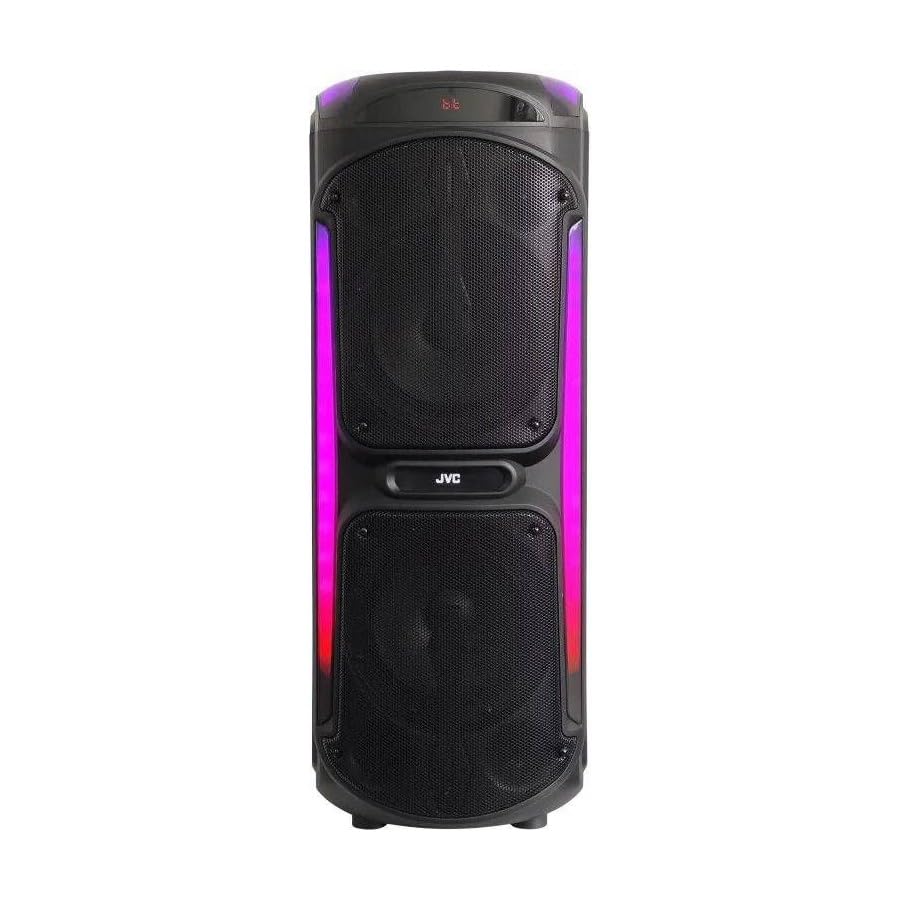
Image: The JVC XS-N3214PB Portable Bluetooth Party Speaker, shown with two microphones, highlighting its versatile connectivity options including Bluetooth, FM Radio, MP3 playback, AUX input, and USB input. The speaker features integrated LED lighting.
2. Інформація про безпеку
Для забезпечення безпечної роботи та запобігання пошкодженням, будь ласка, дотримуйтесь наступних запобіжних заходів:
- Не піддавайте динамік впливу води, вологи або екстремальних температур.
- Не намагайтеся розбирати або модифікувати динамік. Звертайтеся до кваліфікованого персоналу з будь-яким обслуговуванням.
- Тримайте динамік подалі від джерел тепла, прямих сонячних променів та легкозаймистих матеріалів.
- Використовуйте лише зазначений зарядний адаптер.
- Уникайте розміщення важких предметів на динаміку.
- Протирайте динамік м’якою сухою тканиною. Не використовуйте рідкі засоби для чищення або аерозолі.
- Забезпечте належну вентиляцію навколо динаміка під час використання.
3. Вміст упаковки
Перевірте наявність усіх елементів в упаковці:
- JVC XS-N3214PB Portable Bluetooth Party Speaker (1 unit)
- Power Adapter/Charging Cable (1 unit)
- Пульт дистанційного керування (1 шт.)
- Посібник користувача (цей документ)
- (Optional: Microphone, if included with your specific purchase)
4. Продукт закінчивсяview
4.1. особливості
- Powerful 800W Audio Output
- Бездротове підключення Bluetooth
- Вбудована акумуляторна батарея для перенесення
- Integrated LED Party Lights
- FM-радіо-тюнер
- Відтворення через USB
- Вхід AUX
- Microphone Input for Karaoke
- Робота дистанційного керування
- Deep Bass Performance
4.2. Елементи керування та порти
Familiarize yourself with the speaker's control panel and connection ports. (Refer to diagrams in the full printed manual for exact locations).
- Кнопка живлення: Вмикає/вимикає динамік.
- Кнопка режиму: Switches between Bluetooth, FM, USB, and AUX modes.
- Регулювання гучності: Регулює основну гучність.
- Кнопка відтворення/паузи: Керує відтворенням медіа.
- Кнопки попереднього/наступного треку: Навігація між треками або FM-станціями.
- Кнопка світлодіодного підсвічування: Toggles LED lighting effects.
- Регулювання гучності/луни мікрофона: Adjusts microphone input and echo effect.
- Порт USB: Для відтворення з USB-накопичувача.
- Вхід AUX (3.5 мм): Для підключення зовнішніх аудіопристроїв.
- Вхід для мікрофона (6.35 мм): Для підключення дротового мікрофона.
- Порт DC IN: Для підключення адаптера живлення для заряджання динаміка.
5. Налаштування
5.1. Заряджання динаміка
- Connect the power adapter to the DC IN port on the speaker.
- Підключіть інший кінець адаптера живлення до настінної розетки.
- The charging indicator light will illuminate (color may vary) to show the speaker is charging.
- Allow approximately 4-6 hours for a full charge. The indicator light may change or turn off when fully charged.
- Disconnect the power adapter once charging is complete or when using the speaker on battery power.
5.2. Увімкнення/вимкнення живлення
- Щоб увімкнути: Натисніть і утримуйте кнопку живлення кілька секунд, доки не увімкнеться дисплей.
- Щоб вимкнути: Знову натисніть і утримуйте кнопку живлення протягом кількох секунд, доки дисплей не вимкнеться.
6. Інструкція з експлуатації
6.1. Підключення Bluetooth
- Power on the speaker. It will automatically enter Bluetooth pairing mode, indicated by a flashing Bluetooth icon or voice prompt.
- На мобільному пристрої (смартфоні, планшеті тощо) увімкніть Bluetooth та виконайте пошук доступних пристроїв.
- Select "JVC XS-N3214PB" from the list of devices.
- Once paired, the speaker will confirm with an audible tone or a solid Bluetooth icon.
- Тепер ви можете відтворювати аудіо з вашого пристрою через динамік.
6.2. FM-радіо
- Press the Mode button until "FM" is displayed.
- Натисніть кнопку відтворення/паузи, щоб автоматично сканувати та зберігати доступні FM-станції.
- Використовуйте кнопки «Попередній/Наступний трек» для навігації між збереженими станціями.
6.3. Відтворення через USB
- Вставте USB-флеш-накопичувач (відформатований у FAT32), що містить аудіофайли у форматі MP3 files в порт USB.
- The speaker will automatically switch to USB mode and begin playing the first track. If not, press the Mode button to select USB.
- Використовуйте кнопки «Відтворити/Пауза» та «Попередній/Наступний трек» для керування відтворенням.
6.4. Вхід AUX
- Підключіть один кінець аудіокабелю 3.5 мм (не входить до комплекту) до порту AUX IN на динаміку.
- Connect the other end of the cable to the audio output of your external device (e.g., MP3 player, laptop).
- Press the Mode button until "AUX" is displayed.
- Керуйте відтворенням та гучністю зі свого зовнішнього пристрою.
6.5. Microphone and Karaoke Function
- Connect a wired microphone (not included) to the Microphone Input port.
- Adjust the microphone volume and echo effect using the dedicated controls on the speaker.
- Play music via Bluetooth, USB, or AUX, and sing along through the microphone.
6.6. Світлодіодні вечірні вогні
Press the LED Light button to cycle through different lighting modes or to turn the lights off.
6.7. Пульт дистанційного керування
The included remote control allows for convenient operation of the speaker from a distance. Functions include power on/off, mode selection, volume adjustment, track control, and LED light control. Ensure the remote control has working batteries and is pointed towards the speaker's sensor.
7. Технічне обслуговування
- Прибирання: Wipe the speaker's exterior with a soft, dry, lint-free cloth. Do not use abrasive cleaners, waxes, or solvents.
- Зберігання: If storing the speaker for an extended period, ensure it is fully charged, then power it off. Store in a cool, dry place away from direct sunlight. Recharge the battery every few months to maintain its lifespan.
- Догляд за акумулятором: To prolong battery life, avoid fully discharging the speaker frequently. Charge it before the battery is completely depleted.
8. Вирішення проблем
| проблема | Можлива причина | Рішення |
|---|---|---|
| Динамік не вмикається. | Battery is depleted. Power cable not connected. | Charge the speaker. Ensure power cable is securely connected to both speaker and outlet. |
| Ні звуку. | Volume is too low. Incorrect mode selected. Device not paired (Bluetooth). AUX cable loose. | Increase volume on speaker and source device. Press Mode button to select correct input. Re-pair Bluetooth device. Check AUX cable connection. |
| Не вдається підключити пристрій Bluetooth. | Гучномовець не в режимі сполучення. Пристрій занадто далеко. Перешкоди. | Ensure speaker is in Bluetooth mode and flashing. Move device closer to speaker. Turn off other Bluetooth devices. |
| Відтворення з USB не працює. | USB drive not formatted correctly (FAT32). Unsupported file format. USB drive faulty. | Ensure USB drive is FAT32 and contains MP3 fileс. Спробуйте інший USB-накопичувач. |
| Не працює пульт дистанційного керування. | Batteries depleted. Obstruction between remote and speaker. | Replace remote control batteries. Ensure clear line of sight to speaker's IR sensor. |
9. Технічні характеристики
| Номер моделі | XS-N3214PB |
| Бренд | JVC |
| Вихідна потужність | 800 Вт (пікова) |
| Підключення | Bluetooth, USB, AUX (3.5mm), FM Radio, Microphone Input (6.35mm) |
| Режим аудіовиходу | Стерео |
| матеріал | пластик |
| Тип монтажу | Постійна поверхня |
| Спосіб контролю | Пульт, кнопка |
| Розміри (Д x Ш x В) | 35 Г x 31 Ш x 94 В сантиметрів |
| Включені компоненти | 1 x JVC XS-N3214PB 800W Party Portable Bluetooth Speaker, Power Adapter, Remote Control, User Manual |
10. Гарантія та підтримка
10.1. Інформація про гарантію
This JVC XS-N3214PB speaker comes with a 1 роки гарантії з дати покупки. Ця гарантія поширюється на виробничі дефекти та дефекти виготовлення за умов нормального використання. Вона не поширюється на пошкодження, спричинені неправильним використанням, нещасними випадками, несанкціонованими модифікаціями або нормальним зносом. Будь ласка, збережіть підтвердження покупки для пред'явлення гарантійних претензій.
10.2. Підтримка клієнтів
For technical assistance, warranty claims, or product inquiries, please contact JVC customer support through the retailer where the product was purchased or visit the official JVC webсайт для отримання контактної інформації, що стосується вашого регіону.