
вступ
Thank you for choosing the CNAPXAIA C10 Instant Kids Camera. This camera is designed to provide a fun and creative photography experience for children aged 3 to 12. It combines digital photography with ink-free instant printing, allowing children to capture memories and print them instantly. This manual provides detailed instructions for safe and effective use of your camera.
Інформація про безпеку: Не підходить для дітей до 3 років через дрібні деталі.
Що в коробці
Після розпакування переконайтеся, що всі предмети присутні:
- CNAPXAIA C10 Instant Kids Camera
- 3 Rolls of Print Paper
- 6 Coloring Pens
- Шнурок
- Зарядний кабель USB-C
- 32GB Memory Card (pre-installed or separate)

Figure 1: Camera and Included Accessories
Продукт закінченийview
Компоненти камери
The CNAPXAIA C10 camera features a compact design with intuitive controls for children.
- 2.4-дюймовий HD-екран: для viewперегляд фотографій, відео та навігація по меню.
- Об'єктив камери: Для зйомки фото та відео.
- Print Output Slot: Where printed photos emerge.
- Кнопки управління: Power, Shutter, Navigation, Menu, Print.
- Порт USB-C: Для зарядки та передачі даних.
- Слот для карти Micro SD: For memory expansion (32GB card included).

Малюнок 2: Спереду View камери
Налаштування
1. Зарядка камери
- Connect the provided USB-C cable to the camera's USB-C port.
- Підключіть інший кінець кабелю до стандартного USB-адаптера живлення (не входить до комплекту) або USB-порту комп’ютера.
- The charging indicator light will illuminate. The camera is fully charged when the light turns off or changes color (refer to screen indicator).
- A full charge provides approximately 3-4 hours of continuous use.
2. Вставлення карти пам'яті
The camera comes with a 32GB Micro SD card. Locate the Micro SD card slot on the side of the camera. Insert the card with the gold contacts facing down until it clicks into place. To remove, push the card in gently until it springs out.
3. Loading Print Paper
The camera uses ink-free thermal print paper. Follow these steps to load a new roll:
- Крок 1: Open the paper compartment cover on the side of the camera.
- Крок 2: Insert a new roll of print paper into the compartment, ensuring the paper feeds out from the top and a small portion extends beyond the slot.
- Крок 3: Close the paper compartment cover firmly until it clicks.
- Крок 4: The camera is now ready to print.

Figure 3: Loading Print Paper
Інструкція з експлуатації
1. Увімкнення/вимкнення живлення
Натисніть і утримуйте кнопку живлення, щоб увімкнути або вимкнути камеру.
2. Фотографування
- Turn on the camera. It will typically start in photo mode.
- Скомпонуйте кадр за допомогою 2.4-дюймового екрана.
- Натисніть кнопку затвора, щоб зробити фото.
- After taking a photo, you will have the option to print it immediately or save it to the memory card.
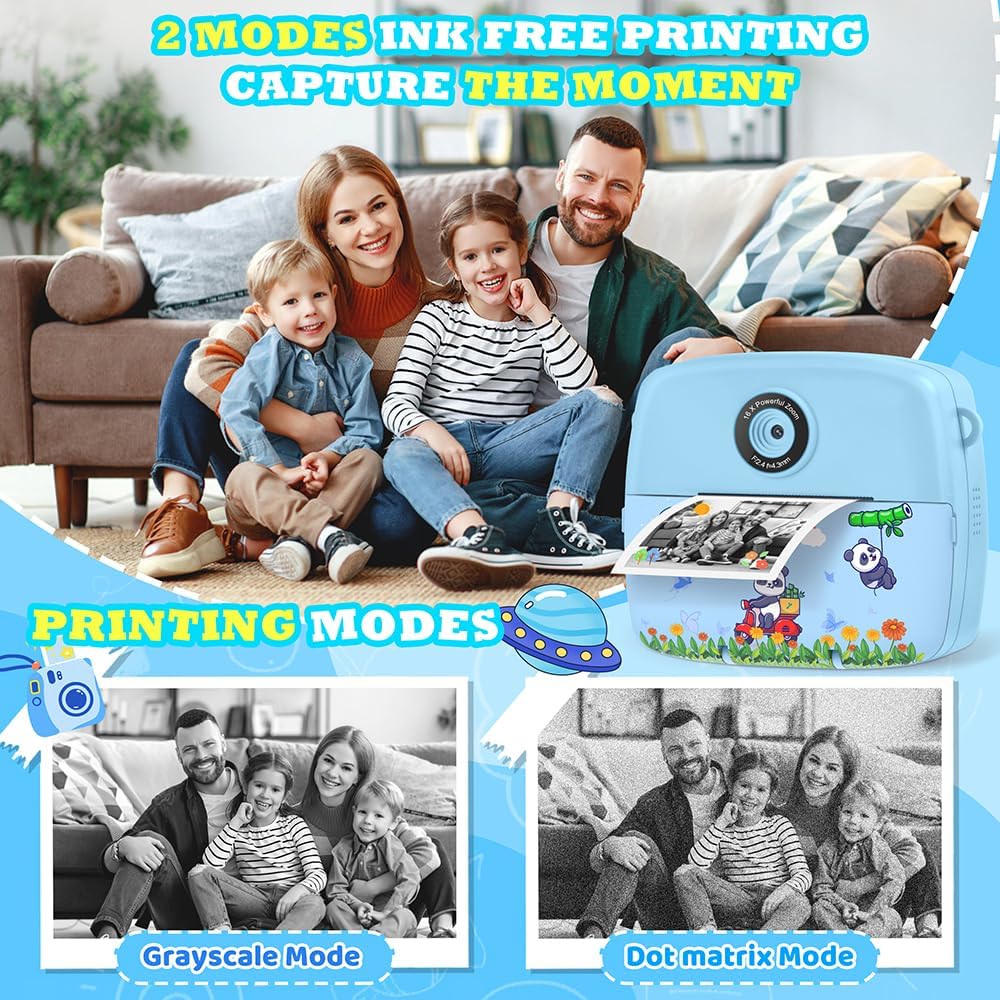
Figure 4: Ink-Free Printing Modes
3. Запис відео
- From the main menu, navigate to the video recording mode.
- Press the Shutter button to start recording. A red 'REC' indicator will appear on the screen.
- Press the Shutter button again to stop recording. Videos are saved in 1080P resolution to the memory card.

Figure 5: Video Recording and Special Features
4. Using Filters, Frames, and Stickers
Камера пропонує різні творчі можливості:
- Фільтри: Apply different color effects to your photos.
- кадри: Add decorative borders to your pictures (12 photo frames available).
- наклейки: Overlay fun graphics onto your images (6 stickers available).
- Mirror Effects: Experiment with 8 different mirror effects.
Access these options through the camera's menu while in photo mode. Use the navigation buttons to select and apply your desired effect before taking a picture.

Figure 6: Creative Photo Options
5. Уповільнена зйомка
Capture sequences of photos over time. Select the time-lapse mode from the menu and choose intervals of 2, 5, or 10 seconds between shots.
6. Цифровий зум
The camera features up to 16x digital zoom. Use the zoom buttons (usually up/down navigation) to adjust the magnification before taking a photo or recording a video.
7. Burst Shooting
For capturing fast-moving subjects, activate burst shooting mode. The camera can take up to 5 frames per second (FPS).
8. Games and MP3 Player
The camera includes 5 puzzle games for entertainment and an MP3 player function. Access these features through the main menu.

Figure 7: Learning and Entertainment Features
9. Coloring Printed Photos (Graffiti DIY)
Use the included coloring pens to add a personal touch to your black and white instant prints.

Figure 8: DIY Coloring Activity
Технічне обслуговування
1. Очищення камери
Wipe the camera body with a soft, dry cloth. Do not use liquid cleaners or solvents. For the lens, use a specialized lens cleaning cloth.
2. Replacing Print Paper
When the print quality degrades or no paper is dispensed, it's time to replace the paper roll. Refer to the "Loading Print Paper" section under Setup for detailed instructions.
3. Догляд за акумулятором
To prolong battery life, avoid fully discharging the camera frequently. Charge the camera regularly, even if not in use for extended periods.
Усунення несправностей
| проблема | Можлива причина | Рішення |
|---|---|---|
| Камера не вмикається. | Низький заряд батареї. | Charge the camera using the USB-C cable. |
| Не вдається робити фото/відео. | Карта пам’яті заповнена або вставлена неправильно. | Перевірте, чи вставлено карту пам’яті. Видаліть непотрібні fileабо замініть картку. |
| Фотографії не друкуються. | No print paper or paper loaded incorrectly. | Ensure print paper is loaded correctly and there is enough paper. Refer to "Loading Print Paper". |
| Екран завис або не реагує. | Збій програмного забезпечення. | Hold the power button for 10 seconds to force a restart. If unresponsive, let the battery drain completely and then recharge. |
| Distorted audio from speaker. | Несправність динаміка. | This may indicate a hardware issue. Contact customer support if the problem persists. |
Технічні характеристики
| Особливість | Деталь |
|---|---|
| Номер моделі | C10 |
| Розміри | 11 х 5 х 9 см |
| вага | 200 г |
| Розмір екрана | 2.4-дюймовий РК-дисплей |
| Роздільна здатність відео | 1080P |
| Роздільна здатність фото | 3 MP (Effective 12 MP) |
| Збільшити | 16-кратне цифрове збільшення |
| Зберігання | 32GB Micro SD Card (included), expandable up to 32GB |
| Тип батареї | 1 літій-полімерний (у комплекті) |
| Інтерфейс зарядки | USB-C |
| Технологія друку | Ink-free thermal printing |
| Підтримується File Формати | JPEG (зображення), MP4 (відео) |
| Швидкість безперервної зйомки | 5 FPS |
| Вікова рекомендація | 3-12 роки |
Гарантія та підтримка
For warranty information or technical support, please refer to the contact details provided with your purchase or visit the official CNAPXAIA webсайт. Зберігайте чек про покупку для гарантійних претензій.