
1. Вступ
The Innex DS200 is a professional USB book scanner designed for efficient digitization of various documents, including books, magazines, and loose papers. It features a 26MP camera, A3 scanning capability, and advanced software functions to enhance scanning quality and workflow. This manual provides detailed instructions for setting up, operating, and maintaining your DS200 scanner.

Figure 1.1: Innex DS200 Scanner in operation with an open book.
2. Вміст упаковки
Перевірте, чи всі перелічені нижче предмети входять до вашої упаковки. Якщо будь-які предмети відсутні або пошкоджені, зверніться до служби підтримки клієнтів.
- Innex DS200 Scanner Unit
- Панель для сканування
- USB кабель
- Адаптер живлення (тип A)
- Power Plugs (Type C, Type G)
- Ручна кнопка
- Ножна педаль
- Adapter (USB-C to USB-A)
- Короткий посібник
- Сервісна картка
- Заява GPSR
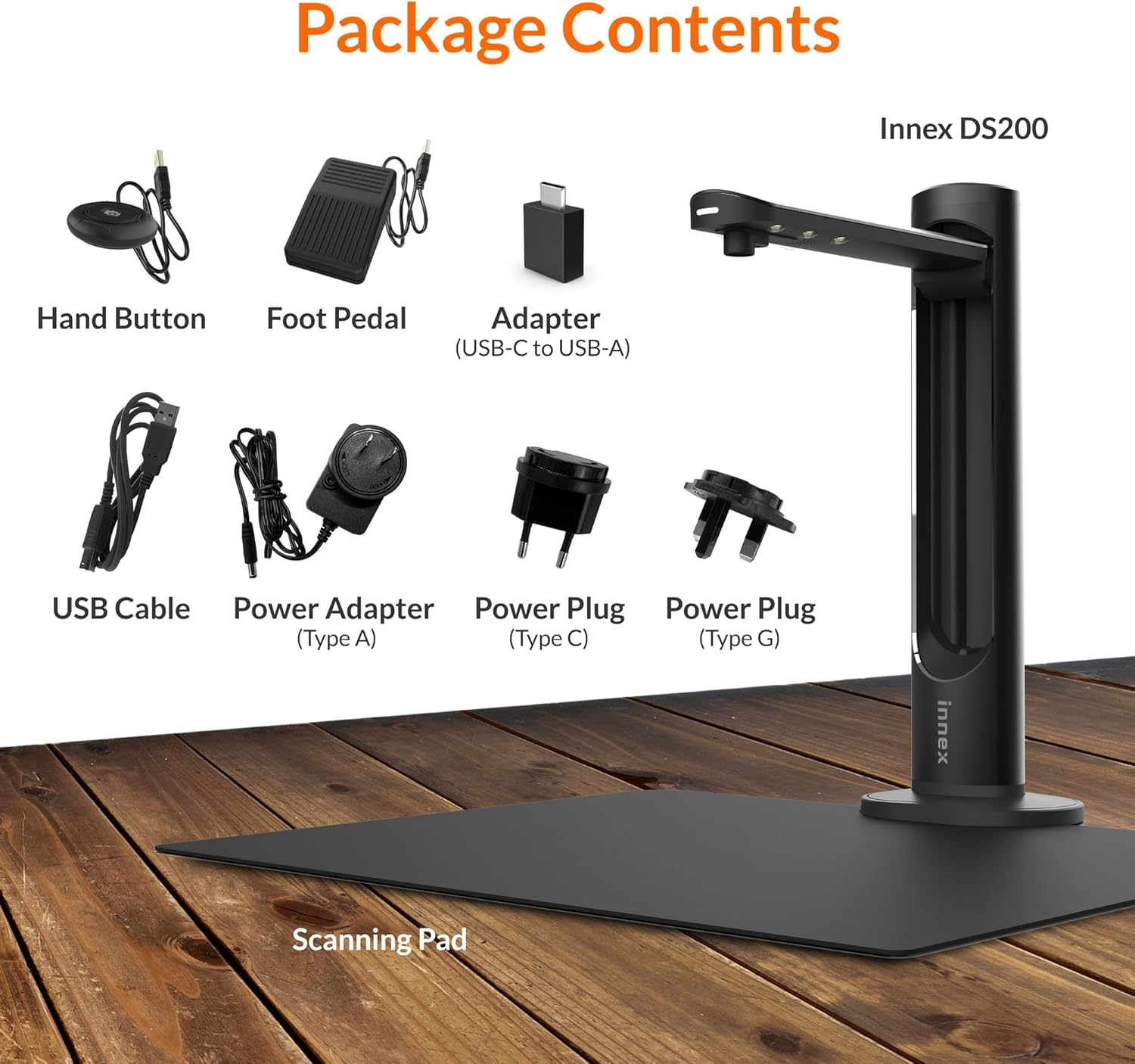
Figure 2.1: Contents of the Innex DS200 package.
3. Налаштування
- Розпакуйте компоненти: Обережно вийміть усі предмети з упаковки.
- Розташування сканера: Place the Innex DS200 scanner unit on a stable, flat surface.
- Place the Scanning Pad: Position the black scanning pad directly beneath the scanner head. Ensure it is centered and flat.
- Підключіть живлення: Connect the power adapter to the scanner and plug it into an electrical outlet. Use the appropriate power plug for your region.
- Підключення до комп'ютера: Connect the scanner to your computer using the provided USB cable. If your computer only has USB-C ports, use the included USB-C to USB-A adapter.
- Встановити програмне забезпечення: Download and install the Innex Scan software from the official Innex website. Follow the on-screen instructions for installation. The software is compatible with Windows and macOS.
- Підключіть аксесуари: Plug in the hand button and foot pedal to the designated ports on the scanner unit.
4. Інструкція з експлуатації
4.1. Основна процедура сканування
- Launch Innex Scan Software: Open the Innex Scan application on your computer.
- Розмістити документ: Place the document or book you wish to scan on the scanning pad. Ensure it is within the scanning area. The laser guide can assist with alignment.
- Налаштувати параметри: In the software, select your desired scanning mode (e.g., Document, Book, Photo) and adjust settings such as color mode, resolution, and output format.
- Розпочати сканування: Trigger the scan using one of the available methods: the software capture button, the hand button, or the foot pedal.
- Review і Зберегти: Після сканування, повторноview the image in the software. Apply any necessary corrections and save the file to your preferred location and format.

Figure 4.1: Using the laser guide for document alignment.

Figure 4.2: Multiple options for triggering a scan.
4.2. Особливості програмного забезпечення
The Innex Scan software includes several features to optimize your scanning experience:
- Curve Flattening: Automatically corrects the curvature of book pages for flat, readable scans.
- OCR (оптичне розпізнавання символів): Converts scanned images into editable and searchable text in over 120 languages.
- Auto-Cropping: Automatically detects and crops the document edges.
- Page-Turn Detection: For book scanning, the software can detect when a page has been turned and automatically initiate the next scan.
- Finger Removal: Intelligently removes images of fingers holding down pages during scanning.
- Режим багатоканального сканування: Allows scanning multiple small items simultaneously, such as business cards or photos, and separates them into individual files.
- Visualizer Mode: Enables the scanner to function as a document camera for presentations or live demonstrations.
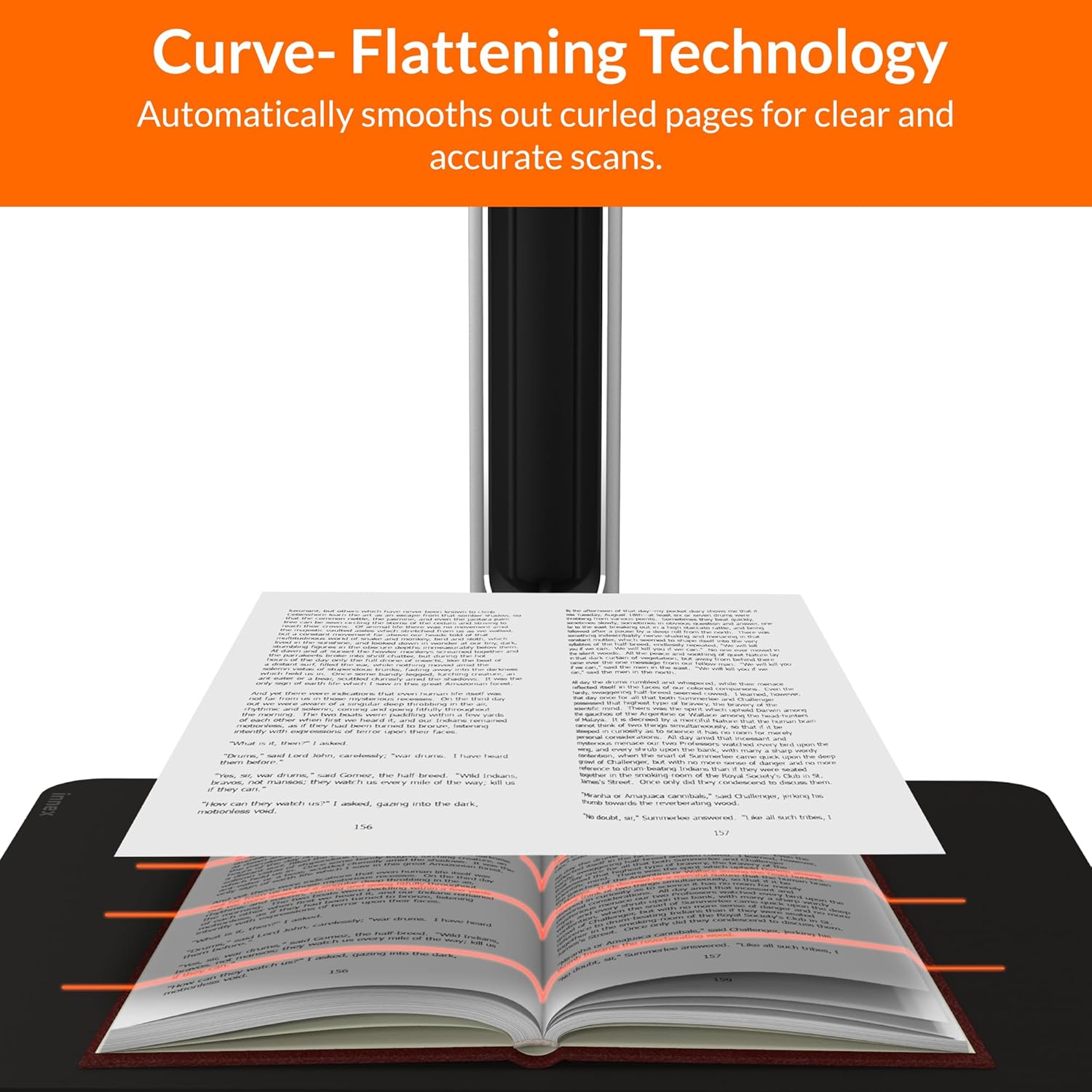
Figure 4.3: Curve Flattening Technology in use.

Figure 4.4: OCR Text Recognition and export options.

Малюнок 4.5: Закінченоview of Innex Scan software features.
4.3. Export Options
The Innex DS200 supports various export formats for both image and text files:
- Зображення Files: JPEG, PNG, BMP, TIFF
- документ Files: PDF (searchable), DOC, EXCEL, TEXT
- Електронна книга Files: EPUB
- Аудіо Files (Text-to-Speech): MP3, WAV
- відео Files (Visualizer Mode): MP4, AVI, FLV, WMV

Figure 4.6: Available export formats in Innex Scan software.
5. Технічне обслуговування
- Прибирання: Regularly wipe the scanner lens and LED lamp with a soft, dry, lint-free cloth to ensure optimal scan quality. Clean the scanning pad with a damp тканину, якщо необхідно.
- Оновлення програмного забезпечення: Periodically check the official Innex website for software updates to ensure you have the latest features and performance improvements.
- Зберігання: Коли сканер не використовується, зберігайте його в чистому, сухому місці, подалі від прямих сонячних променів та екстремальних температур.
6. Вирішення проблем
6.1. Поширені проблеми та їх вирішення
| Випуск | Можлива причина | Рішення |
|---|---|---|
| Сканер не виявлено | Loose USB connection, driver issue, power issue | Ensure USB cable is securely connected. Check power connection. Reinstall scanner drivers or software. Try a different USB port. |
| Poor scan quality | Dirty lens, insufficient lighting, incorrect settings, document not flat | Clean the scanner lens. Ensure adequate ambient lighting or use the built-in LED lamp. Adjust resolution and color settings in software. Ensure documents are flat on the scanning pad. |
| Програмне забезпечення зависає або дає збої | Outdated software, system incompatibility, insufficient system resources | Update Innex Scan software to the latest version. Ensure your computer meets minimum system requirements. Close other demanding applications. Restart the software and computer. |
| OCR not working correctly | Poor scan quality, incorrect language setting, complex font | Improve scan quality. Verify the correct OCR language is selected in the software. For highly stylized or handwritten text, OCR accuracy may vary. |
7. Технічні характеристики
Detailed technical specifications for the Innex DS200 scanner:

Figure 7.1: Innex DS200 Technical Specifications.
- модель: DS200
- Датчик зображення: Сенсор CMOS
- Макс. роздільна здатність: 5800 x 4522 пікселів (26 МП)
- Output DPI: Approx. 300 dpi (A3)
- Макс. Зона зйомки: A3 (16.77" x 12.59" / 426 x 320mm)
- Глибина кольору: 24-бітний
- Фокус об'єктива: Виправлено
- Швидкість сканування: 1.5 sec per A3 page
- Тригер сканування: Ручна кнопка, ножна педаль, програмна кнопка, автоматичне сканування
- Вихідні формати: Picture (JPG, TIFF, BMP, PNG), Document (PDF, Image, PDF Searchable), Text (DOC, EXCEL, TEXT), E-book (EPUB), Audio (MP3, WAV), Video (AVI, MPEG, FLV, WMV)
- Laser Projection: Вбудований
- Джерело світла: Вбудований світлодіод високої яскравості
- Інтерфейс: USB 2.0 Type B x 1 (for PC Connection), USB 2.0 Type-A x 1 (for USB Extension)
- Потужність: 5В/2А
- Мінімальні системні вимоги: Windows 10, 11, macOS 11 or later; Intel i5 Processor or higher; 8GB RAM (Recommended 16GB or more); 20GB Available HDD Space; USB 2.0 Port
- Розміри продукту (у складеному вигляді): 4.33 дюйма (Г) x 5.91 дюйма (Ш) x 15.75 дюйма (В) (110 x 150 x 400 мм)
- Product Dimensions (In Use): 12.05 дюйма (Г) x 5.91 дюйма (Ш) x 15.75 дюйма (В) (307 x 150 x 400 мм)
- Вага нетто: прибл. 2.64 фунтів (1.2 кг)
8. Гарантія та підтримка
For warranty information and technical support, please refer to the service card included in your package or visit the official Innex website. You can also contact FunTech Innovation, the manufacturer, for assistance.
Виробник: FunTech Innovation
Webсайт: Innex Official Store on Amazon