
Element Element 2023
Element 43" Frameless 4K UHD HDR XUMO TV User Manual
Model: Element 2023
1. Вступ
This manual provides essential information for setting up, operating, and maintaining your Element 43-inch Frameless 4K UHD HDR XUMO TV. Please read it thoroughly before using your television to ensure proper functionality and safety.
The Element XUMO TV offers a breathtaking viewing experience with its 4K Ultra HD resolution, delivering clear and detailed images. Enhanced color and contrast are provided by Dolby Vision and HDR technology, ensuring an immersive experience even in dark scenes. Dolby Audio contributes to superior sound quality for movies and games. A 120Hz effective refresh rate ensures smooth motion during fast-paced content.

Зображення 1.1: спереду view of the Element 43" XUMO TV.
2. Що в коробці
Будь ласка, перевірте вміст вашої упаковки, щоб переконатися, що всі предмети присутні:
- 1 Element Xumo TV 43"
- 1 Xumo TV remote control (batteries included)
- 1 Короткий посібник
- 1 TV stand + hardware
3. Налаштування
3.1 Розпакування
- Carefully remove the TV from its packaging. It is recommended to have two people for this step due to the size and weight of the television.
- Покладіть телевізор екраном вниз на м’яку, рівну поверхню, щоб запобігти подряпинам.
- Зніміть усі захисні плівки та пакувальні матеріали.
3.2 Прикріплення підставки
Щоб прикріпити підставку для телевізора:
- Визначте ліву та праву ніжки стійки.
- Вирівняйте кожну ніжку підставки з відповідними отворами для гвинтів на нижній частині телевізора.
- Secure the stand legs using the provided hardware (screws). Do not overtighten.
- Обережно підніміть телевізор у вертикальне положення на стійкій рівній поверхні.
3.3 Підключення периферійних пристроїв
Connect your external devices (e.g., cable box, gaming console, Blu-ray player) to the appropriate ports on the back of the TV. Refer to the Quick Start Guide for port locations.
3.4 Початкове ввімкнення
- Підключіть шнур живлення до телевізора, а потім до розетки.
- Натисніть кнопку живлення на пульті дистанційного керування або на самому телевізорі.
- Follow the on-screen instructions to complete the initial setup, including network connection and channel scanning.
4. Інструкція з експлуатації
4.1 Функції дистанційного керування
The included XUMO TV remote control allows you to navigate the TV's features. It includes an advanced voice remote function for easy content search.
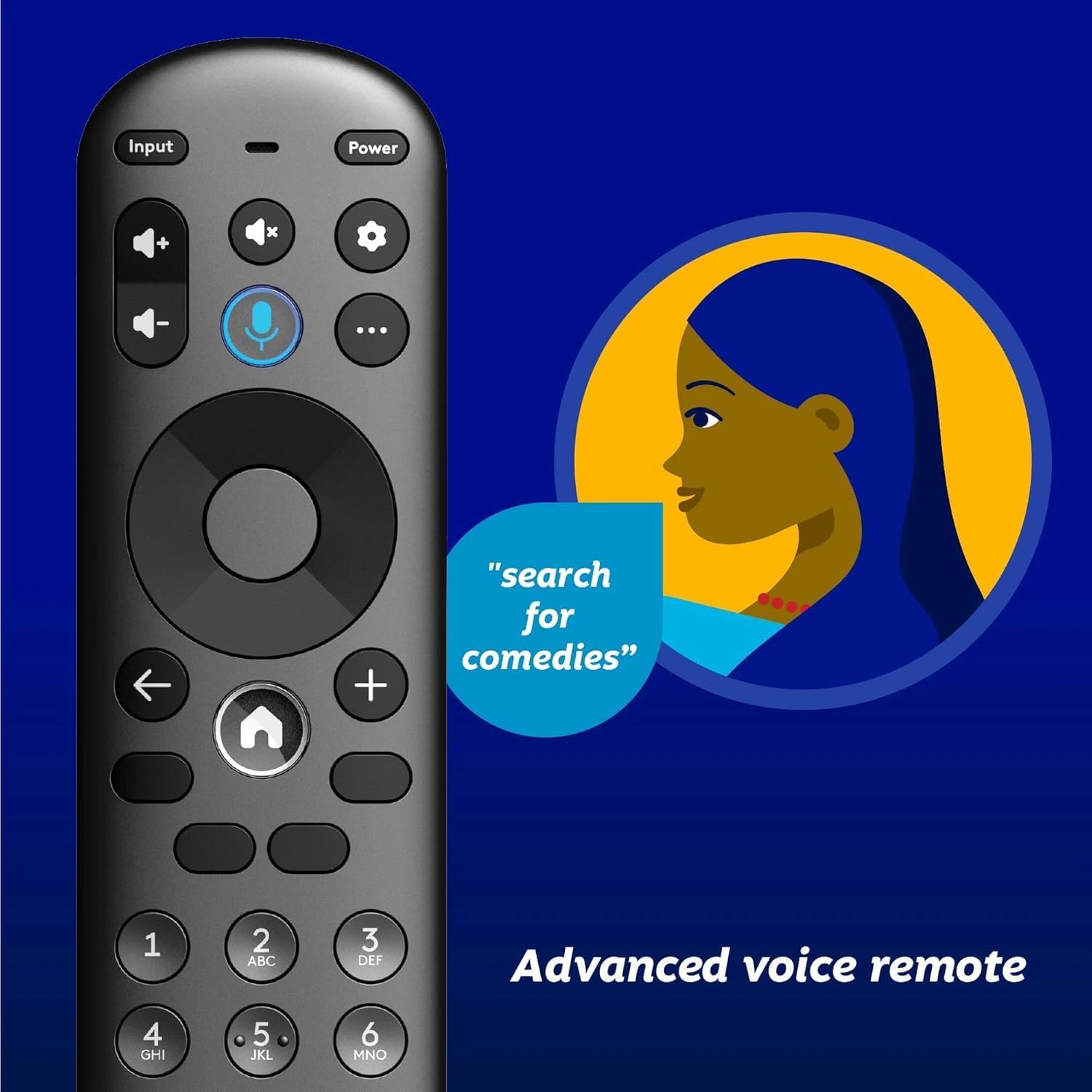
Image 4.1: Element XUMO TV advanced voice remote control.
- Потужність: Вмикає або вимикає телевізор.
- введення: Вибір джерела вхідного сигналу (HDMI, AV тощо).
- Голосова кнопка: Активує голосові команди для пошуку контенту або керування телевізором.
- Навігаційна панель: Використовується для переміщення по меню та вибору опцій.
- Кнопка "Додому: Returns to the XUMO TV home screen.
- Гучність +/-: Регулює рівень гучності.
- Канал +/-: Змінює телеканали.
4.2 Smart TV Features (XUMO)
Your Element TV features a built-in XUMO TV experience, providing access to over 250 pre-loaded apps and streaming services.

Image 4.2: XUMO TV smart interface with streaming applications.
- Програми для потокового передавання: Access thousands of movies, TV shows, and music from platforms like Netflix, YouTube, Disney+, Prime Video, Peacock, and more.
- Прямі канали: Explore over 750 free live channels, including news, sports, and kids' programming, from Xumo Play, Tubi, Pluto TV, and others.
- Персоналізований контент: The XUMO interface is designed to help you stream easily, bringing together content in one simple view.
4.3 Підключення
- Wi-Fi: Підключіться до домашньої бездротової мережі для доступу до Інтернету та потокової передачі.
- Bluetooth: Easily pair your TV with compatible Bluetooth devices such as speakers, headphones, or game controllers.
- Apple AirPlay & Home: Mirror your smartphone, iPad, or Mac screen to the TV, stream media, and control your TV directly from Apple devices.
5. Технічне обслуговування
5.1 Очищення екрана
- Вимкніть телевізор і вийміть вилку з розетки.
- Gently wipe the screen with a soft, dry, lint-free cloth.
- Для стійких плям злегка протрітьampпротріть тканину водою або спеціалізованим засобом для чищення екранів (не розпилюйте безпосередньо на екран).
- Уникайте використання агресивних хімікатів, абразивних засобів або засобів для чищення на спиртовій основі.
5.2 Загальний догляд
- Тримайте телевізор подалі від прямих сонячних променів, джерел тепла та надмірного запилу.
- Забезпечте належну вентиляцію навколо телевізора, щоб запобігти перегріванню.
- Не ставте важкі предмети на телевізор.
6. Вирішення проблем
Якщо у вас виникли проблеми з телевізором, зверніться до наступних поширених проблем та способів їх вирішення:
- Немає живлення:
- Переконайтеся, що шнур живлення надійно підключено як до телевізора, так і до справної електричної розетки.
- Перевірте справність розетки, підключивши інший пристрій.
- Спробуйте натиснути кнопку живлення на самому телевізорі, а не лише на пульті дистанційного керування.
- Немає зображення, але є звук:
- Перевірте, чи вибрано правильне джерело вхідного сигналу (наприклад, HDMI 1, AV).
- Перевірте всі кабельні з’єднання між телевізором та зовнішніми пристроями.
- Перезавантажте телевізор та всі підключені пристрої.
- Немає звуку, але є зображення:
- Перевірте рівень гучності та переконайтеся, що звук телевізора не вимкнено.
- Якщо ви використовуєте зовнішні динаміки, переконайтеся, що вони правильно підключені та увімкнені.
- Перевірте налаштування аудіовиходу в меню телевізора.
- Пульт дистанційного керування не працює:
- Замініть батарейки в пульті дистанційного керування.
- Переконайтеся, що між пультом дистанційного керування та ІЧ-датчиком телевізора немає перешкод.
- Re-pair the remote if it's a Bluetooth remote (refer to the Quick Start Guide for pairing instructions).
- Проблеми з мережевим підключенням:
- Перезавантажте Wi-Fi роутер і модем.
- Check the Wi-Fi settings on the TV to ensure it's connected to the correct network.
- If possible, try connecting the TV to the internet via an Ethernet cable.
7. Технічні характеристики
Key technical specifications for the Element 43" Frameless 4K UHD HDR XUMO TV:
| Особливість | опис |
|---|---|
| Торгова марка | елемент |
| Назва моделі | Element 2023 |
| Розмір екрана | 43 дюймів (110 см) |
| Технологія дисплея | LED |
| роздільна здатність | 4K Ultra HD |
| Особливості | 4K High Definition, HDR (High Dynamic Range), Vibrant Colors, 60 Hz, Dolby Vision, HDR10+ |
| Ефективна частота оновлення | 120 Гц |
| Аудіотехнології | Dolby Audio |
| Підтримувані Інтернет-послуги | Netflix, Prime Video, Max, Disney Plus, YouTube TV, Paramount+, Apple TV+, Crunchyroll, Xumo Play, Tubi, Pluto TV |
| Технологія підключення | Wired, Wireless (Wi-Fi, Bluetooth, Apple AirPlay) |
| Співвідношення сторін | 16:9 |
| Вага товару | 22 фунта |
| Розміри продукту | 3.3 x 37 x 225 дюймів |
7.1 Функції якості зображення

Image 7.1: Dolby Vision technology enhances highlights and darks for superior contrast.

Image 7.2: 120Hz Effective Refresh Rate for smooth motion.

Image 7.3: 4K resolution delivers vivid colors and remarkable detail.
8. Гарантія та підтримка
This product is an Amazon Renewed item. Amazon Renewed products are backed by the Amazon Renewed Guarantee. This means your purchase is eligible for a replacement or refund within 90 days of receipt if it does not work as expected.
For specific warranty details or support inquiries, please refer to the documentation provided with your Amazon Renewed purchase or visit the Amazon Renewed support page.
Пов'язані документиElement 2023


Ask a question about this manual
Ask about setup, troubleshooting, compatibility, parts, safety, or missing instructions. Manuals+ will review the question and use this page’s manual context to help answer it.