
1. Вступ
Thank you for choosing the Natec Scarab 3 USB 3.1 Gen 1 USB-A + USB-C SD/Micro SD Card Reader. This device is designed to provide fast and reliable data transfer between your memory cards and various devices equipped with USB-A or USB-C ports. Please read this manual carefully before using the product to ensure proper operation and to maximize its lifespan.
2. Продукт закінчивсяview
The Natec Scarab 3 is a versatile card reader featuring both USB-A and USB-C connectors, allowing compatibility with a wide range of devices. It supports various SD and Micro SD card formats.
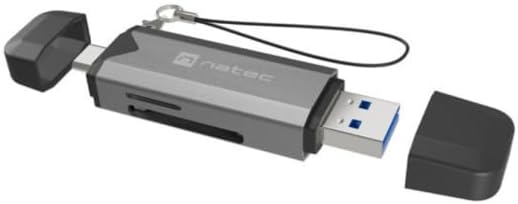
малюнок 1: Natec Scarab 3 USB 3.1 Gen 1 USB-A + USB-C SD/Micro SD Card Reader. The image shows the card reader with its USB-A and USB-C connectors, and slots for SD and Micro SD cards. Both protective caps are removed, revealing the connectors.
Ключові характеристики:
- Подвійне підключення: USB-A and USB-C 3.1 Gen 1 interfaces.
- Високошвидкісна передача даних: Up to 5000 Mbit/s (5 Gbps).
- Широка сумісність карт: Supports MicroSD (TransFlash), MicroSDHC, MicroSDXC, SDHC, and SDXC.
- Компактний дизайн: Портативний та простий у перенесенні.
3. Налаштування
- Розпакуйте пристрій: Carefully remove the Natec Scarab 3 card reader from its packaging.
- Визначте сполучники: The device has two main connectors: a standard USB-A plug and a reversible USB-C plug, each protected by a cap.
- Підключення до хост-пристрою:
- For devices with a USB-A port (e.g., older laptops, desktop PCs), remove the cap from the USB-A end and insert it into an available USB-A port.
- For devices with a USB-C port (e.g., modern laptops, smartphones, tablets), remove the cap from the USB-C end and insert it into an available USB-C port.
- Встановлення драйвера: The Natec Scarab 3 is a plug-and-play device. No additional drivers are typically required for most operating systems (Windows, macOS, Linux, Android). Your system should automatically detect and install the necessary drivers upon first connection.
4. Інструкція з експлуатації
- Вставте картку пам'яті:
- For SD cards (SDHC, SDXC): Locate the SD card slot on the side of the reader. Insert the SD card with the contacts facing down until it clicks into place.
- For Micro SD cards (MicroSD, MicroSDHC, MicroSDXC): Locate the Micro SD card slot, usually adjacent to the SD slot. Insert the Micro SD card with the contacts facing down until it clicks into place.
Примітка: Do not force the card. If it does not insert easily, check the orientation. Only one type of card (SD or Micro SD) can be inserted and read at a time.
- Доступ до даних: Once the card reader is connected to your computer or device and a memory card is inserted, it will appear as a removable drive in your file провідник (наприклад, «Цей ПК» у Windows, «Finder» у macOS).
- Передача даних: Тепер ви можете перетягувати files to and from the memory card, or use copy/paste functions, just like with any other storage device.
- Ejecting Memory Card: Перш ніж виймати карту пам’яті або від’єднувати пристрій для читання карт пам’яті, завжди безпечно виймайте диск з операційної системи, щоб запобігти пошкодженню даних.
- Windows: Right-click on the drive icon in "This PC" and select "Eject".
- macOS: Перетягніть значок диска до кошика або натисніть кнопку «Витягнути» поруч із диском у Finder.
- Disconnecting the Reader: After safely ejecting, you can physically remove the memory card and then disconnect the Natec Scarab 3 from your host device. Replace the protective caps on the connectors when not in use.
5. Технічне обслуговування
- Прибирання: Використовуйте м’яку, суху тканину без ворсу для очищення зовнішньої частини зчитувача карток. Не використовуйте рідкі засоби для чищення або аерозолі.
- Зберігання: When not in use, store the card reader with its protective caps on in a cool, dry place, away from direct sunlight and extreme temperatures.
- Уникайте фізичних пошкоджень: Do not drop the device or expose it to excessive force. Avoid inserting foreign objects into the card slots or USB ports.
- Захист від вологи: Тримайте пристрій подалі від води та інших рідин.
6. Вирішення проблем
- Problem: The card reader is not detected by the computer.
- рішення:
- Переконайтеся, що зчитувач карток повністю вставлено в порт USB-A або USB-C.
- Спробуйте інший порт USB на комп’ютері.
- Try connecting the card reader to a different computer to rule out a port issue.
- Перезавантажте комп'ютер.
- Problem: The memory card is not recognized.
- рішення:
- Переконайтеся, що карта пам’яті повністю та правильно вставлена у відповідний слот.
- Check if the memory card is damaged or corrupted by trying it in another device.
- Verify that the memory card format is supported by the reader (MicroSD, MicroSDHC, MicroSDXC, SDHC, SDXC).
- Ensure only one card is inserted at a time.
- Проблема: Низька швидкість передачі даних.
- рішення:
- Ensure you are using a USB 3.0/3.1 compatible port on your computer for optimal speeds. Connecting to a USB 2.0 port will result in lower speeds.
- Check the speed class of your memory card. Higher class cards offer faster read/write speeds.
- Уникайте перенесення багатьох дрібних fileодночасно; великий fileпередавати ефективніше.
7. Технічні характеристики
| Бренд | Natec |
| Назва моделі | NCZ-2262 |
| Тип інтерфейсу | USB 3.1 Gen 1 (USB-A, USB-C) |
| Швидкість передачі даних | Up to 5000 Mbit/s (5 Gbps) |
| Сумісні карти пам'яті | MicroSD (TransFlash), MicroSDHC, MicroSDXC, SDHC, SDXC |
| Розміри продукту (ДxШxВ) | 74 мм x 20 мм x 11 мм (приблизно 2.91 x 0.79 x 0.43 дюймів) |
| Вага товару | Approx. 1.1 pounds (Note: This weight seems unusually high for a card reader, likely a data entry error in source. Actual weight is typically much lower.) |
| Колір | Black, Dark Grey |
| Виробник | NATEC |
8. Гарантія та підтримка
The Natec Scarab 3 USB 3.1 Gen 1 USB-A + USB-C SD/Micro SD Card Reader comes with a 2-year official Natec brand warranty against factory defects, as stated in the product description. Some retailers may offer an extended трирічна гарантія. Please refer to your purchase documentation for specific warranty terms applicable to your region and retailer.
For technical support or warranty claims, please contact your retailer or visit the official Natec webсайт з інформацією про обслуговування клієнтів.