
Veout V1Pro
Інструкція з експлуатації портативного ігрового монітора Veout V1 Pro 16 дюймів 2.5K 144 Гц
Model: V1Pro | Brand: Veout
1. Вступ
This manual provides detailed instructions for the setup, operation, and maintenance of your Veout V1 Pro 16-inch 2.5K 144Hz Portable Gaming Monitor. Please read this manual thoroughly before using the product to ensure optimal performance and longevity. Keep this manual for future reference.

Image: The Veout V1 Pro monitor, showcasing its high-resolution and refresh rate capabilities.
2. Ключові характеристики
- 2.5K Ultra HD Display: 2560×1600 resolution with 188 PPI and a 16:10 aspect ratio for enhanced content efficiency. Features 8-bit color depth (16.7 million colors) and ΔE < 3 color accuracy.
- 144Hz High Refresh Rate + FreeSync: IPS panel with 100% sRGB gamut, 144Hz refresh rate, and AMD FreeSync technology for smooth visuals. 1ms fast response time, low-blue-light, and flicker-free technology for reduced eye fatigue. (Note: Max 120Hz via HDMI, 144Hz via USB-C).
- Ultra-Slim Aluminum Design: Weighs 1.58lbs and is 0.36 inches thick. Features a built-in aluminum stand adjustable from 0° to 75° and supports portrait mode.
- Універсальна сумісність: Dual USB-C ports and Mini HDMI for plug-and-play connection to laptops, smartphones, PS4/5, Xbox, and Switch 1/2. Built-in speakers included.
- Global Certifications: Passed FCC, CE, RoHS, UKCA, KC, and PSE safety certifications. Holds original design patents and the MUSE Design Gold Award.
3. Що в коробці
Перевірте наявність усіх елементів в упаковці:
- 1 x 16'' Portable Monitor
- 1 кабель USB-C до USB-A
- 1 кабель USB-C – USB-C
- 1 кабель Mini-HDMI до HDMI
- 1 x адаптер живлення 15 Вт
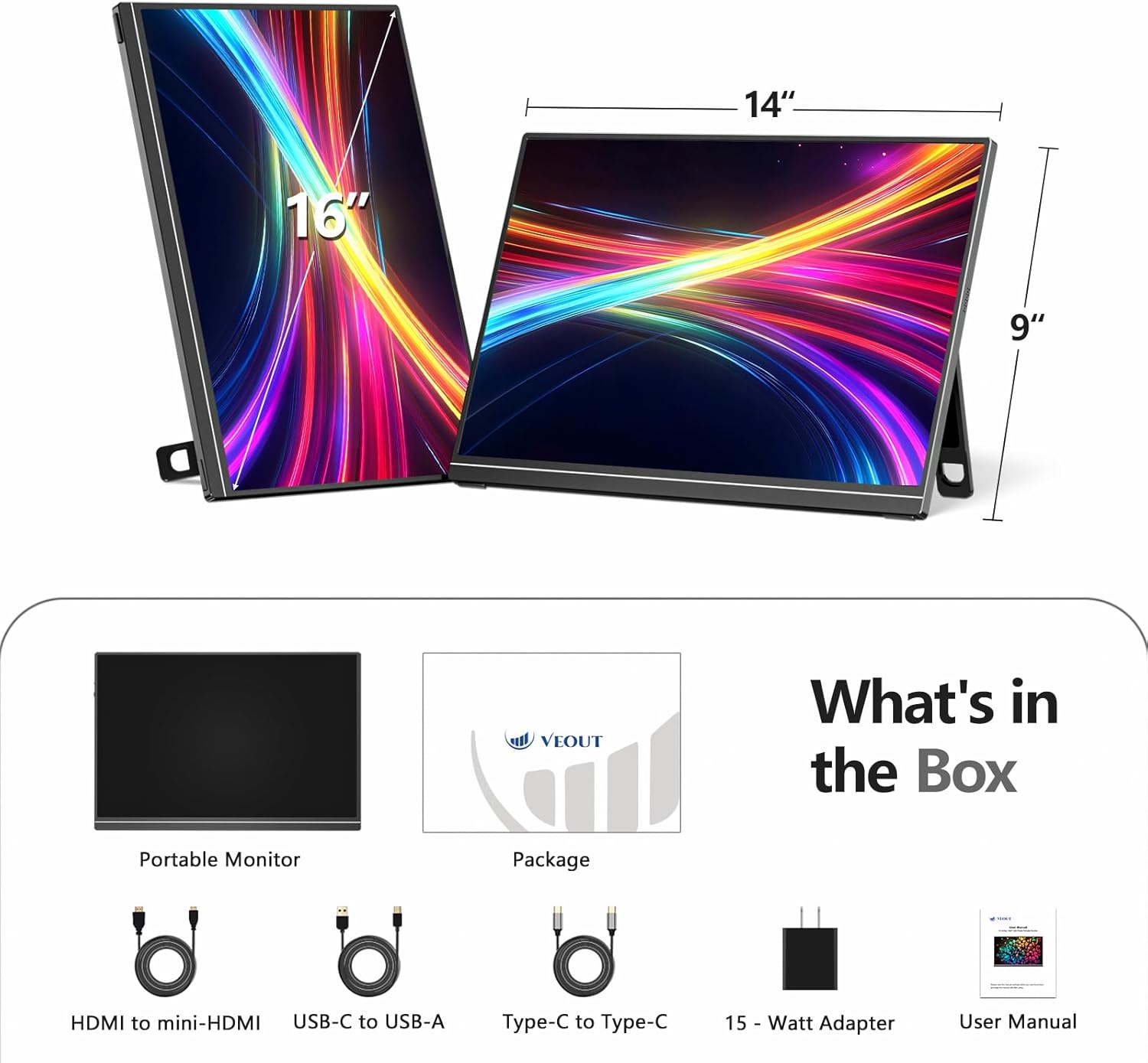
Image: All included accessories and the portable monitor.
4. Продукт закінчивсяview
4.1 Порти та елементи керування
The Veout V1 Pro monitor features multiple ports for versatile connectivity and intuitive controls for easy adjustment.
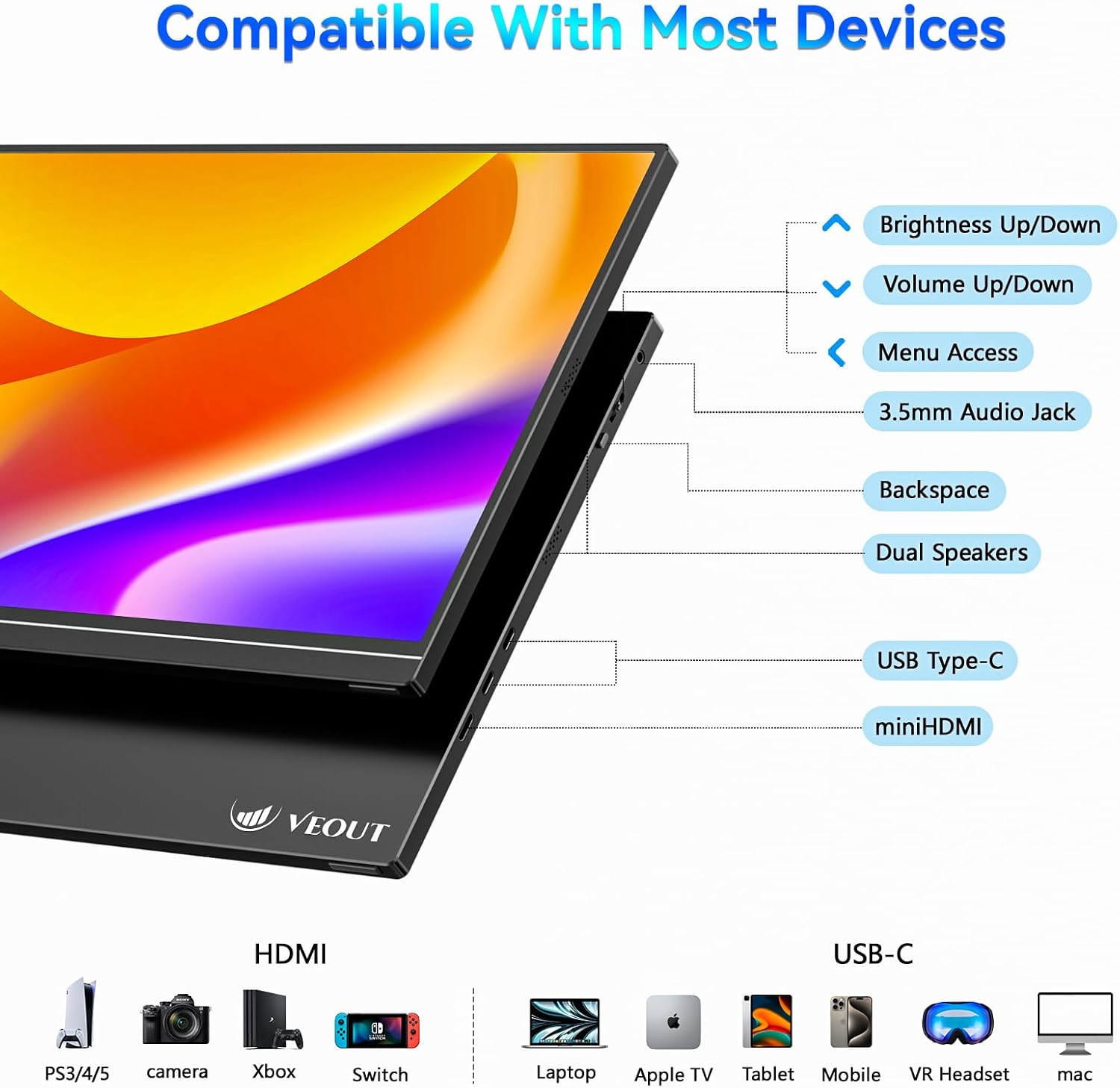
Зображення: Детальне view портів та кнопок керування монітора.
- Brightness Up/Down: Регулює яскравість екрана.
- Збільшення/зменшення гучності: Controls the volume of the built-in speakers.
- Доступ до меню: Navigates the on-screen display (OSD) menu.
- 3.5 мм аудіороз’єм: Для підключення зовнішніх навушників або динаміків.
- Backspace: Used for navigation within the OSD menu.
- Подвійні динаміки: Інтегрований аудіовихід.
- USB типу C (x2): Supports video signal, power delivery, and data transfer.
- Mini HDMI: For video input only.
4.2 Фізичні особливості
The monitor is designed for portability and flexibility, featuring a built-in stand and support for multiple orientations.

Image: The monitor's adjustable stand and ability to rotate for landscape or portrait viewінж.
- Регульована підставка: The integrated aluminum stand allows for angle adjustments from 0° to 75°.
- Портретний режим: The monitor can be rotated 90° to function in portrait orientation, ideal for coding or document viewінж.
- Алюмінієвий корпус: Міцна та легка конструкція.
5. Налаштування та підключення
The Veout V1 Pro monitor offers flexible connectivity options for various devices. Ensure your device supports the necessary video output standards.
5.1 Connecting to Laptops
For laptops with a full-featured USB-C port (supporting video signal and power delivery), a single USB-C to USB-C cable is sufficient for both power and display. For other laptops, use the Mini HDMI for video and a USB-C to USB-A cable with the power adapter for power.

Image: Connecting the monitor to a laptop using a single USB-C cable.
5.2 Connecting to Smartphones and Tablets
For smartphones and tablets with a full-featured USB-C port (supporting DP Alt Mode via USB-C 3.0+), a single USB-C to USB-C cable can provide display and power. Some phones may require an external power adapter. Avoid phones with USB-C 2.0-only ports.

Image: Phone compatibility and connection requirements for the portable monitor.
5.3 Connecting to Gaming Consoles
Connect gaming consoles like PS4/5, Xbox, and Nintendo Switch (docked mode) using the Mini HDMI to HDMI cable for video. Power may need to be supplied via a USB-C cable and the 15W power adapter.
5.4 Перевірка сумісності
Before connecting, ensure your device has either a full-featured USB-C port (supporting video signal and power delivery) or a standard HDMI port for video transmission.

Image: Quick compatibility check for USB-C and HDMI ports.
6. Інструкція з експлуатації
6.1 Налаштування дисплея
Use the control buttons on the monitor to access the On-Screen Display (OSD) menu. Here you can adjust settings such as brightness, contrast, color temperature, and input source. Refer to the 'Product Overview' section for button locations.
6.2 Orientation Modes
The monitor supports both landscape and portrait orientations. To switch modes, physically rotate the monitor and adjust the display settings on your connected device (e.g., laptop or smartphone) accordingly.
6.3 Ігрові функції
Experience smooth gaming with the 144Hz refresh rate and AMD FreeSync technology, which helps eliminate screen tearing and stuttering. Ensure your connected device's graphics settings are configured to utilize these features.

Image: Visual comparison of 144Hz FreeSync versus 60Hz display during gaming.
6.4 Якість відображення
The 2.5K Ultra HD IPS display offers sharp details, vibrant colors, and wide viewing angles. The matte screen reduces glare, enhancing readability in various lighting conditions.

Image: Comparison of 2.5K vs 1080p resolution, emphasizing pixel density and color accuracy.
Відео: Кінецьview of the Veout 2.5K/144Hz portable monitor, demonstrating its features and connectivity.
7. Технічне обслуговування
- Прибирання: Використовуйте м’яку тканину без ворсу для очищення екрана. Для стійких плям злегка протрітьampПротріть тканину водою або розчином для чищення екрану. Уникайте агресивних хімікатів.
- Зберігання: When not in use, fold the stand and store the monitor in a protective sleeve or bag to prevent scratches and damage.
- Обробка: Поводьтеся з монітором обережно. Уникайте падіння та надмірного тиску на екран.
8. Вирішення проблем
- Немає сигналу:
- Переконайтеся, що кабелі надійно підключені як до монітора, так і до джерела сигналу.
- Verify the source device is powered on and configured to output video.
- Check the monitor's OSD menu to ensure the correct input source is selected (Auto, USB-C1, USB-C2, HDMI).
- Confirm your device's USB-C port supports video output (DP Alt Mode).
- Немає живлення:
- If using a single USB-C cable, ensure the source device can provide sufficient power.
- Connect the monitor to the 15W power adapter using the USB-C to USB-A cable.
- Мерехтіння/нестабільний дисплей:
- Перевірте з'єднання кабелю.
- Reduce the refresh rate on your source device if experiencing issues, especially with HDMI connections (max 120Hz for HDMI).
- Ensure FreeSync is enabled/disabled as needed in the OSD menu or source device settings.
- Без звуку:
- Adjust the monitor's volume via the control buttons.
- Перевірте налаштування аудіовиходу на вашому джерелі звуку.
- Ensure external speakers/headphones are properly connected to the 3.5mm audio jack.
9. Технічні характеристики
| Особливість | Специфікація |
|---|---|
| Розміри продукту | 9.37 x 0.3 x 13.9 дюймів |
| Вага товару | 1.58 фунта |
| Номер моделі товару | V1Pro |
| Розмір дисплея стоячого екрана | 16 дюймів |
| Співвідношення сторін | 16:10 |
| роздільна здатність | 2560 x 1600 пікселів (2.5K) |
| Яскравість зображення | 300 кандел (ніт) |
| Загальна кількість портів USB | 2 (USB-C) |
| Опис поверхні екрана | Матовий |
10. Гарантія та підтримка
The Veout V1 Pro monitor comes with a lifetime quality warranty. Enjoy 24/7 customer service and a 30-day free return policy. For technical assistance or warranty claims, please contact Veout customer support through the official channels.

Image: Warranty and support information.
Ask a question about this manual
Ask about setup, troubleshooting, compatibility, parts, safety, or missing instructions. Manuals+ will review the question and use this page’s manual context to help answer it.