
1. Вступ
This manual provides instructions for the safe and effective operation of the Landtek MILA48500 Digital Illuminance Lux Light Meter Datalogger. This device is designed for measuring illuminance (brightness) in various environments, offering a wide measurement range, data logging capabilities, and Bluetooth connectivity for real-time monitoring.
Будь ласка, уважно прочитайте цей посібник перед використанням пристрою, щоб забезпечити його належну роботу та запобігти пошкодженням.
2. Інформація про безпеку
- Не намагайтеся відкривати або модифікувати пристрій. Звертайтеся до кваліфікованого персоналу для проведення будь-яких робіт з обслуговування.
- Тримайте пристрій подалі від води, вологи та екстремальних температур.
- Вийміть батарейки, якщо пристрій не використовуватиметься протягом тривалого часу, щоб запобігти витіканню.
- Утилізуйте батарейки та пристрій відповідно до місцевих правил.
- Avoid pointing the light sensor directly at extremely bright light sources for prolonged periods, as this may affect sensor longevity.
3. Вміст упаковки
Переконайтеся, що всі предмети присутні під час розпакування:
- Digital Illuminance Lux Light Meter Datalogger (MILA48500)
- Сумка для перенесення
- Посібник з англійської мови
- 2 батарейки типу AAA 1.5 В (встановлені або входять до комплекту окремо)

малюнок 3.1: The Landtek MILA48500 Lux Meter package contents, showing the meter, a black protective pouch, and the instruction manual.
4. Пристрій закінчивсяview
Familiarize yourself with the components of the Landtek MILA48500 Lux Meter:

малюнок 4.1: Передня і задня view of the Landtek MILA48500 Lux Meter with labeled components. Key parts include the light sensor, LCD screen, various function buttons (MAX/MIN, HOLD, UNIT, Power), and the battery compartment.
- Датчик світла: Detects ambient light.
- РК-екран: Displays measurement readings, units, and status indicators. Features a backlight for low-light conditions.
- Кнопка MAX/MIN: Перемикається між максимальними та мінімальними записаними значеннями.
- Кнопка HOLD: Freezes the current reading on the display. Also activates Bluetooth when pressed for 2 seconds.
- Кнопка UNIT: Switches between LUX and FC measurement units. Also activates the backlight when pressed for 2 seconds.
- Кнопка живлення: Вмикає або вимикає пристрій.
- Батарейний відсік: Located on the rear, houses two AAA batteries.
5. Налаштування
5.1 Встановлення батареї
- Знайдіть кришку відсіку для батареї на задній панелі пристрою.
- Зсуньте або відкріпіть кришку, щоб відкрити її.
- Insert two 1.5V AAA batteries, ensuring correct polarity (+/-) as indicated inside the compartment.
- Надійно закрийте кришку батарейного відсіку.
5.2 Увімкнення/вимкнення
- Щоб увімкнути: Натисніть Кнопка живлення (). The LCD screen will illuminate.
- Щоб вимкнути: Натисніть Кнопка живлення again. The device also features an automatic power-off function to conserve battery life.
6. Інструкція з експлуатації
6.1 Основні вимірювання
After powering on, the device will immediately begin measuring illuminance. Point the light sensor towards the light source or area you wish to measure.
6.2 Unit Selection (LUX / FC)
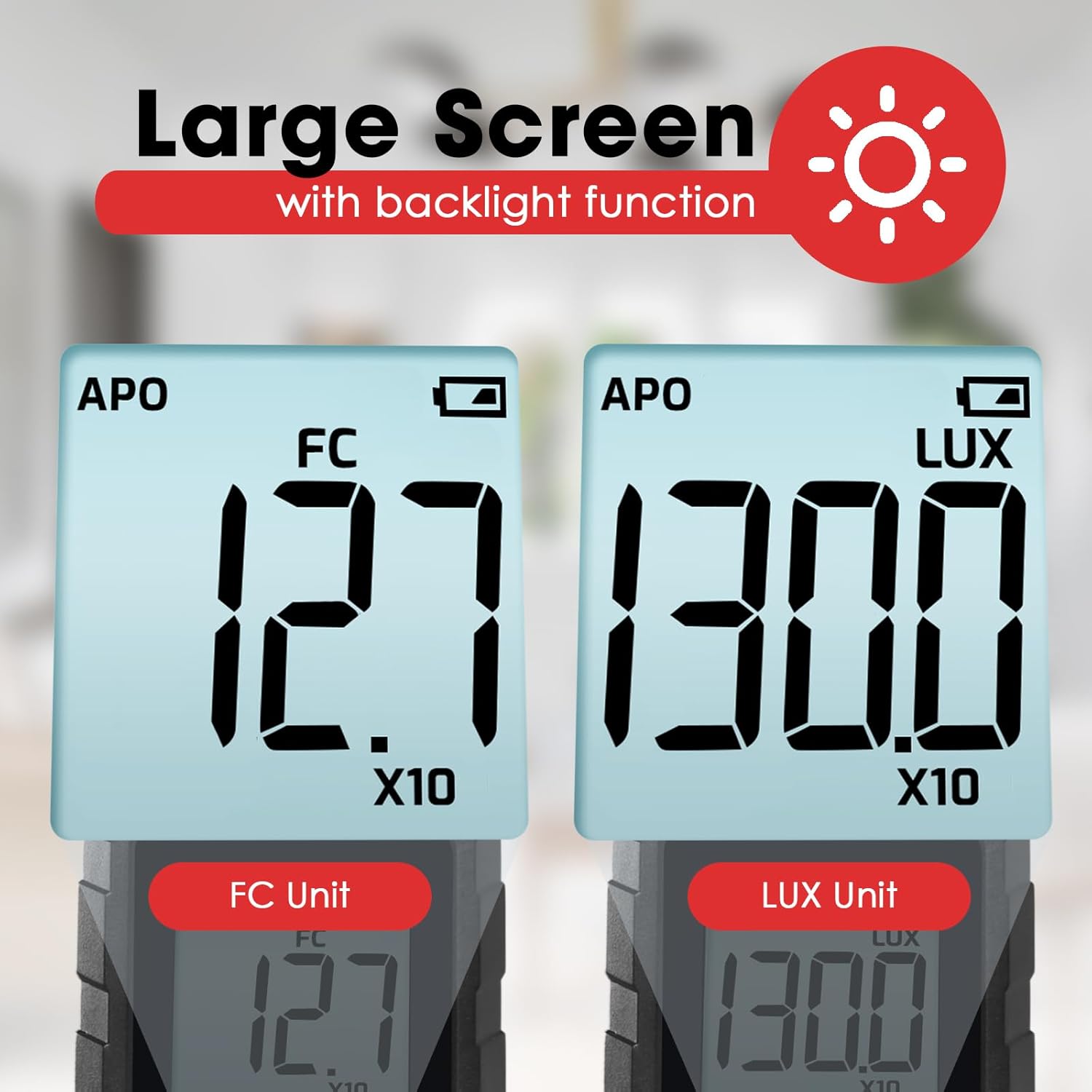
Натисніть Кнопка UNIT to toggle between LUX (lux) and FC (foot-candle) measurement units. The selected unit will be displayed on the LCD screen.

малюнок 6.1: The meter's display showing measurements in FC (left) and LUX (right) units.
6.3 Функція утримання даних
Натисніть Кнопка HOLD briefly to freeze the current reading on the display. Press it again to release the hold and resume live measurement.
6.4 MAX / MIN Display
Натисніть Кнопка MAX/MIN to cycle through the maximum, minimum, and current readings recorded since the device was powered on or the function was reset. The display will indicate 'MAX' or 'MIN' accordingly.
6.5 Функція підсвічування
Натисніть і утримуйте Кнопка UNIT for approximately 2 seconds to turn the LCD backlight on or off.
6.6 Measurement Range Multipliers
The meter automatically adjusts its measurement range. When 'X10' or 'X100' appears on the display, the displayed reading must be multiplied by that factor to obtain the actual illuminance value.
малюнок 6.2: Explanation of how to interpret readings when 'X10' or 'X100' multipliers are active on the display.
- If 'X10' is displayed, multiply the reading by 10. For example, a display of 16.47 with 'X10' means 164.7 LUX.
- If 'X100' is displayed, multiply the reading by 100. For example, a display of 16.47 with 'X100' means 1647 LUX.
6.7 Bluetooth Connectivity and Data Logging
The device supports Bluetooth connectivity for real-time monitoring and data logging via a compatible smartphone application.
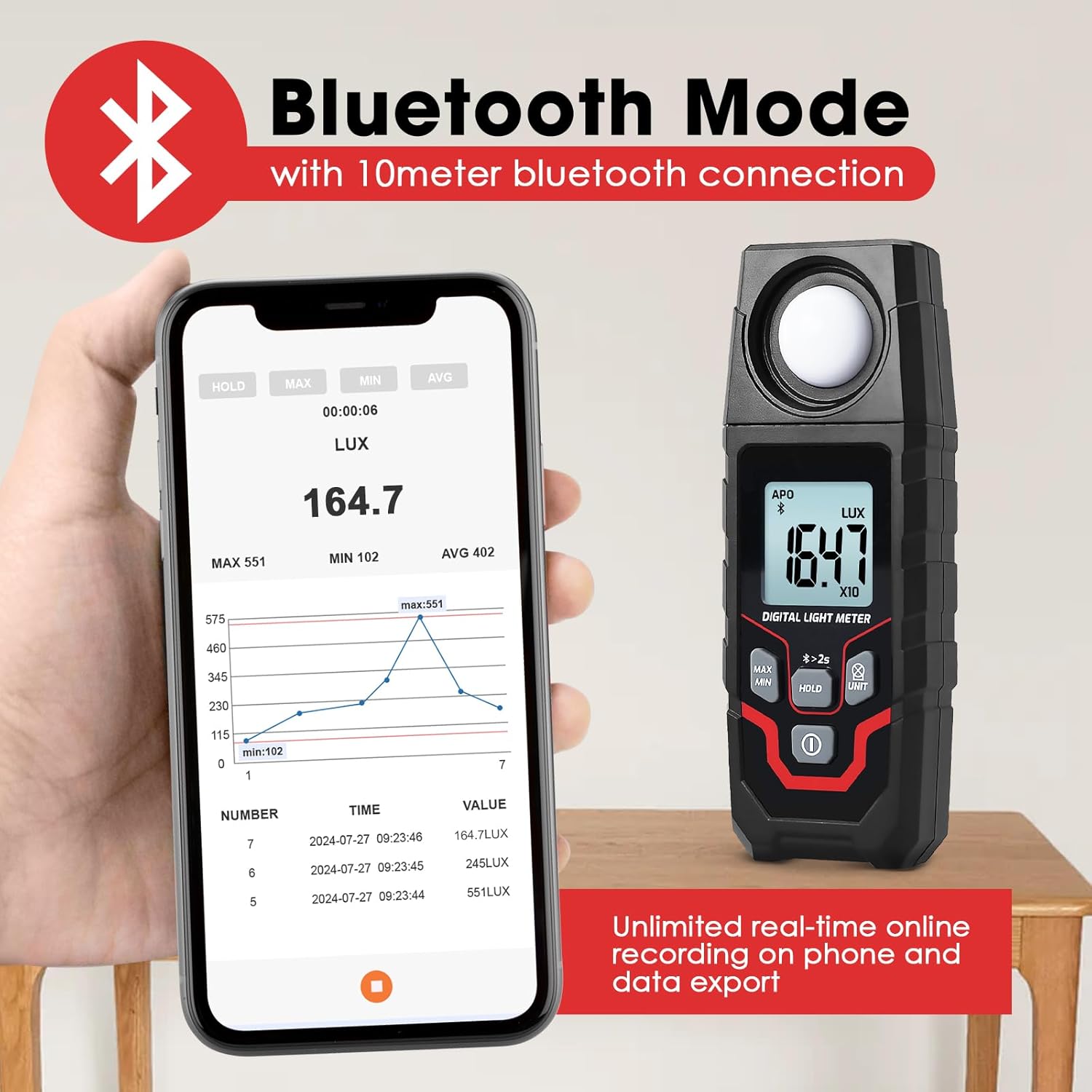
малюнок 6.3: The Lux Meter connected to a smartphone via Bluetooth, displaying real-time data and a historical graph.
- Активувати Bluetooth: Натисніть і утримуйте Кнопка HOLD for approximately 2 seconds. A Bluetooth icon will appear on the meter's display.
- Завантажити додаток: Download the official Landtek application from your smartphone's app store.
- Підключити: Open the app on your smartphone and follow the instructions to pair with the MILA48500 device. The Bluetooth range is up to 10 meters.
- Реєстрація даних: The app allows for unlimited real-time online recording and data export. The meter can also store up to 2000 groups of data for offline recording, which can be downloaded to the app later.
7. Технічне обслуговування
- Прибирання: Use a soft, dry cloth to clean the device. Do not use abrasive cleaners or solvents. Ensure the light sensor is kept clean and free of dust.
- Зберігання: Store the device in a cool, dry place, away from direct sunlight and extreme temperatures. If storing for an extended period, remove the batteries.
- Заміна батареї: Replace batteries when the low battery indicator appears on the display to ensure accurate readings.
8. Вирішення проблем
| проблема | Можлива причина | Рішення |
|---|---|---|
| Пристрій не включається. | Розряджені або неправильно встановлені батареї. | Перевірте полярність батарейок. Замініть їх новими батарейками типу AAA. |
| Неточні показання. | Dirty light sensor; low battery; incorrect unit/multiplier interpretation. | Clean the light sensor. Replace batteries. Ensure correct interpretation of LUX/FC units and X10/X100 multipliers. |
| Збій підключення Bluetooth. | Bluetooth not activated on meter; app issue; out of range. | Press and hold HOLD button for 2s to activate Bluetooth. Restart app/phone. Ensure meter is within 10m of phone. |
| Дисплей тьмяний або мерехтить. | Низький заряд батареї. | Замініть батареї. |
9. Технічні характеристики
| Особливість | Специфікація |
|---|---|
| Метод вимірювання | Інтегральний тип |
| Діапазон | 0.1~200000 LUX / 0.01~20000 FC |
| Measuring Levels (LUX) | 200/2,000/20,000/200,000 |
| Measuring Levels (FC) | 20/200/2,000/20,000 |
| Точність | ±(4% + 10 digits) (calibrated under standard incandescent lamp 2856°K) |
| Resolution (LUX) | <200: 0.1; ≥200: 1 |
| Resolution (FC) | <20: 0.01; 20≤FC<200: 0.1; ≥200: 1 |
| Дисплей | 4-digit LCD, max 1999 |
| Розмір екрана | 34 х 31 мм |
| Датчик світла | Кремнієвий фотодіод з фільтром |
| Sampлінг -курс | прибл. 2 рази на секунду |
| Incident Angle | 120° |
| Repeatability Deviation | ±2% |
| Спектральний діапазон | 400~700 нм |
| Діапазон Bluetooth | Up to 10 meters proximity |
| Умови експлуатації | -10~50°C, максимальна відносна вологість 80%, висота в приміщенні <2000 м |
| Умови зберігання | -10~50°C, max 70% RH (with battery removed) |
| Джерело живлення | 2 батарейки 1.5 В ААА |
| Розміри | 150 x 56 x 28 мм |
| вага | Приблизно 150 г (без батарейок) |

малюнок 9.1: Physical dimensions and weight of the Landtek MILA48500 Lux Meter.
10. Гарантія та підтримка
This product is covered by a manufacturer's warranty. Please refer to the warranty card included in your package or contact Landtek customer support for detailed warranty terms and conditions.
For technical assistance, troubleshooting, or service inquiries, please contact your local distributor or the manufacturer directly. Contact information can typically be found on the manufacturer's webсайті або на упаковці продукту.