
1. Вступ
This manual provides detailed instructions for the installation, operation, and maintenance of your ESX Vision VMX900DAB Universal 1-DIN Multimedia Receiver. Please read this manual thoroughly before using the device to ensure proper functionality and to maximize your user experience.
The ESX Vision VMX900DAB is a versatile 1-DIN multimedia receiver featuring a 9-inch multi-angle touchscreen display. It integrates advanced connectivity options including wireless Apple CarPlay and Android Auto, DAB+ digital radio, Bluetooth hands-free calling and audio streaming, and a comprehensive media player. The unit is designed for universal compatibility and offers a removable monitor for enhanced security.
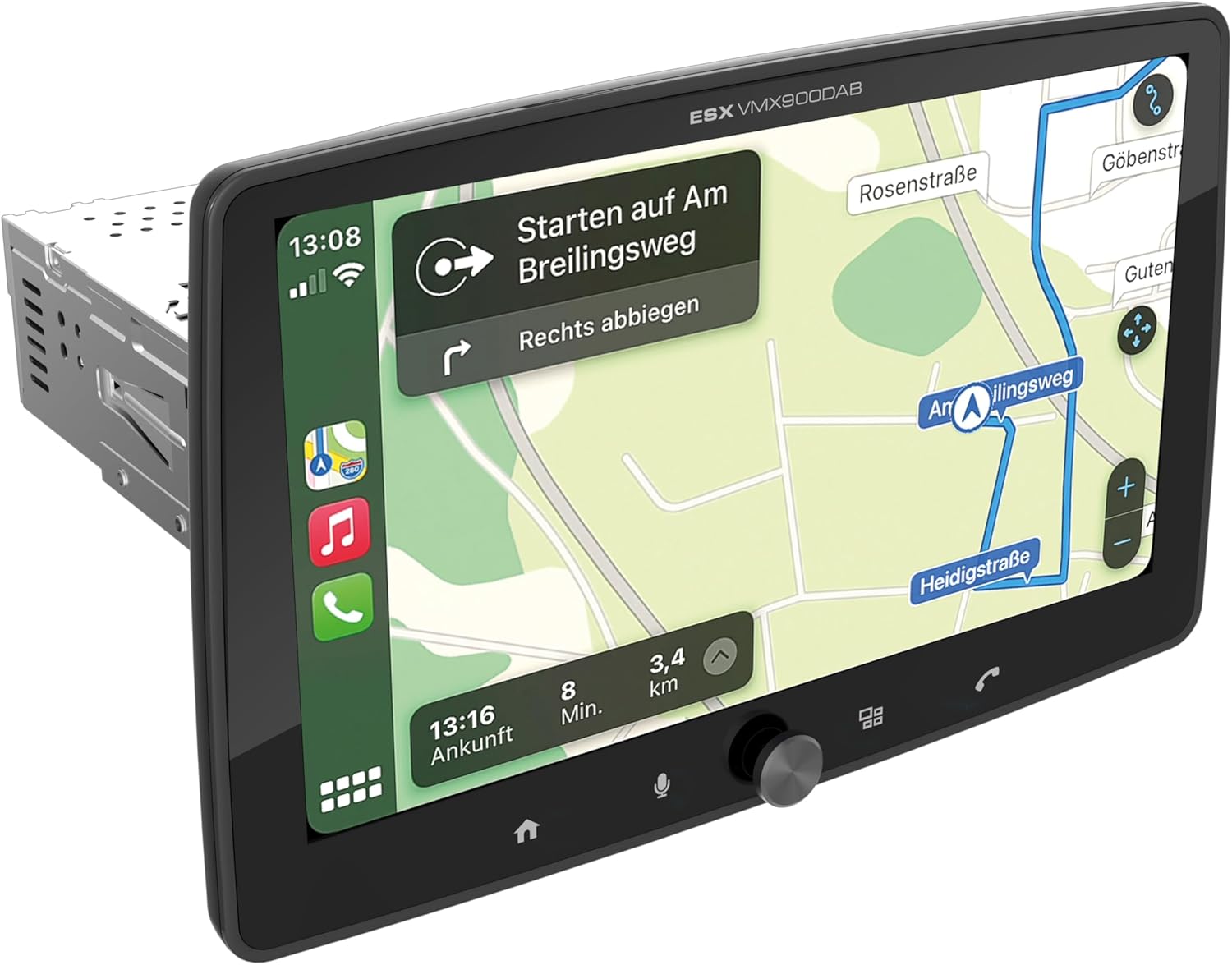
Figure 1.1: ESX Vision VMX900DAB with navigation interface.
2. Налаштування та встановлення
2.1 Вміст упаковки
Перед встановленням перевірте наявність усіх компонентів:
- ESX Vision VMX900DAB Main Unit
- Detachable 9-inch Touchscreen Monitor
- Джгут проводів живлення/динаміків
- Зовнішній мікрофон
- GPS антена
- Антена DAB+
- USB-подовжувальні кабелі
- Кріпильні елементи (кронштейни, гвинти)
- Посібник користувача (цей документ)

Рисунок 2.1: Комплектуючі та компоненти.
2.2 Монтаж головного блоку
- Перед початком встановлення переконайтеся, що акумулятор автомобіля від’єднаний.
- Insert the 1-DIN main unit into the vehicle's dashboard opening.
- Secure the main unit using the provided mounting brackets and screws.
2.3 Підключення монітора
The 9-inch monitor is detachable and connects to the main unit via a click system.
- Align the monitor's connector with the slot on the main unit.
- Gently push the monitor until it clicks securely into place.
- To remove, press the release button (if applicable) and pull the monitor away.

Figure 2.2: Detachable monitor with click system.
2.4 Підключення проводів
Refer to the wiring diagram provided with the unit for specific connections. Key connections include:
- Power and Speakers: Connect the main wiring harness to the vehicle's power supply and speakers.
- Зовнішній мікрофон: Plug the external microphone into its dedicated input for optimal hands-free call quality.
- GPS антена: Підключіть GPS-антену та встановіть її в місці з чітким view неба для точного позиціонування.
- DAB+ антена: Connect the DAB+ antenna for digital radio reception.
- Порти USB: Two USB-A ports are available. One for media playback and charging (1.5A), and another specifically for Apple CarPlay/Android Auto and charging (1.5A).
- RCA Pre-amplified Виходи: Six 4V RCA outputs (FL/FR/RL/RR/SUB1/SUB2) are available for connecting external ampліферів.
- AUX RCA Inputs: Stereo audio and video inputs (L/R/VIDEO) for external audio/video sources.
- Camera RCA Inputs: Окремі входи для передньої та задньої камер.
- Управління кермом: Analog steering wheel remote control input (learnable) for integration with vehicle controls.
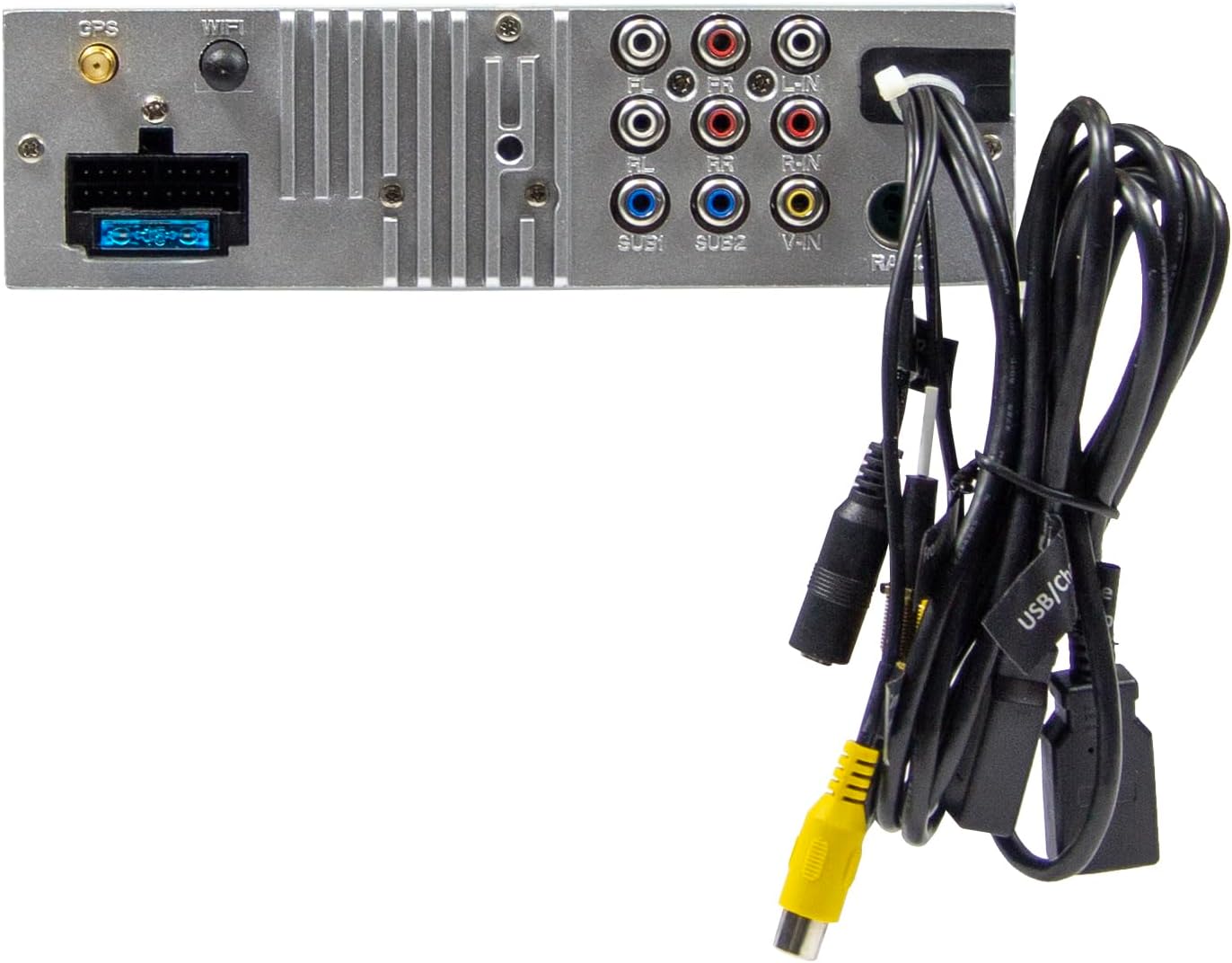
Figure 2.3: Rear connections of the main unit.
3. Інструкція з експлуатації
3.1 Увімкнення/вимкнення живлення та основні елементи керування
- Увімкнення: The unit will power on automatically with the vehicle's ignition.
- Вимкнення живлення: The unit will power off automatically with the vehicle's ignition.
- Регулювання гучності: Use the large rotary knob on the front panel to adjust the volume.
- Функціональні клавіші: Four function keys on the front panel provide quick access to common features.
- Сенсорний екран: All primary functions are controlled via the 9-inch touchscreen.
3.2 Home Screen and Navigation
The home screen provides access to all main functions and applications.

Figure 3.1: Main menu/home screen.
3.3 Apple CarPlay та Android Auto
The VMX900DAB supports both wireless and wired (via USB) Apple CarPlay and Android Auto.
- Бездротове підключення: Enable Bluetooth and Wi-Fi on your smartphone and follow the on-screen prompts to connect.
- Дротове підключення: Connect your smartphone to the dedicated USB-A port using a compatible USB cable.
- Once connected, your smartphone's compatible apps (navigation, music, calls, messages) will be mirrored on the receiver's display.

Figure 3.2: Apple CarPlay interface.
3.4 Radio Functions (DAB+/FM/AM)
- DAB+ радіо: Select the DAB+ icon from the home screen. The unit will scan for available digital radio stations.
- FM/AM-радіо: Select the Radio icon. Use the touchscreen to tune to stations, save presets, and access RDS functions.
3.5 Bluetooth Hands-Free and Audio Streaming
- Сполучення: Enable Bluetooth on your smartphone and search for the VMX900DAB. Select the device and confirm pairing.
- Дзвінки в режимі Hands-Free: Once paired, you can make and receive calls directly through the receiver. The external microphone ensures clear voice transmission. Your phonebook can be synchronized.
- Потокове аудіо: Stream music wirelessly from your smartphone to the receiver.
3.6 Відтворення медіафайлів
The unit supports various audio, video, and photo formats via USB.
- Підтримується File Формати: AVI, FLV, MOV, MKV, WMV, WMA, MP3, FLAC, JPEG, PNG, BMP.
- Insert a USB drive into the media USB-A port. Select the USB icon from the home screen to browse and play media files.
3.7 Monitor Adjustment
The monitor can be tilted and adjusted in height to achieve the optimal viewing angle and prevent obstruction of vehicle controls.

Figure 3.3: Adjustable monitor mechanism.
НІКОЛИ не налаштовуючи
- Startup Logo: Customize the startup logo in the settings menu.
- RGB Key Illumination: Select from various RGB colors and animation effects for the key illumination.
- Мови меню: Supported languages include DEU, ENG, SWE, ITA.
4. Технічне обслуговування
4.1 Очищення пристрою
- Use a soft, dry cloth to wipe the display and unit surfaces.
- Для видалення стійких плям на екрані використовуйте засіб для чищення екранів, спеціально розроблений для електронних дисплеїв, та серветку з мікрофібри.
- Do not use abrasive cleaners, solvents, or harsh chemicals, as these can damage the finish or screen.
4.2 Загальний догляд
- Уникайте тривалого перебування пристрою під екстремальними температурами, прямими сонячними променями або високою вологістю.
- Забезпечте належну вентиляцію навколо пристрою, щоб запобігти перегріванню.
- When removing the monitor, handle it carefully to avoid damage to the connectors.
5. Вирішення проблем
If you encounter issues with your VMX900DAB, refer to the following common problems and solutions:
| проблема | Можлива причина | Рішення |
|---|---|---|
| Немає живлення | Неправильна проводка; Перегорілий запобіжник; Вимкнено запалювання автомобіля | Check power connections; Replace fuse; Turn on vehicle ignition |
| Ні звуку | Занадто низька гучність; увімкнено вимкнення звуку; проблема з проводкою динаміка | Increase volume; Deactivate mute; Check speaker connections |
| Bluetooth не підключається | Bluetooth вимкнено на телефоні/пристрої; Неправильний процес сполучення | Ensure Bluetooth is on; Re-attempt pairing process |
| Apple CarPlay/Android Auto not starting | Incorrect USB port; Faulty USB cable; Phone not compatible/configured | Use the dedicated USB port; Try a different USB cable; Check phone settings for CarPlay/Android Auto |
| Поганий радіоприйом | Антена не підключена; Неправильне розташування антени; Зона слабкого сигналу | Check antenna connection; Adjust antenna position; Try in a different location |
| Монітор не відображає | Monitor not securely attached; Connector issue | Ensure monitor is fully clicked into place; Check for debris in connector |
If the problem persists after attempting these solutions, please contact ESX customer support or your authorized dealer.
6. Технічні характеристики
| Особливість | Специфікація |
|---|---|
| Номер моделі | VMX900DAB |
| Дисплей | 9-inch Multi-angle Touchscreen |
| Форм-фактор | 1-DIN Universal |
| Підключення | USB, Bluetooth, Auxiliary |
| Особливості | Wireless Apple CarPlay, Wireless Android Auto, Detachable Monitor with Click System |
| Радіо тюнер | DAB+ (Digital Radio), FM/AM with RDS |
| Bluetooth | Hands-free function, Audio Streaming |
| USB порти | 2x USB-A (1.5A charging, one dedicated for CarPlay/Android Auto) |
| Max Music Power | 4 x 80 Вт |
| доamplified Outputs | 6x RCA (4V) (FL/FR/RL/RR/SUB1/SUB2) |
| Входи AUX | RCA (L/R/VIDEO) |
| Входи камери | RCA (Front/Rear) |
| Підтримується File Формати | AVI, FLV, MOV, MKV, WMV, WMA, MP3, FLAC, JPEG, PNG, BMP |
| Зовнішній мікрофон | В комплекті |
| Управління кермом | Analog (learnable) |
| GPS-приймач | В комплекті |
| Мови меню | DEU, ENG, SWE, ITA |
| Загальна вихідна потужність | 320 Вт |
| Конфігурація каналу об’ємного звуку | 4.2 |
| Режим аудіовиходу | Стерео |
7. Гарантія та підтримка
For warranty information, please refer to the documentation provided at the time of purchase or contact your authorized ESX dealer. Warranty terms and conditions may vary by region and retailer.
For technical support or further assistance, please contact ESX customer service or visit the official ESX webсайт для ресурсів підтримки.