
вступ
Thank you for choosing the zelotes T80 Ergonomic Gaming Mouse. This wired optical mouse is designed for both gaming and office use, offering adjustable DPI, customizable LED lighting, and a comfortable ergonomic design for extended use. Please read this manual carefully to ensure proper setup and operation of your new mouse.
Особливості продукту
- 7 Buttons & Quick Fire Button: Includes forward, backward, and a rapid fire (double click) button for enhanced control in gaming and productivity.
- 5 регульованих рівнів DPI: Easily switch between 1000/1600/2400/3200/7200 DPI to match your speed and precision needs.
- 7 LED Backlit Modes: Personalize your setup with various lighting effects.
- Ергономічний дизайн: Crafted for comfort with skin-friendly material, sweat-resistant, and anti-slip features to prevent fatigue during long sessions.
- Широка сумісність: Compatible with Windows 11/10/8/7 and Mac OS, suitable for various applications including MMD, FPS games, and office tasks.
Вміст упаковки
- 1 x zelotes T80 Wired Gaming Mouse
- 1 х Інструкція з експлуатації
Налаштування
- Розпакувати: Carefully remove the mouse and its accessories from the packaging.
- Зняти захисну плівку: Before use, please remove the protective film from the mouse's foot pads.
- Підключити: Plug the USB cable of the zelotes T80 Gaming Mouse into an available USB port on your computer (PC or Laptop).
- Встановлення драйвера: Миша працює за принципом «підключи і працюй». Ваша операційна система автоматично виявить і встановить необхідні драйвери. Для базової функціональності зазвичай не потрібне встановлення додаткового програмного забезпечення.
Інструкція з експлуатації
Кнопка Пояснення
The zelotes T80 mouse features 7 buttons for versatile control:
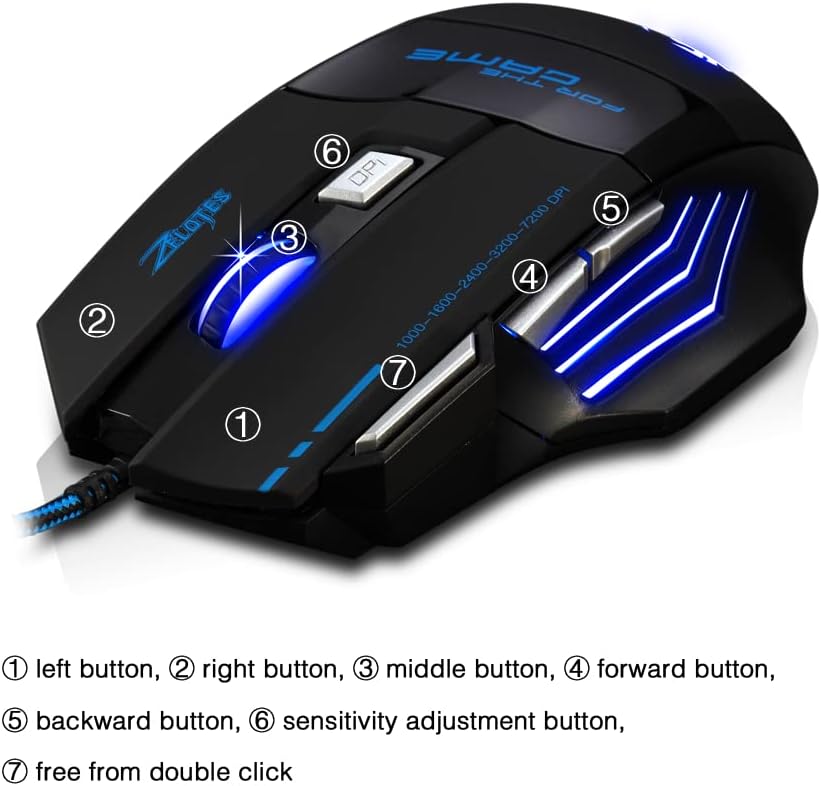
- Left Button (1): Стандартна функція клацання лівою кнопкою миші.
- Right Button (2): Стандартна функція клацання правою кнопкою миші.
- Middle Button / Scroll Wheel (3): Scrolls up/down. Pressing it acts as a middle-click.
- Forward Button (4): Переміщується вперед web браузери або file дослідники.
- Backward Button (5): Переміщується назад web браузери або file дослідники.
- Кнопка DPI (6): Adjusts mouse sensitivity (DPI) and changes LED colors.
- Rapid Fire Button (7): Functions as a double-click of the left button, useful for continuous firing in games.
Налаштування DPI
The mouse offers 5 adjustable DPI levels to suit different tasks and preferences:
- 1000 DPI
- 1600 DPI
- 2400 DPI
- 3200 DPI
- 7200 DPI
Натисніть Кнопка DPI (6) to cycle through these sensitivity levels. Each change will be indicated by a corresponding LED color change.
Керування світлодіодним освітленням
The mouse features 7 LED lighting modes. To change the LED color, long press the DPI button (6). The LED will flash rapidly 7 times and then remain constant on the selected color.

Технічне обслуговування
- Прибирання: Використовуйте м’яку суху тканину для очищення поверхні миші. Для стійкого бруду злегкаamp cloth can be used, ensuring no liquid enters the mouse.
- Догляд за кабелем: Уникайте різких згинів або надмірного натягування USB-кабелю, щоб запобігти його пошкодженню.
- Зберігання: Зберігайте мишу в сухому, прохолодному місці, подалі від прямих сонячних променів та екстремальних температур.
Усунення несправностей
Миша не реагує
- Переконайтеся, що USB-кабель надійно підключено до робочого USB-порту.
- Спробуйте підключити мишу до іншого USB-порту на комп'ютері.
- Перевірте мишу на іншому комп’ютері, щоб визначити, чи проблема в миші, чи в комп’ютері.
LED Lights Not Working/Changing
- Перевірте, чи правильно підключено мишу до комп'ютера.
- Ensure you are long-pressing the DPI button to cycle through colors. A short press changes DPI.
DPI не змінюється
- Ensure you are short-pressing the DPI button to cycle through DPI levels.
- If the issue persists, try reconnecting the mouse.
Технічні характеристики
| Особливість | Деталь |
|---|---|
| Номер моделі | T80 |
| кнопки | 7 (with scroll wheel) |
| Регульований DPI | 1000/1600/2400/3200/7200 DPI |
| Світлодіодне освітлення | 7 режимів освітлення |
| Підключення | USB дротовий |
| Система відстеження | Оптичний |
| Ергономічний дизайн | так |
| Switch Life | 5 мільйонів циклів |
| Розміри | 130x105x45 мм |
| вага | 160 ± 5 г. |
| Довжина кабелю USB | 1.5м |
| Сумісність | Win11, Win10, Win8, Win7, Mac OS |
Гарантія та підтримка
For warranty information and technical support, please refer to the product packaging or contact zelotes customer service through the retailer where the product was purchased. Keep your purchase receipt for warranty claims.