
1. Вступ
The Radiomaster XR2 Nano 2.4GHz ExpressLRS Receiver is a compact and high-performance receiver designed for remote control applications where space and weight are critical. It features an integrated tower antenna, an ESP32C3 microcontroller, and a Semtech LR1121 transceiver, offering reliable 2.4GHz ExpressLRS connectivity with advanced functionality.
2. Інформація про безпеку
Please refer to this instruction manual before use to ensure proper operation and to prevent damage to the device or associated equipment. Always ensure correct wiring and power supply to avoid electrical hazards.
3. Вміст упаковки
Перевірте, чи всі перелічені нижче предмети входять до вашої упаковки:
- 1 * XR2 Nano 2.4GHz ExpressLRS Receiver
- 1 * дріт CRSF
- 3 * Термоусадочна трубка
- 1 * ручна картка

Image: Package contents of the XR2 Nano receiver.
4. Особливості продукту
- Integrated 2.4GHz Tower Antenna: Provides excellent reception within an ultra-compact design.
- ExpressLRS 2.4GHz Compatibility: Fully compatible with all ELRS 2.4GHz transmitters.
- Semtech LR1121 Transceiver: Utilizes a third-generation transceiver for enhanced reliability and responsiveness, supporting DK500Hz mode.
- ESP32C3 High-Performance MCU: Ensures efficient processing and stable operation.
- Built-in Wi-Fi Module: Simplifies firmware updates and configuration via a WebUI on PC or mobile devices.
- Secondary UART Port: Offers advanced functionality for custom setups.
- Castled Pads: Designed for easy and secure soldering.
- Ultra-Compact and Lightweight: Measures 16mm x 12mm x 6mm and weighs only 0.8g, ideal for space-constrained builds.

Image: Integrated tower antenna for compact design.

Image: Dimensions of the XR2 Nano receiver.

Image: Weight of the XR2 Nano receiver.
5. Технічні характеристики
| Пункт | Специфікація |
|---|---|
| Тип | ISM2.4 |
| MCU | ESP32C3 |
| RF чіп | Semtech LR1121 |
| антена | Вбудована баштова антена 2.4 ГГц |
| Діапазон частот | 2.400 - 2.479 ГГц |
| Потужність телеметрії | 10 мВт |
| Maximum Packet Rate | DK500 Гц |
| Minimum Packet Refresh Rate | 50 Гц |
| Робочий випtage | 5V |
| вага | 0.8г |
| Розміри (Д x Ш x В) | 16 мм x 12 мм x 6 мм |
| Версія мікропрограми | ExpressLRS v3.5.1 (pre-installed) |
| Ціль FW | RadioMaster XR2 2.4 RX |
| Інтерфейс шини 1 | CRSF |
| Інтерфейс шини 2 | UART |
6. Налаштування
6.1 Електропроводка
The XR2 Nano receiver uses CRSF protocol for communication. Connect the included CRSF wire to the appropriate pads on your flight controller. The receiver features castled pads for easier soldering. Ensure correct polarity for power (5V) and ground, and proper connection for RX and TX lines.

Зображення: Верх view of the XR2 Nano receiver board with labeled pads.
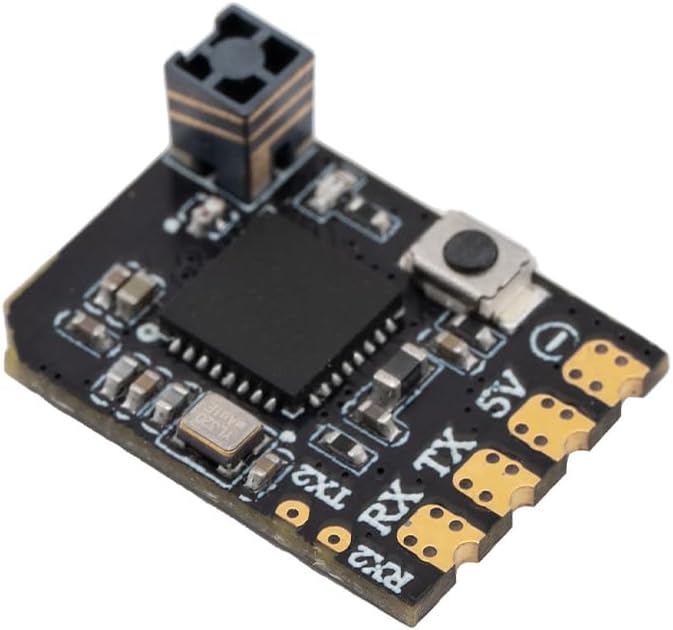
Зображення: Кутове view of the XR2 Nano receiver.
6.2 Зв’язування
To bind the XR2 Nano receiver to your ExpressLRS transmitter, follow these steps:
- Увімкніть приймач.
- Вимкніть приймач.
- Повторіть кроки 1 та 2 ще два рази.
- On the third power-up, the receiver's LED should flash rapidly, indicating it is in binding mode.
- On your ExpressLRS transmitter, navigate to the ELRS LUA script and select 'Bind'. The receiver should bind automatically.
- Alternatively, if the receiver enters Wi-Fi mode (slow flashing LED after binding attempts), you can connect to its Wi-Fi hotspot (SSID: 'ExpressLRS RX', Password: 'expresslrs') and access the WebUI (10.0.0.1) to set your binding phrase.
7. Інструкція з експлуатації
Once bound, the XR2 Nano receiver will establish a low-latency, high-refresh-rate connection with your ExpressLRS transmitter. The receiver is designed for optimal performance in micro drones, whoops, and fixed-wing models where its compact size and light weight are advantageous. Ensure your flight controller is configured to use the CRSF protocol for receiver input.
8. Оновлення мікропрограми
The XR2 Nano receiver comes with ExpressLRS v3.5.1 pre-installed. For future updates, the built-in Wi-Fi module simplifies the process:
- Power on the receiver. If it does not automatically enter Wi-Fi mode (slow flashing LED), you may need to perform the binding power cycle sequence until it does.
- Connect your PC or mobile device to the receiver's Wi-Fi hotspot. The SSID is typically 'ExpressLRS RX' and the password is 'expresslrs'.
- Відкрийте a web браузер і перейдіть до
10.0.0.1. - Від WebІнтерфейс користувача, ви можете завантажити нову прошивку files or configure settings.
9. Вирішення проблем
- Приймач не прив'язаний: Ensure your transmitter is also running ExpressLRS firmware and is set to the correct frequency band (2.4GHz). Verify the binding procedure is followed correctly (three power cycles).
- No signal/telemetry: Check all wiring connections between the receiver and flight controller. Confirm the flight controller's UART is configured for CRSF protocol.
- Періодичне з'єднання: Ensure the receiver is not obstructed by carbon fiber or other materials that can block RF signals. Check for potential interference sources.
- Проблеми з підключенням Wi-Fi: If you cannot connect to the receiver's Wi-Fi, ensure it is in Wi-Fi mode (slow flashing LED). Try restarting the receiver.
10. Технічне обслуговування
The XR2 Nano receiver requires minimal maintenance. Keep the device clean and free from dust and moisture. Avoid exposing it to extreme temperatures or physical shock. Regularly check solder joints for integrity, especially after crashes or heavy use.
11. Гарантія та підтримка
Щоб отримати інформацію про гарантію та технічну підтримку, зверніться до офіційного постачальника Radiomaster. webсайт або зверніться до авторизованого дилера. Зберігайте чек про покупку для гарантійних випадків.